
MatAnyone2 Video Matting
Interactive video matting for ComfyUI with a built-in SAM editor and MatAnyone2 propagation
Nodes (12)
One Click's Worth of SAM Guidance, as a Node
MatAnyone2's Built-In SAM Editor
How MatAnyone2 Matte Cuts Your Clip
When One Cut Isn't Enough
The MatAnyone2 Model Loader
See Your Masks Before You Commit Them
Type Your SAM Points Instead of Clicking Them
The Empty Box Every Scripted Mask Begins With
The SAM Loader That Lets You Skip the Editor Entirely
Point Coordinates In, a Graded Mask Out
The One-Frame Gateway to Every MatAnyone2 Edit
MatAnyone2 Slice Frames

MatAnyone2 Video Matting for ComfyUI





Interactive video matting inside ComfyUI with a built-in SAM point editor and MatAnyone2 propagation. Queue once to open the editor on the first frame, queue again to render a clean foreground pass, alpha matte, and preview composite across the full clip.
Features
- Two-pass interactive workflow: fast first queue to open the editor, full second queue to render the matte.
- Built-in SAM overlay: positive and negative point editing happens directly in ComfyUI.
- Multi-target masking: create and compare multiple mask targets before committing.
- Pinned vendor snapshots: the package ships known-good MatAnyone2 and Segment Anything source snapshots in
vendor/. - Bundled starter clip: the sample workflow ships with a tiny demo video that
install.pycopies intoComfyUI/input/. - Manager-ready packaging:
requirements.txt,install.py, workflow example, and registry metadata are all included.
Installation
ComfyUI Manager
Search for MatAnyone2 Video Matting or MatAnyone2 in ComfyUI Manager and install the latest stable version.
Registry page: registry.comfy.org/nodes/matanyone2-video-matting
Manager will:
- Install Python dependencies from
requirements.txt - Run
install.pyto validate the bundled vendor snapshots and copymatanyone2-demo-input.mp4intoComfyUI/input/ - Ask for a ComfyUI restart
Manual Install
cd ComfyUI/custom_nodes
git clone https://github.com/dreamrec/MatAnyone2_ComfyUI.git
cd MatAnyone2_ComfyUI
python -m pip install -r requirements.txt
python install.py
Restart ComfyUI after installation.
Companion Node for the Demo Workflow
The bundled workflow uses ComfyUI-VideoHelperSuite for video input and output.
Models
Models download automatically on first use if they are missing.
| Model | Default location | Auto-download |
|------|------|------|
| MatAnyone2 checkpoint | ComfyUI/models/matanyone/ | Yes |
| SAM ViT-H | ComfyUI/models/sams/ | Yes |
| SAM ViT-L | ComfyUI/models/sams/ | Yes |
| SAM ViT-B | ComfyUI/models/sams/ | Yes |
Included Workflows
Basic Demo
workflows/matanyone2_demo.json is a ready-to-run example that wires video loading, frame selection, the interactive editor, and final matte export.
It defaults to the bundled matanyone2-demo-input.mp4 starter clip that install.py copies into ComfyUI/input/. Swap the Load Video node to your own footage whenever you are ready.
LoadVideo -> SliceFrames -> SelectFrame -> Interactive SAM -> Matte -> SaveVideo x3
How to use it:
- Drag
workflows/matanyone2_demo.jsononto the ComfyUI canvas. - Queue once on the bundled starter clip, or replace
Load Videowith your own clip first. - Queue once to open the editor on the first frame.
- Left-click for foreground points and right-click for background points.
- Click
Applyin the editor. - Queue again to render the full matte outputs.
Extended Demo (All 12 Nodes)
workflows/matanyone2_extended_demo.json showcases every node in the pack with two parallel paths:
Interactive path (top) — the same editor-based flow from the basic demo.
Scripted/programmatic path (bottom) — builds SAM prompts entirely in-node, no editor needed:
SAM Loader ──────────────────────────────────────────────────────┐
                                                                 │
Prompt Start → Add Point (+) → Add Point (-) → SAM Refine ──→ Merge Masks → Matte
                                                     ↑              ↑
Prompt From Text ─────────────────────→ SAM Refine ──┘    Preview Masks
This workflow demonstrates how to use SAM Loader, Prompt Start, Add Point, Prompt From Text, SAM Refine, Merge Masks, and Preview Masks for scripted or batch matting without the interactive editor.
Gallery
Real workflow + editor capture from the live node pack:
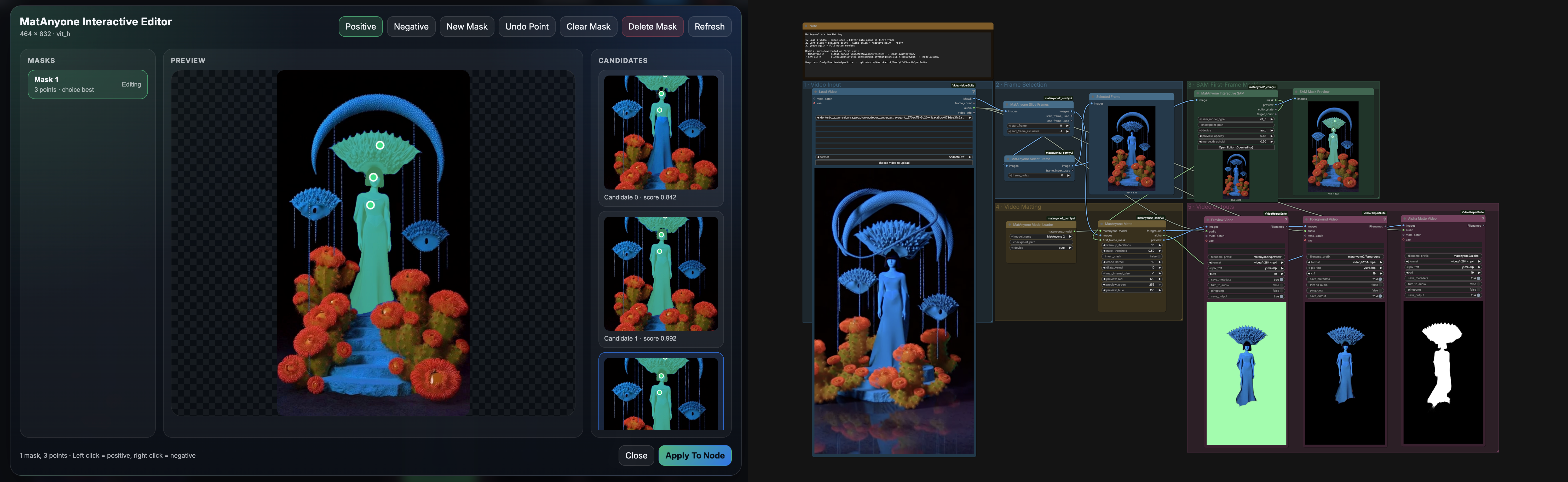
Node Overview
Nodes are grouped under MatAnyone2 and MatAnyone2/SAM in the Add Node menu.
| Node | What it does | |------|------| | MatAnyone2 Model Loader | Loads MatAnyone or MatAnyone2 checkpoints | | MatAnyone2 SAM Loader | Loads a SAM checkpoint for programmatic refinement | | MatAnyone2 Slice Frames | Splits a video image batch into frame data | | MatAnyone2 Select Frame | Pulls a single frame for interactive setup | | MatAnyone2 Prompt Start | Creates an empty point prompt structure | | MatAnyone2 Prompt From Text | Builds prompts from text coordinates | | MatAnyone2 Add Point | Adds foreground or background points in-node | | MatAnyone2 SAM Refine | Runs SAM refinement with explicit prompts | | MatAnyone2 Merge Masks | Merges up to four masks into one | | MatAnyone2 Preview Masks | Draws mask overlays on the source frame | | MatAnyone2 Interactive SAM | Launches the built-in multi-target editor | | MatAnyone2 Matte | Propagates the first-frame mask through the whole clip |
Requirements
- ComfyUI with Python 3.10+
- PyTorch with CUDA, MPS, or CPU support
- 8 GB VRAM minimum, 12+ GB recommended for longer or higher-resolution clips
- Internet access on first run if you want automatic model downloads
Troubleshooting
- If the editor does not open, queue the workflow once so the first-frame preview exists.
- If the demo workflow shows missing video nodes, install VideoHelperSuite first.
- If
Load Videois blank or points at/input/, reruninstall.pyso the bundled demo clip is copied intoComfyUI/input/, or choose your own video in the VHS node before queueing. - If ComfyUI Manager shows a security warning for network access, you are likely on an older registry build from before the vendor sources were bundled directly in the package.
- If VRAM is tight, use a smaller SAM variant and lower
max_internal_size. - If you already keep checkpoints elsewhere, pass an explicit
checkpoint_pathto the loader nodes.
Credits
- MatAnyone2 for the video matting model
- Segment Anything for interactive segmentation
- ComfyUI for the host runtime
License
This repository is licensed under GPL-3.0.
Vendored upstream dependencies keep their own licenses:
- MatAnyone2: Apache-2.0
- Segment Anything: Apache-2.0
┌─────────────────────────────────────────────────────────────────────┐
│ dreamrec // MatAnyone2 // queue once, edit, queue again            │
└─────────────────────────────────────────────────────────────────────┘