
ComfyUI-Spool
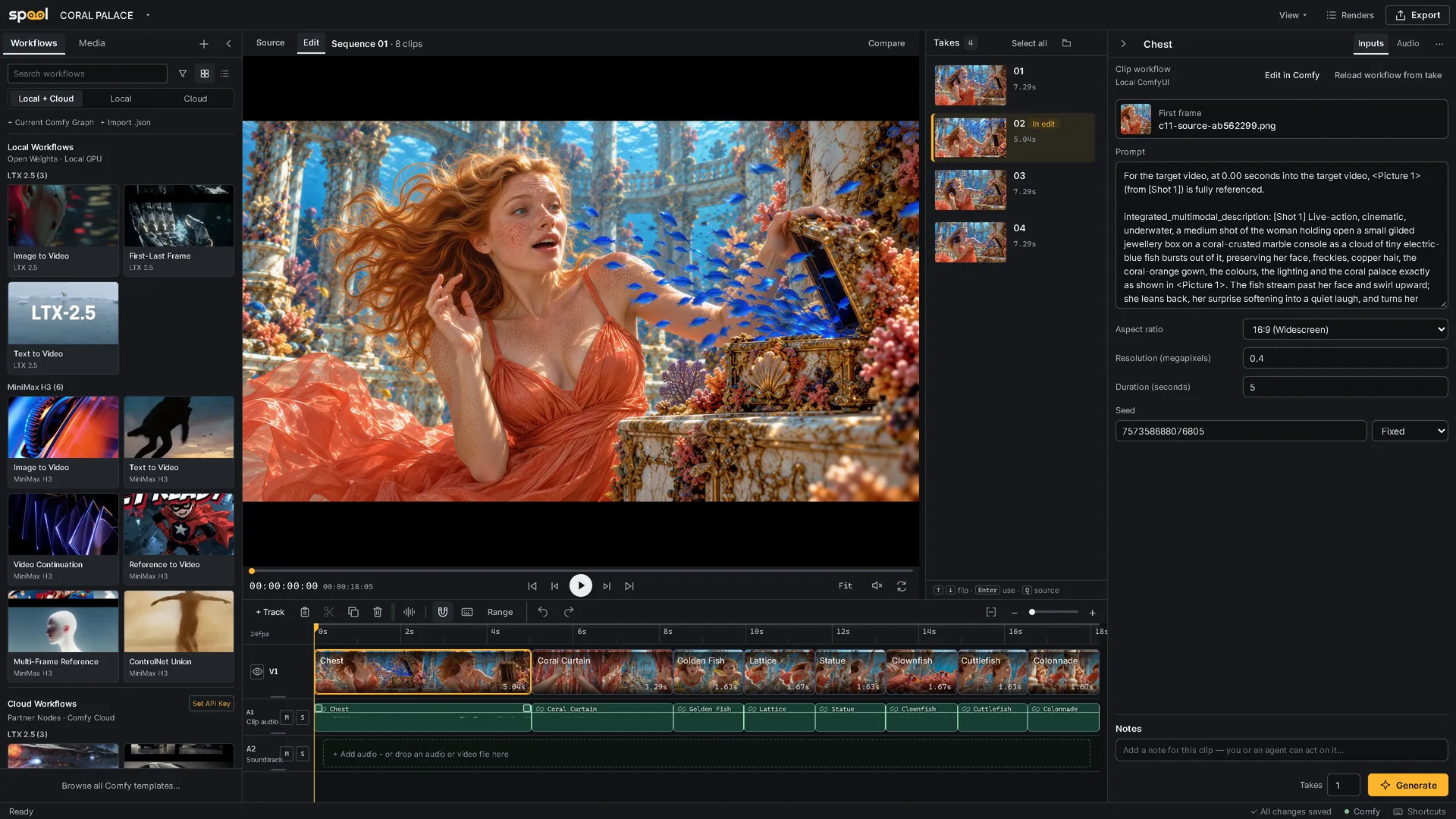
A video timeline for ComfyUI. Queue workflows per clip, review generated takes, and assemble a sequence.
Spool turns ComfyUI into a place to make a film, not just a shot. Lay out shots on a timeline, generate takes for each one with your own workflows, compare them, and choose the take that goes in the edit. Takes render on this computer, on Comfy Cloud or on a Deadline farm.
Your workflows stay as they are: Spool needs no custom nodes in the graph.
[!NOTE] Spool 0.1.0 is an early release, tested on Windows and Apple Silicon macOS. macOS support remains experimental while Desktop and downloaded-launcher checks are completed; Linux is untested. Expect rough edges, and please report them.
Requirements
- ComfyUI 0.39.0 or newer (tested with 0.43.1 / frontend 1.57.4 on Windows, and 0.43.0 / frontend 1.57.4 on Apple Silicon)
- Python 3.11 or newer
ffmpegandffprobeon the PATH of the process running ComfyUI (on macOS, Spool also finds a Homebrew or MacPorts install)- For Comfy Cloud: a Comfy API key
If something is missing, the studio shows Setup needed in its top bar and ComfyUI's startup log says what to install.
Install
ComfyUI Manager: search for Spool and install spool-timeline. With
comfy-cli: comfy node install spool-timeline.
Manually: clone into custom_nodes and install the requirements with the
Python that runs ComfyUI:
cd ComfyUI/custom_nodes
git clone https://github.com/doubletwisted/ComfyUI-Spool Spool
python -m pip install -r Spool/requirements.txt
On the Windows portable build, use python_embeded\python.exe instead of
python; with ComfyUI Desktop on macOS, use .venv/bin/python in its ComfyUI
folder. Restart ComfyUI and reload the browser tab.
Quick start
- Click Open Spool ↗ in ComfyUI's top bar, then New project.
- Open Workflows and click a card to add a shot. You can also drag a ComfyUI
workflow tab or a
.jsonfile onto the timeline, or import footage under Media. - Select the clip and fill in its inputs on the right: source, prompt, duration, seed.
- Set the number of Takes and click Generate.
- Review the takes, compare two side by side, and click Use take.
- Trim and arrange the clips, add a soundtrack and Export.
Documentation
- Editing: the timeline, audio, takes, media and export, including OpenTimelineIO for Resolve and Premiere Pro
- Generation: workflows, clip inputs, Edit in Comfy, Renders and Comfy Cloud
- Projects and storage: project folders, saving and running without ComfyUI
- Agents and automation: the scoped command API, the
CLI and the
spool-controlskill - Deadline: rendering takes on a Thinkbox Deadline farm (experimental)
- Security and network access
FAQ
<details> <summary>Do my workflows need Spool nodes?</summary>No. Spool reads an ordinary workflow, exposes its main inputs on the clip and leaves the graph alone. Edit in Comfy opens the clip's workflow in a ComfyUI tab, and Apply to clip brings your changes back.
</details> <details> <summary>Will a new render replace the take in my edit?</summary>No. New results are added as takes. Only Use take changes what plays in the edit.
</details> <details> <summary>Do I need a GPU?</summary>Not for Comfy Cloud: Cloud renders need neither a local GPU nor a running ComfyUI. Local renders use the GPU of the ComfyUI that Spool runs in.
</details> <details> <summary>Can I use Comfy Cloud with a free account?</summary>Running on Comfy Cloud needs a plan that allows API keys. With a free account, set Execute on to Local ComfyUI · Partner Nodes: the workflow runs on your ComfyUI and pays for Partner Nodes with Comfy credits. See Comfy Cloud.
</details> <details> <summary>Where is my work saved?</summary>Each project is a folder holding project.spool, the inputs you add and one
folder of takes per clip. Open it from another computer or a network share to
continue. Spool's own settings live in ComfyUI/user/spool; the Comfy Cloud key
is stored outside every project. See Projects and storage.
Yes. Double-click run_spool.bat (Windows) or run_spool.command (macOS) in
the Spool folder, or run python -m spool --open there. Editing, import and export work without ComfyUI,
and Spool can start your ComfyUI for you. See
Running without ComfyUI.
Spool stages files for LoadImage, LoadImageMask, LoadAudio, LoadVideo and VHS_LoadVideo, and collects results from SaveImage, PreviewImage, SaveVideo and VHS_VideoCombine. Inputs it cannot identify with confidence stay in the workflow's saved settings, editable through Edit in Comfy. See Limitations.
</details> <details> <summary>Does it work on macOS or Linux?</summary>Experimentally. The Apple Silicon source install has passed real CPU generation,
collection, media import/export, browser and standalone-launcher checks on an
M3 Max running macOS 27.0.1. This does not verify Apple GPU/model performance,
Intel Macs or Linux. See the Mac test results
and the remaining Desktop and downloaded-launcher checks.
Use Chrome for the studio; Safari has only had a basic playback check.
Reveal in Finder and Open clip folder use Finder on macOS and xdg-open
on Linux, and the studio shows Cmd and Option in its shortcuts on a Mac. Deadline
farms that mix macOS and Windows machines are not supported. Please
report what you find.
Only on a network you trust. Spool has no user accounts, so anyone who can reach ComfyUI's port can open and change projects and queue renders on your key. See Security and network access.
</details>Support
If Spool saves you time, you can support its development through GitHub Sponsors or Buy Me a Coffee.
Found a bug or want a feature? Open an issue. Want to help? Read CONTRIBUTING.md.
License
GPL-3.0. See LICENSE and THIRD_PARTY_NOTICES.md.