
ComfyUI-NvEye
Lightweight NVIDIA hardware monitor for ComfyUI. No node conflicts, pure display widget.
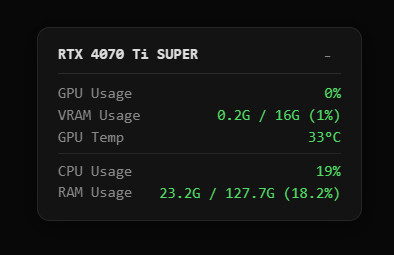
NvEye - ComfyUI Hardware Monitor
ComfyUI already has hardware monitoring solutions such as crystools, but they can cause node conflicts and occupy UI space. NvEye was created as a pure hardware display widget — lightweight, non-intrusive, and conflict-free.
A lightweight hardware monitor for ComfyUI. Displays GPU, VRAM, temperature, CPU and RAM usage directly in the ComfyUI interface.
Installation
- Open your terminal/command prompt.
- Navigate to your ComfyUI
custom_nodesfolder. - Run:
git clone https://github.com/dogodg3838/ComfyUI-NvEye - Restart ComfyUI.
Features
- Real-time GPU / VRAM / Temperature monitoring
- CPU and RAM usage display
- 4-level color indicator (green / yellow / orange / red)
- Draggable and collapsible widget (collapse button top-right)
- Multi-language via right-click: 繁體中文 / English / 日本語 / 한국어
Requirements
- NVIDIA GPU only
- Python package:
psutil(auto-installed by ComfyUI Manager)
NvEye - ComfyUI 硬體監控
ComfyUI 已有 crystools 等硬體監控解決方案,但部分節點會與其他節點產生衝突,且會佔據 UI 介面空間。因此研究並開發了 NvEye,作為純硬體顯示小視窗,輕量、不干擾介面、無節點衝突。
ComfyUI 的輕量級硬體監控工具。 在介面中顯示 GPU、VRAM、溫度、CPU 和 RAM 使用狀況。
安裝方法
- 開啟終端機或命令提示字元。
- 進入 ComfyUI 的
custom_nodes資料夾。 - 執行指令:
git clone https://github.com/dogodg3838/ComfyUI-NvEye - 重啟 ComfyUI 即可。
功能
- 即時 GPU / VRAM / 溫度監控
- CPU 和 RAM 使用率
- 顏色指示(綠 / 黃 / 橙 / 紅)
- 可拖曳、右上角可收合的小視窗
- 右鍵多語言選項:繁體中文 / English / 日本語 / 한국어
需求
- 只支援 NVIDIA 顯示卡
- Python 套件:
psutil(ComfyUI Manager 自動安裝)
NvEye - ComfyUI ハードウェアモニター
ComfyUI には crystools などのハードウェア監視ツールがありますが、ノードの競合や UI 占有が発生する場合があります。NvEye はそれらの問題を避けるために開発された、純粋なハードウェア表示ウィジェットです。
ComfyUI 用の軽量ハードウェアモニターです。 GPU、VRAM、温度、CPU、RAM の使用状況を表示します。
インストール
- ターミナルまたはコマンドプロンプトを開きます。
- ComfyUI の
custom_nodesディレクトリに移動します。 - 次のコマンドを実行します:
git clone https://github.com/dogodg3838/ComfyUI-NvEye - ComfyUI を再起動します。
機能
- リアルタイム GPU / VRAM / 温度モニタリング
- CPU および RAM 使用率
- 4段階カラーインジケーター(緑 / 黄 / オレンジ / 赤)
- ドラッグ可能・右上で折りたたみ可能なウィジェット
- 右クリックで多言語切替:繁體中文 / English / 日本語 / 한국어
必要環境
- NVIDIA GPU のみ対応
- Python パッケージ:
psutil(ComfyUI Manager が自動インストール)
NvEye - ComfyUI 하드웨어 모니터
ComfyUI 에는 crystools 같은 하드웨어 모니터링 도구가 있지만, 노드 충돌이나 UI 공간 점유 문제가 발생할 수 있습니다. NvEye 는 이러한 문제를 피하기 위해 개발된 순수 하드웨어 표시 위젯입니다.
ComfyUI 용 경량 하드웨어 모니터입니다. GPU, VRAM, 온도, CPU, RAM 사용 현황을 표시합니다.
설치 방법
- 터미널 또는 명령 프롬프트를 엽니다.
- ComfyUI의
custom_nodes디렉토리로 이동합니다. - 다음을 실행합니다:
git clone https://github.com/dogodg3838/ComfyUI-NvEye - ComfyUI를 재시작합니다.
기능
- 실시간 GPU / VRAM / 온도 모니터링
- CPU 및 RAM 사용률
- 4단계 색상 표시(녹색 / 노란색 / 주황색 / 빨간색)
- 드래그 가능・우측 상단에서 접을 수 있는 위젯
- 우클릭 다국어 전환:繁體中文 / English / 日本語 / 한국어
요구 사항
- NVIDIA GPU 전용
- Python 패키지:
psutil(ComfyUI Manager 자동 설치)