
comfyui_mliang_color_correction
A lightweight ComfyUI custom node package for final image color correction, designed for quick exposure, contrast, saturation, temperature, tint, shadow, and highlight adjustments.
Nodes (4)
The 'Legacy' color correction node — same sliders, older name, still works
The legacy white balance node — an older name for the same cast fix
The one-node finishing pass that un-flats your generations without re-rolling
Fix a green or blue cast in one node — no model, no extra install
MLiang Color Correction for ComfyUI
一个轻量、纯净的 ComfyUI 图像颜色校正节点包,用于在工作流末端快速微调曝光、对比度、饱和度、色温、色调、阴影和高光。
A lightweight ComfyUI custom node package for final image color correction, designed for quick exposure, contrast, saturation, temperature, tint, shadow, and highlight adjustments.
Nodes
MLiang Color Correction
Main color grading node for ComfyUI IMAGE tensors.
Controls:
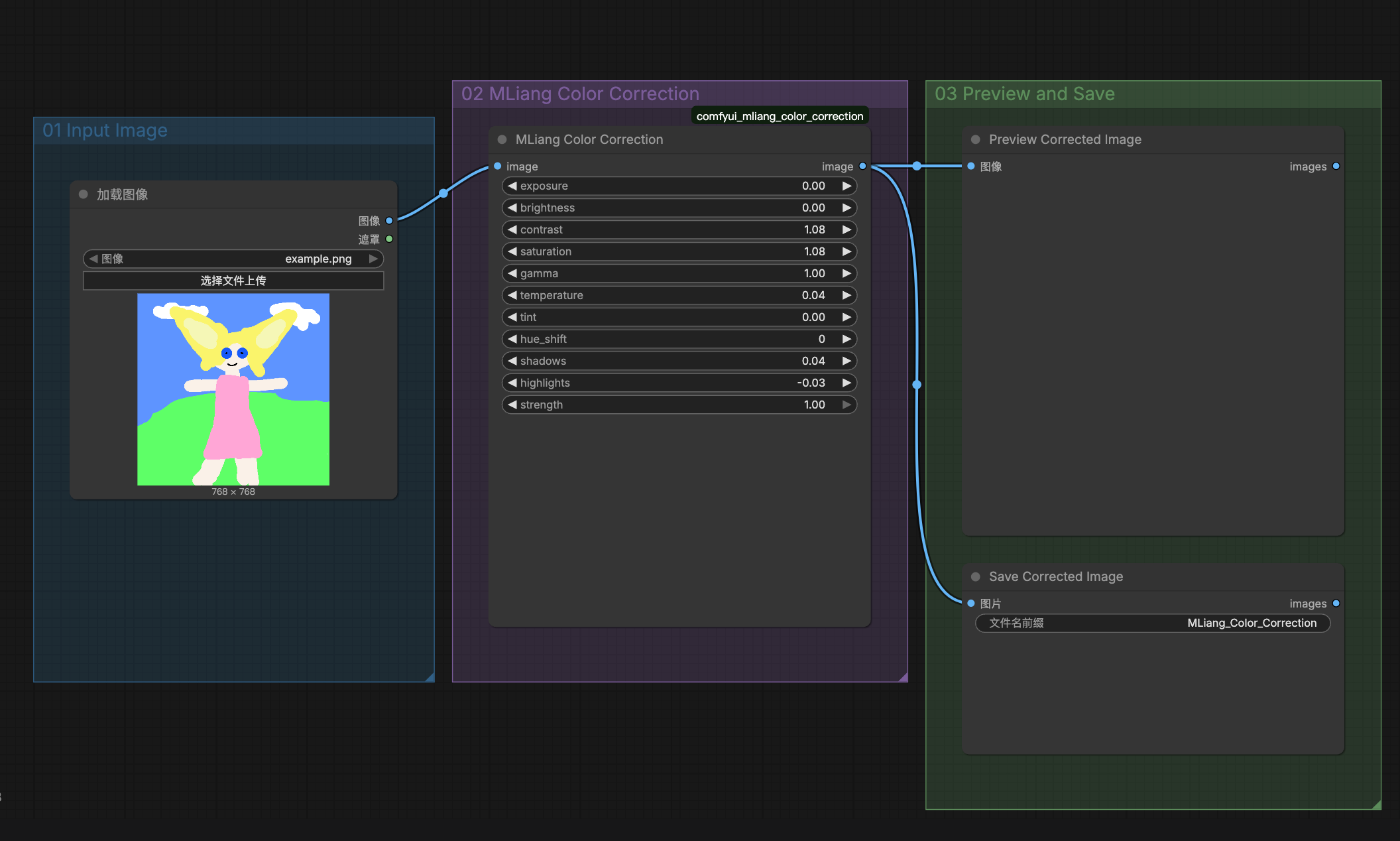
exposurebrightnesscontrastsaturationgammatemperaturetinthue_shiftshadowshighlightsstrength
MLiang White Balance
Simple RGB white balance node.
Controls:
redgreenbluenormalize_lumastrength
Both nodes accept and return ComfyUI IMAGE tensors in [batch, height, width, channels] format.
Example Workflow
A clean showcase workflow is included:
examples/MLiang_Color_Correction_Showcase.json
Workflow structure:
Load Image -> MLiang Color Correction -> Preview Image / Save Image
This example is intentionally minimal, so it can be used as a pure demo workflow or dropped into another image generation pipeline.
Installation
Clone this repository into your ComfyUI custom_nodes folder:
cd ComfyUI/custom_nodes
git clone https://github.com/dingmuliang/comfyui_mliang_color_correction.git
Restart ComfyUI after installation.
Usage
- Load an image with ComfyUI's built-in
Load Imagenode. - Connect it to
MLiang Color Correction. - Adjust the color parameters.
- Connect the output to
Preview ImageorSave Image.
Recommended use cases:
- final color polish after txt2img/img2img generation
- matching generated images to a reference color mood
- quick brightness and contrast fixes before sending images back to Photoshop
- lightweight workflow demonstrations without model dependencies
Compatibility
- ComfyUI
- PyTorch tensor operations
- No extra model files required
- No external Python dependencies beyond the standard ComfyUI environment
Project Structure
comfyui_mliang_color_correction/
├── __init__.py
├── README.md
├── LICENSE
├── assets/
│   ├── MLiang_Color_Correction_Showcase.png
│   └── wechat-pay.png
└── examples/
    └── MLiang_Color_Correction_Showcase.json
Community
| Support |
|---------|
|  |
| WeChat Pay |
|
| WeChat Pay |
License
MIT License