
comfyui-workflow-prettier
Auto-arrange workflow nodes with 4 layout algorithms, group-aware positioning, alignment tools, and undo
Nodes (1)
Workflow Prettier
Auto-arrange your ComfyUI workflow nodes with a single click.
Features
-
4 layout algorithms
- Layered — DAG columns with crossing minimization (Sugiyama). Best for standard pipelines.
- Linear — Single row in execution order. Good for simple chains.
- Compact — Rectangle packing for minimal canvas area.
- Sort by Type — Groups identical node types into columns.
-
Group-aware — Nodes inside groups are arranged within the group, then groups are positioned as blocks.
-
3 directions — Left-to-Right, Top-to-Bottom, Right-to-Left
-
Alignment tools — Select 2+ nodes, right-click → Align Left/Right/Top/Bottom, Center, Distribute evenly
-
Configurable spacing — Horizontal, vertical, and group padding sliders
-
10-deep undo stack
Installation
ComfyUI Manager (Recommended)
Search for "Workflow Prettier" in the ComfyUI Manager and install.
Manual (Git)
cd ComfyUI/custom_nodes
git clone https://github.com/deepme987/comfyui-workflow-prettier.git
Restart ComfyUI. No pip dependencies required.
Usage
Quick Access
Right-click the canvas → Prettify Workflow → pick a layout. Uses sensible defaults.
Full Control
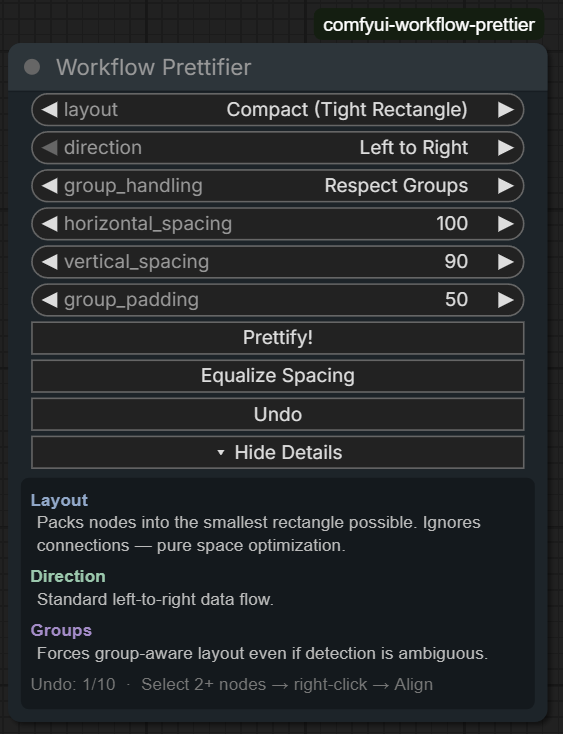
- Add the Workflow Prettifier node (search or find in
utilscategory) - Configure layout, direction, group handling, and spacing
- Click Prettify!
- Click Undo if you don't like the result
Alignment Tools
- Select 2+ nodes
- Right-click any selected node → Align / Distribute
- Choose from: Align Left/Right/Top/Bottom, Center H/V, Distribute H/V
Configuration
| Setting | Default | Description | |---------|---------|-------------| | Layout | Layered | Layout algorithm | | Direction | Left to Right | Flow direction | | Group Handling | Auto | How to handle node groups | | Horizontal Spacing | 100 | Gap between columns | | Vertical Spacing | 100 | Gap between rows | | Group Padding | 100 | Padding inside groups |
Contributing
Contributions welcome! Fork, branch, test with various workflows, and submit a PR.