
Pin Node Input
Pin widget controls from any node to a persistent sidebar panel
📌 Pin Node Input
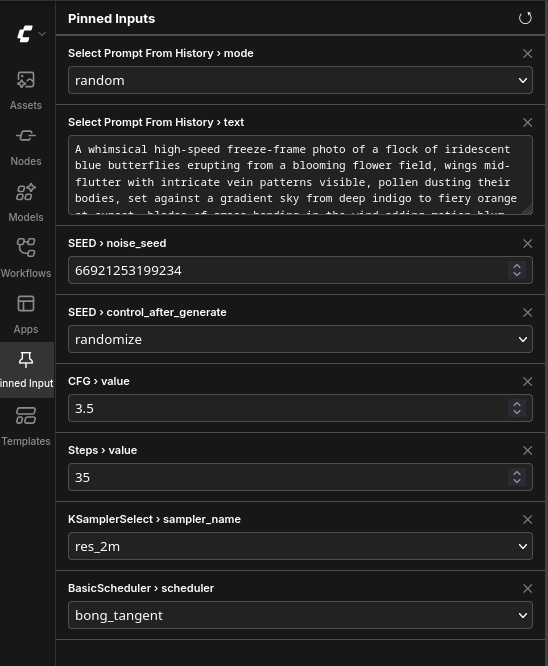
A ComfyUI extension that lets you pin any widget from any node to a sidebar panel, so you can tweak the settings you change constantly — prompts, seed, steps, CFG, resolution — without hunting across the canvas between runs.
No extra nodes, no workflow restructuring. Pin a widget, change it from the sidebar, done.
Features
- Pin / unpin any widget via the node's right-click menu → 📌 Pin widget…
- Sidebar panel with native-feeling controls for every widget type:
- dropdowns (samplers, schedulers, checkpoints, …)
- numbers with correct int/float handling, min/max and step
- toggles
- multiline text areas for prompts
- Live two-way sync — change a value on the canvas (or let
randomizeroll a new seed after each run) and the panel updates within ~0.6 s. Change it in the panel and the node updates instantly. - Seed convenience — pinning a
seed/noise_seedwidget automatically pins itscontrol_after_generatecompanion. - Drag to reorder — grab the ⠿ handle on any row to rearrange pins; the order is saved with the workflow.
- Click a pin's label to center the canvas on its source node.
- Pins are saved inside the workflow (
.json), so every workflow remembers its own pinned set and they travel with the file when you share it. - Frontend-only: adds zero Python nodes and does not touch your graph or outputs.
Installation
Via ComfyUI Manager (recommended)
- Open Manager → Custom Nodes Manager
- Search for Pin Node Input
- Install and restart ComfyUI
Manual
cd ComfyUI/custom_nodes
git clone https://github.com/dawncreatescode/comfyui-pin-node-input.git
Restart ComfyUI and hard-refresh your browser (Ctrl+Shift+R) so the frontend script loads.
Requirements: a recent ComfyUI with the new frontend (the default since mid-2024). No Python dependencies.
Usage
- Pin something: right-click any node → 📌 Pin widget… → click a widget name. A ✓ marks widgets that are already pinned; clicking them again unpins.
- Open the panel: click the 📌 thumbtack icon in the sidebar.
- Edit values directly in the panel — changes apply to the node immediately.
- Unpin with the ✕ on a row, or via the same right-click menu.
- Save your workflow as usual; pins are stored in it and restored on load.
The ↺ button in the panel header forces a full rebuild — useful if dropdown contents changed (e.g. you added a model file) or you renamed a node and want the label updated.
Stale pins
If a pinned node is deleted or its widget is converted to an input, the row shows ⚠ Widget not found instead of breaking. Unpin it, or undo the deletion and the row comes back to life automatically.
How it works (for the curious)
- A pin is just a reference —
{nodeId, widgetName}— stored ingraph.extra, which ComfyUI serializes inside the workflow JSON. - Panel controls proxy the real LiteGraph widgets: writes set
widget.valueand fire the widget's callback; reads happen via a lightweight sync loop (600 ms, only while the panel is mounted) that never overwrites a control you're currently typing in. - The panel is registered through the official
app.extensionManager.registerSidebarTabAPI, so it follows your ComfyUI theme and survives frontend updates better than hacks into internal components.
Known limitations
- Widgets converted to inputs have no local value and therefore can't be edited from the panel (shown as stale).
- Image/file upload widgets and button widgets are intentionally not pinnable.
License
MIT — see LICENSE.