
Comfy DV Nodes
Quality of life ComfyUI nodes: dynamic string formatting with Python f-strings or Jinja2 templates, seed-controlled random input selection, and workflow circuit-breaker for conditional queue interruption.
Nodes (23)
The node that makes ComfyUI actually talk to a local LLM
Stop a queue run gracefully when things go wrong mid-workflow
The string-formatting node that replaced three others in my workflows
Talk to your local llama.cpp server from inside ComfyUI
Pin a model into VRAM before you chat
Pick a model from a live dropdown, no typing required
Evict the model from VRAM so your image pipeline gets it back
One node to point ComfyUI at your local model server
See what the model actually 'remembers'
Username and password auth for your model server
Authenticate to a remote model server with a bearer token
Add any HTTP header you want to your model server requests
How much conversation is the model carrying?
Telling your local reasoning model to just answer
The escape hatch for every sampling parameter comfydv doesn't have a slider for
Ollama Option — Max Tokens
Your local LLM refused again? This node just rerolls the seed
Ollama Option — Repeat Penalty
Lock or randomize your LLM's randomness
Ollama Option — Temperature
Ollama Option — Top K
Nudge how 'creative' your model's sampling gets
Pick one of many inputs at random — with a seed when you want it reproducible
comfydv
Quality-of-life nodes for ComfyUI, built to disappear into your workflow.
comfydv fills the gaps ComfyUI's built-in library leaves on the table: string templates that build their own sockets as you type, seed-controlled randomisation, graceful mid-queue interruption, and a local-LLM integration that doesn't care whether you're running Ollama or llama.cpp. No Python required — install it, drop the nodes on your canvas, wire them up.
What is comfydv?
A small, focused ComfyUI utility pack. It exists because:
- It reads your intent, not just your syntax. Format String detects
{variables}in a template and adds/removes input sockets live, as you type — no manual socket wrangling. - One LLM integration, any local backend. Wire a Chat Completion node once; swap between Ollama and llama.cpp by changing a single upstream client node. Structured output, multi-turn history, and model load/unload work identically on both.
- It fails politely. Circuit Breaker halts a queue run cleanly instead of throwing a stack trace at you; a disconnected LLM server gets a specific, actionable error instead of a silent empty dropdown.
- Small, tested, boring in the best way. Every node is unit-tested and the local-LLM nodes are verified against real running servers, not just mocks.
What's inside
| Node | What it does |
|------|---------------|
| Format String | Renders a Python f-string or Jinja2 template. Sockets appear and disappear automatically as you type variables. |
| Random Choice | Accepts any number of typed inputs and returns one at random, with a seed for reproducibility. |
| Circuit Breaker | Halts the current queue run gracefully — no crash, just a clean stop — when a condition isn't met. |
| Ollama Client / LlamaCpp Client | Configure a connection to a local Ollama or llama.cpp server. Both emit the same LLM_CLIENT socket — every node below works with either. |
| LLM Model Selector | Live dropdown of models available on the connected server. |
| LLM Load Model / LLM Unload Model | Explicit VRAM management — pin a model in memory before inference, evict it after. |
| Chat Completion | Send a prompt (optionally with history) to the connected server; response shown inline and as an output socket. |
| Ollama Option — * | Seven composable parameter nodes (Temperature, Seed, Max Tokens, Top P, Top K, Repeat Penalty, Extra Body) that merge into Chat Completion's options input. |
| Ollama Debug History / Ollama History Length | Inspect an OLLAMA_HISTORY conversation list — pretty-print it or count its messages. |
Install
Via ComfyUI Manager (recommended): search for comfydv, click Install.
Manual:
cd /path/to/ComfyUI/custom_nodes
git clone https://github.com/darth-veitcher/comfydv.git
Restart ComfyUI. Nodes appear under dv/, dv/ollama, and dv/llamacpp in the node menu. Runtime dependencies (jinja2, aiohttp, pydantic-ai) install automatically via requirements.txt.
For local-LLM nodes, bring your own backend:
- Ollama — install Ollama, pull a model (
ollama pull qwen2.5:latest). - llama.cpp — build/install
llama-server, launch it in router mode.
Quickstart
- Right-click the canvas → Add Node → dv/ for Format String, Random Choice, and Circuit Breaker.
- For local LLM nodes: start Ollama (
ollama serve) orllama-server(router mode), then add nodes from dv/ollama/ or dv/llamacpp/ — the chat/model-management nodes are shared between both backends.
Full documentation, including every node's inputs/outputs: darth-veitcher.github.io/comfydv
Format String
Type a template, get sockets. {variable_name} in f-string mode, {{ variable_name }} in Jinja2 mode — either way, comfydv watches what you type and keeps the node's inputs in sync automatically.
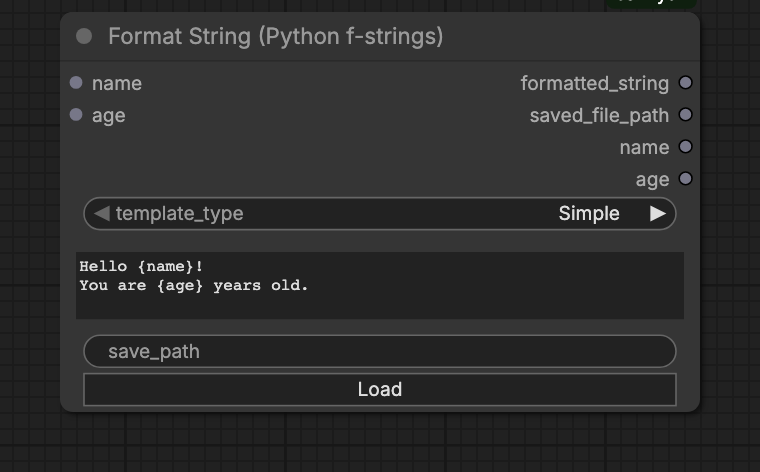
| Output | Content |
|--------|---------|
| formatted_string | The rendered result |
| saved_file_path | Where it was written, if save_path is set |
| <var> … | Each input passed through unchanged, for easy chaining |
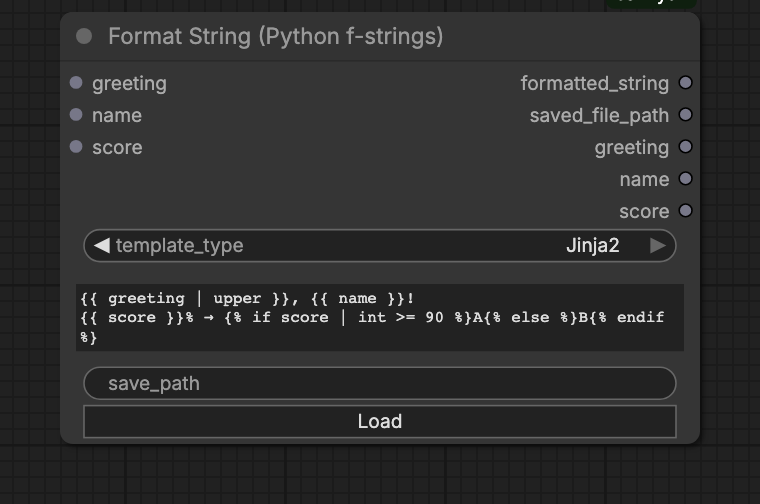
Switch template_type to Jinja2 to unlock filters (| upper, | int), conditionals, and loops:
Random Choice
Wire in any number of same-typed inputs — images, strings, conditioning, anything ComfyUI can carry over a socket — and get one back at random.
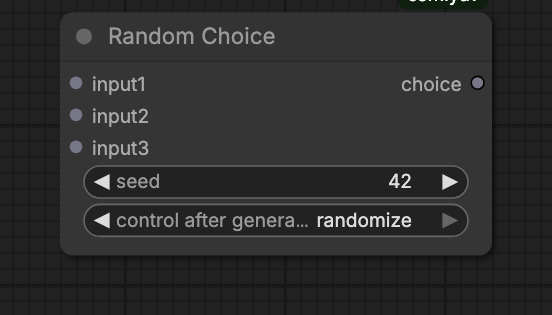
seed = 0 randomises every run; any other value locks the selection. Unused input slots vanish automatically when you disconnect them.
Circuit Breaker
Stop a queue run cleanly when a condition isn't met, instead of letting a downstream node crash on bad input.
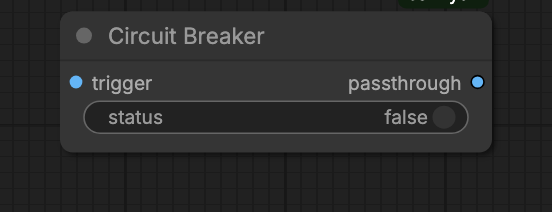
Wire a trigger (an image, or anything) into trigger and a boolean into status. status = false raises InterruptProcessingException — ComfyUI stops the run without an error dialog. status = true passes the trigger straight through.
Typical use: skip an expensive upscale pass when an upstream quality-check node says the draft's already good enough.
Local LLMs
One set of nodes, two interchangeable backends. Configure a connection once with Ollama Client or LlamaCpp Client — both output the same LLM_CLIENT socket — and every downstream node (model selection, load/unload, chat, structured output, multi-turn history) works exactly the same way regardless of which one you picked. Swapping backends means rewiring one node, not rebuilding your graph.
Connect and chat
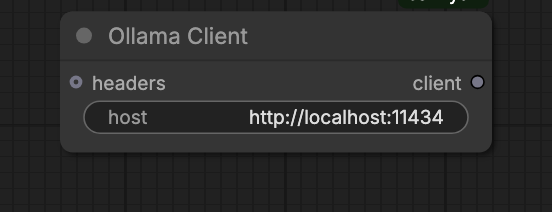
- Ollama Client (default
http://localhost:11434) or LlamaCpp Client (defaulthttp://localhost:8080) — set the host. - LLM Model Selector — pick a model from the live dropdown, or wire a model name straight into Chat Completion.
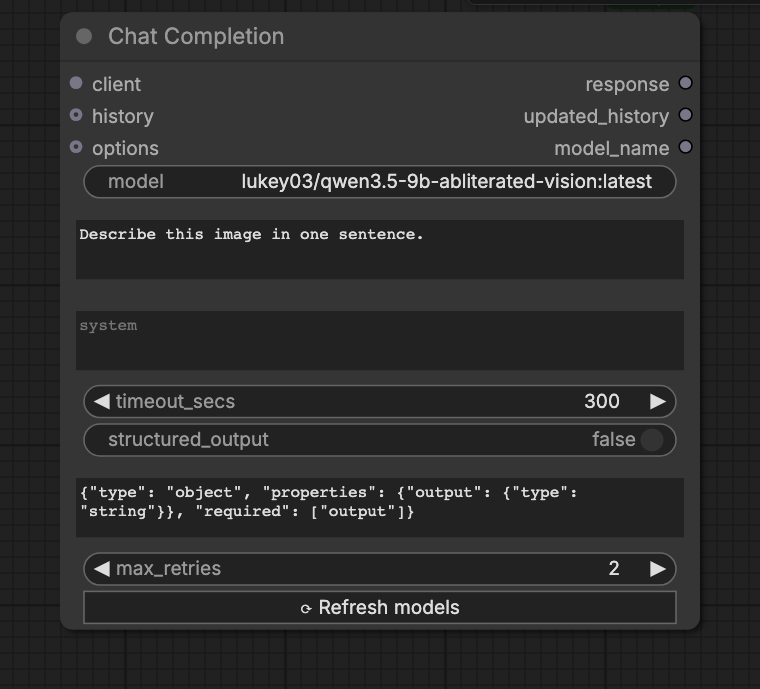
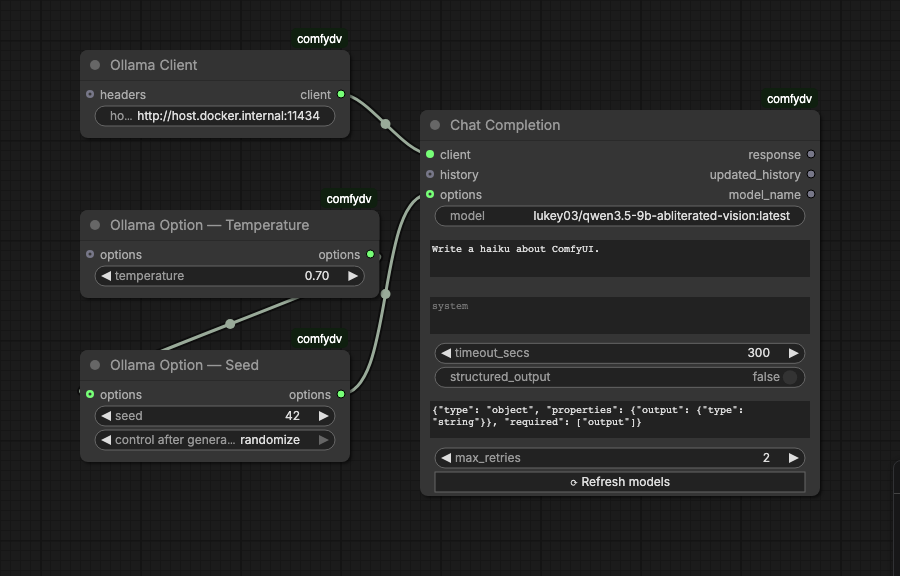
- Chat Completion — wire in client, model, and prompt. The response renders inline in the node and is also available as an output socket.
A complete graph looks like this:
Describing images (vision)
Chat Completion has an optional image input. Wire any IMAGE into it and, with a vision-capable model loaded, the model can describe or reason about the picture — captioning, visual Q&A, reading text in an image, whatever the model supports.
- Ollama — use a multimodal model (e.g. a llava-class model).
- llama.cpp — launch
llama-serverwith a multimodal projector:--mmproj <projector.gguf>alongside the model.
Image input works the same on both backends — same node, same wiring — and composes with everything else: structured output (schema-validated fields pulled straight from the image), multi-turn history, and the option nodes. A batch of images is sent as multiple images on the turn. Leave the input unwired and Chat Completion behaves exactly as before, text only.
Manual memory management
Single-GPU and memory-constrained setups need explicit control over what's resident in VRAM. LLM Load Model pins a model into memory; LLM Unload Model evicts it immediately, freeing room for the next model or the rest of your image pipeline.
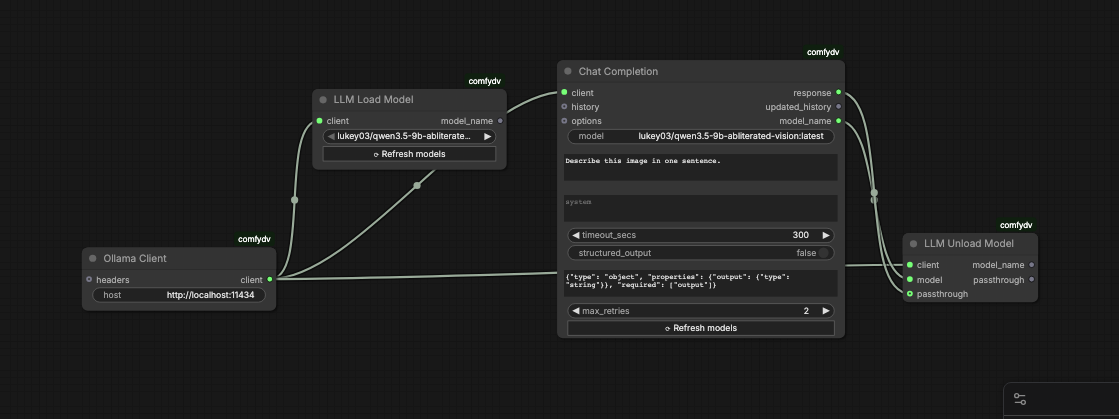
The Load → Chat → Unload chain is enforced by data dependencies, not by convention:
LLMLoadModel.model_name→ChatCompletion.model— guarantees Load runs before Chat, and feeds the model name straight in.ChatCompletion.model_name→LLMUnloadModel.model— guarantees Unload runs after Chat completes.- (Optional)
ChatCompletion.response→LLMUnloadModel.passthrough— Unload returns the response unchanged, so the rest of your workflow can still consume it.
Tuning generation
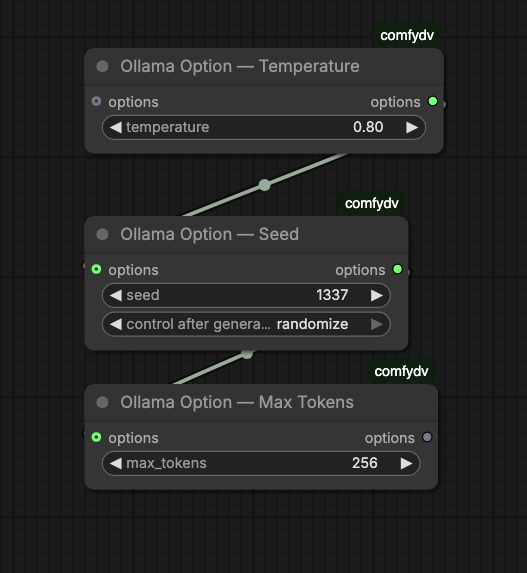
Chain any combination of Ollama Option — nodes ahead of Chat Completion to override inference parameters:
| Option node | Parameter |
|-------------|-----------|
| Temperature | temperature |
| Seed | seed |
| Max Tokens | num_predict |
| Top P | top_p |
| Top K | top_k |
| Repeat Penalty | repeat_penalty |
| Extra Body | arbitrary JSON, merged into options |
Multi-turn conversations
OLLAMA_HISTORY flows out of Chat Completion as a {"role", "content"} list. Feed it back into the next Chat Completion call for multi-turn context, or inspect it with Ollama Debug History / Ollama History Length.
llama.cpp
Everything above works unchanged against llama.cpp — swap in a LlamaCpp Client and the rest of the graph doesn't know the difference. The one thing llama.cpp needs that Ollama doesn't: router mode, a directory of models rather than a single -m model.gguf:
llama-server --models-dir ./models -c 8192
In exchange, router mode gives comfydv a richer live status than Ollama can report — loading and downloading, not just loaded/unloaded — plus the same explicit load/unload primitives Ollama's nodes already use.
Upgrading a workflow saved before this rename
Nodes were renamed once, to make them backend-generic (OllamaChatCompletion → ChatCompletion, etc.). If ComfyUI reports old node types as missing when you reopen a saved workflow, reconnect using this table — behavior is unchanged, only the names are:
| Old | New |
|-----|-----|
| OllamaChatCompletion | ChatCompletion |
| OllamaModelSelector | LLMModelSelector |
| OllamaLoadModel | LLMLoadModel |
| OllamaUnloadModel | LLMUnloadModel |
| OLLAMA_CLIENT socket | LLM_CLIENT socket |
OllamaClient kept its name — delete and re-add any node showing as missing, then rewire it to the same OllamaClient node.