
ComfyUI-DaSiWa-Nodes
DaSiWa Custom Nodes Collection
Nodes (34)
Bolt custom fields onto your saved images
A combine node that picks its own codec
Join Clips Is the One DaSiWa Node That Loads No Model At All
Extend the take instead of re-rendering it
Your H3 continuation isn't ready until the file proves it
Segment Decode Decodes More Than It Keeps, and That's the Point
Stop Re-Decoding Your H3 Video Every Time You Extend It
Create RefMod Is a Casting File, Not a LoRA
Tiles, refines, and leaves your audio alone
Transition Guide Pins Both Edges of the Cut and Makes the Model Fill the Middle
Transition Render Keeps Only the Middle of What You Just Paid For
DaSiWa Inpaint Composite
DaSiWa Inpaint Crop Prep
Run a local chat or vision-language model in your graph
Point a local LLM or VLM at your workflow
A local model that knows Anima wants tags and LTX hates full stops
Stack 10 LoRAs with separate video and audio strength
The settings hub behind DaSiWa's metadata savers
Civitai-ready output with auto LoRA detection
Every metadata port on one node
One toggle to mute or bypass a pile of nodes
{wildcard|inline} prompt syntax, no manager needed
Hit a megapixel target at any aspect ratio
Turn 12 fps into 24 on your NVIDIA card, then remember to fix the encoder
NVIDIA's RTX Video SDK as a 3-pass node
Seamless Loop Finds the Seam Your Clip Already Had — Then Morphs It Shut
A seed control that won't eat your good seed
Tiling inside the sampler, not a second pass
A sharper, dependency-free resize for images and video
A flicker-free watermark for image and video batches
Roll the dice on your prompt — and be able to reroll the exact same roll
MiniMax H3 Cache
A real timeline for MiniMax H3, without leaving ComfyUI
The unglamorous node that makes the H3 Director actually work
DaSiWa Custom Nodes Collection
A high-performance collection of custom nodes for ComfyUI, optimized for video workflows, resolution management, and logic control. Its installed version is shown in ComfyUI → Settings → About.
Use ComfyUI → Settings → Other → DaSiWa → ... to enable or disable extra settings.
📰 News & Changelog — release notes and complete change history across the collection →
Included Nodes
🎬 MiniMaxH3 Director
🎬 MiniMaxH3 Director — The Ultimate One-Stop Video Creation Pipeline: Experience the most advanced, feature-complete MiniMaxH3 Director node available for ComfyUI. Built as a comprehensive production hub, it seamlessly merges timeline-based multi-modal authoring, intelligent LLM/VLM Prompt Forge assistance, deep RefMod persona control, and high-precision continuity extensions into a single, unified workflow. Whether starting from text, images, or an existing H3 video, the Director serves as your central command deck for end-to-end synchronized video and audio generation.
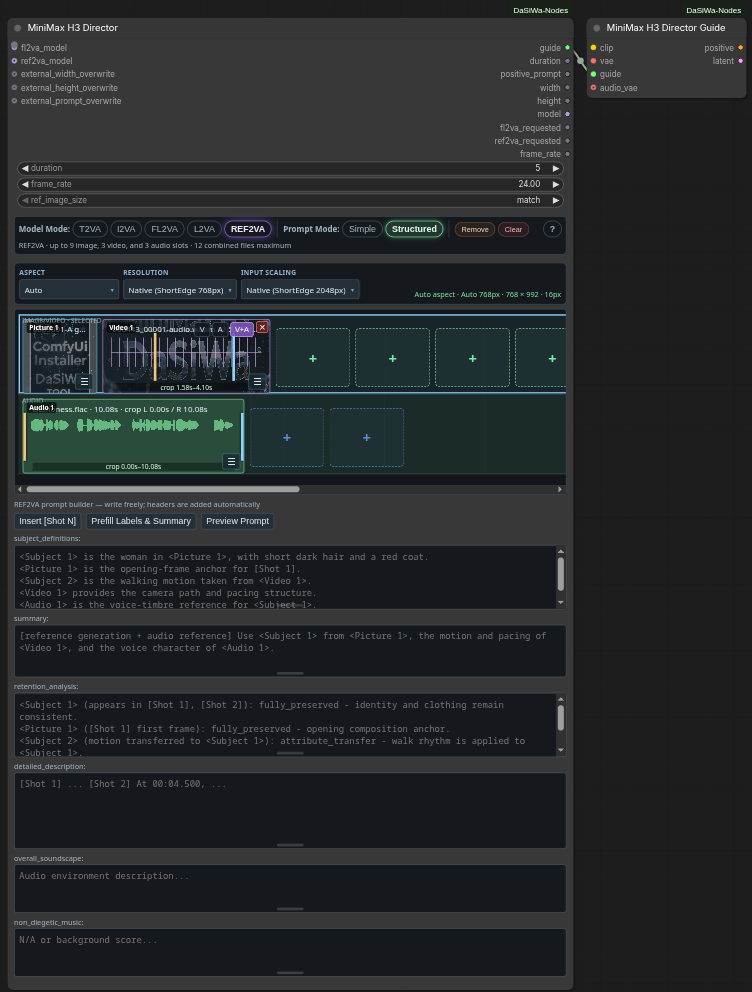
- 🎥 H3 modes: T2VA/I2VA/L2VA/FL2VA in the two-image endpoint family (first/last-frame interpolation); REF2VA (9 images, 3 videos, 3 audio files; 12 total); Image Inpaint (one image → single output frame via a 5-frame pass).
- 🖼️ Reference Director: separate image/video/audio lanes; drag-reorder slots, per-media prompts, external soundtracks, embedded-video V/A/V+A switch; incompatible media retained when changing modes.
- 📋 Media input: lane-selected Ctrl+V, file-manager drag-and-drop, paste-replace on a selected tile; first-frame video thumbnails and audio waveforms.
- ⏱️ Reference trims: draggable crop markers and preview range, ▶ Play crop; full-file audio amplitude preview; audio/video previews with highlighted crop, draggable live playhead and source-time readout; 2–15s per reference window and ≤15s combined visual / ≤15s combined audio, with input-path validation.
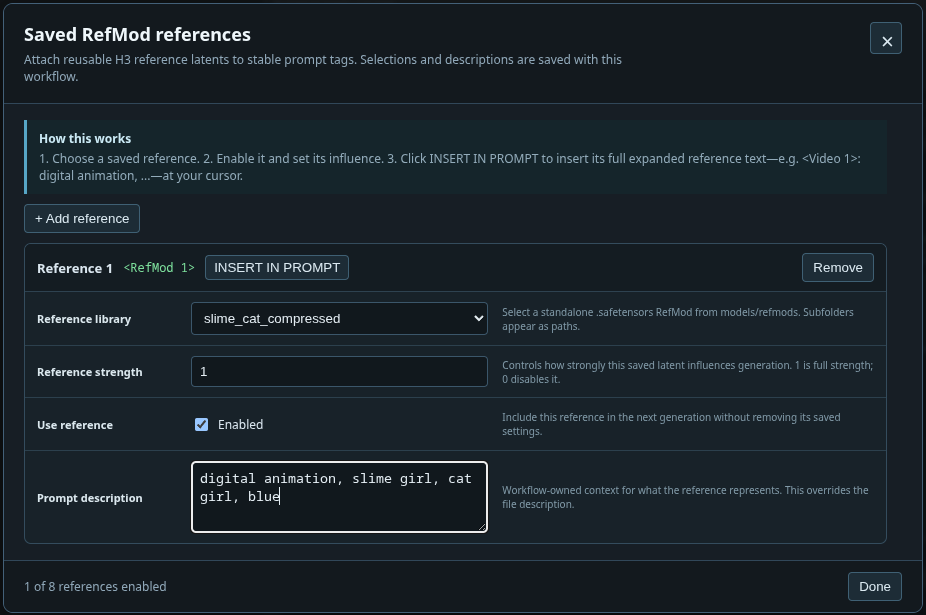
- 📸 RefMods: image/video/audio files and upstream v5 bundles from
models/refmods/; overlay selection, strength scaling, workflow-local descriptions, runtime<RefMod N>→ native-label resolution. - ✍️ Prompt editor: one free-text field per mode; optional structure, shot/RefMod insertion and reference-label prefill; legacy prompts migrate into that field.
- 👥 Forge Cast & People boxes: find or draw character boxes; editable character/place/style/pose cards, automatic vision reading with a saved opt-out; explicit Idea/Shot changes retain priority. Cards persist in workflows; manual descriptions work without vision.
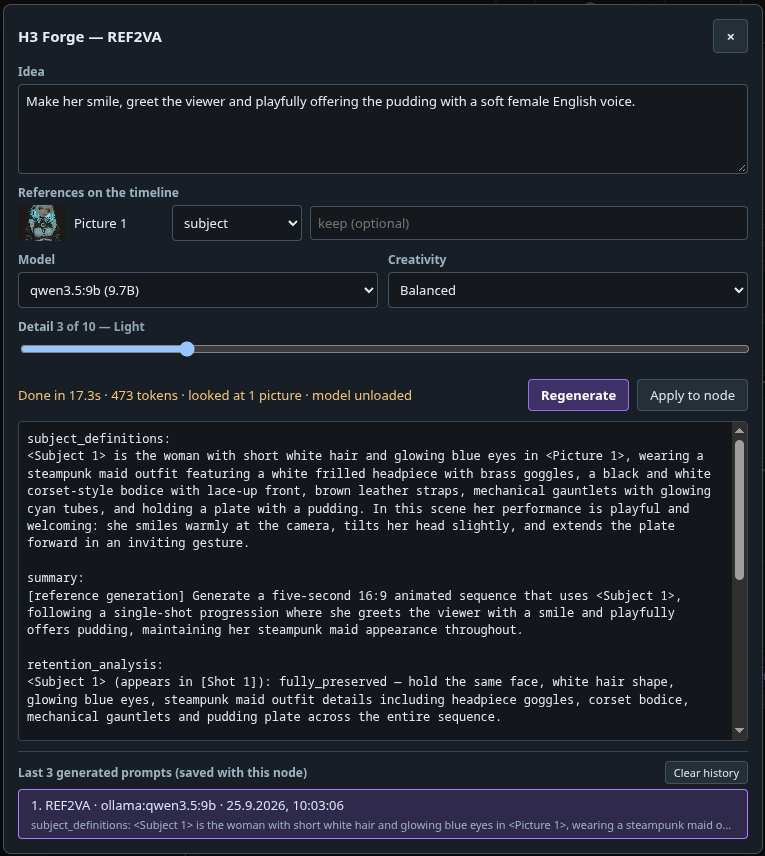
- ✨ Prompt Forge: review/apply H3 drafts from
models/llm, Ollama or an OpenAI-compatible server. REF2VA picture buttons combine character, place, style and frame roles, with optional ordered people selections (left/right, top/bottom or front/back; no order picked means the numbers say who is in the picture, not where); Pose and Custom remain exclusive; image-only labelled drafts need no writer vision, while mixed references retain the full REF2VA path. Choose Auto or 1–5 shots with optional per-shot descriptions; continuity retains vision context and inherited definitions. Model setup and limitations →. - ♾️ Continuity (opt-in): extend a completed 24-fps H3 video/audio take from a pinned latent checkpoint; Duration controls added seconds, new-take capture is opt-in; separate next-action prompt, explicit source advancement, optional Forge draft. Wiring and limits →.
- 📐 Smart resolution: Auto/custom aspect, resolution and megapixel presets; input scaling via Torch Resize (Off/Auto/Target/Fit/Fill/Fit+pad/Divisible crop).
- 💾 Save/Load packs: reference files, prompt and RefMod selections; append/overwrite with mode-limit and missing-file checks.
- 📦 Create & edit RefMods: beside Save, export selected media as a reusable v5 safetensors bundle with crop previews, editable descriptions and concept metadata—no sampler or additional pack required. Selecting a saved RefMod loads its members automatically; Save Changes saves an edited copy without re-encoding or overwriting the original. Reset the picker to return to the media-line creation view. Usage →.
- 🧩 Native H3 routing: Director + Guide forward to built-in H3 nodes; selected-model lazy loading and name-bound REF2VA inputs; optional prompt and width/height overwrite sockets.
- 🎞️ Frame rate: 0.1–240 FLOAT input (default 24) and matching output for downstream nodes; Image Inpaint outputs a still.
- ⚡ Optional performance node: MiniMaxH3 Cache patches the connected model; cache storage supports CUDA/CPU fallback. It is a separate node, not a Director mode.
- 💎 Optional output processing: MiniMaxH3 Enhanced Upscale performs latent upscale and per-step diffusion refinement in one node. RTX Upscaler & Refiner offers pixel-space denoise/deblur/VSR upscale; Watermark Overlay adds branding; Enhanced Video Combine encodes/muxes audio and previews output.
Full documentation, UI guide, and prompting reference →
🔍 MiniMaxH3 Enhanced Upscale
One node that upscales a completed MiniMax H3 video/audio latent and refines it with per-step diffusion, keeping the original audio.
- Independent
spatial_tiling(diffusion) andtemporal_chunking(upscale + refinement), both on by default. Refinement uses tile-local H3 coordinates and a preferred automatic layout capped at 2.1 MP per tile. If that layout cannot fit the memory estimate, smaller spatial tiles are planned down to the existing 512px floor; no additional tile controls or wiring are needed. - Memory Planning defaults on with a Memory Reserve (%) slider: 0–100%, in 5-point steps, default 5% after device/model reserves. Off bypasses estimated diffusion-budget rejection at your own OOM risk, without disabling tiling/chunking, ComfyUI memory management or host RAM checks. The legacy MB cap is hidden but preserved for saved/API workflows. A single full-canvas tile uses native sampling; appended inputs preserve existing widget slots. The aggressive default is not a VRAM guarantee and can change automatic plans and seeded results.
- Learned safetensors upscaling from
models/latent_upscale_models/, orinterpolation; no automatic choice, no fallback. - Optional Spike Guard, default off: detects and softly corrects unusually strong local latent deviations after learned upscale, before refinement. Separate detection threshold, correction strength and artifact-pattern direction controls; experimental, checkpoint-specific and not a general image-quality fix.
- Factor-only scaling (default 2.0), refinement defaults CFG 1, 1 step, denoise 0.2 (
0skips refinement). Native packed video/audioLATENToutput; the original audio stream is returned unchanged. - Optional Director guide + H3 video VAE re-encode endpoint images at the enlarged resolution; works without a Director.
- Director Image Inpaint is supported as its complete five-frame I2V pass, with interpolation or learned upscale and optional refinement. Decode and extract the still afterward; arbitrary source denoise masks remain unsupported.
- Continuity: keep Append & Stage before the upscaler and feed it the cumulative latent.
Upscaler wiring, sockets, checkpoint selection and limits → · Continuity setup, source import and timing →
🧩 Tiled Diffusion (Image)
MODEL patch for SD/SDXL/Flux-family image checkpoints: every sampling step denoises overlapping tiles (default 1024 px, 128 px overlap) and blends them with positive pyramid weights, so a model samples canvases far larger than its native size without seams. Wire it between the loader and the sampler; ControlNet is not supported. Details →
MiniMaxH3 Continuity • Segment Prepare
- Inputs: sampler
LATENTand the matching Guidecontinuity_context; select New segment only in Director Advanced. - Outputs: bounded
render_latent, matchingsegment_context, publicationticket. - Storage: original-resolution root plus immutable new-token deltas; no repeated full-timeline checkpoint per extension.
MiniMaxH3 Continuity • Segment Decode
- Inputs: local render latent, native H3 video/audio VAEs and Segment Prepare.segment_context.
- Outputs: only the new visible
IMAGEframes and synchronizedAUDIO; optional Enhanced Upscale goes before this node. - Compatibility: full-timeline output remains the default; keep every delta's parent checkpoint.
MiniMaxH3 • Join Clips
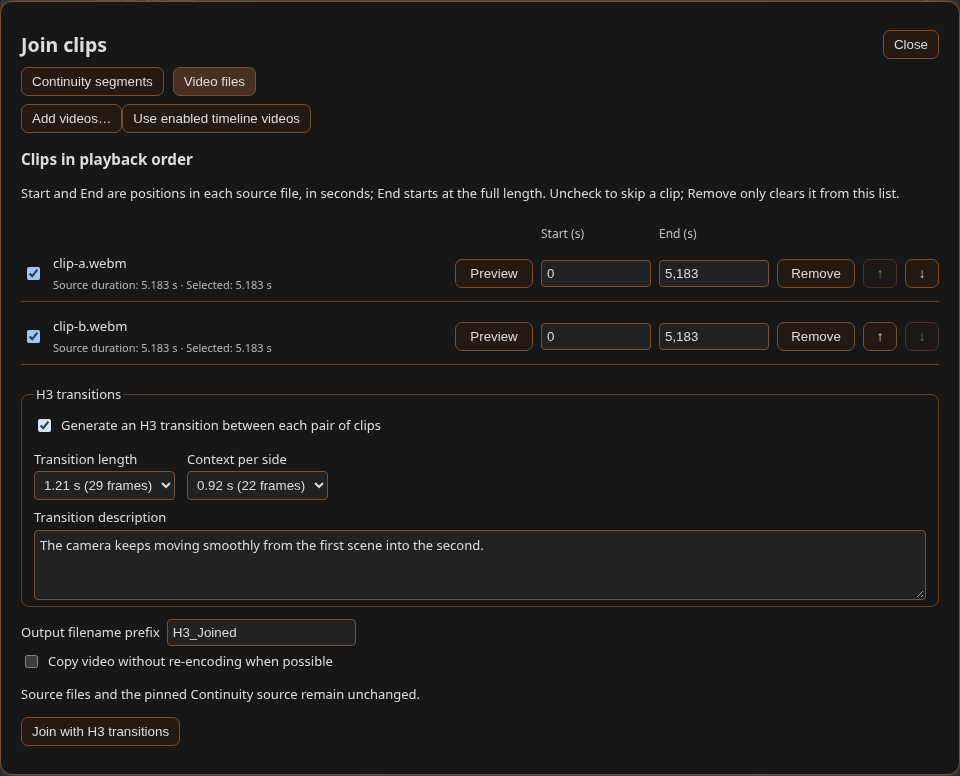
- Selection: Director Join clips… dialog for ordered Continuity exports or independent uploaded videos; separate from reference media.
- Execution: isolated model-free queue job; H.264/AAC re-encode at 24 fps, with explicit preflight confirmation.
- H3 transitions: optional per-cut bridge rendered with the Director's own Guide, model and sampler; clip ends act as H3 guides, only the new middle is inserted.
- Limits: matching 8-bit SDR, 24-fps canvases; transitions need Director → Guide → one sampler wiring.
Which option to use → · Segment wiring, clip selection, storage and media limits →
⚡ MiniMaxH3 Cache
An approximate, model-scoped whole-block-stack residual cache for ComfyUI's native MiniMax H3 model.
- MODEL PATCH: clones only the connected MiniMax H3
MODEL; no global model-class monkey patch. - CONTROLLED REUSE: sampled audio/video-token relative-L1 threshold, 15–90% sampling window, and a bounded number of consecutive cache hits.
- STORAGE: auto / CUDA / CPU cached-residual storage with CPU fallback if automatic storage runs out of VRAM.
- COMPATIBILITY: preserves ComfyUI block replacements, transformer options, and model-scoped optimized-attention overrides.
- PDD HEAD BANK: works with ComfyUI's PDD LoRA head bank (0.34+). The node passes the PDD sigma-schedule arguments automatically, so cache and PDD coexist with no extra setup.
- PER-TOKEN MASKS: honors per-token video and audio denoise masks, running masked rows at their own strength exactly like Core, so cached and region-masked generations match Core quality.
- QUALITY: approximate optimization—higher cache thresholds trade fidelity for more skipped block-stack evaluations.
Full documentation, usage, compatibility, and provenance →
🏷️ Lable (DaSiWa)
Workflow-only labels for the classic canvas and Nodes 2.0. Add Lable (DaSiWa) from DaSiWa / utilities, then double-click it to edit.
- Font previews, alignment, rotation, independent text/background opacity, and sliders with editable numbers.
- 48 color swatches, RGB picker, editable HEX values, and a screen-eyedropper icon. Native ComfyUI node colors respect label opacity.
- Embedded PNG/JPEG/WebP images: auto-scaled background, floating beside text, or above/below text. Images travel with saved workflows.
- Drag, resize, fit to text, and pin/click-through. No rgthree dependency, server route, or execution node.
Full documentation and compatibility →
♾️ Seamless Loop
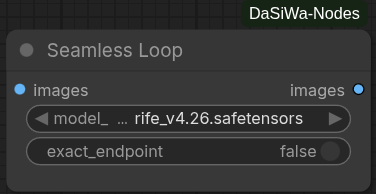
One IMAGE batch in, one IMAGE batch out. Choose native RIFE / FILM (default) or RTX Frame Generation for the loop transition.
- Automatic trim/overlap selection using PSNR/MSE, local SSIM, edges, temporal differences and exposure analysis.
- Bidirectional pair interpolation, eased overlap morphing and bounded local color correction; original middle frames remain unchanged.
- RIFE/FILM selects a native safetensors checkpoint from
models/frame_interpolation/. RTX uses NVIDIA VFX without that checkpoint, with LOW/MEDIUM/HIGH quality (HIGH default) and a CUDA device selector. exact_endpointis off by default for continuous cyclic playback; enable it only when identical first/last pixels are required.- Native interpolation needs no additional dependency; RTX requires a supported NVIDIA GPU and
nvidia-vfxwith VideoFrameGeneration. This does not multiply the whole video's FPS. Output duration can change; audio must be aligned downstream. - Visible seams may remain with incompatible motion or scene changes; residual temporal discontinuities are logged.
Usage, model compatibility and references →
💎 RTX Upscaler & Refiner
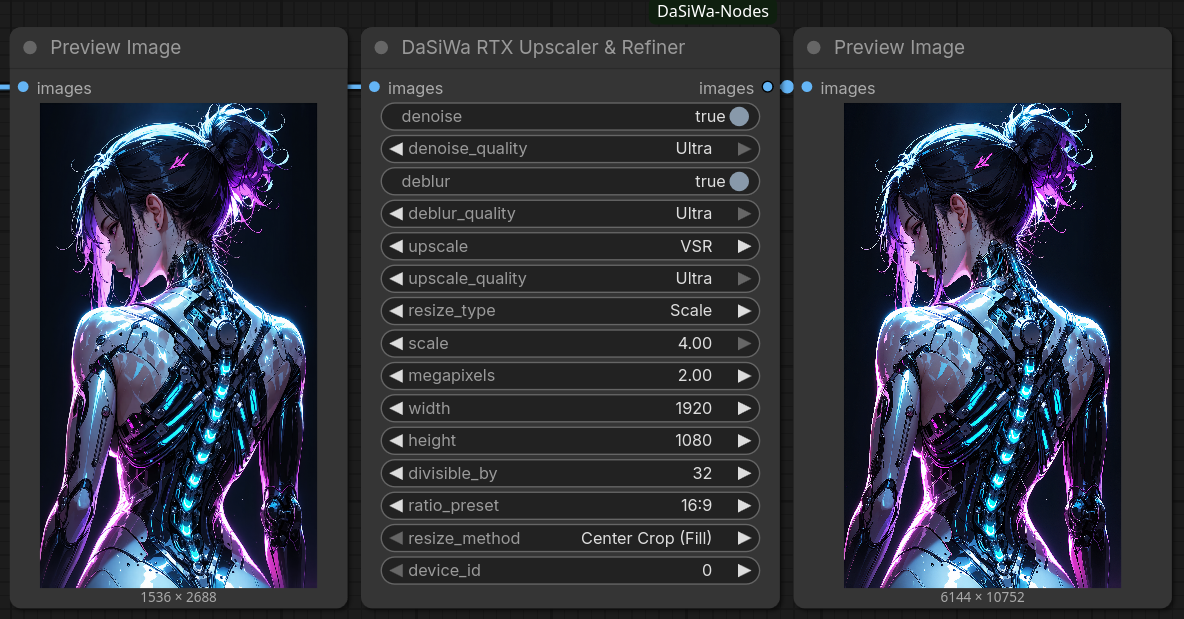
NVIDIA RTX Video SDK enhancement with Denoise, Deblur and VSR/High Bitrate upscaling. Processing uses bounded frame windows and produces one standard ComfyUI IMAGE batch.
- Refine: Independent Denoise and Deblur passes (both off by default).
- Upscale: VSR for typical compressed sources and High Bitrate for clean, high-bitrate/lossless sources; SDK-supported Streaming modes.
- SDK-aware options: Available effects and parameters are detected from the installed SDK. Optional RGB10A2 10-bit processing and per-pass strengths preserve the legacy default path; no automatic SDK installation.
- TrueHDR (opt-in): Final SDR → BT.2020/PQ conversion, also usable on its own. IMAGE does not carry HDR metadata; correct HDR encoding/tagging must be provided downstream, and Enhanced Video Combine HDR export is not yet verified.
- Alpha and diagnostics (opt-in): Preserve alpha through matching crop/resize, or check small samples for invalid pixels and suspected SDR channel collapse. Both are off by default.
- Compatibility: Keeps its own DaSiWa node ID and existing workflow inputs/outputs, without replacing the official NVIDIA VFX nodes. Frame count/FPS stay unchanged; RIFE remains separate.
- Smart Sizing: Multiple resize modes including Constant Megapixel targets.
- Efficiency: Internal
chunking(on, 16 frames by default) bounds processing intermediates; the final output remains a singleIMAGEbatch. - Lossless output storage:
lossless_fp16(on by default) uses FP16 only if every output value round-trips exactly and memory headroom permits; typical VSR output remains FP32. - Memory Control: Full input and output batches still scale with video duration and may be cached by ComfyUI; internal chunking is not constant-memory streaming. GPU output is budgeted with a conservative per-frame/SDK working reserve and a 24 GiB output cap; RAM output is capacity-checked and aborts clearly if insufficient.
torch.emptyavoids zero-fill, not the full storage requirement. Optionaluse_mmapenables a disk-backed last resort (off by default);auto_unload_modelsrequests target-device ComfyUI memory reclamation under pressure, not global model unloading.
🎞️ RTX Frame Generation
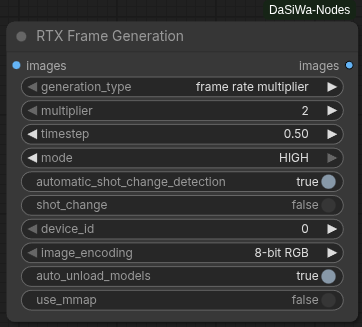
- Interpolation: Multiplier 2–16 or one frame at a chosen timestep; preserves every original frame and both endpoints. Multiplier output:
(N-1)*M+1frames, encode at source FPS × M. - Quality and cuts: HIGH by default, with MEDIUM/LOW alternatives; automatic scene-cut detection and an explicit cut override.
- Precision: RGB8 by default; optional SDK-supported RGB10A2 10-bit SDR. Not HDR; alpha is discarded.
- Memory: Bounded pair staging, budgeted VRAM/RAM, native memory reclamation under pressure and opt-in disk-backed output. Complete frame batches still need storage.
- Workflow: IMAGE batches only; decode videos upstream and route audio separately. Non-midpoint timesteps have unequal temporal spacing. Requires SDK
VideoFrameGeneration.
Frame generation controls, timing and limits →
📐 Resolution Scale Calculator
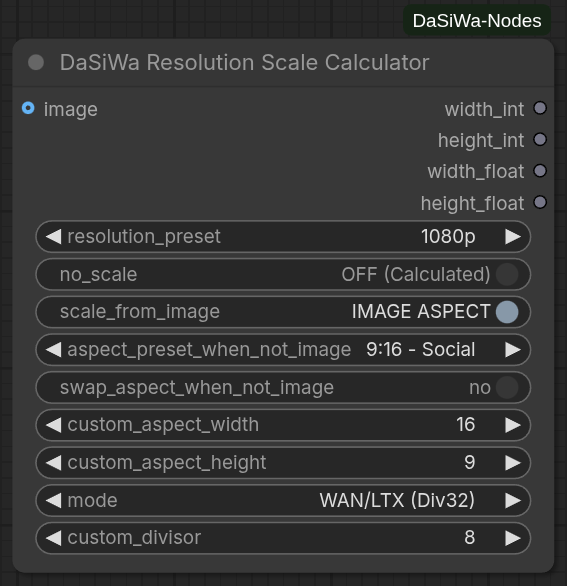
The DaSiWa Scale Calculator provides mathematically precise resolution management for high-performance video models. It uses a Constant-Area Square-Root method to ensure that your GPU VRAM usage remains stable regardless of the aspect ratio.
- Unified Resolution Presets: Pick standard
ptargets from 144p to 2160p/4K or optimized megapixel tiers from one dropdown. - Clear Aspect Modes:
IMAGE ASPECTuses the connected image shape;USE ASPECT BELOWuses the always-visible aspect controls. - Video-Safe Snapping: Standard, Div32, Div64, and custom divisor modes keep dimensions aligned for different model families.
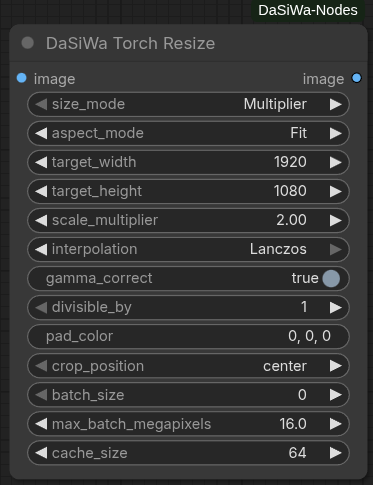
⚡ Torch Resize
A drop-in replacement for ComfyUI's built-in resize nodes that keeps images sharp and video workflows fast without extra dependencies.
- Sharper results: Lanczos resampling with optional sRGB-to-linear gamma correction produces cleaner upscaling and downscaling than native bilinear/bicubic.
- Video-friendly batching: Automatically splits long frame sequences into memory-safe chunks so you never run out of VRAM, while keeping output order intact.
- Zero extra installs: Runs entirely on the PyTorch build ComfyUI already uses — no Pillow, torchlanc, Triton, or vendor SDK required.
- Precise sizing control: Divisible-by alignment, five aspect modes (fit, fill/crop, pad, stretch, long-side crop), and configurable crop/pad placement eliminate guesswork for downstream model constraints.
- Alpha preserved: Transparency channels are resized independently without gamma conversion artifacts.
🎛️ Node Status Switch
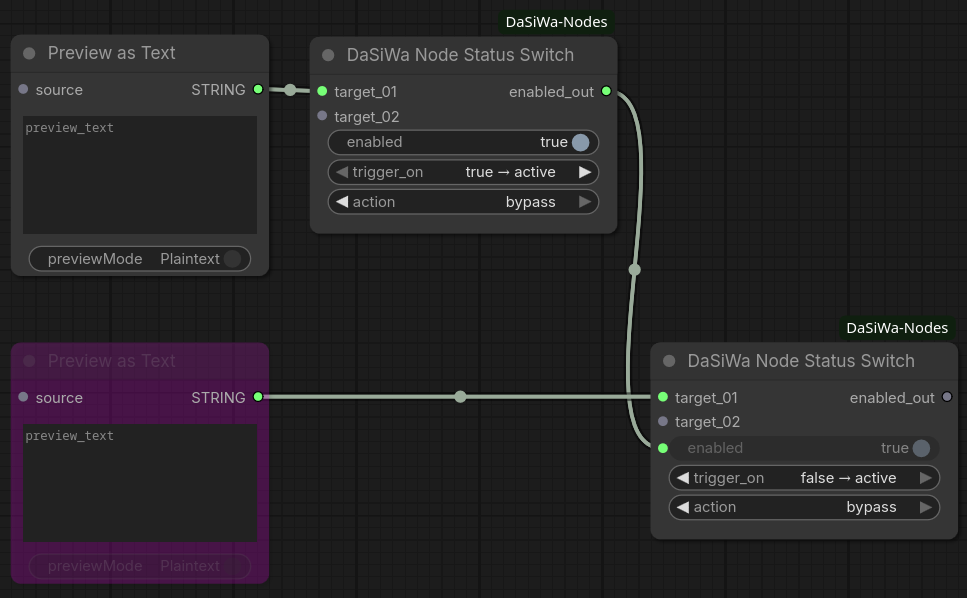
The DaSiWa Node Status Switch lets you mute or bypass any node in your workflow using a single toggle. Targets are registered by wiring their outputs into the switch's input slots, which grow dynamically as you connect more nodes (up to 99).
Quick start:
- Add a DaSiWa Node Status Switch to your workflow
- Drag any output from the node(s) you want to control into the switch's
target_01input — new slots appear as you connect more - Set
actiontomuteorbypassand configuretrigger_onto taste - Toggle
enableddirectly on the switch
🎬 Advanced LoRA Loader
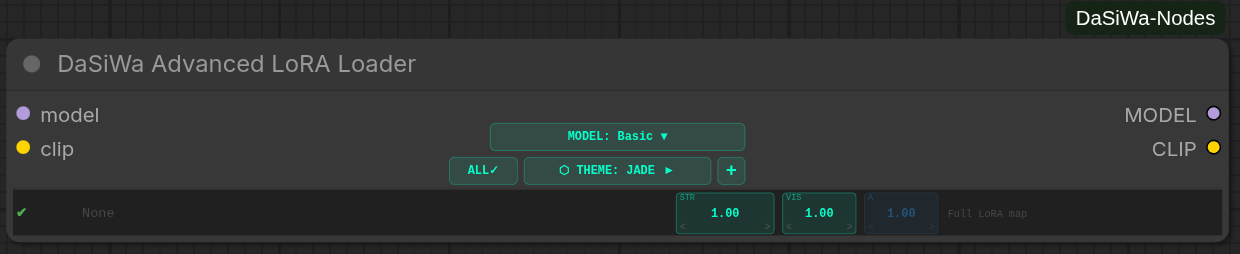
The Advanced LoRA Loader is a 10-slot stacker for ordinary image/video LoRAs and LTX-2.3. In Basic mode, it loads the complete LoRA map, so it is compatible with standard image and video models. Its VIS control means visual strength: it affects the whole LoRA map in Basic mode, including image models. LTX-2.3 additionally supports independent audio separation.
- Model Modes: Select Basic for universal image/video compatibility or LTX-2.3 for separate visual/audio branches. MiniMax H3 uses Basic mode because its transformer blocks are shared between video and audio.
- Visual Control:
STR × VISis the effective visual strength. In Basic mode,VIScontrols the complete LoRA map; it is not video-only. - Dual-Branch Control: LTX-2.3 can adjust visual (
VIS×) and audio (A×) multipliers independently per LoRA. - 10 LoRA Slots: Stack up to 10 LoRAs with fine-grained strength control (STR: −5.0 to +5.0).
- Toggle All: The
ALLheader button enables every slot; when all slots are enabled, it disables every slot. - Key Count Indicator: Auto-scans each LoRA to show video/audio key counts before generation.
- 6 Themes: Switch between Jade, Neon, Studio, Chrome, OLED, and Wood color schemes.
- Searchable UI: Quick LoRA search with live filtering in the node itself.
- LoRA Info Button (ⓘ): an info button at the right edge of each slot row (drawn as a circle with an "i") opens an info panel with the LoRA's Civitai links — looked up by the file's SHA-256 and cached in
lorainfo/— shown as both mirrors,.com(labeledBLUE:in blue) and.red(labeledRED:in red); the lookup falls back to the.redmirror when.comhas no entry, and misses are memoized so a missing LoRA doesn't re-hit the API on every open (Refresh forces a re-lookup). The panel also lists trigger/trained words from the safetensors header and Civitai (click-select, copy) and preview images (Civitai plus a local sidecar image next to the LoRA if present). The file name and sha256 sit on their own rows at the top, so long folder paths can't stretch the controls (v0.4.35). - Trash Button (v0.4.29): a small ASCII-drawn trash button sits directly right of the info button. It resets that slot's LoRA back to None (STR / V× / A× kept — same as picking None in the picker) so you can unstack a LoRA without reopening the picker. The info button shifted slightly left to make room.
- PDD/ACC Metadata (v0.4.27): LoRA files are read with their metadata and it is forwarded to Core's
load_lora_for_modelslike the nativeLoraLoader, so PDD/ACC head banks activate; older ComfyUI builds fall back automatically. - Opt-in LoRA Cache (v0.4.27): a cache button in the control strip keeps each unique LoRA file in a small LRU cache so a LoRA reused across slots is read once — off by default.
💾 Metadata Image Saver (Civitai Ready)
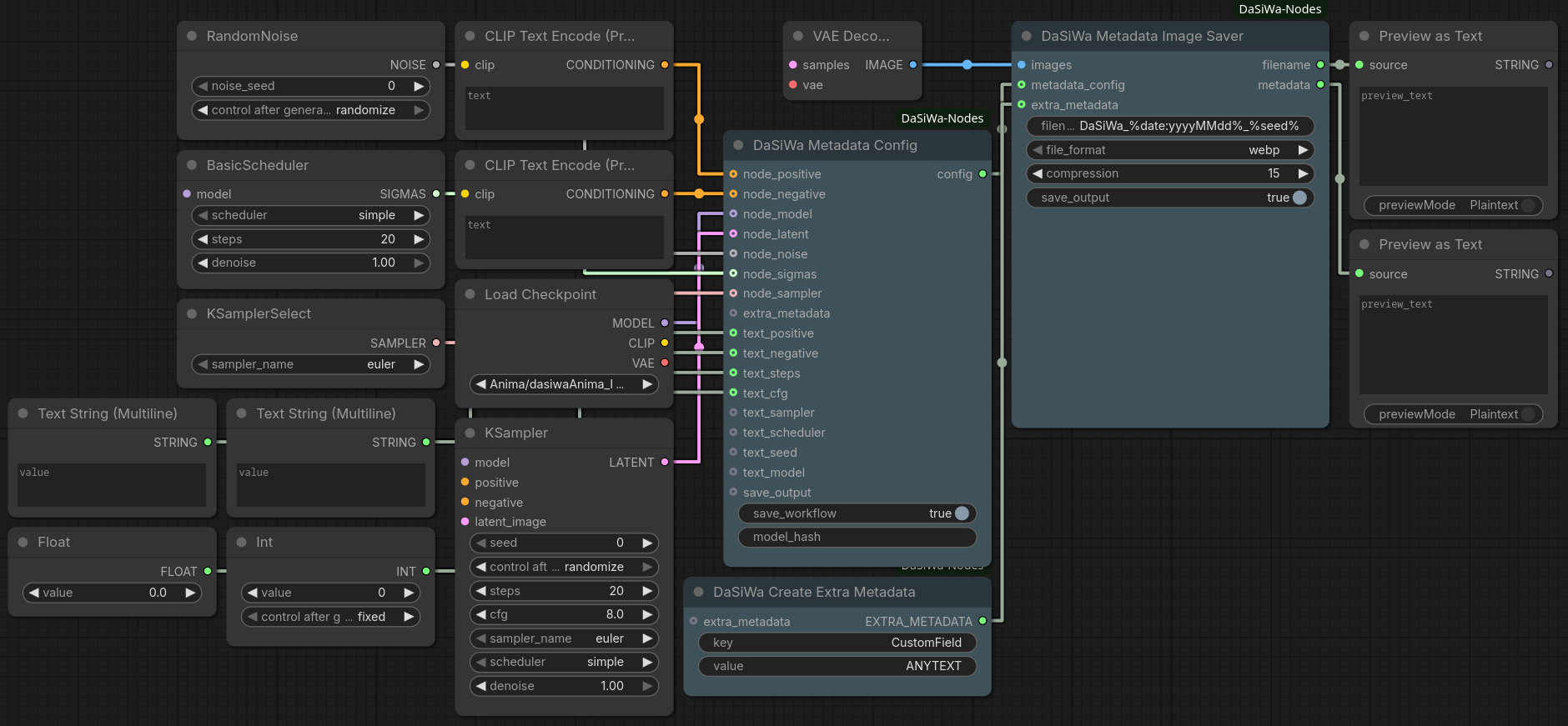
The DaSiWa Metadata Image Saver ensures your images are fully compatible with Civitai, Hugging Face, and other galleries by embedding A1111-style metadata. It automatically detects LoRAs used in the workflow and supports dynamic filenames.
- Civitai Compatibility: Writes the standard
parametersblock for auto-parsing of prompts and resources. - LoRA Detection: Scans your workflow and appends
<lora:name:weight>triggers plusLora hashes(v0.5.29) — Civitai links LoRAs and checkpoints only by hash. - WebP Support: Full "Drag-and-Drop" workflow reconstruction support for both PNG and WebP formats.
- Dynamic Filenames: Use placeholders like
%seed%,%date%,%model%,%width%, and%height%. - Privacy: Toggle workflow JSON embedding to share images without exposing your full graph.
🎞️ Enhanced Video Combine
Converts an IMAGE batch into a high-quality video with optional AUDIO muxing and an in-node VHS-style preview.
- Optional RAM reclamation:
free_memory_if_needed(default off) requests native ComfyUI cache/pinned-memory release only under pressure, before encoding and at five-second wall-clock intervals. It does not globally offload GPU models or free the live input batch.
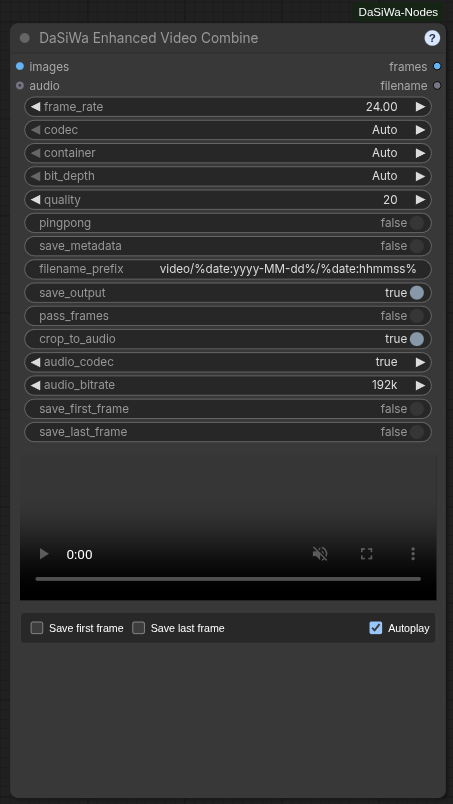
- Codecs: Auto (AV1/MP4 → VP9/WebM → H.264/MP4), or explicit AV1 / VP9 / H.264 / H.265(HEVC). Hardware-first encoder chain (NVENC → QSV → AMF → VAAPI → software); mandatory H.264/MP4 fallback.
- PyAV-native encoding (v0.4.40): Encoding, audio muxing, metadata, animated outputs, and preview transcoding run through PyAV 18 and its bundled FFmpeg libraries without launching external processes. Hardware encoders are tried first and failed or unavailable devices fall back to software encoders.
- Seekable previews (v0.4.40): Every generated video receives one-second keyframes. MP4 outputs use fast-start metadata. AV1, VP9, HEVC, 10-bit, and other compatibility previews are cached as ordinary H.264/AAC files served with HTTP byte-range support, so browsers can pause and scrub reliably. Downloads remain the unchanged original codec/container.
- Containers: Auto codec uses AV1/MP4 → VP9/WebM → H.264/MP4. With an explicit codec and container Auto: AV1 tries MP4 (faststart) → WebM → MKV; VP9 keeps WebM → MKV → MP4; H.264/H.265 keep MP4 → MKV. Explicit container selections remain unchanged.
- Animated images: Animated AVIF (GPU AV1 or software) and Animated WebP (
libwebp_anim). Looping, no audio. - Transparency (v0.5.25): RGBA batches (for example from the Qwen Image 2.1 VAE) keep their alpha channel in Animated WebP and in VP9 WebM/MKV. Alpha needs the CPU encoders (
libwebp,libvpx-vp9, 8-bit); every other format drops alpha. - Bit depth & quality: Auto-detects 8-bit vs 10-bit source precision; Auto codec forces 8-bit 4:2:0. CRF/CQ-based quality slider (default 20).
- Audio muxing: Opus/AAC/MP3 selectable; Auto uses Opus (WebM) or AAC (MKV/MP4). Bitrates 64–320k. Optional crop-to-audio.
- In-node preview: Framed player with native hover-reveal controls and hover-to-unmute audio; an optional Mute checkbox keeps the preview permanently silent, and both Autoplay and Mute are remembered with the node. Streamed H.264 transcoding for AV1/H.265 where needed.
- Frame exports: Save first/last frame as PNG alongside the video; all assets published to ComfyUI Assets.
- Ping-pong mode: Forward/reverse frame loop.
- Workflow metadata: Embed prompt/workflow JSON where supported.
- Output naming (v0.4.45): Connect a seed to the optional
seedsocket and use%seed%infilename_prefix(for examplevideo/%date:yyyy-MM-dd%/shot_%seed%) to include the exact generation seed in the video and first/last-frame export names. - Logging: Compact CLI output with codec/container/encoder decisions and resolved audio settings. Built-in
?help dialog.
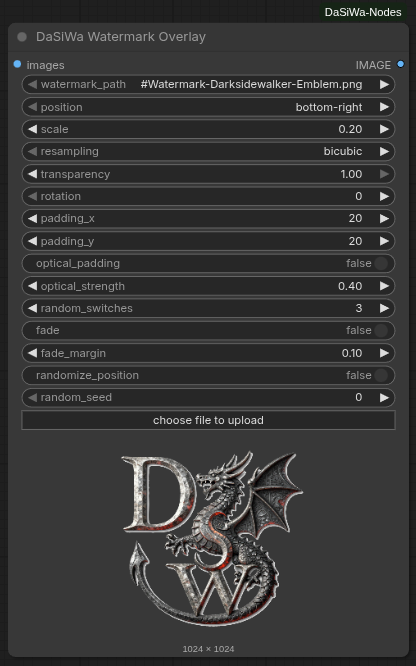
🎬 Watermark Overlay
A professional-grade watermark tool optimized for image and video batches. It uses a stable CPU compositor with high-quality resampling and precise rotation.
- Dynamic Random Positioning: Toggle seeded corner cycling while keeping the selected position as the start position.
- Splash Mode: Configure dynamic fade-in and fade-out at the start and end of clips for professional branding.
- Optical Padding: Automatically adjusts placement by the watermark's visual center of mass for perfect alignment.
- Stable Compositing: Output frames are initialized from the source batch before the watermark region is blended, avoiding flicker and black-frame artifacts.
🩹 Inpaint Crop Prep & Composite
A two-node crop-inpaint-composite pair for any inpainting model. Inpaint Crop Prep tight-crops to the mask and scales it for a high-res inpainter; Inpaint Composite blends the result back onto the original image.
- Crop Prep: Gaussian-blurs the mask, extracts its bounding box (with configurable
grow_pxpadding), crops image + mask, and bicubic-scales both totarget_width×target_height. Emitscropped_image,cropped_mask, and the original-spacebbox_x/y/w/hso you can composite back.can_shrink(default on) allows downscaling; turn it off to keep the crop at least its native size. - Composite: pastes the inpainted
sourcepatch back at(x, y)with the (auto-rescaled) mask, applying optional Match Channels or Histogram color correction against the destination region for a seamless blend. - Pure PyTorch: separable Gaussian blur, bicubic resampling, and channel-statistics color matching with no torchvision or extra dependencies.
Wiring:
IMAGE + MASK ──► Inpaint Crop Prep ──► (cropped_image, cropped_mask)
                                     ──► any inpainter ──► source patch
IMAGE ───────────────────────────────────────────────┐
                                                     ▼
                                  Inpaint Composite (x, y, w, h from Crop Prep)
                                                     │
                                                     ▼
                                                   IMAGE
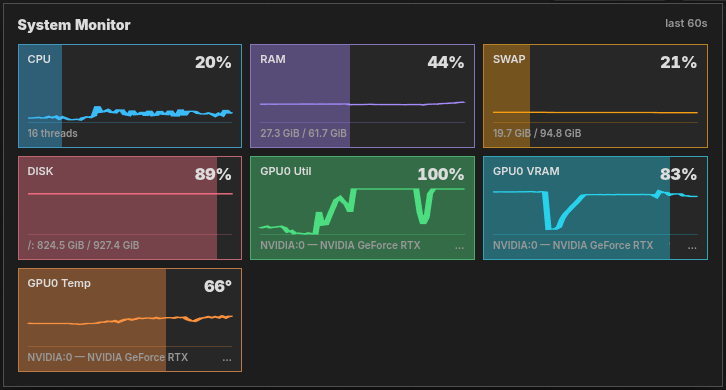
🖥️ System Monitor
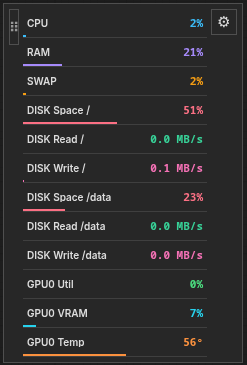
A compact telemetry bar that defaults to its own row below ComfyUI's top controls; switching to Ultra compact docks a small card on the right.
- Multi-GPU Support: Separate metrics per GPU device (NVIDIA, AMD, Intel) labeled as GPU0, GPU1, etc.
- Resource Metrics: CPU, RAM, SWAP/Pagefile, DISK, GPU Utilization, GPU VRAM, and GPU Temperature.
- Visual Feedback: Color-coded borders and proportional background fills (0–100%) for instant at-a-glance assessment.
- Lite / Ultra compact / Full Modes: Lite defaults to a top toolbar row; Ultra compact switches to a right-docked card with every enabled metric visible; Full shows detailed values and live 60-second graphs.
- Resizable Lite Bar: Drag its corner horizontally; meters keep their size and wrap into new rows as the bar narrows. Reset to the default Lite bar from its menu.
- Dock or Float: The default is a separate top row; Ultra compact switches to the right. Either mode can then be docked elsewhere or floated. Placement and Lite width persist across reloads.
- Viewport-Aware Menu: The settings menu opens toward available screen space; separate background and drawing/text/lines opacity sliders are also available in ComfyUI Settings.
- Cross-Platform: Works on Linux and Windows with automatic fallback detection for GPU tools.
- Container-safe: In containers and sandboxes where parts of
/procare missing (e.g./proc/vmstat), probes degrade ton/ainstead of warning every second. SetDASWA_SYSTEM_MONITOR=0(alsofalse/no/off/disable) to fully stop the backend polling thread. - Free Memory Button: Separate DaSiWa-logo button stays beside the top controls regardless of monitor placement. Free VRAM unloads ComfyUI models; Free System RAM also resets its execution cache. Free Both explicitly requests both actions (same cleanup as Free System RAM, retained for compatibility). Hide it independently under Settings → Other → DaSiWa → Free Memory.
Lite mode

Full mode
Ultra-Compact mode
🔀 Random String Picker
Bridge any string/text node through DaSiWa Random String Picker to randomize prompt variants inline.
- Text passthrough: Accepts a connected
STRINGinput and returns aSTRINGoutput. - Inline variants: Replaces every
{A|B|C}segment with one randomly selected option. - Multiple groups: Processes any number of groups independently, such as
{red|blue} car in {sun|rain}. - Literal passthrough: Text outside complete
{...}groups is left unchanged.

🎯 Seed Control
Seed Control extracts the MiniMaxH3 Director's seed panel into a standalone node — the same seed UX for any workflow, without a Director in the graph.
- Full 64-bit seeds: unsigned
0..0xFFFFFFFFFFFFFFFFseed field, matching the H3 seed space. - Random|Fixed switch: one segmented switch (a single control, Pixaroma style) — Random rolls a fresh seed on every queue, Fixed keeps the current seed for repeatable results; New rolls a fresh seed and keeps the selected mode, Use Last restores the previous seed and flips to Fixed. Stepping, typing, and the switch all lock the seed as Fixed.
- Stacked layout: seed field with an attached ▲/▼ spinner (Pixaroma seed control style; hold to repeat, wraps at the 64-bit bounds) on its own row, then the Random|Fixed switch + New, then Use Last / Last 10 seeds. The panel column has a fixed width (~240 px) and every row is the same 42 px cell height, so resizing the node never stretches or reflows the fields. The seed number auto-fits its font (shrinks as needed) so a full 16-digit seed always displays without clipping.
- Lossless 64-bit seeds: the panel keeps the seed as a decimal string and only mirrors it into the hidden INT widget (which coerces 16-digit values to a lossy JS number), so the spinner and display never desync at the top of the 64-bit range.
- Last 10 seeds: collapsible history with per-entry copy actions.
- External override socket: linking
seeddisables the local controls (showing an "External seed connected" note) and passes the connected value through — same semantics as the Director's external seed input. - Downstream NOISE output: the
seedINT and aNOISE-compatible object are emitted, so the value can be passed straight to any node that accepts aNOISEinput (e.g. the LTX sampler'snoisesocket). - Headless-safe: in Random mode without a local value the backend rolls a fresh seed on every queue, so API clients get the same behaviour without the DOM panel.
- Persists with the workflow: mode, last seed and history live in a hidden state widget and survive save/reload.
🎲 Wildcard & Preset Prompt Builder
DaSiWa Wildcard & Preset Prompt Builder builds positive and negative STRING prompts directly from the bundled dual wildcard library—no downstream picker node needed.
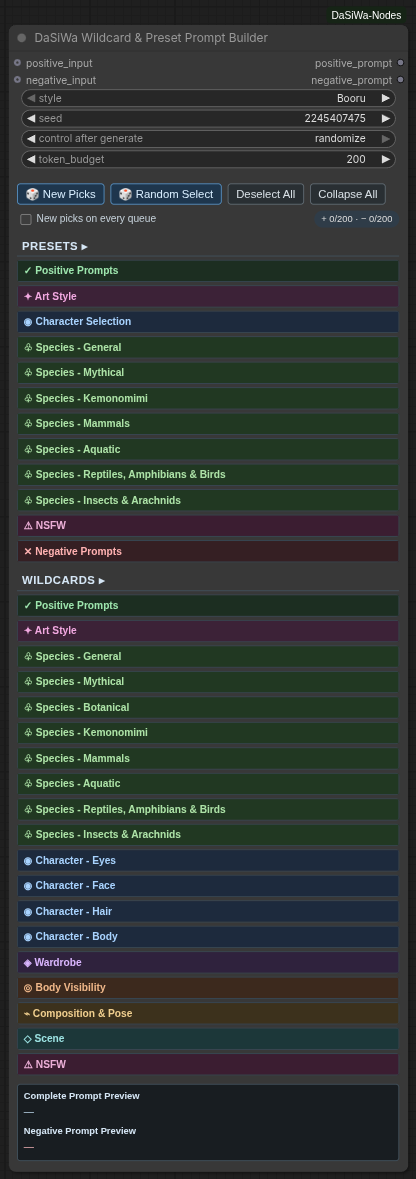
- Dual style: Switch globally between Booru and Natural Language source keys.
- Compact selector: Collapsible categories expose subject checkboxes, weights, deterministic live selections, and right-aligned selected-subject counters that remain visible while a category is collapsed.
- Fast inspiration: Random Select replaces the current selection with 1–10 secure-random available Preset/Wildcard subjects.
- Reproducible rerolls: Seed plus the stored reroll value reproduce every
{A|B|C}choice; New Picks only advances the reroll value, while New picks on every queue opts into fresh output for each queue—including Preview as Text selected-output execution. - Weighted, bounded prompts: Non-1.0 enabled subjects use ComfyUI emphasis syntax. Each positive/negative prompt independently removes complete lowest-weight subjects until it meets the token budget.
- Optional prompt prefixes: Connect
positive_inputornegative_inputto prepend an existing prompt to that generated side. - Custom library: Edit or replace
data/wildcards_and_presets_dual.jsonwith a compatible library; no checksum sidecar or pinned data version is required.
Wildcard & Preset Prompt Builder documentation →
🧠 LLM Prompt Writer & Analyze
The DaSiWa LLM / VLM nodes let you run local transformers chat or vision-language models from inside a ComfyUI workflow. They accept native STRING inputs and native IMAGE batches from nodes such as Load Image or VHS frame loaders.
- Native ComfyUI Inputs: Analyze connected text, still images, or video/image-sequence frame batches.
- Prompt Writer: Simple node for Anima, Illustrious, Krea2, Wan 2.2, LTX 2.3 and YuE2 (separate Song Style, Lyrics and Instrumental Style presets), with an unchanged user prefix, style, detail, creativity and optional reference pictures.
- Prompt Presets: Editable model-specific guides plus shared H3 rewriting, custom instructions and existing caption/video presets; output without segment scaffolding.
- Memory Modes: Keep models cached for speed, or use full cleanup to unload DaSiWa and ComfyUI managed models before/after analysis so later image/video models recover VRAM/RAM.
- Frame Sampling: Limit video analysis with max frames, stride, frame strategy, resize controls, context limits, and optional KV-cache reduction.
- Local and External Models: Load already-installed Transformers folders or GGUFs, keep the legacy loopback Ollama mode, or use operator-configured OpenAI-compatible/Ollama servers. Endpoints and credentials stay outside workflow JSON; runtime downloads and custom remote model code remain disabled. The Director and LLM nodes share backend implementations without changing Director settings or workflows.
🛠️ Installation
Manual install
- Activate your venv inside your ComfyUI folder
- Clone this repo into your
custom_nodesfolder:git clone https://github.com/darksidewalker/ComfyUI-DaSiWa-Nodes - Install all dependencies:
pip install -r requirements.txt - Requirement: NVIDIA RTX GPU with drivers 530+. (Windows users may need the NVIDIA Broadcast SDK; Linux usually works out-of-the-box with the pip package).
- Restart ComfyUI.
Use ComfyUI-Manager
Search for DaSiWa-Nodes and install.
Repository contents versus local data
The repository ships assets/ screenshots, docs/, data/ starter libraries, nodes/ and js/. The former example workflows/ and in-repository test suites were retired; they are not part of the current package or its push workflow. A formerly bundled Spectrum v0.2.20 compatibility patch targeted a separate project, was never applied by this pack, and is no longer shipped.
Runtime files do not belong in the node pack repository: lorainfo/ is a regenerable Civitai metadata cache; .hermes/, .projectatlas/, graft/, Python bytecode and test caches are local tooling state. H3 Continuity checkpoints live in the ComfyUI output directory at output/df_h3_continuity/ (not beside nodes/); browser video previews live in ComfyUI's temp directory. The root-level input/, output/, temp/, models/, and cache/ are ignored as safeguards if someone uses this checkout as a ComfyUI base directory. The .gitignore rules prevent new matching files being staged; they do not remove files already tracked or delete anyone's local files.
A commit on local or Gitea main does not automatically appear on the separate GitHub remote; publishing to each remote is a separate action.
Credits
- The RTX implementation in this collection is based on the excellent work by Deno2026/comfyui-deno-custom-nodes.
- Lora-Loader is based on Brojakhoeman/Loradaddyloaderltx.
- Ideas for Watermark Overlay are inspired by Artificial-Sweetener/comfyui-WhiteRabbit
- MiniMaxH3 Director was inspired by the LTX Director concept from whatdreamscost
- MiniMaxH3 Director RefMod integration (saved person references,
.safetensorslatent format, strength scaling) is based on the design and file format established in Luisacaotica/ComfyUI-MiniMaxH3Mod. The DaSiWa implementation was contributed by kasimalperenyavuz-design in PR #45. It is standalone — no runtime dependency on the upstream pack — but both can be installed side-by-side and share the same RefMod files inmodels/refmods/.