
Cyberdelia Prompt Format
Prompt cleanup for ComfyUI — port of sd-webui-prompt-format. Dedupe tags, fix bracket/comma spacing, swap underscores. Button-driven, not realtime. By Cyberdelia AI Lab.
Nodes (2)
comfyui-cyberdelia-prompt-format
<p align="center"> <img src="assets/icon.png" alt="Cyberdelia Prompt Format icon" width="200"> </p>

Prompt cleanup for ComfyUI.
By Cyberdelia AI Lab · github.com/cyberdeliaAI
Migration notice
This package was previously published as
ComfyUI-PromptFormat. The repository has been renamed for consistency with the rest of the Cyberdelia ComfyUI ecosystem. Node class names (CyberdeliaPromptFormat,CyberdeliaPromptFormatEncode) and display names are unchanged, so existing workflows continue to work — just reinstall under the new name.
Before / After
One click on ✨ Format turns this:
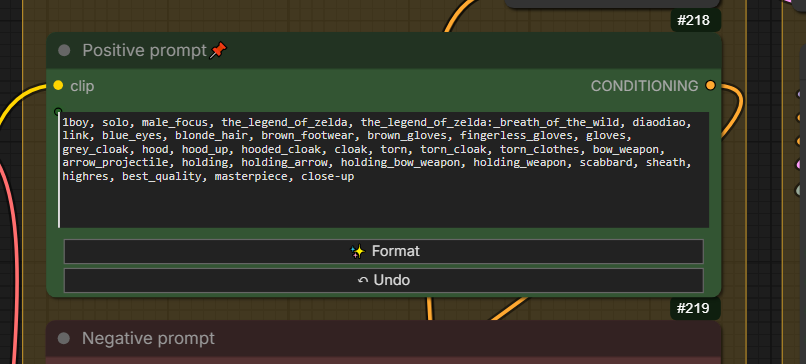
...into this:
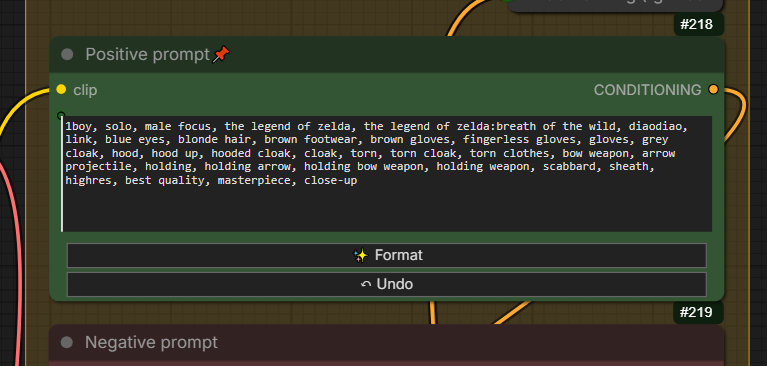
Note how the_legend_of_zelda:_breath_of_the_wild becomes the legend of zelda:breath of the wild, duplicates like gloves are removed, and colon spacing is tightened — without touching your tag weights or brackets.
What it does
- Dedupe tags — removes duplicates, with optional regex-based aliases (e.g.
1girl: girl, woman, lady). - Remove underscores —
long_hair→long hair, except for embedding filenames and user-excluded tags (e.g.score_9). - Fix spacing — normalizes commas and spaces around
(),[],{},|,:. - Append commas — trailing commas on multi-line prompts, so you can break lines without breaking prompts.
- Strips
<lora:...>syntax — ComfyUI uses LoRA loader nodes; inline LoRA tags are dropped.
Two ways to use it
1. The nodes — automatic formatting on run
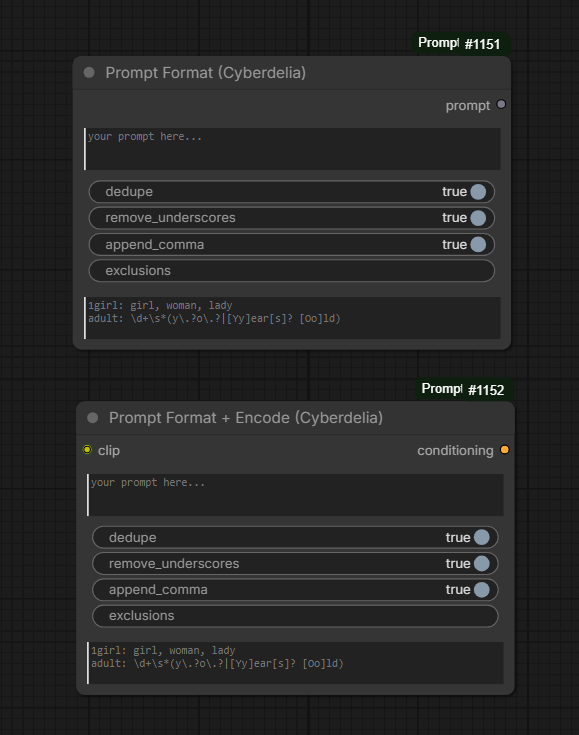
- Prompt Format (Cyberdelia) — string → string. Drop it between any text source and your text encoder.
- Prompt Format + Encode (Cyberdelia) — string + CLIP → CONDITIONING + STRING. Combines formatting and CLIP encoding in one step, and also outputs the cleaned prompt.
Both nodes format automatically when the workflow executes — no button to click. Use these when you want deterministic, reproducible output baked into your workflow, and when you need full control (exclusions, regex aliases).
2. The ✨ Format button — for existing encoder nodes
A ✨ Format and ↶ Undo button is injected into the stock text encoder nodes, so you can clean up prompts in place without adding a node to the graph:
CLIPTextEncodeCLIPTextEncodeSDXL/CLIPTextEncodeSDXLRefinerCLIPTextEncodeFluxBNK_CLIPTextEncodeAdvancedandsmZ CLIPTextEncode
Right-click for per-node-type toggles (dedupe / remove underscores / append comma), stored in localStorage. Exclusions and aliases aren't exposed on foreign nodes — if you need those, chain a Prompt Format node instead.
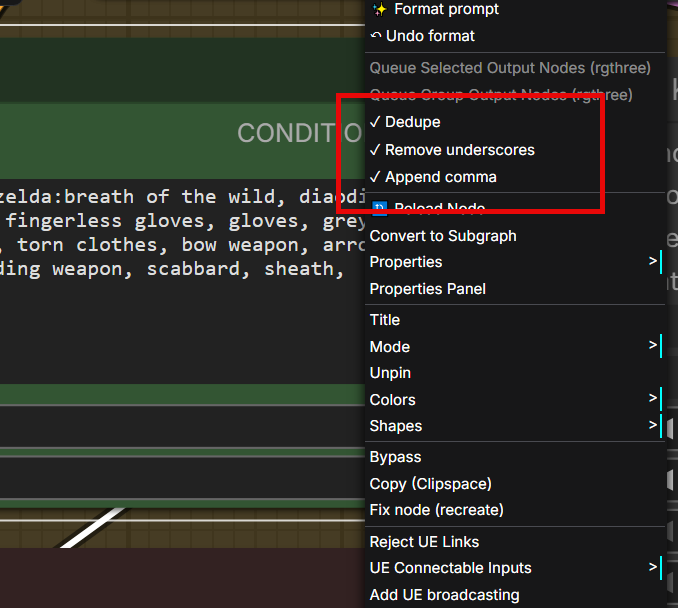
Formatting is not realtime in either case. The button runs on click; the node runs on workflow execute.
Installation
Manual
cd ComfyUI/custom_nodes
git clone https://github.com/cyberdeliaAI/comfyui-cyberdelia-prompt-format
Restart ComfyUI. No extra dependencies.
Aliases (regex syntax)
Same format as the Forge extension:
main_tag: alt1, alt2, regex_pattern
1girl: girl, woman, lady
adult: \d+\s*(y\.?o\.?|[Yy]ear[s]? [Oo]ld)
Each alternate on the right is matched as an anchored regex against each cleaned tag; if it matches, the tag is replaced by main_tag and considered a duplicate from then on.
In the compact node widget, separate multiple alias rules with semicolons. Line breaks are still supported when aliases come from existing workflows or connected text inputs.
Exclusions
Comma-separated list of tags to protect from underscore replacement:
score_9, score_8_up, score_7_up, masterpiece_v2
Use * as a wildcard for tag families:
score_*
This protects tags like score_1, score_8_up, and score_9.
Embedding filenames in your embeddings/ folder are auto-detected and always protected.