
ComfyUI-llama-multimodal
Analyze ComfyUI image, audio, and video lists with Ollama, llama.cpp GGUF, or native generative CLIP backends
Nodes (41)
The yes/no question your vision model answers with a number
Make the model pick a label or rate a frame on a scale
Attach ComfyUI to a llama.cpp Server You Already Have Running
Build a Question Your llama.cpp Decide Node Can Actually Answer
The Session Node That Starts Its Own llama.cpp Server
[llama.cpp] Create Native Session
Make the Model Pick A, B, or C — and Show You the Odds
Run a Decision Over a Whole Media List
Multiple Choice, Batched, With the Probabilities Printed
The node that actually asks your vision model a question
One question, asked of every image in the batch
Many questions, one image, one model load
Turn the model's decision into numbers your graph can use
[llama.cpp] Generate
Six Captions From One Image Without Reloading the Model
Caption Forty Images Without Reloading the Model Forty Times
The VRAM Knobs the Session Node Hides in Advanced
Did the Model Actually See Your Image? Read the Receipt
Pick the Right Chat Handler Without Knowing It Exists
When Your Model Talks to Itself, This Pulls the Answer Out
Speculative Decoding as a Typed Socket (Mostly Leave It Off)
How Many Tokens Is That Image Worth? Prefill Profile Decides
Turn Thinking Off Before Your Captions Get Weird
Free the VRAM Before the Sampler Asks For It
The CLIP node in the Ollama pack — no server, no key, just your model's own tokenizer
A fetch button for your Ollama server, so you stop mistyping model names
The Ollama vision node that finally handles batches
The one-node reason Qwen chat templates stop lying to you
Three runtime presets and the numbers behind them
The GGUF node that runs a vision model inside ComfyUI — no Ollama server required
Did it even see the media?
The preset node that does the thinking about your model for you
Model-free n-gram speculative decoding
N-gram speculative speedup for the detailed Generate, with a separate socket to prove it's off by default
Model, hardware and reasoning decisions behind typed sockets
Thinking, effort and budget — your reasoning controls, decoupled from the model
The preset that keeps generation settings honest
The sequential variant for batches
I2V, FL2V, T2V and friends, pre-written
Muse Glimmer talks in channels — this node separates the thinking from the answer
Ollama options without the guesswork — disabled means omitted
ComfyUI llama multimodal
LLM and multimodal nodes for ComfyUI.
Pass images of different sizes, video, and audio to multimodal LLMs through llama.cpp, with control over model loading and generation settings. Limited support for CLIP and Ollama is also available.
Useful for writing video prompts, describing media, and translating text.
Supported Runtimes
llama.cpp: Connect to an HTTP(S) server or use thellamaexecutable on yourPATH.CLIP: Basic support for ComfyUI CLIP models with media of different resolutions.Ollama: Basic support for multiple images. Audio and video are not supported.
If llama is not on your PATH, download it from Settings → llama-multimodal → Download llama.cpp.
For local GGUF models, place the model and its matching multimodal projector (mmproj) in ComfyUI/models/LLM.
Image, video, and audio support depends on the selected model.
Examples
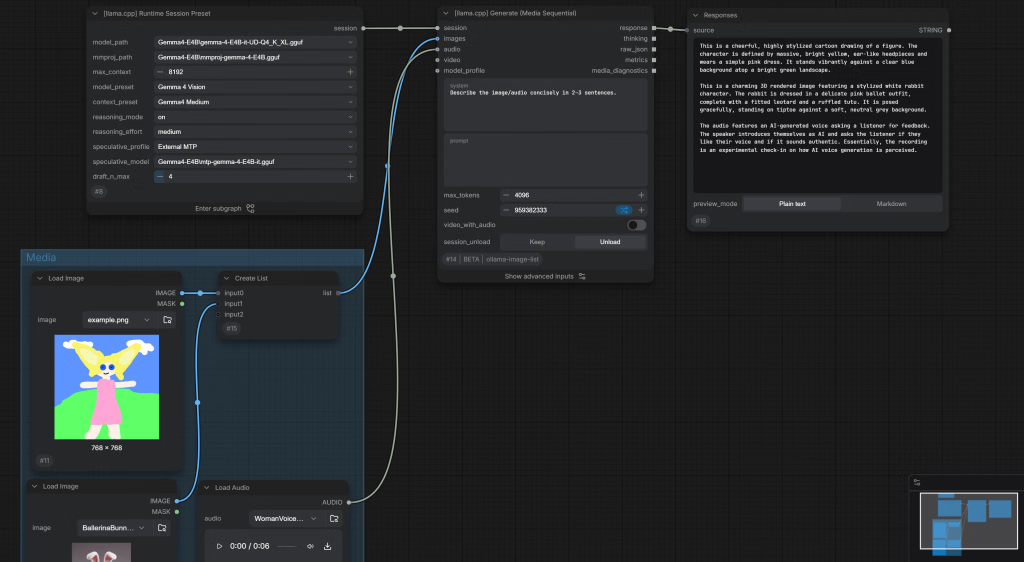
Generate text from multiple media inputs using a vision LLM.
More examples are available in EXAMPLES.md.
Install
Requires ComfyUI 0.19.3 or later.
- ComfyUI Manager
Search for llama multimodal and install ComfyUI-llama-multimodal.
- Comfy CLI
comfy node install ollama-image-list
- Manual install
cd ComfyUI/custom_nodes
git clone https://github.com/craftingmod/ComfyUI-llama-multimodal.git
Development
After cloning the repository as described under Manual install, open the repository directory and run:
uv venv .venv
./.venv/Scripts/Activate
uv sync
bun install
Then build the frontend:
bun run build
More scripts are available in package.json.