
cozdx1 Comma Weight
Adjust whole comma-separated prompt tags with Ctrl+Up/Down in ComfyUI.
ComfyUI Comma Weight
Adjust complete comma-separated prompt tags with Ctrl+Up/Down (Command+Up/Down on macOS). Place the cursor anywhere inside a tag, or select parts of several tags: Comma Weight expands the edit to the comma boundaries.
This is a ComfyUI frontend extension that does not add a node to the canvas.
How it works
For example, select only hair, lo in black hair, long hair, smile and press Ctrl+Up once with ComfyUI's weight precision set to 0.2:
black h[air, lo]ng hair, smile
             ↓
(black hair, long hair:1.2), smile
The screenshots compare ComfyUI's default weighting with Comma Weight for both a single tag and a rough selection across two tags:
| Selection | ComfyUI default | Comma Weight |
| --- | --- | --- |
| Part of one tag |  |
|  |
| Parts of two tags |
|
| Parts of two tags | 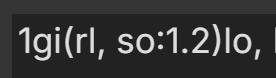 |
| 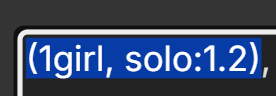 |
|
- A cursor inside
looking at vieweradjusts the entire tag:(looking at viewer:1.2). - A partial selection across tags adjusts them as one group.
- Pressing the shortcut again changes the existing group's weight. Returning to
1removes the weight wrapper. - Commas inside balanced
(),[], or{}do not split a tag. Line breaks separate tags. - The step size follows ComfyUI's Settings → Comfy → Edit Token Weight → Ctrl+up/down precision.
Settings
Open Settings → Comma-Weight → General to turn the extension on or off. Changes take effect immediately. When disabled, ComfyUI's built-in Ctrl+Up/Down behavior applies.

Installation
ComfyUI Manager
Search for Comma Weight in ComfyUI Manager and install it. Then restart ComfyUI and refresh the browser.
Manual
Enter the following command from your ComfyUI custom_nodes directory:
git clone https://github.com/cozdx1/ComfyUI-Comma-Weight.git
Restart ComfyUI and refresh the browser. To update a manual installation, run git pull in the cloned directory, then restart and refresh.
Compatibility
Tested with ComfyUI frontend 1.51.9. The shortcut applies to editable text areas on the ComfyUI page. It may not work as intended with other frontend versions or extensions that use the same shortcut.
Development
Run the JavaScript behavior tests with node --test tests/weight-range.test.mjs.