
Flux FaceIR
ComfyUI extension for FLUX FaceIR aligned-face and whole-image restoration.
Nodes (4)
Finding, straightening, and exporting the face so the restoration has something to work on
The unglamorous RetinaFace loader that every FaceIR whole-image workflow starts with
Warping the restored face back onto the photo with a seam nobody can find
Restoring a face with 50 diffusion steps and zero CodeFormer
ComfyUI Flux FaceIR
ComfyUI extension for FLUX FaceIR face restoration. It supports both:
- aligned face restoration from pre-cropped face patches
- full-image restoration from original images with face detection, alignment, parameter export, and paste-back
Main training/inference repository: cosmicrealm/flux-restoration
Workflows
This extension ships with two workflows:
workflows/aligned_face_restore.jsonworkflows/full_image_restore.json
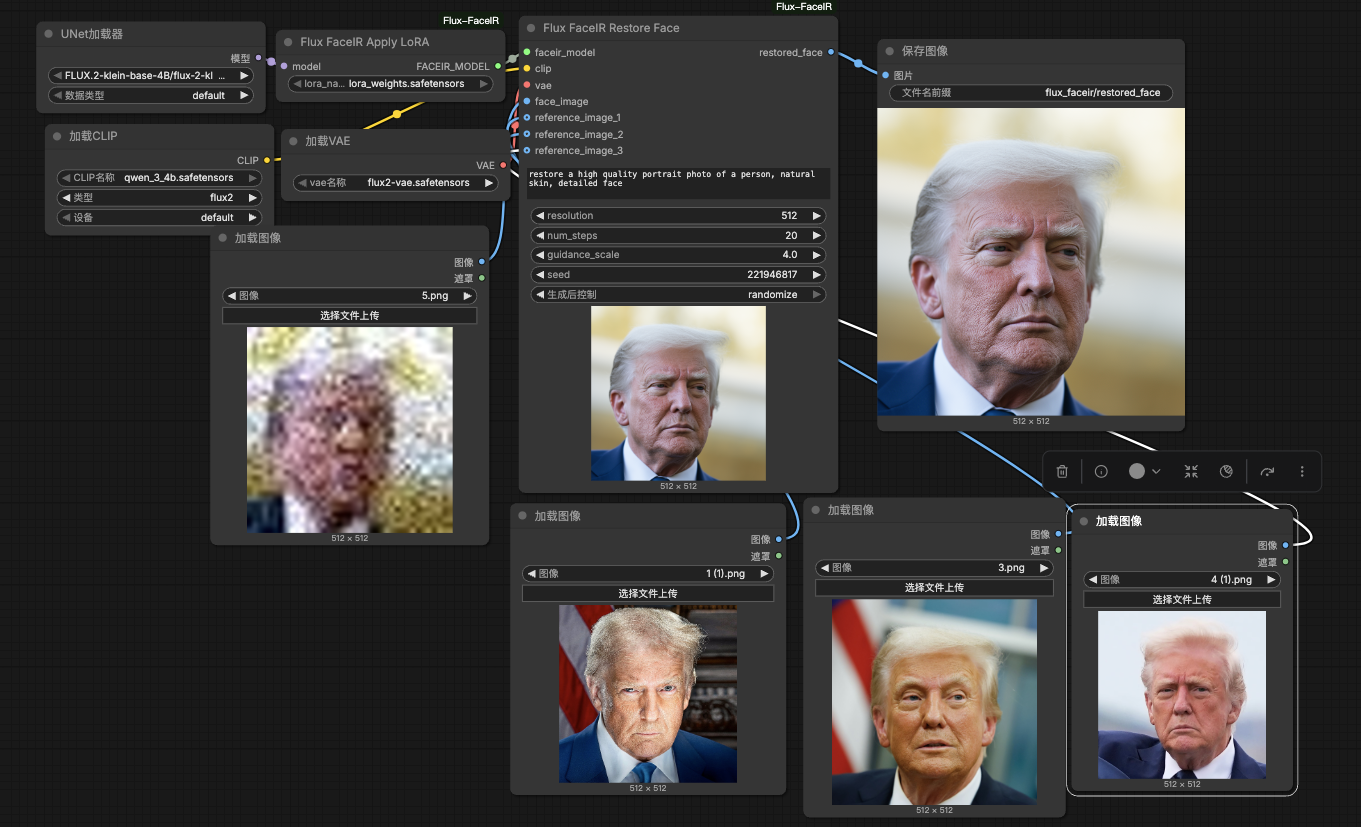
aligned_face_restore.json is for already aligned face crops.
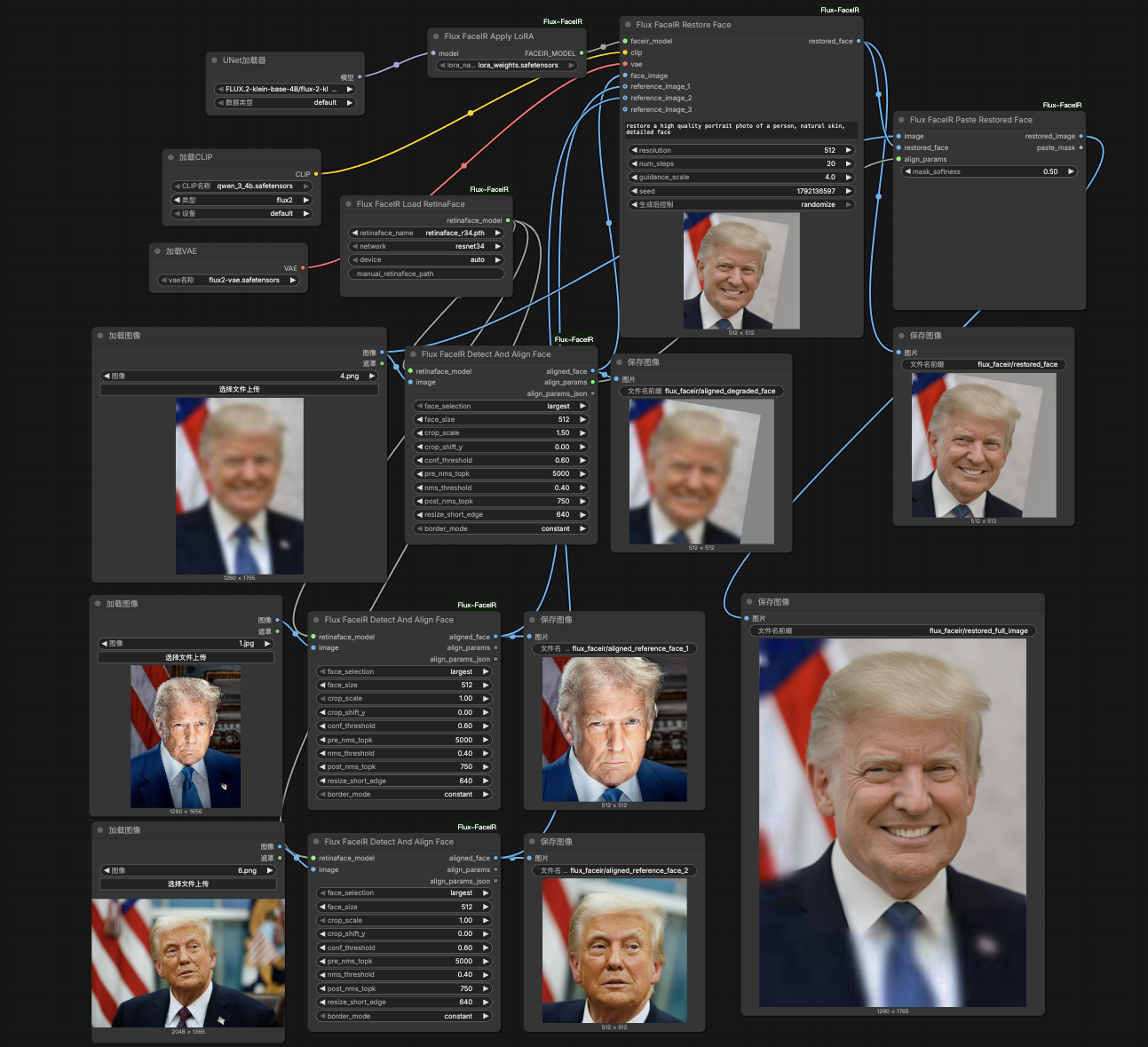
full_image_restore.json is the whole-image workflow:
- load one degraded full image
- load reference full images
- detect and align faces with RetinaFace
- restore the aligned degraded face with FaceIR
- export alignment parameters
- paste the restored face back to the original degraded image
The detect-and-align node returns both:
align_params: structured affine/paste-back parameters for downstream nodesalign_params_json: readable JSON text for debugging or export
Screenshots
Aligned workflow:
Whole-image workflow:
Installation
ComfyUI Manager / Registry
Search for Flux FaceIR in ComfyUI Manager, or install it with the Comfy CLI:
comfy node install flux-faceir
The two bundled workflows will then be available from ComfyUI's workflow template browser. Model weights are installed separately; see Required Models.
Manual installation
Clone this repository into ComfyUI/custom_nodes, then install dependencies:
cd /path/to/ComfyUI/custom_nodes
git clone https://github.com/cosmicrealm/ComfyUI-Flux-FaceIR.git ComfyUI-Flux-FaceIR
cd ComfyUI-Flux-FaceIR
python install.py
If you downloaded a zip or received this extension bundled with another package, extract or copy it so the final directory is:
ComfyUI/custom_nodes/ComfyUI-Flux-FaceIR
Do not leave the directory named ComfyUI-Flux-FaceIR-main. Fully restart ComfyUI
after installation.
Required Models
Recommended model layout:
ComfyUI/models/
  diffusion_models/
    FLUX.2-klein-base-4B/
      flux-2-klein-base-4b.safetensors
  text_encoders/
    qwen_3_4b.safetensors
  vae/
    flux2-vae.safetensors
  loras/
    lora_weights.safetensors
  face_detectors/
    retinaface_r34.pth
Download links:
- FLUX base model:
flux-2-klein-base-4b.safetensors - Qwen text encoder:
qwen_3_4b.safetensors - FLUX VAE:
flux2-vae.safetensors - FaceIR LoRA:
lora_weights.safetensors - RetinaFace detector:
retinaface_r34.pth
Example download commands:
mkdir -p ComfyUI/models/face_detectors
wget -O ComfyUI/models/face_detectors/retinaface_r34.pth \
  https://github.com/yakhyo/retinaface-pytorch/releases/download/v0.0.1/retinaface_r34.pth
mkdir -p ComfyUI/models/loras
wget -O ComfyUI/models/loras/lora_weights.safetensors \
  https://huggingface.co/zhangjinyang/flux-restoration/resolve/main/pretrained_models/lora_weights.safetensors
Node Overview
Core nodes:
Flux FaceIR Apply LoRAFlux FaceIR Load RetinaFaceFlux FaceIR Detect And Align FaceFlux FaceIR Restore FaceFlux FaceIR Paste Restored Face
Recommended graph:
- Load base FLUX components with
UNETLoader,CLIPLoader, andVAELoader. - Apply
lora_weights.safetensorswithFlux FaceIR Apply LoRA. - If your inputs are already aligned:
use
Flux FaceIR Restore Facedirectly. - If your inputs are full images:
use
Flux FaceIR Load RetinaFace->Flux FaceIR Detect And Align Face->Flux FaceIR Restore Face->Flux FaceIR Paste Restored Face.
The bundled whole-image workflow is configured for:
- detector weights:
retinaface_r34.pth
Notes
- This extension does not download weights automatically.
- Base model loading follows standard ComfyUI loaders.
- The bundled workflow targets the non-quantized
flux-2-klein-base-4b.safetensors, not the FP8 variant. Flux FaceIR Restore Facesupports blind restoration and reference-guided restoration with up to three references.- The full-image workflow only pastes the restored face back into the degraded source image. Reference images are used only for guidance.
crop_scale,crop_shift_y, detector thresholds, and resize settings are exposed on the detect-and-align node, so you can widen the crop to include more forehead, chin, or shoulder context when needed.