
ComfyUI-SMPL
ComfyUI nodes that turn a height and a weight into an SMPL / SMPL-H body avatar: shaded render, exact silhouette mask, depth map and 24 body-part masks for ControlNet-style conditioning.
Nodes (2)
ComfyUI-SMPL — SMPL Avatar nodes
ComfyUI nodes that build an SMPL or SMPL-H body from a height and a weight, render it with an orthographic camera, and output maps that can be used directly as ControlNet-style conditioning:
- a shaded render (
IMAGE), - the silhouette as a
MASK, computed from the exact render coverage, - a depth map (
IMAGE, near = white), - 24 per-body-part masks (
MASK), plus a node that unions any selection of parts.
Licensing in one paragraph. The code in this repository is MIT-licensed. It depends on the SMPL / SMPL-H body models and on the
smplxpackage, which are not MIT: both are distributed by the Max Planck Institute for Intelligent Systems under non-commercial research licenses, and the model files cannot be redistributed. Every user must download the models from the official websites and accept their license. Commercial use of SMPL requires a license from Meshcapade / Max Planck. See Licensing and THIRD_PARTY_NOTICES.md.
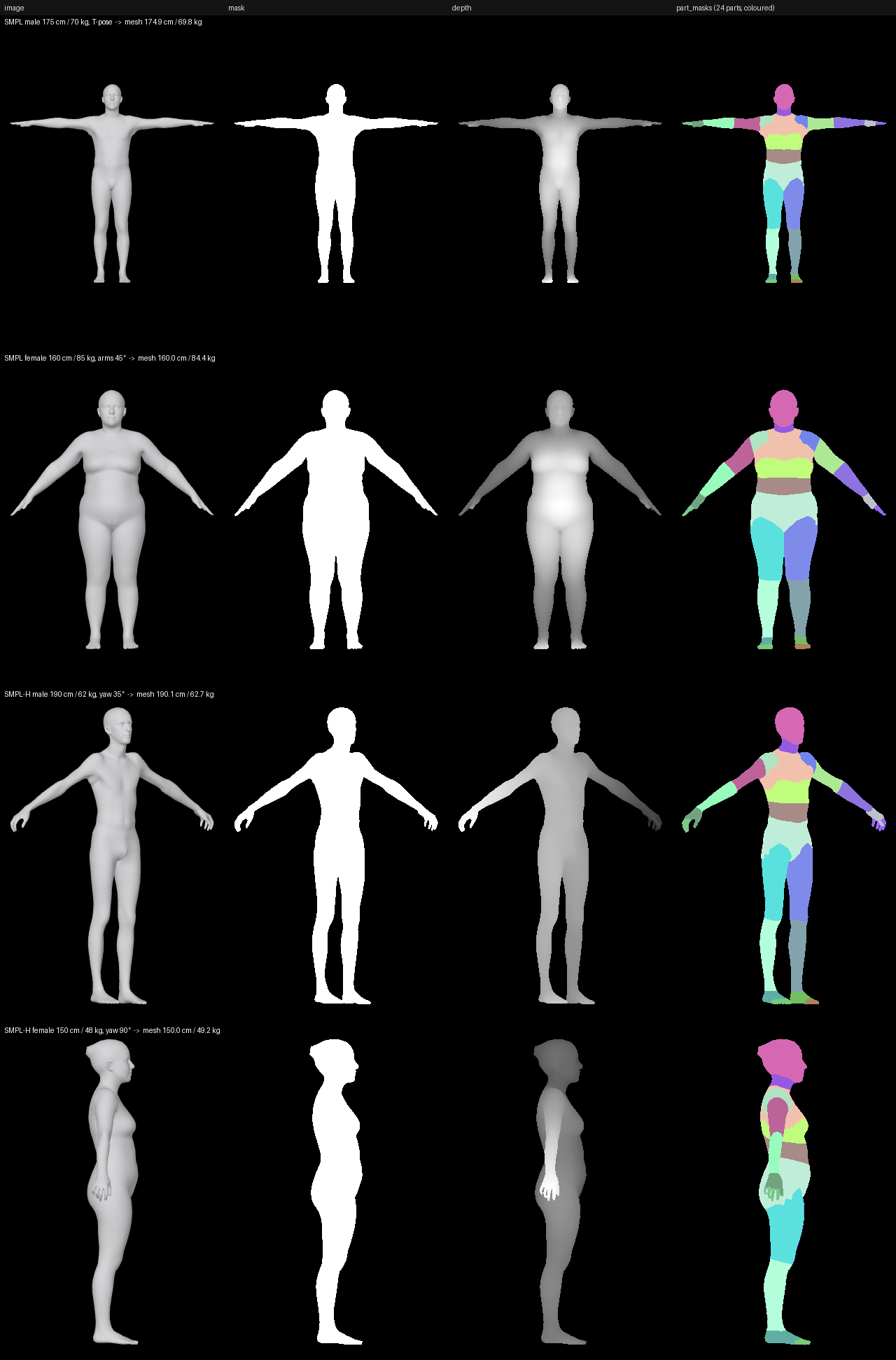
Four bodies generated from a height and a weight (the caption of each row gives the request and the measurements of the resulting mesh). Rendered from the SMPL / SMPL+H models, © Max-Planck-Gesellschaft, shown for illustration under their non-commercial license; see docs/README.md.
Nodes
Generate SMPL Avatar (SMPLAvatarGenerate)
| Input | Type | Description |
|---|---|---|
| model_type | SMPL / SMPL-H | Body only, or body with articulated hands (relaxed hand pose). |
| gender | male / female | Selects the gendered model. |
| height_cm, weight_kg | FLOAT | Target body measurements (see Shape regressor). |
| width, height | INT | Output size in pixels. |
| arm_angle (optional) | FLOAT | Lowers both arms from the T-pose (0 = T-pose, ~45 = A-pose). |
| yaw (optional) | FLOAT | Rotation about the vertical axis in degrees (90 = right profile). |
| framing (optional) | fit / fixed | fit fills the image; fixed keeps a constant metres-per-pixel scale so different heights stay comparable, and cuts whatever lies outside the view (a warning is logged). |
| padding (optional) | FLOAT | Margin around the body (fit) or below the feet (fixed). |
| view_height_m (optional) | FLOAT | Height of the view in metres for fixed framing. The view is view_height_m × width / height metres wide (1.47 m at 512 × 768), so raise it, or lower the arms, when the body is cut. |
| background (optional) | black / white / gray | Background of the shaded render. |
| soft_mask (optional) | BOOLEAN | Anti-aliased masks (exact per-pixel coverage) instead of binary ones. |
| compute_part_masks (optional) | BOOLEAN | Render the 24 part masks (needs the part segmentation, downloaded on first use). |
| Output | Type | Description |
|---|---|---|
| image | IMAGE [1,H,W,3] | Shaded render composited over the background. |
| mask | MASK [1,H,W] | Silhouette, 1 = body. |
| depth | IMAGE [1,H,W,3] | Nearest point 1.0, farthest fully covered body point 0.2, background 0 (edge pixels scaled by coverage with soft_mask). |
| part_masks | MASK [24,H,W] | One mask per SMPL part, in SMPL joint order. The 24 masks are disjoint and their sum equals mask (all zeros when compute_part_masks is off). |
Union SMPL Part Masks (SMPLAvatarPartMaskUnion)
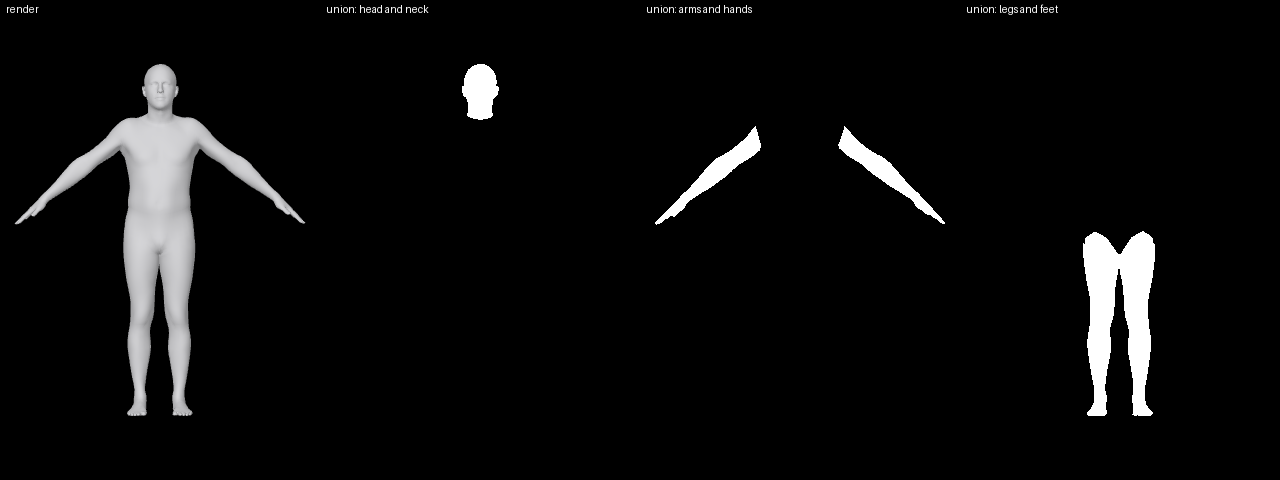
Takes part_masks and returns one MASK [1,H,W]: the union of the parts
selected by a preset (head, torso, arms, hands, legs, feet, upper body,
lower body, full body, ...) and/or the 24 individual toggles. grow_px dilates
(positive) or erodes (negative) the result. A batch of 24·N masks from N
avatars gives N output masks.
The 24 parts and their order are listed in docs/TECHNICAL.md.
Example workflows
Both workflows are in example_workflows/ and in
ComfyUI's template browser once the pack is installed (Templates in the
left sidebar, under Extensions → ComfyUI-SMPL; searching "smpl" finds
them). Masks are displayed with ComfyUI's built-in Preview Mask node, so no
other node pack is needed.
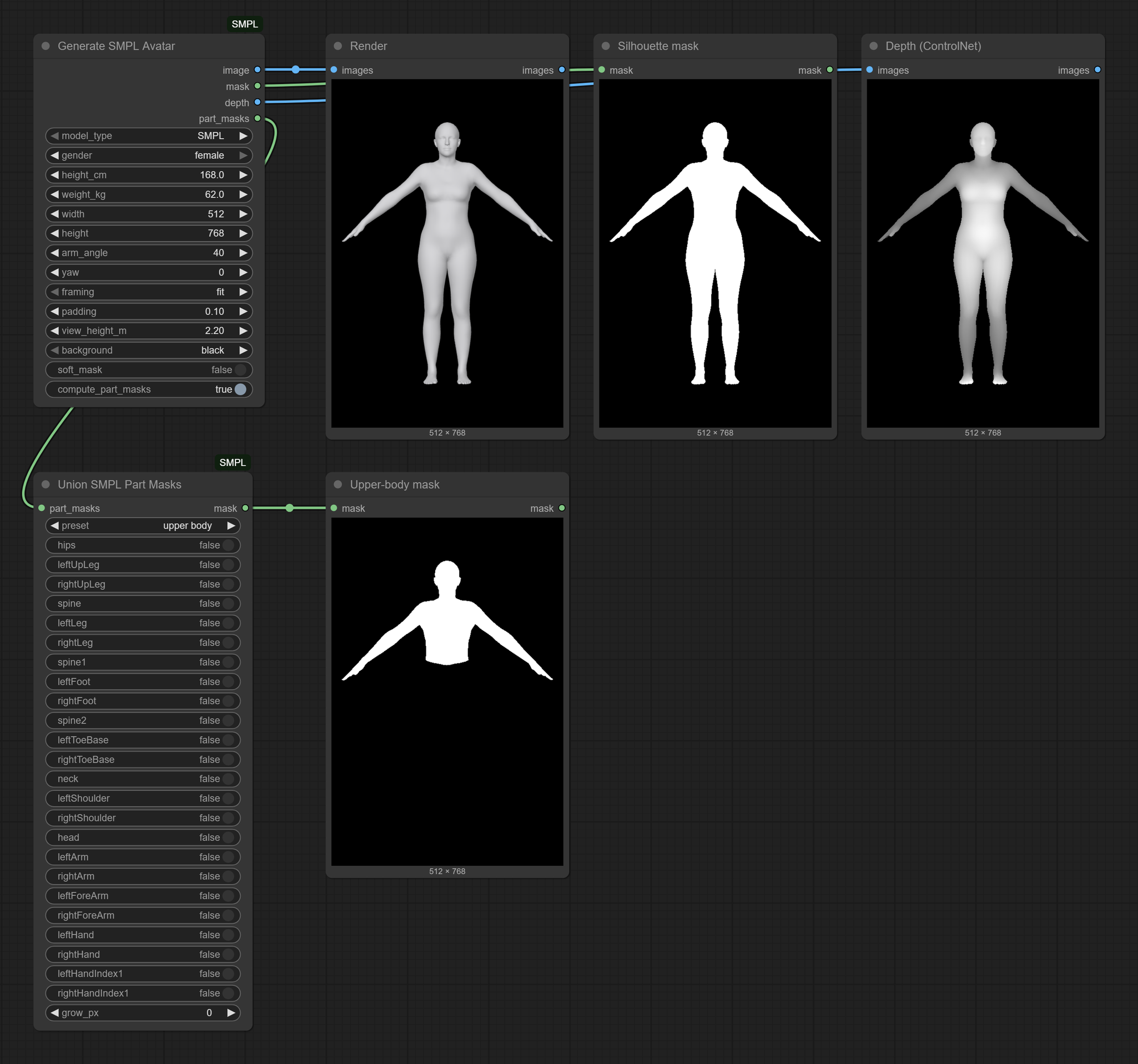
Render, silhouette, depth and a part mask
smpl_avatar_maps.json: one
Generate SMPL Avatar node feeds Preview Image / Preview Mask nodes with
the render, the silhouette and the depth map, and a Union SMPL Part Masks
node with the upper body preset.
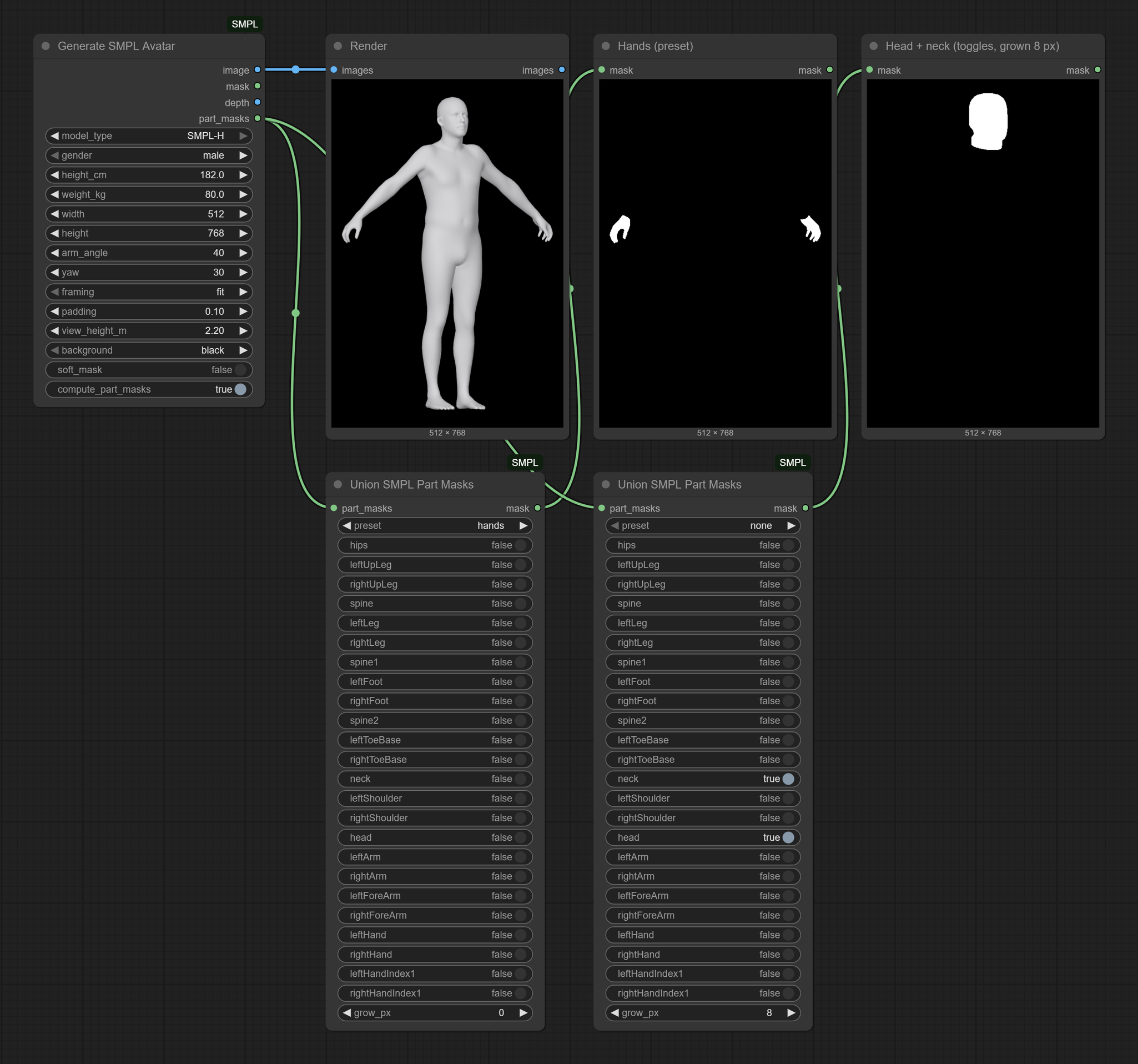
Part masks from a preset or from the toggles
smpl_avatar_part_masks.json:
an SMPL-H body seen from a three-quarter view (yaw = 30) and two Union SMPL
Part Masks nodes: one uses the hands preset, the other selects head and
neck with the toggles and dilates the result by 8 pixels (grow_px).
The screenshots contain renders of the SMPL / SMPL+H models, © Max-Planck-Gesellschaft, shown for illustration under their non-commercial license; see docs/README.md.
Installation
-
Put the pack in
ComfyUI/custom_nodes/:git clone https://github.com/corentineuvrard/ComfyUI-SMPLthere, or download the ZIP from GitHub and extract it there (renameComfyUI-SMPL-maintoComfyUI-SMPL), or install it with ComfyUI-Manager (Install via Git URL), which also runs step 2. -
Install the requirements with the Python that runs ComfyUI, then start or restart ComfyUI:
cd ComfyUI/custom_nodes/ComfyUI-SMPL
pip install -r requirements.txt
Windows portable build: open a command prompt in the
ComfyUI_windows_portablefolder (the one withrun_nvidia_gpu.bat) and runpython_embeded\python.exe -m pip install -r ComfyUI\custom_nodes\ComfyUI-SMPL\requirements.txt.This adds
smplx,pygletandtrimesh; ComfyUI's own PyOpenGL and torch are left as they are (the renderer, pyrender, is included in the pack: see why). -
Install the body model files (next section). They are loaded on first use, so ComfyUI does not need another restart.
The nodes appear under the SMPL Avatar category. The first run takes 10–20 s: the pack fits the height/weight regressor from your model files, downloads the 110 KB part segmentation from GitHub (see offline use) and starts its render worker. Later runs take well under a second.
Body model files
The SMPL and SMPL-H files are not included: each user downloads them.
| Model | Where | What to download |
|---|---|---|
| SMPL | https://smpl.is.tue.mpg.de | The "SMPL for Python" archive (e.g. SMPL_python_v.1.1.0.zip), which contains the male and female models basicmodel_{m,f}_lbs_10_207_0_v1.x.0.pkl |
| SMPL-H | https://mano.is.tue.mpg.de | The "Models & Code" archive (e.g. mano_v1_2.zip), which contains SMPLH_male.pkl, SMPLH_female.pkl, MANO_LEFT.pkl and MANO_RIGHT.pkl |
Both sites require registration and acceptance of a non-commercial license.
The official files contain chumpy objects, and the SMPL-H files lack the
MANO hand parameters smplx expects; the script below fixes both without
chumpy (NumPy only), reading the downloaded zip archives directly:
python scripts/prepare_models.py --source path/to/downloads
(Windows portable build, from the ComfyUI_windows_portable folder:
python_embeded\python.exe ComfyUI\custom_nodes\ComfyUI-SMPL\scripts\prepare_models.py --source ....)
It writes the files to the pack's own models/ folder, where the node finds
them without any further configuration (--output <folder> writes them
elsewhere, --force replaces existing files):
ComfyUI-SMPL/models/
├── smpl/SMPL_MALE.pkl, SMPL_FEMALE.pkl
└── smplh/SMPLH_MALE.pkl, SMPLH_FEMALE.pkl
The node also looks in ComfyUI/models/body_models/ (same layout) and in
the folders listed in SMPL_AVATAR_MODEL_DIR; details in
docs/TECHNICAL.md.
Trust note. The .pkl model files are Python pickles, which can execute
code when loaded: only use files you downloaded from the official sites
yourself (or produced from them with scripts/prepare_models.py).
Configuration
| Variable | Effect |
|---|---|
| SMPL_AVATAR_MODEL_DIR | Extra folder(s) searched for body model files. |
| SMPL_AVATAR_NO_DOWNLOAD=1 | Never download the part segmentation. |
| SMPL_AVATAR_RENDER_PROCESS | auto (default), worker or inprocess. |
| SMPL_AVATAR_RENDER_TIMEOUT | Seconds to wait for one worker reply (default 300; 0 = no limit). |
| SMPL_AVATAR_GL_PLATFORM | PYOPENGL_PLATFORM for the render worker (egl, osmesa, ...; default = unset). |
| PYOPENGL_PLATFORM | Never overridden; see the OpenGL platform notes (an empty value counts as unset). |
| SMPL_AVATAR_REQUIRE_GL=1 | Tests only: fail instead of skipping rendering tests when no OpenGL context can be created. |
Windows portable build: add one set NAME=value line per variable above the
python_embeded line of run_nvidia_gpu.bat (or run_cpu.bat), for
example set SMPL_AVATAR_MODEL_DIR=D:\body_models.
Licensing
- This repository's code: MIT, © 2026 Corentin Euvrard (LICENSE).
LICENSEis the plain MIT text; what it does and does not cover is spelled out in THIRD_PARTY_NOTICES.md. - Vendored pyrender (
smpl_avatar/_vendor/pyrender): MIT, © 2019 Matthew Matl; see itsLICENSEfile and THIRD_PARTY_NOTICES.md. - smplx (runtime dependency, installed from PyPI): Max Planck "Software Copyright License for non-commercial scientific research purposes". It is not an open-source license, and using this pack means using smplx under those terms.
- SMPL, SMPL-H, MANO model files: Max Planck non-commercial licenses; each user downloads them and accepts the license; redistribution is not allowed. Commercial licensing of SMPL is available through Meshcapade.
- Part segmentation: published by Meshcapade without a stated license; downloaded by each user, not redistributed.
- Shape regressor coefficients: derived from the user's own SMPL files on the user's machine; not distributed.
In short, the MIT licenses apply to this code only; they do not make the SMPL stack as a whole usable for commercial purposes. Please cite SMPL (Loper et al., 2015) and, for SMPL-H, MANO (Romero et al., 2017) in publications — see THIRD_PARTY_NOTICES.md.
Technical notes
How the height/weight regressor is fitted and how accurate it is, how the maps are rendered (worker process, masks, depth, part segmentation), the OpenGL platform policy for headless Linux, the tested versions and the development notes are in docs/TECHNICAL.md.