
ComfyUI-Image-Compress
ComfyUI custom node for JPEG/PNG compression with quality, scale, and performance reporting
ComfyUI Image Compress



A custom ComfyUI node that compresses images using JPEG or PNG encoding with independent control over encode quality and output scale. Includes a detailed per-frame performance report covering file size savings and encode/decode timing.

Features
- JPEG lossy compression — quality slider directly degrades pixel data, exactly as it would appear saved to disk
- PNG lossless compression — deflate level controls file size on disk; pixels are always preserved exactly
- Scale percent — resizes image dimensions before encoding; the only way to visibly reduce a PNG output tensor
- Batch support — processes all frames in a batch tensor independently
- Performance report — per-frame metrics for original size, compressed size, reduction %, compression ratio, PNG deflate level, encode time, and decode time; batch summary included for multi-frame inputs
- Round-trip encoding — output tensor reflects the actual encoded result, so JPEG artefacts are baked in downstream
Installation
Option A — Clone directly into custom_nodes:
cd ComfyUI/custom_nodes
git clone https://github.com/comfyuiattic-989/comfyui-image-compress
Option B — Manual:
- Download the latest release zip from the Releases page
- Extract the
image_compressfolder intoComfyUI/custom_nodes/
Then restart ComfyUI. The node will appear under image/processing → Image Compress.
No extra dependencies required. Pillow, NumPy, and PyTorch are all bundled with ComfyUI.
Usage
Inputs
| Input | Type | Default | Description |
|---|---|---|---|
| image | IMAGE | — | Standard ComfyUI image tensor. Batches are fully supported. |
| quality | INT slider 1–100 | 80 | JPEG: encode quality — lower = more artefacts, smaller file. PNG: deflate level — lower = more compression, same pixels. |
| scale_percent | INT slider 1–100 | 100 | Resize both dimensions to this percentage before encoding. 100 = no resize. 50 = half width and height. Applies to both formats. |
| format | JPEG | PNG | JPEG | Codec to use for compression. |
Outputs
| Output | Type | Description |
|---|---|---|
| image | IMAGE | Compressed (and optionally rescaled) image tensor |
| report | STRING | Plain-text performance report. Wire to a Show Text node to display in-graph, or read from the server console. |
Understanding the Two Controls
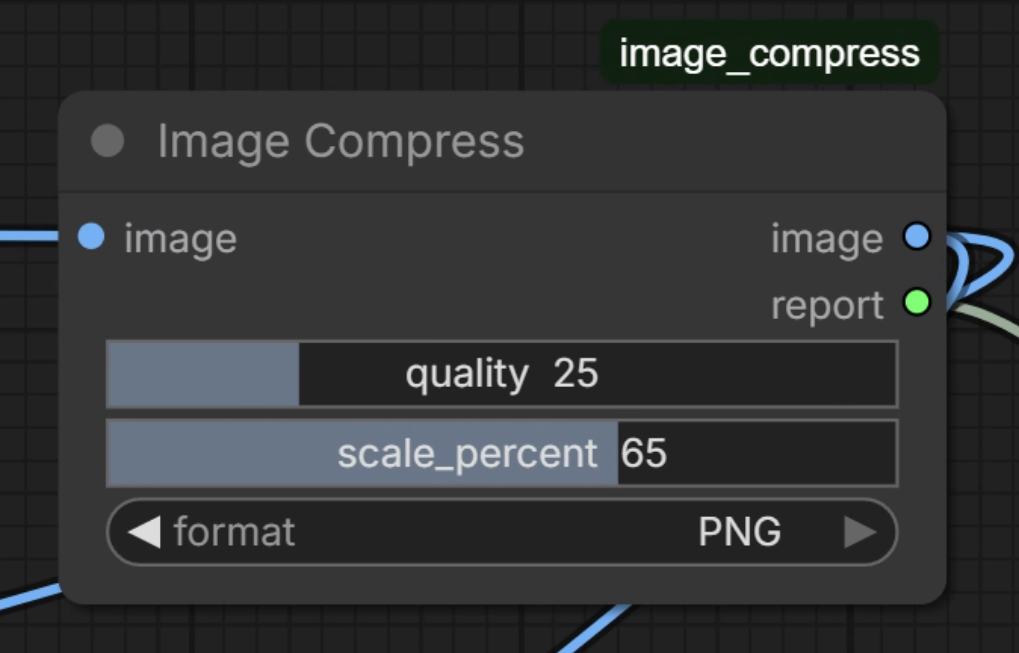
The quality and scale_percent sliders are independent and serve different purposes:
| | quality | scale_percent |
|---|---|---|
| JPEG | Degrades pixel data (lossy) | Reduces pixel dimensions |
| PNG | Controls deflate level (file size only — pixels unchanged) | Reduces pixel dimensions |
PNG note: Because PNG is a lossless format, the decoded output tensor will always be pixel-identical to the input regardless of
quality. If you need the output tensor to visibly differ when using PNG, setscale_percentbelow100. The report will warn you if PNG is run at full scale.
Example combinations
| Format | Quality | Scale | Effect | |---|---|---|---| | JPEG | 80 | 100 | Lossy encode, original dimensions | | JPEG | 40 | 50 | Aggressive lossy encode at half resolution | | PNG | 50 | 100 | Lossless pixels, moderate deflate — tensor unchanged | | PNG | 50 | 75 | Lossless pixels at 75% resolution — tensor visibly smaller |
Sample Report Output
╔════════════════════════════════════════════════════════╗
║  IMAGE COMPRESS – PERFORMANCE REPORT                   ║
╚════════════════════════════════════════════════════════╝
  Format        : JPEG
  Quality       : 75/100
  Scale         : 50%
  Frames        : 1
──────────────────────────────────────────────────────────
  Frame   1
    Input  dimensions:  1024×1024 px
    Output dimensions:   512×512 px  (scaled to 50%)
    Original size    :   3072.00 KB  (uncompressed)
    Compressed size  :     48.21 KB
    Size reduction   :     98.4 %
    Compression ratio:   63.72×
    Encode time      :      6.38 ms
    Decode time      :      2.11 ms
    Total time       :      8.49 ms
──────────────────────────────────────────────────────────
Project Structure
comfyui-image-compress/
├── .github/
│   ├── ISSUE_TEMPLATE/
│   │   ├── bug_report.md
│   │   ├── feature_request.md
│   │   └── config.yml
│   └── workflows/
│       └── ci.yml          # Lint + smoke tests on Python 3.10/3.11/3.12
├── __init__.py             # ComfyUI node registry entry point
├── image_compress.py       # Node implementation
├── pyproject.toml          # Package metadata
├── CHANGELOG.md
├── LICENSE                 # MIT
└── README.md
Requirements
- ComfyUI (any recent version)
- Python 3.10+
Pillow >= 9.0— bundled with ComfyUInumpy >= 1.23— bundled with ComfyUItorch >= 2.0— bundled with ComfyUI
Contributing
Bug reports and feature requests are welcome via GitHub Issues. Please use the provided issue templates.
For pull requests:
- Fork the repository
- Create a feature branch (
git checkout -b feature/my-change) - Make your changes
- Ensure
ruff check .passes with no errors - Open a pull request against
main
Changelog
See CHANGELOG.md for the full version history.
License
MIT © 2026