
ComfyUI-DiffHDR
DiffHDR (LDR to HDR reconstruction for images, videos and HDRI panoramas) on ComfyUI's native Wan2.1-VACE.
Nodes (7)
The 60 MB patch that turns VACE-14B into an HDR model
Dig the sun back out of a white sky
The one node that undoes DiffHDR's log curve
The log curve and the mask that make a native VACE graph HDR
Writing float HDR that a compositor won't throw back at you
How to actually see a linear HDR frame
Get the window back out of a blown-out clip
ComfyUI-DiffHDR
Turn clipped 8-bit footage into linear, scene-referred HDR inside ComfyUI. This is a from-scratch port of DiffHDR (Eyeline Labs) onto ComfyUI's native Wan2.1-VACE-14B objects — no VACE fork, no bundled inference engine.

The first frame of the demo dance sequence. Left: the clipped LDR input. Middle: the same input
pulled down four stops — the window is a flat white shape, there is nothing to recover. Right: the
DiffHDR reconstruction at the same −4 EV (the node's defaults: fast preset, 20 steps), with the sky
and the trees outside the window back.
What it is
DiffHDR treats LDR-to-HDR conversion as a generative radiance-inpainting problem inside the latent
space of a video diffusion model (Wan2.1-VACE-14B). It works in a log-gamma color space and uses
the video model's spatio-temporal priors to synthesize plausible detail in over- and under-exposed
regions while recovering continuous radiance in the correctly-exposed ones. This pack exposes that
as seven native DiffHDR* nodes that plug into stock UNETLoader / VAELoader / CLIPLoader /
WanVaceToVideo / KSampler objects, in three modes:
- Image — a single clipped LDR frame in, one linear HDR frame out.
- Video — an LDR frame sequence in; long clips run as overlapping, blended sliding windows.
- HDRI (panorama) — a clipped equirectangular LDR panorama in, a full HDR environment map out, using a separate LoRA trained for panoramas.
Installation
- Clone this repository into
ComfyUI/custom_nodes/ComfyUI-DiffHDR:git clone https://github.com/claussteinmassl/ComfyUI-DiffHDR.git ComfyUI/custom_nodes/ComfyUI-DiffHDR pip install -r requirements.txtinside your ComfyUI Python environment (addsOpenEXRandhuggingface_hub;torchandsafetensorsare assumed to already be provided by ComfyUI).- Download the Wan2.1-VACE-14B model and the Wan 2.1 VAE into the usual ComfyUI model folders.
- Restart ComfyUI. The nodes register under the DiffHDR category.
| Model | File | Source | Folder |
|---|---|---|---|
| Wan2.1 VACE 14B | wan2.1_vace_14B_fp16.safetensors | Comfy-Org/Wan_2.1_ComfyUI_repackaged (split_files/diffusion_models/) | models/diffusion_models |
| Wan2.1 VACE 14B GGUF (low memory / Apple Silicon) | e.g. Wan2.1_14B_VACE-Q4_K_M.gguf, Q5_K_M, Q8_0 | QuantStack/Wan2.1_14B_VACE-GGUF — requires the ComfyUI-GGUF custom node (UnetLoaderGGUF in place of UNETLoader) | models/diffusion_models |
| Wan 2.1 VAE | wan_2.1_vae.safetensors | same Comfy-Org repo (split_files/vae/) | models/vae |
| umT5-xxl (optional — only for custom prompts) | umt5_xxl_fp8_e4m3fn_scaled.safetensors | same Comfy-Org repo (split_files/text_encoders/) | models/text_encoders |
| DiffHDR LoRAs | DiffHDR.safetensors (image/video), DiffHDR_Pano.safetensors (HDRI) | Eyeline-Labs/DiffHDR — downloaded automatically | models/loras/DiffHDR |
Wan2.1-VACE-14B and the Wan 2.1 VAE are the same checkpoints any native ComfyUI VACE workflow uses. The DiffHDR LoRA is fetched automatically the first time a DiffHDR node runs. All filenames above were verified against the current file listing of each Hugging Face repository, and every one of them was downloaded and run end-to-end during GPU validation.
The text encoder is optional. DiffHDR was trained with an empty prompt for images/video and a
fixed prompt for panoramas, so both all-in-one nodes ship with exactly those embeddings baked in
(assets/embeds/) and run with no CLIP model loaded at all. The three all-in-one example
graphs therefore contain no CLIPLoader: leave clip unconnected and you save the ~11 GB
umT5-xxl download and its load time; the prompt widget is then ignored. Add a umT5-xxl
CLIPLoader (type wan) only if you want to experiment with your own prompts — the modular
example graph needs it, because its CLIPTextEncode → WanVaceToVideo path has no baked-in
embeddings.
Usage
Four example workflows are in workflows/ (ComfyUI UI-format JSON, load with Open or
drag-and-drop): diffhdr_image.json, diffhdr_video.json, diffhdr_hdri.json and
diffhdr_modular.json. All of them reference wan2.1_vace_14B_fp16.safetensors and
wan_2.1_vae.safetensors (the modular graph additionally needs
umt5_xxl_fp8_e4m3fn_scaled.safetensors) — set the loader widgets to match whatever you actually
have installed if you use the GGUF or a different precision.
Quick start: the all-in-one node
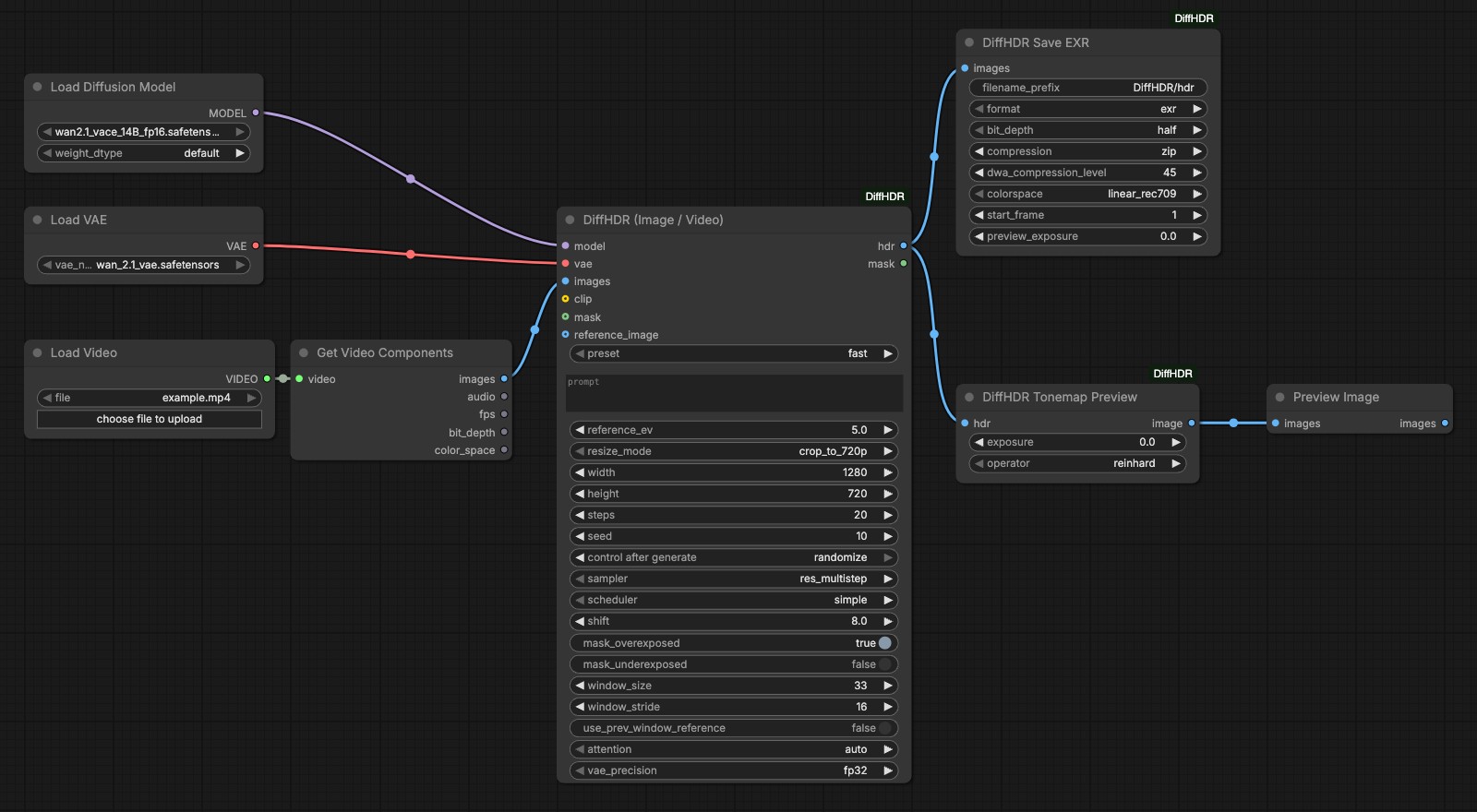
The whole graph: two loaders, a video loader and the all-in-one node. No text encoder — the
clip input stays empty because the umT5 embeddings are baked in.
workflows/diffhdr_video.json — everything under one hood: UNETLoader + VAELoader +
LoadVideo + GetVideoComponents (core ComfyUI video nodes, no VideoHelperSuite dependency) →
DiffHDR (Image / Video) → DiffHDR Save EXR and DiffHDR Tonemap Preview → PreviewImage.
diffhdr_image.json is the same graph with LoadImage instead of the video loader;
diffhdr_hdri.json feeds an equirectangular panorama into DiffHDR HDRI (Panorama). There is
deliberately no text encoder in these three graphs: the bundled umT5 embeddings cover the
prompts DiffHDR was trained with, so the clip input is left unconnected and the prompt widget
is ignored. Add a CLIPLoader (umT5-xxl, type wan) and wire it to clip only if you want to
encode a prompt of your own. The inputs that matter:
preset(first widget) —fast(the default) samples withres_multistep/simple/ shift 8, which was measured to reach the 50-step reference in a fraction of the steps;originalswitches to the reference implementation'seuler/simple/ shift 5;customhands control to thesampler/scheduler/shiftwidgets further down. These are tuned defaults, not the paper's — selectoriginalto reproduce the reference implementation.steps— 20 is the default and is indistinguishable from the 50-step reference with thefastpreset; 10 is plenty for finals, 6 for previews. 50 reproduces the published setting. See Performance and how many steps? below.sampler/scheduler/shift— only honoured whenpresetiscustom. The lists are curated: thebetascheduler and thedeissampler measured worse than doing nothing and are not offered.resize_mode—crop_to_720pcentre-crops and resizes to the 1280×720 training resolution (720×1280 for portrait);nativekeeps your size floored to multiples of 16;customuses thewidth/heightwidgets.- Masks —
mask_overexposed(on by default) andmask_underexposedchoose what gets regenerated. The optionalmaskinput overrides the automatic detection entirely, andreference_image(boosted byreference_ev, default 5 stops) guides the content of clipped regions. - Long video — clips longer than
window_size(4n+1, default 33 = the training length) are processed as sliding windows starting everywindow_strideframes (default 16) and blended. Every window is sampled on its own, so left alone each one invents its own version of the clipped content and the blend cross-fades between them;use_prev_window_reference(on by default) feeds each window the previous one's output frame as its reference image, which keeps the reconstructed background the same along the clip — see the measured numbers under Details. attention—autopicks SageAttention, then flash-attn, else ComfyUI's default, with an automatic PyTorch SDPA fallback. SageAttention is quantised attention; picksdpaorflash_attnexplicitly if you need bit-reproducible results.vae_precision—fp32is recommended;as_loadedsaves memory but can band the highlights.
Modular graph
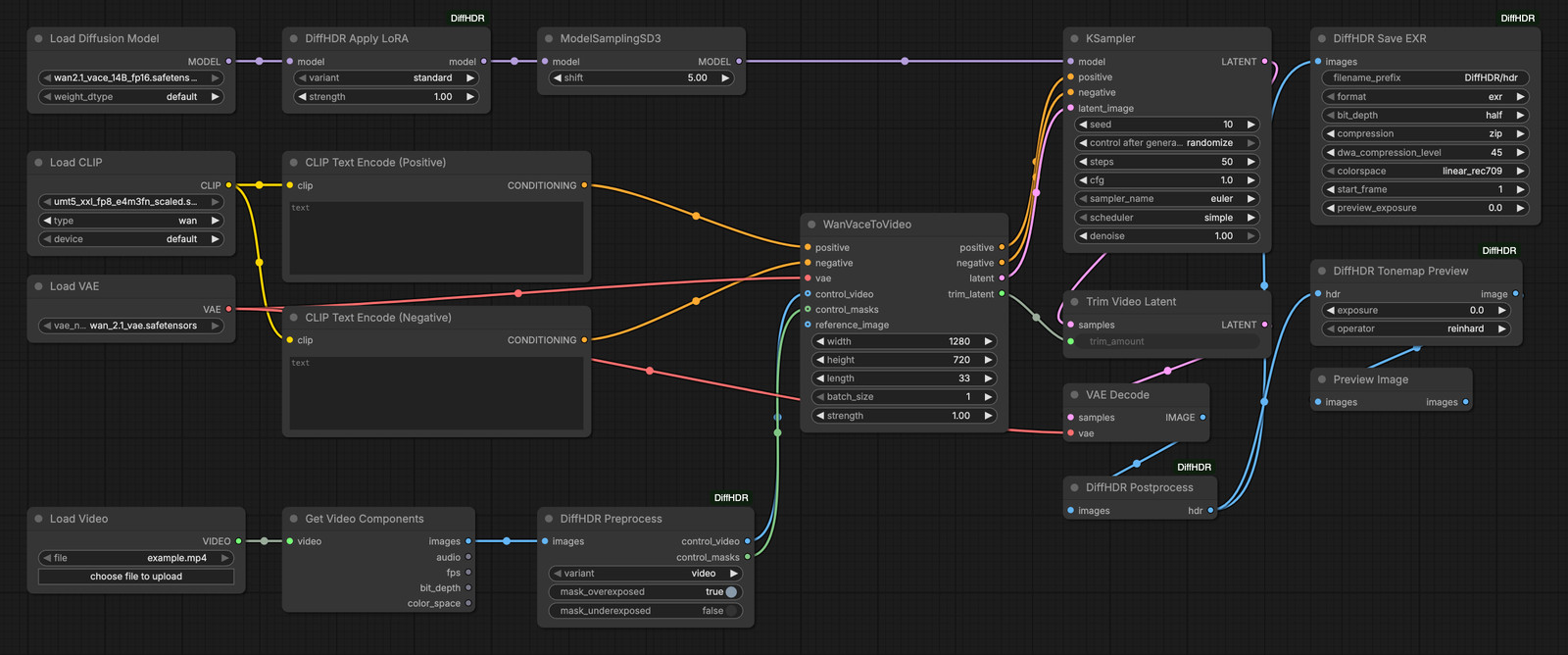
workflows/diffhdr_modular.json rebuilds the same pipeline out of individual nodes on a native
VACE graph: DiffHDR Apply LoRA → ModelSamplingSD3 (shift 8), DiffHDR Preprocess →
WanVaceToVideo (conditioned by CLIPTextEncode) → KSampler (res_multistep / simple,
cfg 1) → TrimVideoLatent → VAEDecode → DiffHDR Postprocess → save / tonemap / preview. The
example sets the same values as the all-in-one node's fast preset; for the reference
implementation's setting use shift 5 and euler / simple. Use this graph when you need to
combine DiffHDR with other VACE controls or additional LoRAs, since every step is a separate node
you can reach into.
Nodes
| Node | What it does |
|---|---|
| DiffHDR (Image / Video) (DiffHDRVideo) | All-in-one reconstruction for a single image or a frame sequence, including long-video windowing. |
| DiffHDR HDRI (Panorama) (DiffHDRPano) | All-in-one reconstruction of an HDR environment map from an equirectangular LDR panorama. |
| DiffHDR Apply LoRA (DiffHDRApplyLora) | Downloads and patches the DiffHDR LoRA into a Wan2.1-VACE-14B model, for modular graphs. |
| DiffHDR Preprocess (DiffHDRPreprocess) | Builds the log-encoded control video and the regeneration mask for WanVaceToVideo. |
| DiffHDR Postprocess (DiffHDRPostprocess) | Decodes the DiffHDR log curve back to linear HDR after VAE Decode. |
| DiffHDR Tonemap Preview (DiffHDRTonemap) | Converts linear HDR to displayable sRGB for preview or LDR export. |
| DiffHDR Save EXR (DiffHDRSaveEXR) | Writes linear HDR as OpenEXR (single file or sequence) or Radiance .hdr. |
Every input is documented in Full node reference below.
Saving EXR
DiffHDR Save EXR writes half (16-bit) or float (32-bit) OpenEXR with none, rle, zips,
zip, piz, pxr24, b44, b44a or lossy dwaa / dwab compression (dwa_compression_level,
default 45, applies to the last two), or Radiance .hdr. colorspace converts the pixels to
linear_rec709, acescg or aces2065_1 and writes the matching chromaticities into the header. A
batch becomes <filename_prefix>_<counter>/frame_####.exr starting at start_frame; a single image
is written directly under filename_prefix.
Results
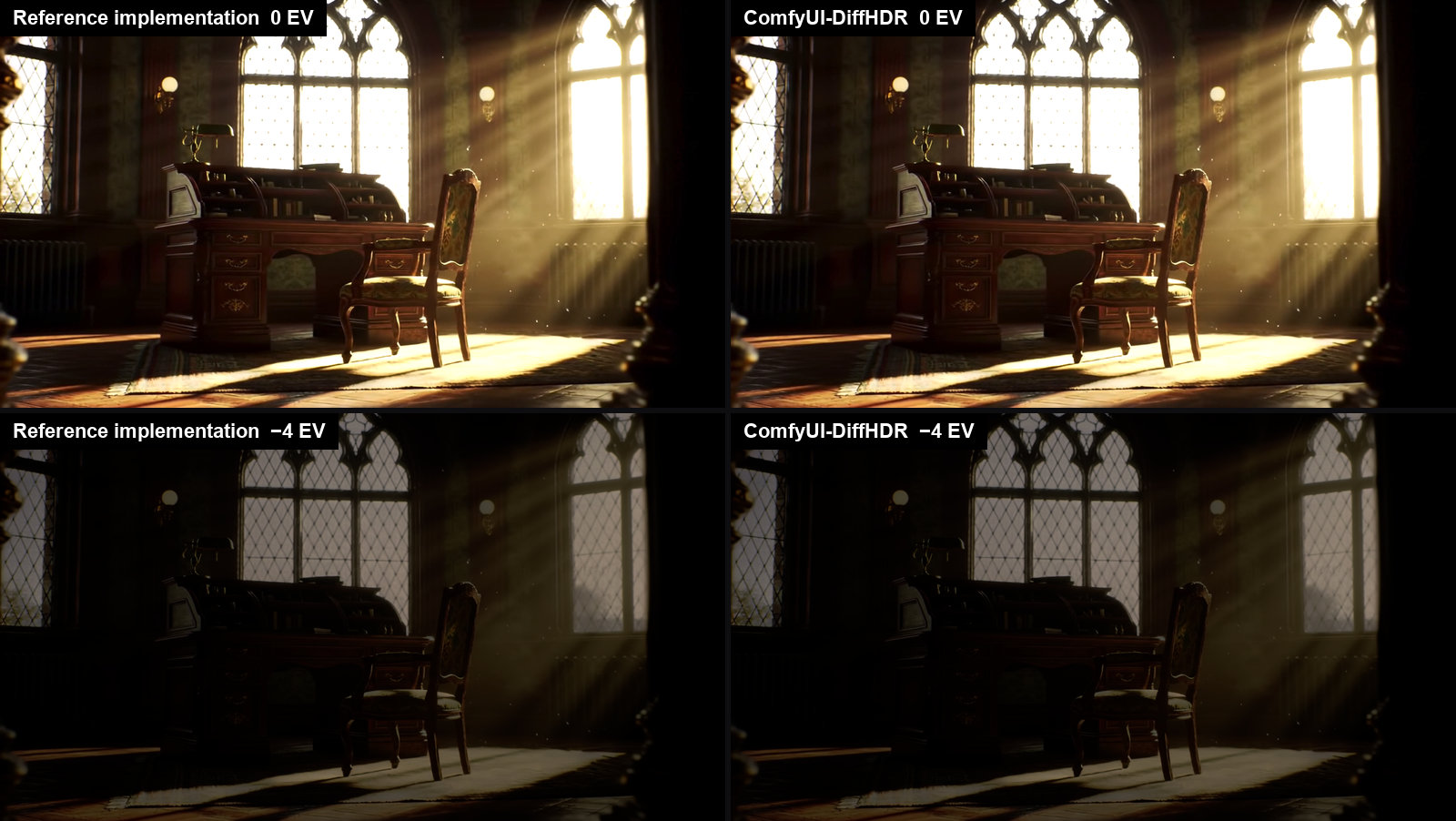
Same input, same seed, same 50 sampling steps: the reference implementation and this pack, shown at 0 EV and −4 EV. Log-space PSNR outside the mask for this clip is 59.1 dB, against a 42.1 dB floor between two runs of the reference itself.
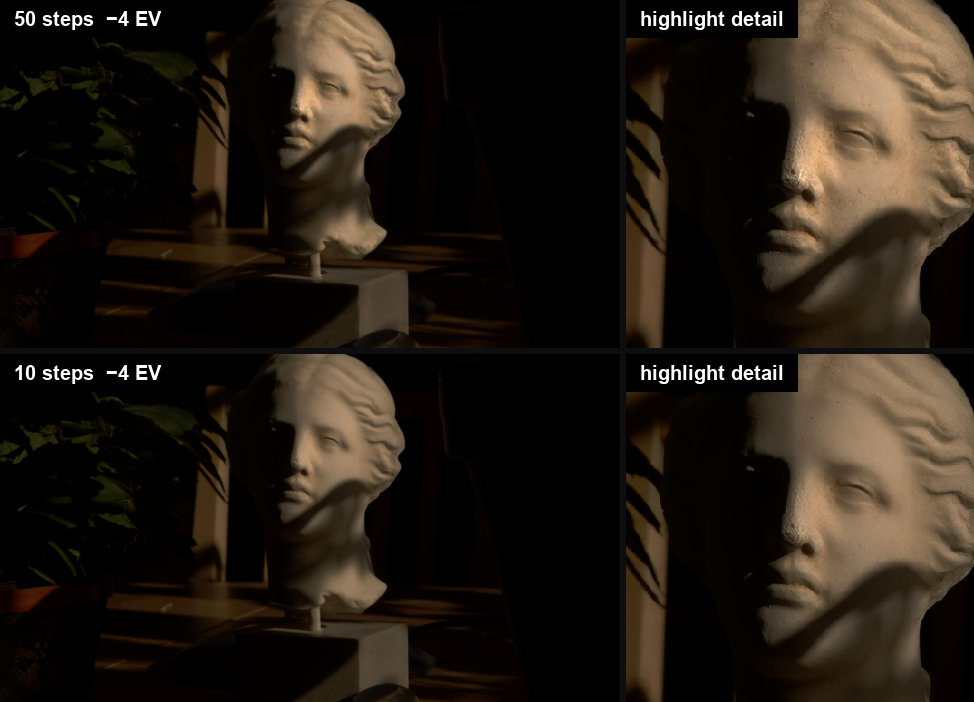
50 against 10 sampling steps on the test image, at −4 EV with a crop on the brightest reconstructed highlight. Ten steps is fine for iterating, but it reconstructs a flatter highlight: masked p99.9 luminance 5.61 against 8.87, peak 6.4 against 15.0.

Long video, 99 frames in six sliding windows, shown at −4 EV. Left: every window sampled on its
own — the view behind the glass changes with every window and the blend cross-fades between the
versions. Middle: the same run with use_prev_window_reference (the default), fast preset,
20 steps — the foliage stays the same along the clip. Right: original preset, 50 steps, same
reference. Full-quality MP4, 3840×720.
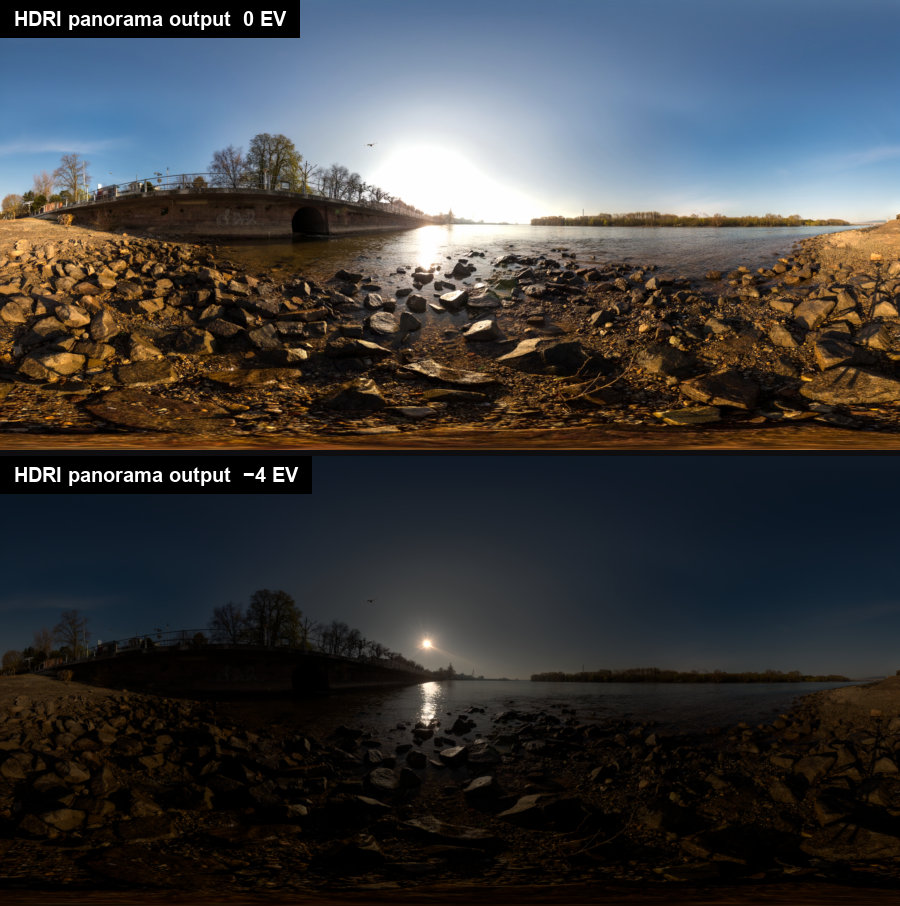
HDRI mode: a clipped equirectangular LDR panorama reconstructed into a 2048×1024 environment map. Four stops down, the sun and its reflection separate out of what was a flat white sky.
The pictures above derive from the DiffHDR demo media (Apache-2.0).
Details
<details> <summary><b>Validation against the reference implementation</b></summary>Validated end-to-end on an NVIDIA A100 80GB PCIe, using byte-identical pre-sized inputs and the reference default of 50 sampling steps on both sides.
| Case | Mask IoU vs reference mask code | Log-space PSNR outside the mask | Reference's own seed-to-seed PSNR | |---|---|---|---| | Single image (1280×720) | 1.000000 | 57.8 dB | 47.0 dB | | Video, 33 frames (1280×720) | 1.000000 | 59.1 dB | 42.1 dB | | Long video, all 99 demo frames, 6 blended windows | 1.000000 | 57.5 dB | — | | Long video, 65 frames, 3 blended windows | 1.000000 | 53.4 dB | 33.2 dB | | HDRI panorama (2048×1024) | 1.000000 | 51.1 dB | — |
Wherever a reference seed-to-seed floor could be measured, the output is closer to the reference than two runs of the reference itself (with different seeds) are to each other, and the exposure masks are bit-identical to the reference algorithm in every case.
The 99-frame run covers the full demo sequence, so the last window is short (19 real frames) and is padded to the trained length by repeating the last frame, exactly as the reference does. Inside the reconstructed region the two agree to within 5 % on p99.9 luminance (25.4 vs 24.2) and 0.3 % on the mean log value (0.4255 vs 0.4244), and the largest frame-to-frame step in masked mean log at a window boundary is 0.0035 against a median of 0.0014 over a 0.377–0.450 range — i.e. no visible seam, including at the padded last window.
Inside the reconstructed (masked) region the robust highlight statistics agree closely — e.g. for the 33-frame video p99.9 luminance 3.82 vs 3.72 and mean log value 0.4004 vs 0.3995 — while the single brightest pixel is not a meaningful comparison, because the reference's own two seeds differ on it by a factor of ~4 (p99.9 of 3.72 vs 13.65 between reference seeds 10 and 11).
Also verified on real weights: the DiffHDR LoRA downloads from a clean install and applies exactly
80 patches for both variants; the float32 VAE working copy really is float32 in all 194 parameters
(the checkpoint otherwise loads as bfloat16); and the sampler schedule matches the reference's
linspace(1, 0, N+1)[:-1] with shift 5 to within 6e-8 at 50, 20 and 10 steps.
The bundled text embeddings (assets/embeds/, produced with ComfyUI's own umT5-xxl encoder by
scripts/make_embeds.py) were verified on the GPU too: cosine similarity against the DiffSynth
prompter output used by the reference implementation is 0.999997 (empty prompt) and 0.99982
(panorama prompt) — closer than the reference's own bfloat16 run is to its float32 run (0.99996 /
0.99955). A 33-frame video reconstructed with the bundled embeddings matches the same run with a
live CLIPLoader at 85.5 dB log-space PSNR.
Every DiffHDR node logs one INFO line per execution with its own stage breakdown, so you can see where your time goes on your own hardware instead of guessing:
DiffHDR timing [video, 33 frames, 1 window(s), 10 steps]: prepare=0.0s conditioning=1.0s
model_patch=0.0s masks=6.2s control=1.9s encode=7.6s sample=118.2s decode=5.5s window=131.5s
blend=1.0s total=141.8s
DiffHDR timing [save_exr, 33 frames, exr/float/zip]: write=7.2s preview=0.5s total=7.7s
total is wall clock for the whole node, so it is not the sum of the stages: window already
contains encode/sample/decode, and the difference between total and the stages is work no
stage covers.
Where the time goes
Measured on an NVIDIA A100 80GB PCIe (CUDA 12.8, PyTorch 2.8, ComfyUI 0.36.0), bf16
wan2.1_vace_14B_fp16.safetensors with the float32 VAE, PyTorch SDPA attention, umT5 connected,
1280×720 (panorama 2048×1024), warm (model already resident), 10 sampling steps. Seconds.
| Stage | Image | Video, 33 frames | Panorama |
|---|---|---|---|
| prepare (resize / fit) | 0.0 | 0.0 | 0.0 |
| conditioning (text embeddings) | 0.8 | 1.0 | 0.8 |
| model_patch (LoRA + shift + attention) | 0.0 | 0.0 | 0.0 |
| masks (exposure detection + stabilisation) | 0.4 | 6.2 | 0.1 |
| control (log encoding, reference prep) | 0.1 | 1.9 | 0.2 |
| encode (VACE tensors, 2 VAE encodes) | 8.0 | 7.6 | 0.8 |
| sample | 118.2 | 118.2 | 20.1 |
| decode (VAE) | 5.5 | 5.5 | 0.3 |
| blend (window overlap) | — | 1.0 | — |
| node total | 133.3 | 141.8 | 22.4 |
| Save EXR (float32 / ZIP, write + preview) | 0.4 | 7.7 | 0.8 |
| graph overhead (image loading, queue) | 6.4 | 6.1 | 1.9 |
| end-to-end | 140.1 | 155.6 | 25.1 |
Three things follow directly from these measurements:
- Sampling is linear in steps and is the whole story. From 10 and 50 steps on the same job:
(588.1 − 118.2) / 40= 11.7 s per step at 720p × 33 frames, with an intercept of 0.7 s. - The per-job fixed cost is small: node total minus
sampleis 24 s for a 33-frame video and 15 s for an image. (Earlier versions of this README quoted "roughly 300 s of fixed cost"; that figure was derived from a line fit on a CPU-starved host, and it is wrong — the number above is measured stage by stage.) - Image mode is not cheaper because it samples less. It replicates the single frame to the
trained 33-frame window, so it runs the same VAE and sampling work:
windowis 131.9 s (image) against 131.5 s (video). The whole difference is per-frame CPU work, mostly mask detection over 33 frames instead of 1.
Totals
Same host and settings; warm. A cold first run after a ComfyUI restart adds a 170 s model load (measured 350.9 s cold vs 180.7 s warm for the same job).
| Mode | Steps | Output frames | Warm wall time | s / output frame | Peak VRAM |
|---|---|---|---|---|---|
| Image (720p) | 10 | 1 | 140 s | 140 | 62.9 GB |
| Video, 33 frames (720p) | 10 | 33 | 156 s | 4.7 | 63.4 GB |
| Video, 33 frames (720p) | 50 | 33 | 636 s | 19.3 | 62.9 GB |
| Long video, 99 frames, 6 windows | 20 | 99 | 1559 s (260 s / window) | 15.7 | 63.4 GB |
| Long video, 99 frames, 6 windows | 50 | 99 | 3706 s (618 s / window) | 37.4 | 63.4 GB |
| Long video, 99 frames, use_prev_window_reference | 20 | 99 | 1754 s | 17.7 | 63.4 GB |
| HDRI panorama 2048×1024 | 10 | 1 | 25 s | 25 | 48.7 GB |
The panorama is far cheaper than the video modes because it is a single latent frame: 2048×1024 is 256×128 latent pixels against 9 latent frames × 80×45 for a 720p clip.
Long clips also cost host RAM in proportion to their length — see Limitations.
The same GPU can be twice as slow
These jobs are GPU-bound only during sample. Everything else is CPU work, and two rented
"A100 80GB PCIe" hosts measured 2.4× apart end-to-end on the identical 10-step 33-frame job
with identical code (181 s vs 438 s) even though the sampling component — the only GPU-bound part
— differed by about 5 % (118 s measured here against the ~124 s implied by the other host's
step-count fit). The cause is CPU contention, and one setting dominates it: PyTorch sizes its
thread pool from the cores the container advertises, not from the cores the instance is
allocated. On a pod that showed 128 cores to torch but was allocated 16 vCPU, capping the pool
nearly halved the mask stage:
| torch.get_num_threads() | mask stage, 33 frames @720p |
|---|---|
| 64 (the default there) | 6.4 s |
| 16 | 3.5 s |
If your DiffHDR timing line shows a large masks or control value relative to sample, set
OMP_NUM_THREADS to the number of cores you actually have before starting ComfyUI.
Quantised base models and attention backends
Measured in an earlier session on a different A100 80GB PCIe host (the one at the slow end of the range above), 33-frame video at 20 steps. The wall times are only comparable to each other; the VRAM figures and the PSNRs are host-independent.
| Base model | Warm wall time | Peak VRAM | Log-space PSNR vs bf16 |
|---|---|---|---|
| bf16 wan2.1_vace_14B_fp16.safetensors | 575 s | 62.2 GB | — |
| weight_dtype = fp8_e4m3fn (same file) | 684 s | 47.2 GB | 41.2 dB |
| GGUF Wan2.1_14B_VACE-Q4_K_M.gguf | 605 s | 41.0 GB | 40.7 dB |
Attention backends produce the same result: auto and flash_attn are both within 85.6 dB of
sdpa (auto resolved to flash-attn on that host, under the preference order auto used before
it was changed to prefer SageAttention). flash-attn was the fastest at 530 s for
the 20-step video versus 575 s for SDPA on that host.
The reference implementation's own timings, on that same earlier host and the same inputs, were 1185 s (image), 994 s (33-frame video) and 592 s (panorama); on the faster host its 99-frame long video took 4538 s against our 3706 s. Each reference invocation is a fresh process that loads the 14B model from scratch (~270–400 s of the total), so they are not directly comparable to the warm numbers above.
How many steps?
The step count is the one real speed lever, and how far you can turn it down depends on the
preset. All parity numbers above were measured at 50 steps with the original preset.
fastpreset (default), 10–20 steps — the keeper setting. At 10 steps the reconstruction lands inside the 50-step reference's own seed-to-seed spread on both test clips, at 4.5x the speed; 20 steps is the shipped default because it costs little and leaves no doubt.fastpreset, 6 steps — previews and seed hunting, 7x faster than the reference setting. Highlight statistics are still within ~1 % of the 50-step run on the clips measured, but fine highlight texture (leaded-glass tracery and the like) starts to soften. At 4 steps both measured samplers lose that texture outright.originalpreset — reproduces the reference implementation. It needs 20 steps to get wherefastis at 10, and at 6–10 steps it carries a systematic +2.1 to +2.9 % highlight lift. 50 steps is the published setting.- Long videos behave the same. The sliding-window path was measured separately on all 99
demo frames (six blended windows):
fastat 20 steps reaches 46.5 dB against the 50-steporiginalrun andfastat 10 steps 43.1 dB, where two 50-step runs that differ only in the seed are 25.1 dB apart. No preset or step count changes the window seams. The table is in Samplers, turbo LoRAs and SageAttention 3 (measured) below. - Check your own footage. How much a lower step count changes the highlights is
content-dependent, and the two presets miss in opposite directions. On the bright 99-frame
long-video sequence 20
originalsteps reconstruct ~22 % less highlight energy than 50 (masked p99.9 19.3 vs 24.6) whilefastat 20 steps reconstructs ~66 % more; both stay within the spread of two 50-step runs of the same clip. use_prev_window_reference(on by default since 0.3.0) costs about 2 % more time at 20 steps over 99 frames (1137 s vs 1114 s) and is what keeps the reconstructed background the same from window to window — the numbers are in Samplers, turbo LoRAs and SageAttention 3 (measured).
Everything below was measured on a rented RTX PRO 6000 Blackwell (ComfyUI v0.36.0, fp16 VACE, fp32 VAE, SageAttention 2.2.0, cfg 1, 33 frames at 1280×720 unless stated): 197 runs on turbo LoRAs and SageAttention 3, 116 runs on samplers with seed statistics, and 10 runs of the full 99-frame sequence on the sliding-window long-video path.
Step-distillation ("turbo") LoRAs do not work here, and SageAttention 3 is not worth it.
Thirteen Wan 2.1 turbo LoRAs (lightx2v, CausVid, AccVid, FusionX, FastWan, rCM, …) load cleanly
next to DiffHDR — it patches the 8 vace_blocks, they patch the main blocks — but they shift
the value of DiffHDR's log-encoded output, and the log curve turns that into exponentially
blown highlights: at 6 steps and strength 1.0, masked log-PSNR against the 50-step run falls from
37.1 dB with no LoRA to 28.4 dB (CausVid v2 r32, +75 % highlight level) down to 15.7 dB
(lightx2v v1 r64, +3,894 %), and turning the strength down only walks the curve back towards
"off" — CausVid v2 @ 0.1 at 12 steps reaches 39.9 dB in 106 s while no LoRA at 10 steps reaches
40.1 dB in 90 s. They also cannot speed anything up: the time per step was 7.93–8.02 s in all
197 runs, with or without a LoRA. SageAttention 3 (FP4) builds and runs on Blackwell but is
1.06x faster than SageAttention 2.2 at the kernel level and 0.7 % end to end (89.7 s vs
90.3 s at 10 steps), with 5x the numerical error — against SDPA at the same seed it reaches only
36.8 dB inside the mask where SageAttention 2.2 reaches 62.4 dB, so it is not offered.
Read every quality number against the seed spread. There is no ground-truth HDR here, and the 50-step output is one sample of a stochastic process: two 50-step runs of the same input that differ only in the noise seed are 31.6–32.0 dB apart inside the mask on the video clips, 27.2 dB on a single image and 25.3 dB on a panorama, and on one clip one seed in three invents a small sun core that lifts the p99.9 highlight level by 449 %. The stable statistic is therefore the mean log value of the reconstructed region (seed spread ±0.5 to ±2.2 %), not the extreme quantiles — a configuration that reaches ~32 dB against a same-seed 50-step run is as close to the reference as a second reference run would be.
Sampler and step count (33 frames at 1280×720, node's own time, mean over 3 seeds, masked log-PSNR against the same-seed 50-step run):
| preset | steps | node time | vs 50 steps | quality |
|---|---|---|---|---|
| fast | 6 | 58 s | 7.0x | 44.4 dB (clip B) / 39.3 dB (clip A); mean log within +0.2 % / +1.0 % — fine tracery softens slightly |
| fast | 10 | 90 s | 4.5x | 48.2 dB / 43.5 dB; first setting inside the reference's own seed range on both clips |
| fast | 20 | 169 s | 2.4x | the shipped default; not measured separately — 10 steps already lands inside the reference's seed spread, 20 leaves no doubt |
| original | 10 | 90 s | 4.5x | 40.5 dB / 40.0 dB, with a systematic +2.1 % highlight lift on both clips |
| original | 20 | 169 s | 2.4x | 47.1 dB, +0.9 % (clip B); 46.2 dB on clip A |
| original | 50 | 408 s | 1.0x | the published setting — and itself one draw from the ~32 dB-wide seed distribution above |
res_multistep and dpmpp_2m are interchangeable (never more than 0.12 dB apart) and both are
free: the sampler costs nothing per step, only the step count does (8.0 s/step plus ~10 s fixed at
this resolution). Raising the shift from 5 to 8 helps every sampler, euler included. Two
settings are deliberately missing from the widgets: the beta scheduler (−54 % highlight
energy, mushy reconstruction) and the deis sampler (+144 %, below the seed noise floor,
invents glow patches).
The sliding-window long-video path, measured (2026-09-21). Everything above comes from
single-window inputs; long clips take a different path through the node, so the presets were
re-measured on it: all 99 frames of the demo sequence at 1280×720, six blended windows
(window_size 33, window_stride 16), use_prev_window_reference off (it was not the default
yet), seed 34, through the DiffHDR (Image / Video) node itself. The reference is the same node at
original / 50 steps.
| preset | steps | node time | masked PSNR vs the 50-step reference | mean log vs reference | seam ratio |
|---|---|---|---|---|---|
| fast | 6 | 346 s | 38.6 dB | +1.1 % | 2.8x |
| fast | 10 | 540 s | 43.1 dB | +0.5 % | 2.9x |
| fast | 20 | 1027 s | 46.5 dB | −0.1 % | 2.8x |
| original | 6 | 346 s | 35.7 dB | +2.0 % | 3.0x |
| original | 20 | 1025 s | 47.0 dB | +0.5 % | 2.6x |
| original | 50 | 2564 s | the reference | — | 2.9x |
Read all of it against the noise floor: two 50-step original runs that differ only in the
noise seed are 25.1 dB apart on this clip, with 75 % less highlight energy at p99.9 and a
8.8 % lower mean log value — the windowed 99-frame path has a far wider seed distribution than
the 33-frame clips (31.6–32.0 dB). Every preset and step count above therefore sits well inside
the reference's own distribution, and the deviations in the table are small fractions of the
distance between two reference runs.
fast is the better choice on this path too: at 6 steps it is 3 dB closer to the reference than
original and carries half its mean-log bias, and at 20 steps the two are level (46.5 vs
47.0 dB, and fast is the closer of the two in mean log). The two presets miss in opposite
directions — fast reconstructs more highlight energy than the 50-step run (p99.9 +52 to
+67 %), original at low step counts reconstructs less (−22 % at 20 steps, −41 % at 6), which
is the same under-reconstruction the "How many steps?" section reports. No configuration
introduces a seam or flicker: the largest masked mean-log jump at a window boundary stays at
2.6–3.0x the median jump elsewhere for every run, against 2.9x for the reference itself and 5.6x
for the second reference seed, and the flicker score is flat at 0.0037–0.0039 everywhere.
Node time depends only on the step count (48.0–48.4 s per step for all six windows); the sampler
itself is free. The 6-step figure is the warm one — the first run after a ComfyUI restart carries
about 180 s of one-off model loading inside its first sampling call.
Window-to-window consistency, measured (2026-09-21). The seam statistics above say the
cross-fade is smooth; they do not say that the windows agree on what they reconstruct. Watched
as a video, the 99-frame sequence without a window reference shows the sunlit foliage behind the
glass fade into a different reconstruction with every window — each window is sampled on its own
and only the decoded frames are blended. use_prev_window_reference hands every window the
previous window's output frame at the next window's start as its VACE reference image; it is now
on by default (the animation under Results shows the three runs side by side). Same clip, fast /
20 steps / seed 34, per-window outputs captured before the blend:
| | without reference | with use_prev_window_reference |
|---|---|---|
| agreement of neighbouring windows over their shared frames (masked log PSNR, mean / worst) | 28.7 / 24.8 dB | 34.4 / 30.8 dB |
| masked mean log, frame 0 → 96 | −15.8 % | −4.6 % |
| masked PSNR against the 50-step run with the reference | 28.7 dB | 43.8 dB |
| node time | 1114 s | 1137 s |
The reference keeps the foliage for the whole clip and holds the 20-step result within 43.8 dB of the 50-step one; the remaining 31–38 dB disagreement between neighbouring windows grows slowly towards the end of the clip, so on very long shots the background can still drift. Two alternatives were measured on the same clip and rejected: a fixed reference from the first window, and joint denoising of all windows with ComfyUI's native context windows (FreeNoise, pyramid fusion). The latter removed the hand-offs entirely and was 11 % faster, but averaging five overlapping windows at every sampling step flattened the reconstruction to a featureless haze (masked p99.9 of 5 against 30–60 for the blended runs), at 50 steps as well as at 20.
For a creative, deliberately unfaithful look, workflows/experimental/ holds two graphs that
put a Wan 2.1 turbo LoRA in front of the node. On the same 99 frames, FastWan rank 64 at strength
1.0 and 6 steps reaches 21.8 dB with +212 % highlight energy and AccVid rank 32 reaches
26.8 dB with +27 % — both far outside the seed distribution, and the FastWan render invents a
whole scene outside the window that no reference run contains. That is a look, not a
reconstruction; the graphs are labelled accordingly.
All numbers below were measured on a rented NVIDIA RTX PRO 6000 Blackwell Workstation
Edition (96 GB, compute capability 12.0, driver 610.57.04) on 2026-09-19: ComfyUI v0.36.0,
PyTorch 2.8.0+cu128, Triton 3.4.0, flash-attn 2.8.3, SageAttention 1.0.6 (PyPI) and 2.2.0
(source build), OMP_NUM_THREADS=31, float32 VAE, bundled text embeddings (no CLIP loader),
pre-sized inputs with resize_mode=native.
Every row is warm (the model was already resident; the cold run before it is discarded) and
every row was checked in the ComfyUI log: the requested backend actually ran — no run fell back
to SDPA, and nothing was offloaded or partially loaded, so the VRAM figures are the real
working-set peaks (nvidia-smi, sampled once a second).
Attention x precision — 33 frames, 1280x720, 10 steps
s/step is the sample stage divided by the step count; total is the node's own wall clock.
The long-video rows quote seconds per output frame instead, because their sample stage
covers three sliding windows.
| Model / precision | Attention | s/step | Total (33 f @ 10) | Peak VRAM | vs SDPA |
|---|---|---|---|---|---|
| fp16 file, default dtype | sdpa | 9.75 | 108.3 s | 50.9 GB | 1.00x |
| fp16 file, default dtype | flash_attn 2.8.3 | 9.61 | 106.8 s | 50.7 GB | 1.02x |
| fp16 file, default dtype | sage 1.0.6 | 9.03 | 100.7 s | 52.0 GB | 1.08x |
| fp16 file, default dtype | sage 2.2.0 | 8.24 | 92.8 s | 50.9 GB | 1.18x |
| fp16 file, default dtype | auto (-> flash_attn) | 9.60 | 106.7 s | 50.7 GB | 1.02x |
| weight_dtype=fp8_e4m3fn | sdpa | 9.46 | 105.2 s | 34.9 GB | 1.00x |
| weight_dtype=fp8_e4m3fn | flash_attn 2.8.3 | 9.30 | 103.6 s | 35.8 GB | 1.02x |
| weight_dtype=fp8_e4m3fn | sage 1.0.6 | 8.74 | 97.7 s | 35.8 GB | 1.08x |
| weight_dtype=fp8_e4m3fn | sage 2.2.0 | 7.94 | 89.5 s | 34.9 GB | 1.19x |
| weight_dtype=fp8_e4m3fn | auto (-> flash_attn) | 9.30 | 103.3 s | 35.0 GB | 1.02x |
| GGUF Q4_K_M | sdpa | 10.25 | 113.0 s | 28.7 GB | 1.00x |
| GGUF Q4_K_M | sage 1.0.6 | 9.52 | 105.4 s | 29.3 GB | 1.08x |
| GGUF Q4_K_M | sage 2.2.0 | 8.70 | 97.2 s | 30.0 GB | 1.18x |
The two auto (-> flash_attn) rows were measured before auto was changed to prefer
SageAttention; they are kept unchanged because that is what ran. On the same machine today auto
resolves to sage, i.e. it lands on the sage 2.2.0 rows instead.
Two things worth knowing beyond the attention question:
- fp8 is not slower here, and it saves 16 GB.
fp8_e4m3fnis 3 % faster than the plain fp16 file at 34.9 GB instead of 50.9 GB peak. GGUFQ4_K_Mis the smallest (28.7 GB) but the slowest of the three with SDPA (+8 %). - On this 96 GB card nothing ever offloaded, at any precision.
Image, panorama, step scaling, long video
| Job | Attention | Steps | s/step | Node total | Wall | Peak VRAM | |---|---|---|---|---|---|---| | Image 1280x720 | sdpa | 10 | 9.76 | 106.7 s | 110.0 s | 50.7 GB | | Image 1280x720 | sage 2.2.0 | 10 | 8.24 | 91.5 s | 95.0 s | 50.9 GB | | Panorama 2048x1024 | sdpa | 10 | 1.65 | 17.1 s | 20.0 s | 36.8 GB | | Panorama 2048x1024 | sage 2.2.0 | 10 | 1.55 | 16.1 s | 20.0 s | 36.8 GB | | Video 33 f | sage 1.0.6 | 20 | 8.95 | 189.1 s | 200.1 s | 50.3 GB | | Video 33 f | sage 1.0.6 | 50 | 9.04 | 462.8 s | 470.2 s | 52.2 GB | | Video 33 f | sage 2.2.0 | 20 | 8.25 | 175.1 s | 185.1 s | 50.3 GB | | Video 33 f | sage 2.2.0 | 50 | 8.26 | 423.6 s | 430.2 s | 52.2 GB | | Long video, 65 f, 3 windows, fp8 | sage 1.0.6 | 10 | 5.77 s / frame | 362.8 s | 375.2 s | 35.2 GB | | Long video, 65 f, 3 windows, fp8 | sage 2.2.0 | 10 | 5.16 s / frame | 322.1 s | 335.2 s | 35.9 GB |
Sampling is linear in steps. With SageAttention 2.2.0 on the 33-frame clip:
(413.2 - 165.0) / 30 = 8.27 s/step, and the 10-step run gives 8.24 s/step — the same number,
so there is no measurable per-run sampling overhead. A 65-frame clip (three blended windows,
fp8 + SageAttention 2.2.0, 10 steps) finishes in 335 s, i.e. 5.2 s per output frame.
Quality guard — is the speed-up free?
SageAttention is approximate, quantised attention, so a speed-up only counts if the HDR reconstruction is unchanged. For one fixed seed each backend was compared against the SDPA output of the same precision (33 frames, log-space PSNR, plus the masked highlight statistics that actually matter for HDR):
| Precision | Backend | log PSNR (frame) | log PSNR (masked) | masked p99.9 | masked p99.99 | masked mean-log | |---|---|---|---|---|---|---| | fp16 | flash_attn 2.8.3 | 84.1 dB | 81.5 dB | -0.04 % | -0.02 % | -0.006 % | | fp16 | sage 1.0.6 | 73.6 dB | 69.4 dB | -0.19 % | -0.12 % | +0.019 % | | fp16 | sage 2.2.0 | 71.4 dB | 65.3 dB | -0.44 % | -0.33 % | -0.077 % | | fp8 | flash_attn 2.8.3 | 83.9 dB | 80.6 dB | -0.05 % | -0.03 % | -0.007 % | | fp8 | sage 1.0.6 | 69.1 dB | 62.0 dB | -1.04 % | -0.92 % | -0.146 % | | fp8 | sage 2.2.0 | 69.1 dB | 62.1 dB | +0.80 % | +0.85 % | +0.138 % | | GGUF | sage 1.0.6 | 72.1 dB | 66.9 dB | -0.47 % | -0.36 % | -0.050 % | | GGUF | sage 2.2.0 | 71.3 dB | 65.3 dB | -0.49 % | -0.26 % | -0.065 % |
flash-attn is numerically free: 84 dB against SDPA and highlight statistics that move by
less than 0.05 %. SageAttention is visually free and numerically almost free: even its worst
row is 62 dB inside the reconstructed region — far above the 40 dB bar this project uses for
"same image" — and the reconstructed highlight energy moves by at most 1 %, in both directions,
i.e. it is noise rather than a systematic loss. Tonemapped side-by-side sheets (0 EV, -4 EV and
a highlight crop, one row per backend) were inspected at all three precisions and the backends
are indistinguishable. Use SageAttention for HDR work without hesitation; if you want
bit-for-bit-comparable results across machines, use sdpa.
What to set
attention = sageis the fastest option on this GPU (1.18-1.19x over SDPA end to end, 1.08x with the PyPI package alone), and it costs no visible quality.attention = autogets you there by itself: it prefers SageAttention, so on a machine with SageAttention installed it resolves to the fastest row above; it only falls back to flash-attn (1.02x here) when SageAttention is missing, and to ComfyUI's own default when neither is installed. Setsdpaorflash_attnexplicitly when you want bit-reproducible output rather than the quantised kernel.- flash-attn's benefit is small because PyTorch 2.8's SDPA already dispatches to an efficient fused kernel on Blackwell. Measured on the bare Wan self-attention shape (40 heads x 128, 32,400 tokens, bf16): SDPA 60.7 ms, flash-attn 57.7 ms (1.05x), SageAttention 1.0.6 47.9 ms (1.27x), SageAttention 2.2.0 32.7 ms (2.05x). Attention is roughly a third of the sampling cost, which is why a 2x attention kernel becomes a 1.19x job.
- Combine
sagewithweight_dtype = fp8_e4m3fnfor the best of both: fastest measured configuration and 16 GB less VRAM than the plain fp16 file.
Install recipe that worked (Linux, Python 3.12, PyTorch 2.8.0+cu128)
flash-attn — prebuilt wheel, no compilation, 11 s:
pip install --no-deps \
  https://github.com/Dao-AILab/flash-attention/releases/download/v2.8.3/flash_attn-2.8.3+cu12torch2.8cxx11abiTRUE-cp312-cp312-linux_x86_64.whl
Pick the asset whose torch2.X, cp3XX and cxx11abi{TRUE,FALSE} match your environment
(python -c "import torch; print(torch.__version__, torch._C._GLIBCXX_USE_CXX11_ABI)").
SageAttention — the PyPI package installs in seconds and works, but on Blackwell it prints
You need pytorch with cu130 or higher to use optimized CUDA operations and falls back to its
slower Triton path:
pip install sageattention # 1.0.6, 1.08x
SageAttention 2.2.0 from source is what gives the 1.18x; it compiled in 277 s (4.6 min) with 16 parallel jobs on a 32-vCPU pod:
git clone https://github.com/thu-ml/SageAttention.git && cd SageAttention && git checkout v2.2.0
export TORCH_CUDA_ARCH_LIST=12.0     # 8.6 for Ampere RTX A6000, 8.9 for Ada, 9.0 for Hopper
export MAX_JOBS=16 EXT_PARALLEL=4 NVCC_APPEND_FLAGS="--threads 4"
pip install --no-build-isolation .
Restart ComfyUI afterwards and check the startup log: the node logs
DiffHDR attention: <backend> for auto, warns and falls back to SDPA when a backend is
missing, and ComfyUI itself logs Flash Attention failed, using default SDPA or
Error running sage attention per call if a kernel fails at runtime. If you see any of those,
the run you are looking at is an SDPA run.
DiffHDR (Image / Video) — DiffHDRVideo
All-in-one reconstruction for a single image or a frame sequence. One frame runs in image mode; up
to window_size frames run as a single window; more frames run as overlapping, blended sliding
windows.
- Inputs:
preset(fast/original/custom, defaultfast),model(Wan2.1-VACE-14B),vae(Wan 2.1 VAE),images(LDR image or batch),clip(optional umT5-xxl),prompt(only used withclipconnected),mask(optional, overrides automatic detection),reference_image(optional, guides content of over-exposed regions),reference_ev(exposure boost applied to the reference, default 5 stops),resize_mode(crop_to_720p/native/custom),width,height(forcustom),steps(default 20),seed,sampler(defaultres_multistep),scheduler(defaultsimple),shift(default 8.0 — the last three only honoured whenpresetiscustom),mask_overexposed,mask_underexposed,window_size(frames per window, 4n+1, default 33 — the training length),window_stride(frames between window starts, default 16),use_prev_window_reference(default on — each window gets the previous window's output frame as its reference image, so the reconstructed content stays the same along the clip; off reconstructs every window on its own),attention,vae_precision. - Outputs:
hdr(linear scene-referred HDR image/batch),mask(regenerated regions).
DiffHDR HDRI (Panorama) — DiffHDRPano
Reconstructs an HDR environment map from a single clipped, equirectangular LDR panorama using the DiffHDR panorama LoRA.
- Inputs:
preset(fast/original/custom, defaultfast),model,vae,image(equirectangular, 2:1; only the first frame of a batch is used),clip(optional),prompt(defaults to the training prompt, only used withclipconnected),mask(optional),width(default 2048),height(default 1024 — the panorama is stretched to this size, not cropped),steps(default 20),seed,sampler,scheduler,shift(only honoured whenpresetiscustom),attention,vae_precision. - Outputs:
hdr,mask.
DiffHDR Apply LoRA — DiffHDRApplyLora
For modular graphs: downloads (on first use) and patches the DiffHDR LoRA into a Wan2.1-VACE-14B
model. Follow with ModelSamplingSD3 and sample with cfg 1 — shift 8 with res_multistep /
simple to match the all-in-one node's fast preset, shift 5 with euler / simple for the
reference implementation's setting.
- Inputs:
model,variant(standard: image/video,pano: HDRI),strength(default 1.0). - Outputs:
model.
DiffHDR Preprocess — DiffHDRPreprocess
Builds the log-encoded control video and regeneration mask for a native WanVaceToVideo graph.
- Inputs:
images(sRGB LDR frames, sized to multiples of 16),variant(video/panomask detector),mask_overexposed,mask_underexposed. - Outputs:
control_video(log-encoded frames, feed toWanVaceToVideo.control_video),control_masks(feed toWanVaceToVideo.control_masks).
DiffHDR Postprocess — DiffHDRPostprocess
Decodes the DiffHDR log curve to linear HDR after VAE Decode in a modular graph.
- Inputs:
images(VAE-decoded, log-encoded frames). - Outputs:
hdr(linear HDR).
DiffHDR Tonemap Preview — DiffHDRTonemap
Converts linear HDR to a displayable sRGB image, for PreviewImage or an LDR export.
- Inputs:
hdr,exposure(stops, default 0),operator(reinhardcompresses highlights,clipshows the LDR range at the chosen exposure as-is). - Outputs:
image(sRGB,[0,1]).
DiffHDR Save EXR — DiffHDRSaveEXR
Writes linear HDR as OpenEXR (single file or frame sequence) or Radiance .hdr.
- Inputs:
images(linear Rec.709 HDR image or batch),filename_prefix(defaultDiffHDR/hdr),format(exr/hdr),bit_depth(half/float),compression(none,rle,zips,zip,piz,pxr24,b44,b44a,dwaa,dwab),dwa_compression_level(default 45, only used bydwaa/dwab),colorspace(linear_rec709/acescg/aces2065_1),start_frame(first frame number of a sequence),preview_exposure(exposure for the tonemapped UI preview only). - Outputs: none (output node; also emits a tonemapped preview in the UI).
- CUDA:
attention=autoprefers SageAttention, then flash-attn, then ComfyUI's own default attention backend, depending on what is importable in your environment; unavailable/incompatible backends fall back to PyTorch SDPA automatically. - ROCm: treated like any other discrete accelerator; flash-attn/SageAttention availability follows whatever ComfyUI itself detects for the device, with the same SDPA fallback.
- MPS (Apple Silicon): flash-attn and SageAttention are GPU-only backends in ComfyUI and are
not selected on
mps, soattention=auto(or any explicit choice) transparently uses PyTorch SDPA. For VRAM-constrained Apple Silicon machines, use a GGUF-quantized Wan2.1-VACE-14B checkpoint via the ComfyUI-GGUF custom node instead of the full fp16 safetensors. - CPU: supported for testing (this is how the automated test suite and CI run) but far too slow for real inference on a 14B video diffusion model.
- Windows: the code path has no Windows-specific branches, but it has not been run on a Windows GPU yet — see Limitations.
- CPU thread pool: if the
masksorcontrolstage dominates yourDiffHDR timingline, capOMP_NUM_THREADSto the cores you actually have before starting ComfyUI — see Performance.
- The
hdroutput of every DiffHDR node is linear, scene-referred Rec.709 data with values that legitimately exceed1.0in reconstructed highlights. Never route it through an 8-bit save or preview node directly — useDiffHDR Tonemap Previewfirst, or write it out withDiffHDR Save EXR. DiffHDR Save EXRcan target OpenEXR (half/16-bit orfloat/32-bit, withnone/rle/zips/zip/piz/pxr24/b44/b44a/ lossydwaa/dwabcompression) or Radiance.hdr(RGBE). The Radiance path is always linear Rec.709 and ignores the bit depth, compression and colorspace widgets.colorspaceconverts pixels from linear Rec.709 to the chosen primaries (linear_rec709,acescg,aces2065_1) and writes the matching chromaticities into the EXR header, so downstream tools read the file correctly regardless of which primaries you picked.- A batch of frames is written as
<filename_prefix>_<counter>/frame_####.exr; a single image is written directly underfilename_prefix.start_framesets the first frame number in a sequence. Frame numbers are padded to at least four digits, widened for the whole sequence when the last frame needs more, so the files always stay in lexical order.
- DiffHDR was trained at 720p (1280×720 or 720×1280) on 33-frame windows;
resize_mode=crop_to_720pand the defaultwindow_size=33match that training distribution most closely. Other sizes and window lengths work but are extrapolating beyond the training distribution. window_sizemust be4n+1;window_stridemust be smaller thanwindow_size.- Long clips are still sampled window by window.
use_prev_window_referencekeeps the reconstructed content of the clipped regions consistent from window to window, but each window remains its own sample: on very long shots the background can drift slowly, and turning the option off makes every window invent its own version. - Long clips cost host RAM in proportion to their length. At 1280×720 a frame needs about
37 MB of system RAM while the node runs — roughly 26 MB of it allocated by DiffHDR
itself (log-encoded control frames, mask, HDR output buffer) plus the ~11 MB input IMAGE
that ComfyUI keeps cached. The figure is derived from the tensor sizes
(
1280·720·3·4bytes per float32 RGB frame,1280·720·4per mask frame), not measured on a specific machine. A 500-frame 720p clip therefore needs roughly 18 GB of free RAM; split longer shots or process them in parts. - The published numbers were measured on a single A100 80GB PCIe; other GPUs will differ.
- The Windows GPU path is untested.
python -m pytest -qruns the suite. It needspytestandnumpy(requirements-dev.txt) on top of the runtime requirements, and runs on the CPU.- Point
COMFYUI_PATHat a ComfyUI checkout to also run the tests that import ComfyUI itself (node registration, schemas, the workflowwidgets_valuescheck):COMFYUI_PATH=/path/to/ComfyUI python -m pytest -q. SetDIFFHDR_REQUIRE_COMFY=1to make those tests fail instead of skipping when ComfyUI cannot be imported. - A few tests compare directly against the upstream implementation and skip unless it is checked
out locally:
git clone https://github.com/Eyeline-Labs/DiffHDR .dev/reference/DiffHDR. - CI runs the suite on Linux, macOS and Windows with Python 3.10 and 3.12, plus a dedicated job that
checks out ComfyUI and runs the ComfyUI-dependent tests with
DIFFHDR_REQUIRE_COMFY=1.
Credits & License
This project is licensed under Apache-2.0 (see LICENSE). It is an independent ComfyUI
integration of:
- DiffHDR by Eyeline Labs (Apache-2.0) — mask detection, the log encoding curve and the long-video blending scheme are ported from this project. Paper: DiffHDR: Re-Exposing LDR Videos with Video Diffusion Models, arXiv:2604.06161, project page eyeline-labs.github.io/DiffHDR.
- DiffSynth-Studio (Apache-2.0), which DiffHDR itself builds on.
- Wan 2.1 (Apache-2.0), the underlying video diffusion model, used here through ComfyUI's native Wan2.1-VACE-14B support.
- The DiffHDR LoRA weights (Apache-2.0) are downloaded at runtime and are not part of this repository.
See NOTICE for the full attribution.