
Ciru AMD Halo Qwen 2.1 Turbo
Qwen Image 2.1: Turbo Prediction and Strix Halo packed attention for text-to-image and image editing. Start edits with full evaluations; edit prediction is opt-in.
Ciru AMD Halo Qwen 2.1 Turbo for ComfyUI
A single MODEL → MODEL node for Qwen Image 2.1 text-to-image and image editing. Connect UNETLoader → QwenImage21Cache → Ciru AMD Halo Qwen 2.1 Turbo → KSampler, then start text-to-image with 30 Euler/simple steps, CFG 1, 12 full evaluations, and auto attention. For image edits, start with full_evaluations equal to the sampler step count. Prediction can run on other hardware for text-to-image. The packed 2048 attention path is enabled only on AMD Strix Halo (gfx1151); the package's GPU check routes other hardware through its existing attention implementation. With 12/30 text-to-image, the other 18 sampler steps still run, using predicted denoiser outputs.
The node contains no model weights. It uses the Qwen Image 2.1 model, text encoder and VAE already installed in ComfyUI.
Install
This repository is a normal ComfyUI custom node:
cd /path/to/ComfyUI/custom_nodes
git clone https://github.com/ciru-ai/ComfyUI-CiruImageAccelerator.git
# Restart ComfyUI, then reload the browser.
Search for Ciru AMD Halo Qwen 2.1 Turbo in ComfyUI-Manager or run comfy node install ciru-image-accelerator with the Comfy CLI. Git clone and the source ZIP also work.
For a ZIP installation, extract the release so that ComfyUI/custom_nodes/ComfyUI-CiruImageAccelerator/__init__.py exists. No pip install step or replacement Torch build is required. On gfx1151, the optional 2048 attention optimization requires a working Triton installation in the same Python environment as ComfyUI; auto falls back to ComfyUI's native attention if Triton is missing and logs that choice. Install a Triton build compatible with your existing ROCm/PyTorch stack if you want that optimization. The package never installs dependencies at runtime.
Check the installation with the Python interpreter and environment used to launch ComfyUI:
/path/to/comfy-python /path/to/ComfyUI/custom_nodes/ComfyUI-CiruImageAccelerator/tools/doctor.py
The check reports the detected GPU, PyTorch/HIP/Triton versions and expected model paths without loading the weights. If PyTorch cannot import, run it through the same ROCm library-path setup as your ComfyUI launcher. A successful check confirms prerequisites; run the included 2048 workflow to verify the attention kernel compiles on your stack.
Use a recent ComfyUI that includes the TextEncodeQwenImage21 and QwenImage21Cache nodes. Download the INT8 ConvRot denoiser and encoder and BF16 VAE from Comfy-Org/Qwen-Image-2.1. Place them in the standard models/diffusion_models, models/text_encoders and models/vae folders shown on that page. These model files are not redistributed here.
Use
Add Ciru AMD Halo Qwen 2.1 Turbo after the Qwen Image 2.1 model loader and cache node, and before KSampler:
UNETLoader → QwenImage21Cache → Ciru AMD Halo Qwen 2.1 Turbo → KSampler
Use TextEncodeQwenImage21 for conditioning. Start with Euler, simple scheduler, CFG 1, 30 steps, batch one. Prediction requires at least 20 sampler steps. The included workflows demonstrate 1024 and 2048 square output. Prompt enhancement is optional and stays separate from this node.
Image editing uses the same Ciru AMD Halo Qwen 2.1 Turbo node, not a separate edit node. Open Templates → Extensions → ComfyUI-CiruImageAccelerator → qwen21-1024-image-edit-full, or load workflows/qwen21-1024-image-edit-full.gui.json into ComfyUI. In its Load Image node, choose the source picture; the bundled assets/elephant-1024-full.png is an optional example you can upload. Write the edit instruction in TextEncodeQwenImage21 and refer to the source as <image1>. The template connects the image and VAE to that encoder, its latent output to KSampler, and the Ciru node on the MODEL connection between QwenImage21Cache and KSampler.

The edit template starts at 30 sampler steps and 30 full_evaluations, which performs every denoiser evaluation. auto keeps native attention at 1024 and uses packed attention for the qualified 2048-square shape on gfx1151. To try faster edit prediction, explicitly enable allow_edit_prediction and lower full_evaluations; this is experimental, so compare with a full-evaluation edit before relying on source fidelity. If you use ComfyUI's official Image Edit (Qwen Image 2.1) workflow instead, insert the Ciru node on its MODEL connection after QwenImage21Cache and before the sampler.
For text-to-image, open Templates → Extensions → ComfyUI-CiruImageAccelerator and choose the 1024 or 2048 GUI workflow. The editable node controls are visible between the cache and sampler. The same text-to-image setups are in api_examples/ for API users; use qwen21-1024-default.api.json or qwen21-2048-default.api.json, and the -full files for 30/30 references. The GUI workflows in workflows/ are what ComfyUI shows in its Templates menu.
The node has four controls:
enabled: turn both optimizations on or off.full_evaluations: 12 is the default and our preferred speed–quality balance. Lower values finish sooner but rely more on prediction, which can lose fine detail or change the image. Higher values use the full denoiser more often and generally preserve more fidelity, but take longer. Set it equal to the sampler step count to remove prediction entirely. The minimum is 6; every sampler step still executes.attention:autokeeps ComfyUI's native attention for 1024-square and smaller attention shapes. It selects the measured packed BF16 kernel only for the qualified 16,384-token shape used by 2048-square images on ROCm gfx1151.nativealways leaves ComfyUI's attention unchanged.strixexplicitly enables the custom kernel at qualified 1024 or 2048 sizes and reports an error if the gfx1151/Triton path is unavailable.allow_edit_prediction: off by default. With reference images, prediction is blocked unless this is enabled orfull_evaluationsequals sampler steps. The optional edit-prediction path is experimental.
The 1024 Strix kernel uses an interleaved head layout, but it can be slower than ComfyUI's native attention at smaller sizes. Use strix there only when deliberately comparing the two. At 2048 square, the custom path packs each head contiguously. Other shapes, masks, dtypes, batches and hardware use the existing attention path. An existing attention override is preserved by auto; select native when combining this node with another attention extension.
Example output and speed
The same rewritten elephant prompt, seed 99, CFG 1 and 30 Euler/simple steps on a Radeon 8060S. This earlier 1024 comparison used the forced Strix attention path for both images; its timings are not the new 1024 auto default. The comparison changes the number of full denoiser evaluations, not the model weights.
| Full 30/30, forced Strix | 12/30, forced Strix |
|---|---|
| 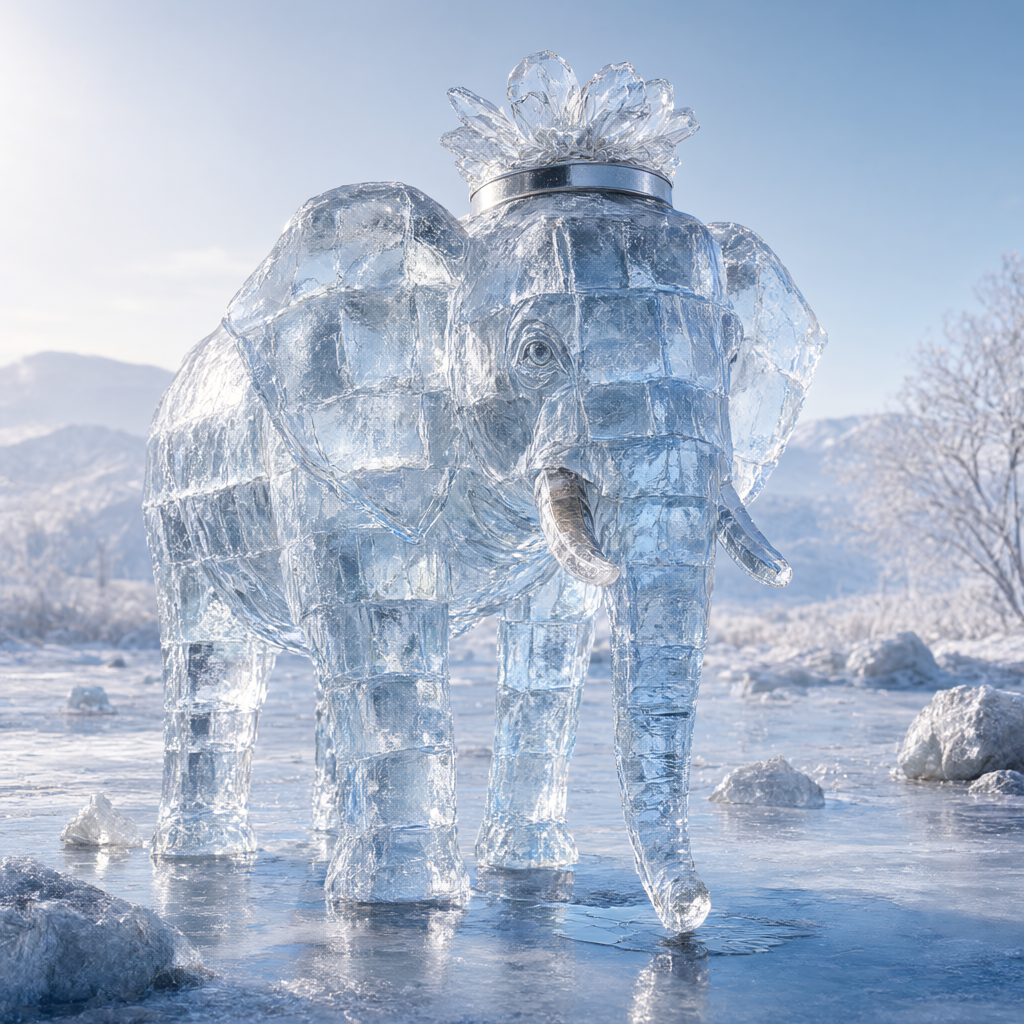 |
| 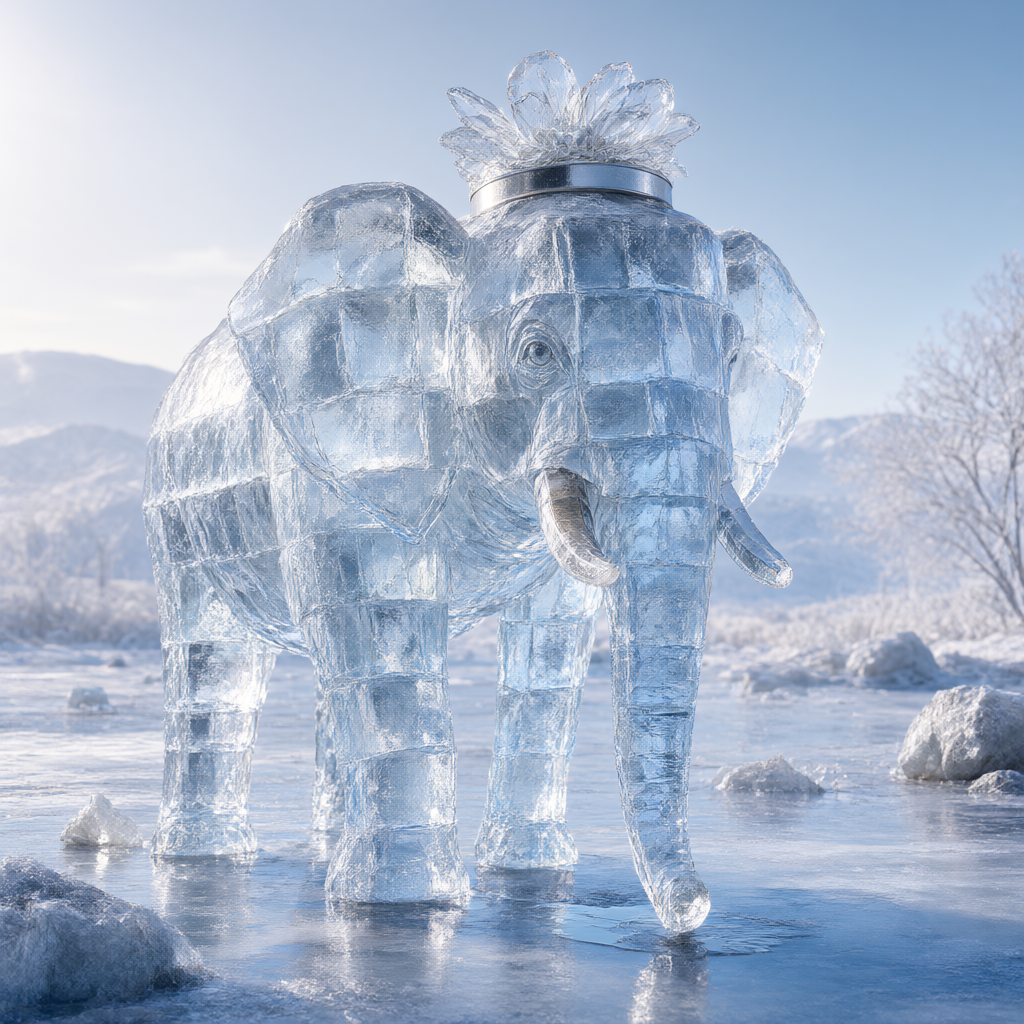 |
| 74.06 s | 34.62 s |
|
| 74.06 s | 34.62 s |
With the current 1024 auto default, a matched 12/30 Gothic portrait took 34.74 s using native attention. The earlier forced Strix run took 33.43 s on that prompt. The custom path can also make smaller workloads slower, so auto leaves them on ComfyUI's native implementation; use strix only to compare on your own stack.
At 2048 square, the packed-attention full reference took 420.05 s and the packaged 12/30 path took 173.19 s. The 2048 packaged image was byte-identical to the saved 12/30 reference. These are single runs with model loading and prompt rewriting excluded. The full reference and 1024 images were produced in earlier matched runs; see VALIDATION.md for artifact hashes and exact scope.
Current validation and limits
The package was exercised with Qwen Image 2.1 INT8 ConvRot denoiser and encoder, BF16 VAE, Radeon 8060S/gfx1151, ComfyUI c194dd00cd42aa18d9dbf27d977bf6b85d9ea565, Torch 2.13.0+rocm10.0.0, HIP 7.15.26333, Euler/simple, CFG 1, batch one. The forced Strix path produced byte-identical 1024 and 2048 PNGs to previous 12-evaluation research results. See VALIDATION.md for the clean-install and GUI workflow tests.
Image editing with reference conditioning is supported with full evaluations, and predicted edits require the separate opt-in. On one 1024 edit, 12/30 predicted calls produced a visually close result to 30/30 full calls, with mean RGB pixel difference 2.53/255; this single comparison does not establish general edit fidelity. Editing can change contrast and texture beyond the requested area even without prediction, so inspect edits for source fidelity. The predictor rejects batch sizes above one and unexpected extra model calls. Other samplers, CFG settings, LoRAs, CUDA and other AMD GPUs are not yet qualified for image quality or speed; the attention path stays native outside its gfx1151 shape guard. Prediction changes text-to-image outputs, especially at the most aggressive settings. Seven and twelve full evaluations matched the earlier research runner PNGs at a 25-step fixture.
The package does not claim to improve all ComfyUI attention implementations. The large 2048 layout improvement was measured against our earlier interleaved dense kernel, not against a fully optimized alternative. Existing model weights and Qwen's Research License remain the user's responsibility; the model license restricts commercial use without a separate license.
Credits
Qwen supplies Qwen Image 2.1 and its model terms. ComfyUI and comfy-kitchen supply the model integration and INT8 ConvRot path. The prediction method is inspired by TaylorSeer; this package adapts residual prediction and tested schedules to Qwen Image 2.1. Ciru's contribution includes the scoped ComfyUI node, schedule controls, Strix Halo attention layout diagnosis and integrated backend. This repository contains code and workflows, not Qwen weights.