
ComfyUI Extension
CG Edit in Krita
Adds a custom node that opens an image in Krita for editing.
chrisgoringe/cg-krita
Nodes1
On cloudLocal install
Categorykrita
Stars6
Updated4 months ago
Readme
Edit in Krita
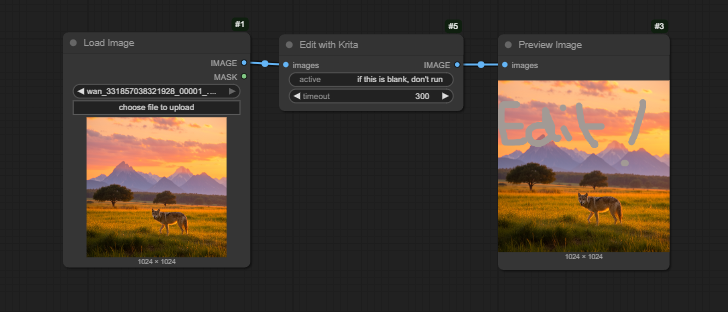
Often in my inpainting workflows I want to make a small edit manually, to nudge the inpaint in the right direction. So I created this node that will open the image in Krita, and when you save it, pass it on.
It's a great companion to Image Filter.
Installation
Install Krita if you don't have it
Install the custom node
With the Comfy Manager, or manually:
cd [...]/ComfyUI/custom_nodes
git clone https://github.com/chrisgoringe/cg-krita
Restart ComfyUI. In the python console you will hopefully see a message saying the Krita files have been installed.
Usage
- Put the
Edit with Kritanode into your workflow where you want to edit an image.- The timeout specifies a timeout, after which the original image will be passed through.
- The active field can be used to dynamically enable/disable the node. It's a
STRINGinput; if it is empty, the node will just pass the image through; if it contains anything at all, the node will run.
- Make sure Krita is running on your computer
- Run the workflow
- The image will load in Krita.
- If Krita isn't running, the workflow will just wait. When you launch Krita, the image will open.
- Make the edits you want, and save. When you save, the image will close in Krita, and the workflow resume.
- Note that you need to make a change, however trivial, for Comfy to resume before the timeout. The node checks the modification time.
- If you sent a batch of images, they will each open in turn.
Problems?
Try here first. Then report an issue.