
Comfyui-mini-nodes
A collection of custom nodes for ComfyUI, featuring high-precision color matching (MKL, Wavelet, HM), latent size adjustment, and metadata-aware image saving.
Nodes (4)
Mask-based color matching that only touches the pixels you point at
Exporting a PNG that does NOT carry your workflow
A latent-size preset picker that spits out two clean integers
Grade a whole video from two stills — and ramp the strength in and out over a frame range
ComfyUI Mini Nodes


A collection of simple custom nodes for ComfyUI, featuring color matching, latent size adjustment, and metadata-aware image saving.
UPDATE HISTORY
v1.0.4 Update: Fix high resolution shape mismatch and add nodes_video_color_match.
v1.0.3 Update: Presets Update: Comprehensive updates and optimizations to the presets system for better usability. Node Renaming: The Latent Size node has been renamed to Resolution for better semantic clarity. Note The functionality remains identical. If you are loading an old workflow, simply replace the missing Latent Size node with the new Resolution node.
v1.0.2 Update Summary: An essential hotfix for v1.0.2 to address algorithm limitations in specific workflows.
Re-introduction & Stability: Re-introduced Linear and Mean methods as top options. These are optimized for Mask inputs, providing superior stability and precision for local color matching (e.g., skin tones) compared to non-linear methods.
New Algorithms:
MKL: The primary choice for general full-image color transfer.
Wavelet: Best suited for fixing color/white balance in identical compositions.
UX Cleanup: Removed the redundant Balanced Linear option; users can achieve the same results by adjusting the strength parameter.
🚀 v1.0.1 Core Node Upgrade: mini_color_match Designed specifically for outpainting workflows and character skin-tone consistency, this update eliminates the "sampling offset" caused by mismatched image dimensions, significantly improving color matching precision.
Key Enhancements Decoupled Spatial Sampling: The node no longer forces the reference image to resize or crop to match the target. It now performs independent pixel sampling in the original coordinate space of each image. This ensures that even with different aspect ratios, the skin tone statistics remain accurate as long as the masks are placed correctly on the respective faces.
Intelligent Optional Masks: Mask inputs are now optional. If no masks are connected, the node automatically switches to a "Full-Frame Match" mode, using global image statistics for quick grading.
High-Sensitivity Sampling Threshold: The pixel extraction threshold has been lowered from 0.5 to 0.1. This allows the algorithm to capture feathered mask edges, resulting in a much more delicate and natural color transition.
Enhanced Balanced Linear Matching: The contrast scaling limit has been expanded from 0.85–1.15 to a more robust 0.5–2.0. This enables the node to handle drastic lighting differences, making it easier to achieve deep cinematic color transfers from "modern digital" to "90s film aesthetic".
Pro Tip: For the best results in outpainting, draw a mask over the target face and the reference face separately. The node will precisely align the skin tones regardless of image positioning.
📦 Features
🎨 Color Match Node
Are you frustrated by color shifts introduced by image editing models? Standard color matching nodes often fall short. This node provides a precise solution.
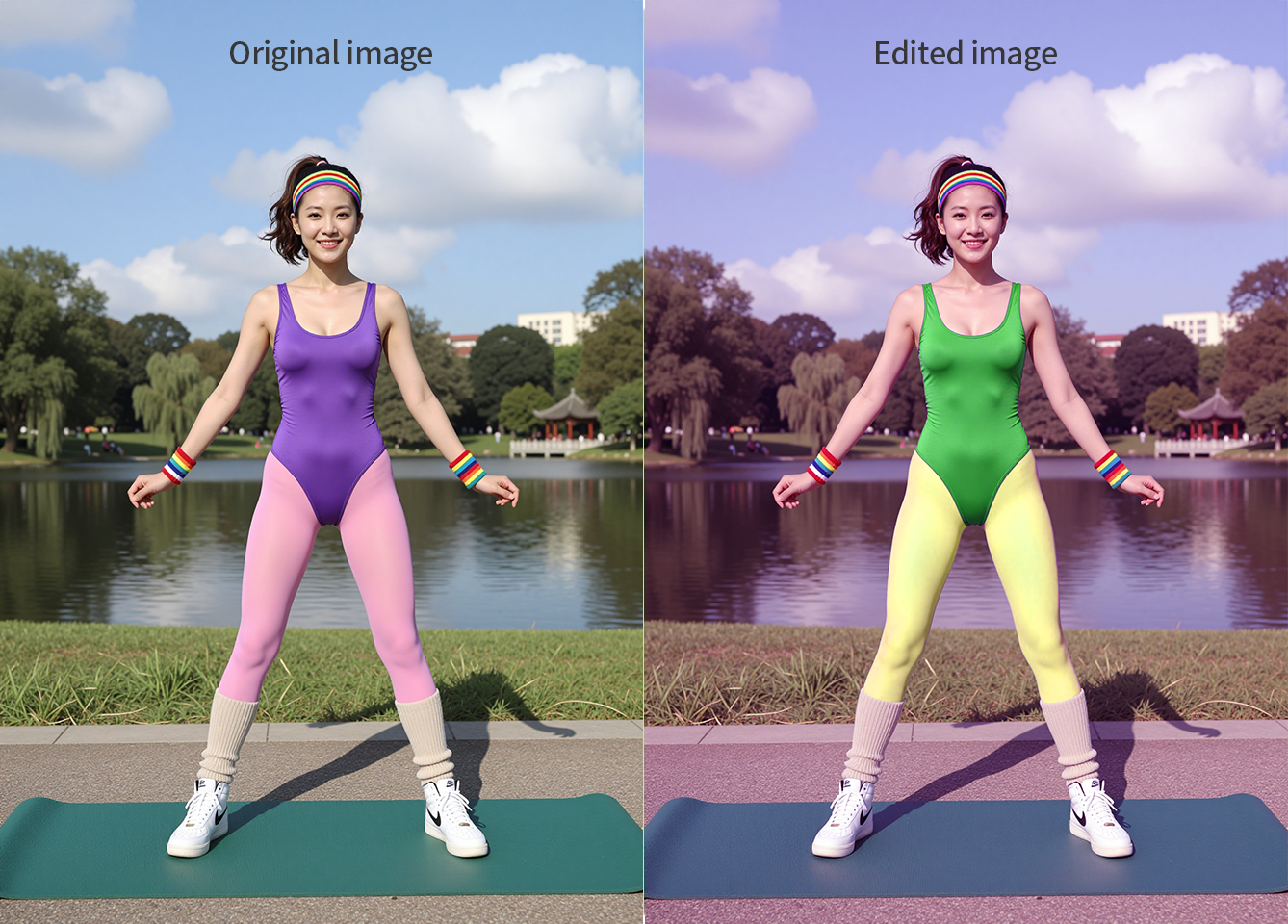
As shown, edited images suffer from both passive color shifts (from the model) and active color changes (due to content differences like clothing, pose, or perspective). Using the entire original image as a reference fails to accurately correct these shifts.
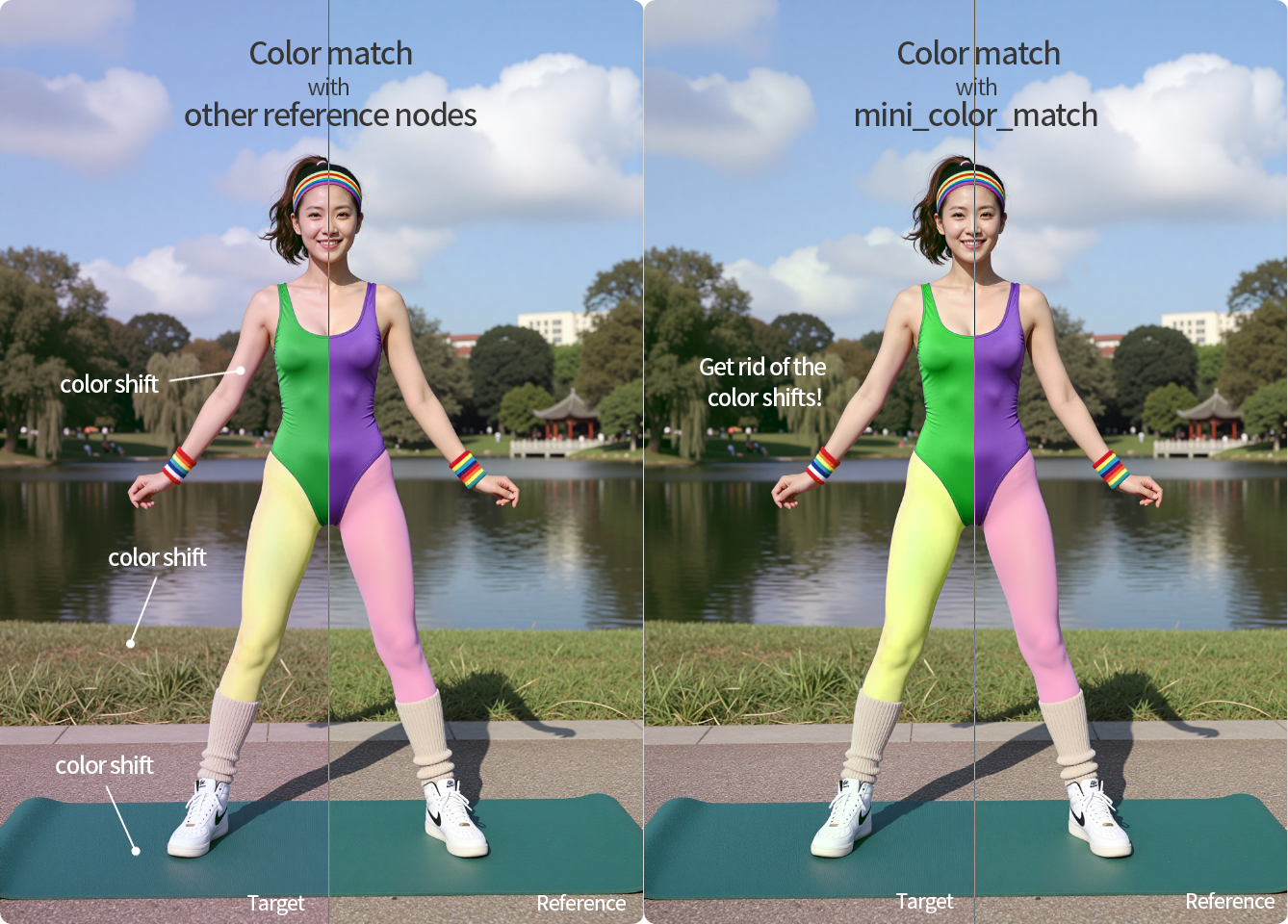
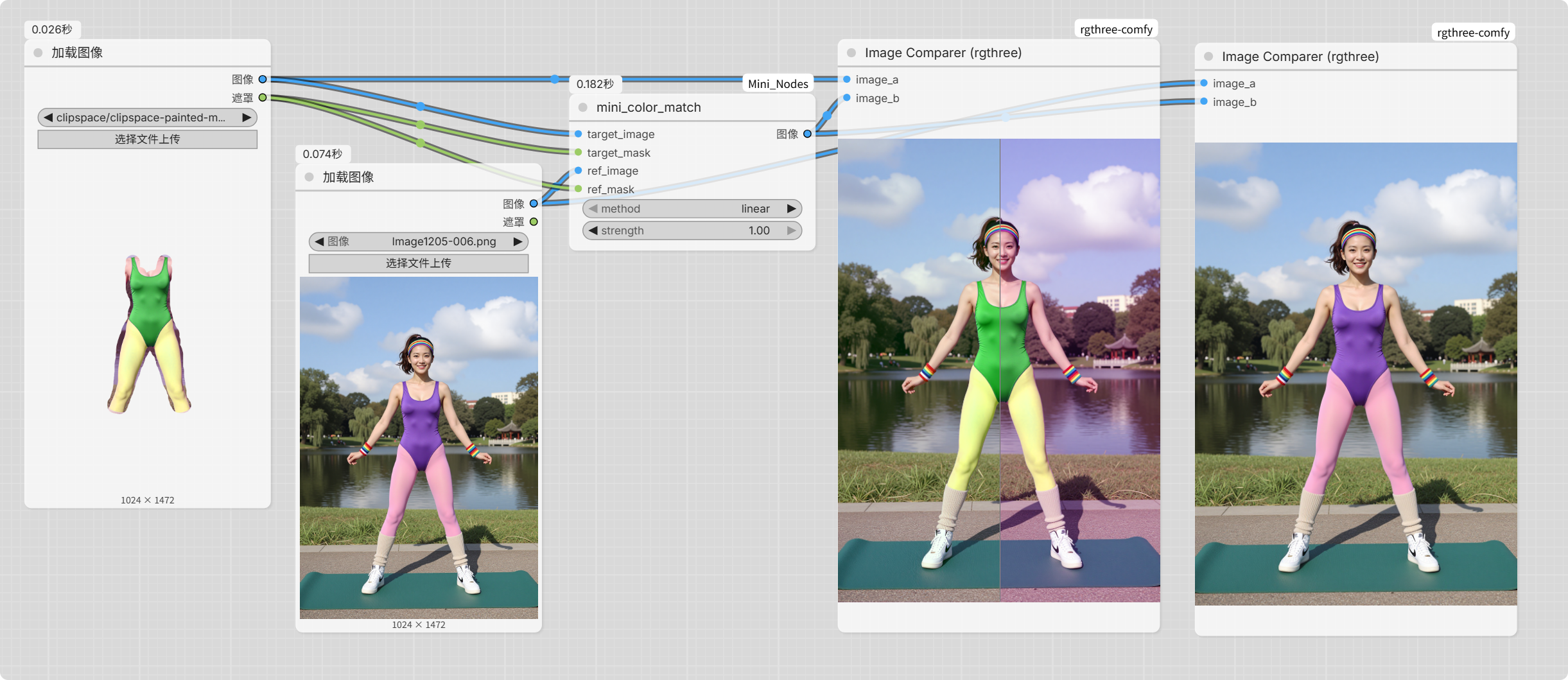
The mini_color_match node solves this by using an input mask to select only the unchanged pixels as a reference, resulting in a color correction that closely matches the original.
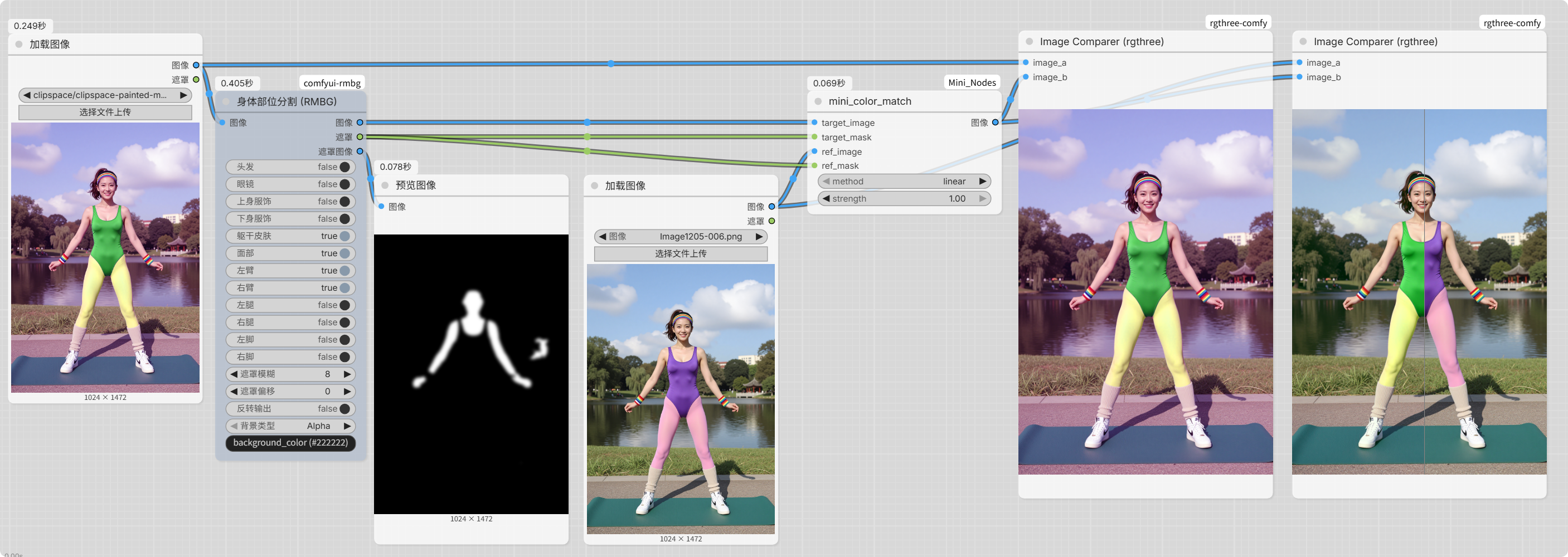
Furthermore, besides manual masks, you can use other segmentation nodes for automated selection (e.g., segmenting skin tones is highly recommended).
Since the target mask and reference mask are separate inputs, you can even use a differently styled reference image (again, using skin tones as a reference on both) to achieve stylized color grading.
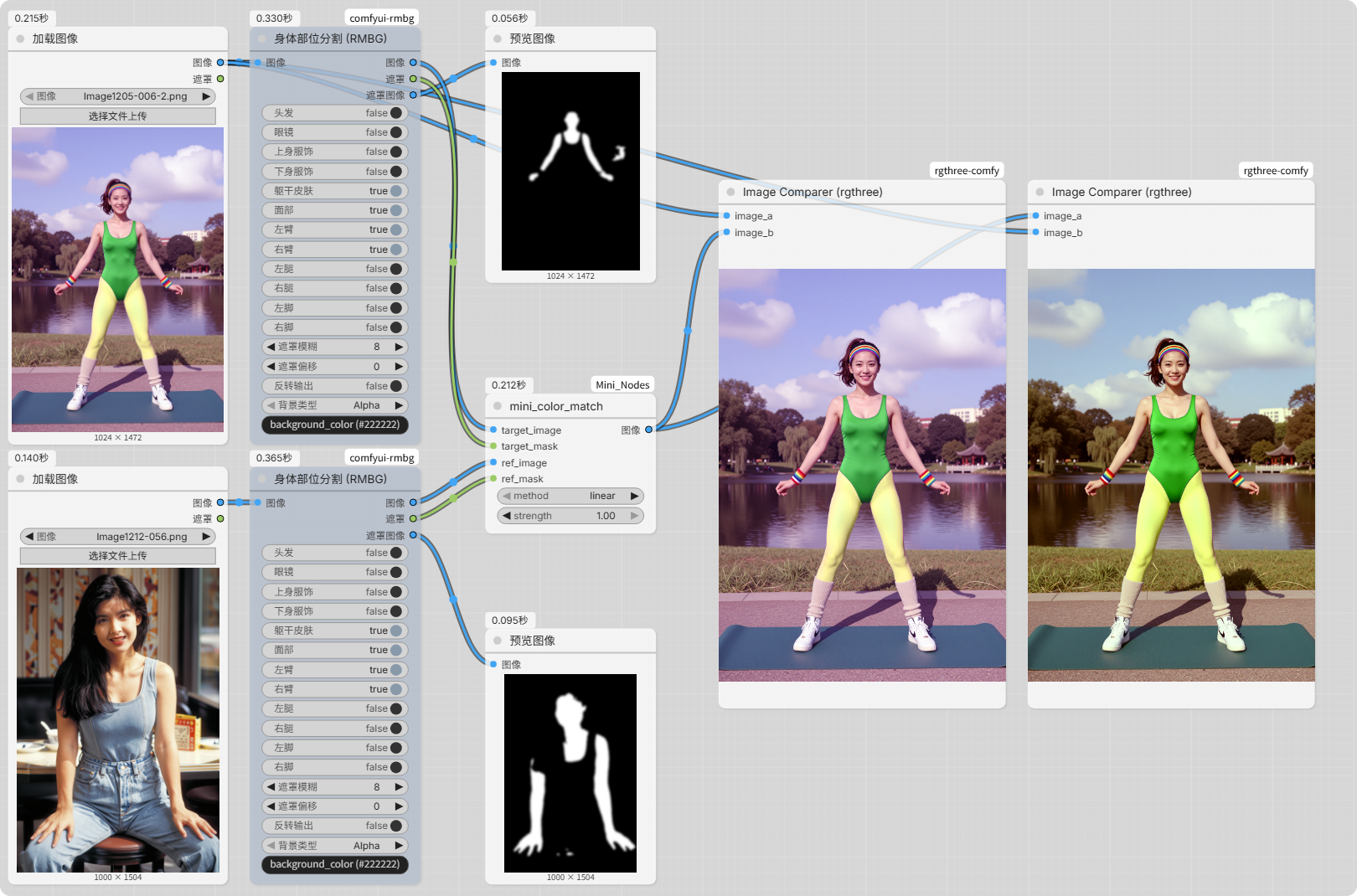
Options:
- Method:
linear: "Scales R, G, B independently. Strongest color match."unbalanced_linear: "Scales R, G, B uniformly. Balances color and contrast."mean: "Only shifts the mean value. Preserves original contrast."
- Strength: Controls the intensity of the effect, from
0.0(no effect) to1.0(full effect).
🔍 Latent Size Adjuster
Quickly select latent dimensions with presets for speed and efficiency.
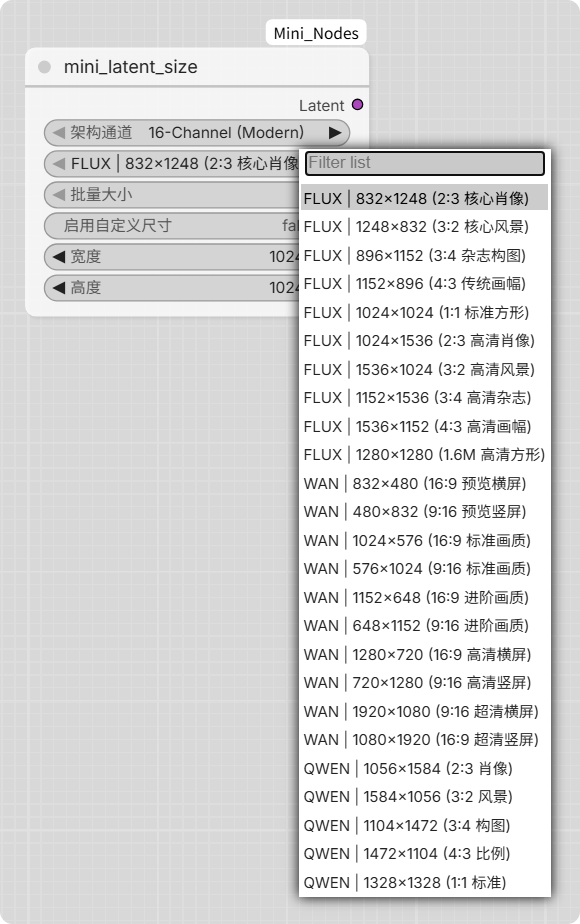
Options:
- Architecture Channels: Select based on your model's tensor type to avoid "Dimension Mismatch" or "Shape Error".
16-channel (Default): Compatible with most popular models (FLUX.1, QWEN-IMAGE, WAN2.1/2.2, Z-IMAGE, SD3, etc.).4-channel: For older models (SD1, SD1.5, SDXL1.0, etc.).128-channel: For newer models (FLUX2, FLUX2.KLEIN, etc.).
💾 Image Save with Metadata
Easily toggle whether to embed your workflow metadata into the saved image file via a simple boolean switch.
🚀 Installation
- Open your ComfyUI directory.
- Navigate to the
custom_nodes/folder. - Run the following command:
git clone https://github.com/catmaxj/comfyui-mini-nodes.git
There are no additional dependencies. Simply restart ComfyUI, search for the node names, and drag them into your workflow.
📜 License This project is licensed under the MIT License. See the LICENSE file for details.