
ComfyUI-ZImageTurbo-FlowSampler
Rectified-flow samplers for Z-Image-Turbo. Clean interpolation formula without sigma division, linear schedulers, higher-order variants. Fixes built-in euler/euler_ancestral instability issues
Nodes (7)
One shift knob, any flow-matching model
Flux's own resolution-aware shift, as a ComfyUI node
Stop guessing what your sigma schedule actually looks like
Skip the shift math with one-click presets for Z-Image, Flux and SD3
One-shot generation from a native diffusers pipe
The exact sigma curve Z-Image-Turbo was distilled on
The Z-Image-Turbo schedule with a denoise dial for img2img
ComfyUI-ZImageTurbo-FlowSampler
Custom ComfyUI nodes for Z-Image-Turbo implementing verified rectified-flow samplers with clean interpolation formula, linear sigma schedulers, and higher-order variants.
The Discovery
Z-Image-Turbo was distilled using:
- Linear sigma schedule (1.0 → 0.0)
- Deterministic Euler steps via rectified-flow interpolation
- No intermediate noise injection
- Explicit final step handling when σ_next = 0
After extensive code analysis of ComfyUI's sampling implementation, a critical mismatch was identified between the built-in samplers and Z-Image-Turbo's distillation process.
Built-in Sampler Issues
sample_euler (default)
# Karras ODE formulation
d = (x - denoised) / sigma  # Division by sigma → unstable near σ≈0
x = x + d * dt              # Implicit final step
- Contains churn machinery (
s_churn,s_tmin,s_tmax) - Division by sigma causes numerical instability
- No explicit σ_next = 0 handling
- Designed for traditional diffusion, not rectified flow
sample_euler_ancestral
Contains a rectified-flow branch (sample_euler_ancestral_RF), but activation requires:
- Sampler must be
euler_ancestral - Model sampling type must be
CONST - eta > 0 (introduces ancestral noise)
For deterministic Z-Image-Turbo workflows (CFG=1.0, eta=0), this clean path is never reached.
Custom Implementation
# Core update from sample_euler_flow
if sigma_next == 0:
    x = denoised
else:
    ratio = sigma_next / sigma
    x = ratio * x + (1.0 - ratio) * denoised
Comparison
| Feature | Built-in euler | Built-in euler_ancestral | Custom euler_flow | |---------|---------------|-------------------------|-------------------| | Update formula | Karras ODE derivative | RF interpolation (gated) | RF interpolation (always) | | Division by sigma | Yes | No (when RF branch active) | No | | Final step handling | Implicit | Explicit | Explicit | | Churn machinery | Present | Present (outside RF branch) | Removed | | Ancestral noise | Not required | Required (eta > 0) for RF | Optional (eta=0 default) | | Z-Image turbo alignment | Partial | Conditional | Complete |
Nodes Provided
Samplers
- euler_flow: 1st-order rectified-flow Euler (recommended)
- euler_flow_alt: Derivative formulation (for comparison)
- midpoint_flow: 2nd-order midpoint method
- heun_flow: 2nd-order Heun method
- euler_flow_verbose: Debug mode with step-by-step output
Schedulers
- ZImageTurbo Scheduler: Linear sigma schedule (1.0 → 0.0)
- ZImageTurbo Scheduler (Advanced): With denoise control for img2img
- FlowMatch Scheduler: Generic flow-matching with shift parameter
- FlowMatch Scheduler (Dynamic): Resolution-aware shift calculation
- ZImage Presets: One-click configurations for Z-Image-Turbo, Flux, SD3
Utilities
- Sigma Viewer: Debug node to visualize sigma schedules
- ZImage Sampler: Unified sampler node with type selection and eta control
Installation
Via ComfyUI Manager
- Search for "ComfyUI-ZImageTurbo-FlowSampler"
- Install and restart ComfyUI
Manual Installation
cd ComfyUI/custom_nodes
git clone https://github.com/capitan01R/ComfyUI-ZImageTurbo-FlowSampler.git
Restart ComfyUI.
Nodes
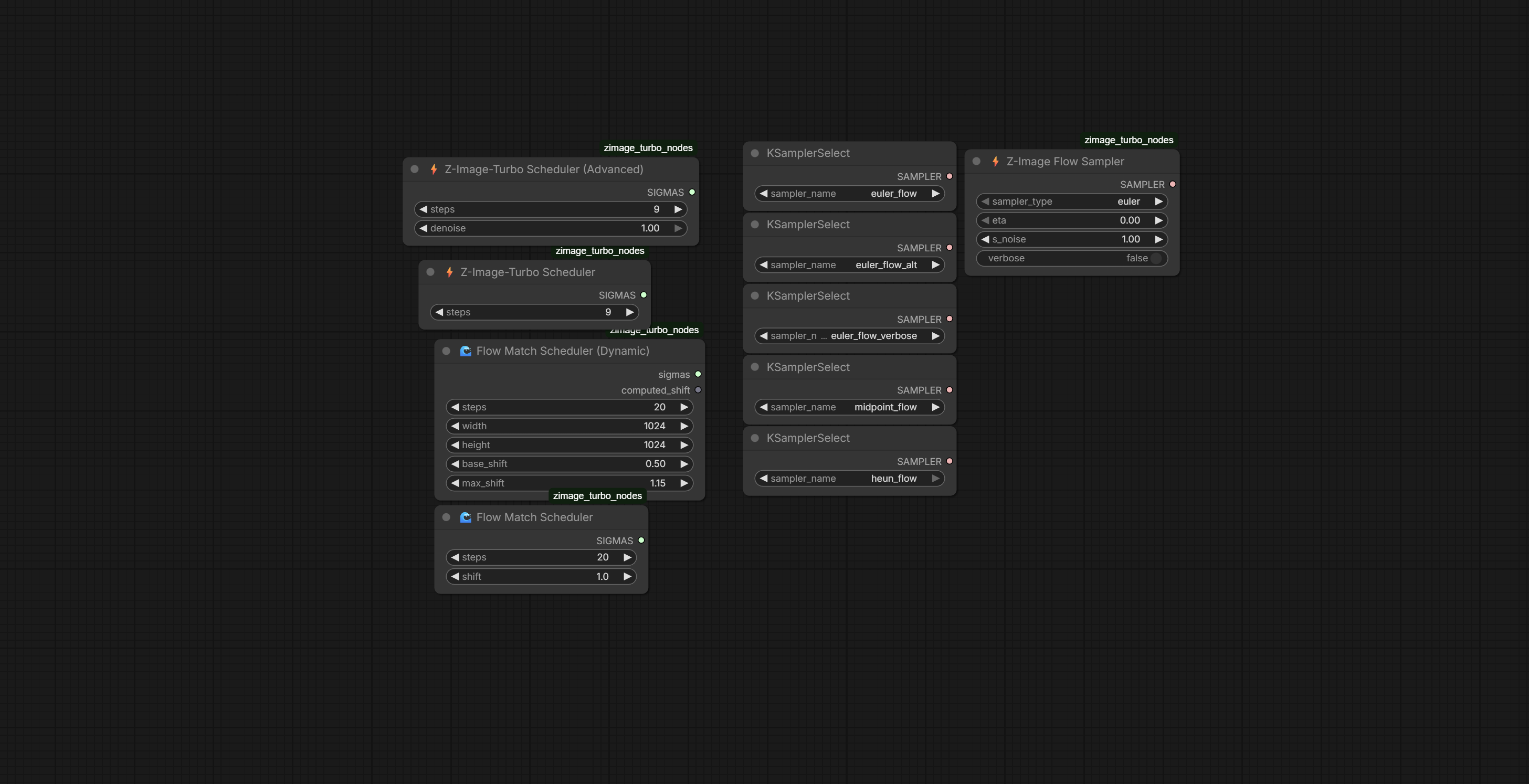
Recommended Settings for Z-Image-Turbo
- Steps: 8-9
- CFG: 1.0
- Sampler: euler_flow
- Scheduler: ZImageTurbo Scheduler (linear)
- eta: 0.0 (deterministic, sharpest)
eta Parameter Guide
- 0.0: Deterministic, sharpest results
- 0.1-0.2: Subtle variation, can reduce artifacts
- 0.3-0.5: Balanced diversity with slight softening
- 0.5-1.0: More creative variation, softer outputs
Example Workflow
- Add ZImage Sampler node, select
euler_flow, eta=0.0 - Add ZImageTurbo Scheduler node, steps=8
- Connect to SamplerCustomAdvanced
- Set CFG=1.0
Testing
All nodes tested on Z-Image-Turbo at:
- 8-9 steps
- CFG 1.0
- Linear sigma schedule
- Various eta values (0.0-1.0)
Observations on bf16 generations:
- Sharper detail preservation
- Improved facial coherence
- Reduced numerical artifacts in final steps
Technical Details
Why Interpolation > Derivative
Both formulations are algebraically equivalent when σ ≠ 0:
Karras ODE:
d = (x - x̂) / σ
x' = x + d * (σ_next - σ)
RF Interpolation:
ratio = σ_next / σ
x' = ratio * x + (1 - ratio) * x̂
The interpolation form provides:
- No division by potentially small sigma values
- Explicit final-step handling
- Cleaner code path without legacy diffusion machinery
- Direct alignment with Z-Image-Turbo distillation process
Compatibility
Primary target: Z-Image-Turbo
Also compatible with other flow-matching models via appropriate schedulers:
- Flux (use dynamic scheduler or presets)
- SD3/SD3.5 (use shifted scheduler with shift=3.0)
Author: Capitan01R
Version: 1.0.0
Based on analysis of:
- Tongyi-MAI/Z-Image official implementation
- ComfyUI k_diffusion sampling code
- Rectified flow mathematical framework
Note: Linear sigma schedule is critical for Z-Image-Turbo. Non-linear schedules break the distillation and produce degraded results.