
ComfyUI BytePlus ModelArk & AI MediaKit
ComfyUI nodes for BytePlus ModelArk (Seedream, Seedance, Seed/DeepSeek/GLM LLMs, Hyper3D and Hitem3D 3D models), Seed Speech (Seed Audio, TTS, ASR) and AI MediaKit (video and image enhancement), billed to your own BytePlus account. Docs: https://byteplus-sa.github.io/ComfyUI-BytePlus-ModelArk/
Nodes (25)
Find the asset:// URI you forgot to write down
Keep a voice clip where Seedance can find it
Register a face once, reuse it in every Seedance shot
Put a clip in Seedance's reference library
Four photos in, a high-poly base mesh out
Text straight to a mesh
An upscaler for the photos local models keep hallucinating
The dev node that fakes a 5-minute render in 10 seconds
The prompt writer that costs you fractions of a cent
Give the shot a beginning and an ending
50 references, three jobs in one node
30 seconds with sound, for a price
Preview at 480p, pay for 1080p once
Two keyframes and one Pro-only model
One still, six seconds of life
The cheap shot, and why you might still want it
Transcripts, timings and SRT without the Whisper dance
Two minutes of dialogue, music and foley from one prompt
The closed image model you can't download, doing your editing
Turn a flat image into editable layers
A voiceover node with an emotion dial
15 seconds of audio, and a slot you pay for
8K restoration on someone else's GPU
Where did that Seedance render go? This node goes and finds it
Seedance clips stutter? This node was built for exactly that
ComfyUI BytePlus ModelArk & AI MediaKit
Use BytePlus models in ComfyUI with your own BytePlus API keys: Seedream images, Seedance videos, Hyper3D and Hitem3D 3D models, Seed / DeepSeek / GLM language models, Seed Speech audio, and AI MediaKit video and image enhancement.
Calls go straight to BytePlus and are billed to your BytePlus account (contract pricing and resource packs apply). No Comfy credits are used.
Status: v0.6.1. Requires ComfyUI 0.31.0 or later. Works in Classic Canvas and Nodes 2.0.
New in v0.6.1: reliability and safety fixes from a full code review, checked against the live APIs. Stop no longer errors or leaves paid work running unseen, re-running a non_blocking Seedance node collects the pending video instead of billing a new one, last_frame always matches its video, and parallel Image Quality Enhance calls no longer lose images. Signed result links no longer appear in logs. generation_count is limited to 16, and the BytePlus LLM node's turns now sets the conversation length. Workflows need no changes.
Contents
Full documentation, with a page for every node and template: https://byteplus-sa.github.io/ComfyUI-BytePlus-ModelArk/. Install and update from the Comfy Registry.
- Quick Start
- What's Included
- API Keys
- Node Reference
- Guides: reference videos, links and assets, private assets, draft mode
- Example Workflows
- Development
Quick Start
1. Install. The pack is on the Comfy Registry: registry.comfy.org/nodes/ComfyUI-BytePlus-ModelArk. In ComfyUI-Manager, search for BytePlus ModelArk (listed as ComfyUI BytePlus ModelArk & AI MediaKit), or use the Comfy CLI:
comfy node install ComfyUI-BytePlus-ModelArk
Or by hand:
cd ComfyUI/custom_nodes
git clone https://github.com/byteplus-sa/ComfyUI-BytePlus-ModelArk
pip install -r ComfyUI-BytePlus-ModelArk/requirements.txt
Run pip with the Python that runs ComfyUI, then restart ComfyUI. If the BytePlus SDK is missing or too old, the nodes don't load and the console prints the install command.
Update. In ComfyUI-Manager press Update on the pack, or run:
comfy node update ComfyUI-BytePlus-ModelArk
For a manual install, run git pull in the pack folder and pip install -r requirements.txt again. Restart ComfyUI afterwards. Your saved keys stay in user/.env. See the Update page.
2. Add your key. Create a key in the ModelArk console and activate the models you want (keys and models are per region). In ComfyUI open Settings → BytePlus, paste the key, pick its region and press Save. No restart needed.
3. Run a template. Open the template browser, pick a BytePlus workflow and press Run. Connect Save Image / Save Video to keep results.
What's Included
| Service | Nodes | Key | |---|---|---| | ModelArk – images | Seedream 4.5 & 5.0, Seedream 5.0 Layer Separation | ModelArk API key | | ModelArk – video | Seedance 1.0 (3 nodes), Seedance 2.5 (3 nodes), Draft to Final | ModelArk API key | | ModelArk – 3D | Hyper3D Gen2, Hitem3D 2.0 | ModelArk API key | | ModelArk – language | BytePlus LLM (Seed 2.x, DeepSeek, GLM) | ModelArk API key | | ModelArk – asset library | Create Image / Video / Audio Asset, Asset Library | ModelArk API key + IAM AK/SK | | Seed Speech | Seed Audio 1.0, Seed Speech TTS, Seed Speech ASR, Seed Voice Clone | Seed Speech API key | | AI MediaKit | vCube Video Enhance, Video Smoothness Enhance, Image Quality Enhance | AI MediaKit API key |
The image, video, LLM and asset nodes match ComfyUI's built-in ByteDance nodes input for input, but use BytePlus model IDs. This pack's extras (parallel generations, non-blocking runs and so on) sit under each node's advanced inputs.
Good to know
- Nodes only run when their output is used. They save nothing themselves: connect
Save Image/Save Video. A node with nothing connected doesn't run and isn't billed. - Regions:
ap-southeast-1(default) oreu-west-1for ModelArk. Seedream 5.0 Lite isn't available ineu-west-1. Seed Speech and AI MediaKit run inap-southeast-1only. - Comfy.org login is needed for a few features that upload local media to Comfy.org storage (BytePlus only accepts links there): Seedance reference videos, standard ASR, MediaKit sources and new private assets.
API Keys
Each BytePlus product has its own key; they are not interchangeable.
| Key | Where to create it | Used by | .env variable |
|---|---|---|---|
| ModelArk API key | ModelArk console | Image, video, LLM and asset nodes | BYTEPLUS_API_KEY (+ BYTEPLUS_REGION) |
| Seed Speech API key | Seed Speech console → Settings → API Keys (activate the services first) | Speech nodes | BYTEPLUS_SEED_SPEECH_API_KEY |
| AI MediaKit API key | AI MediaKit console → Settings → API key | Enhancement nodes | BYTEPLUS_VOD_MEDIAKIT_API_KEY |
| IAM AK/SK | IAM console (a sub-user allowed only the asset library) | Asset library nodes | BYTEPLUS_ACCESS_KEY, BYTEPLUS_SECRET_KEY (+ BYTEPLUS_SESSION_TOKEN for STS) |
Option A: Settings → BytePlus (recommended)
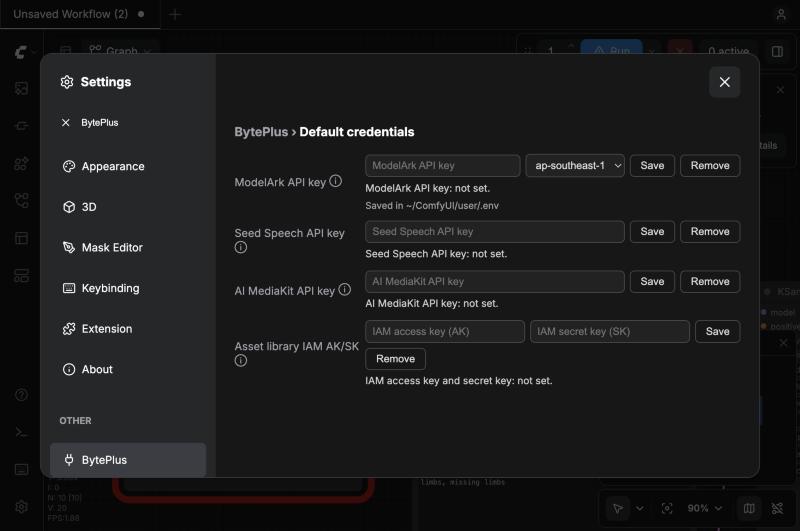
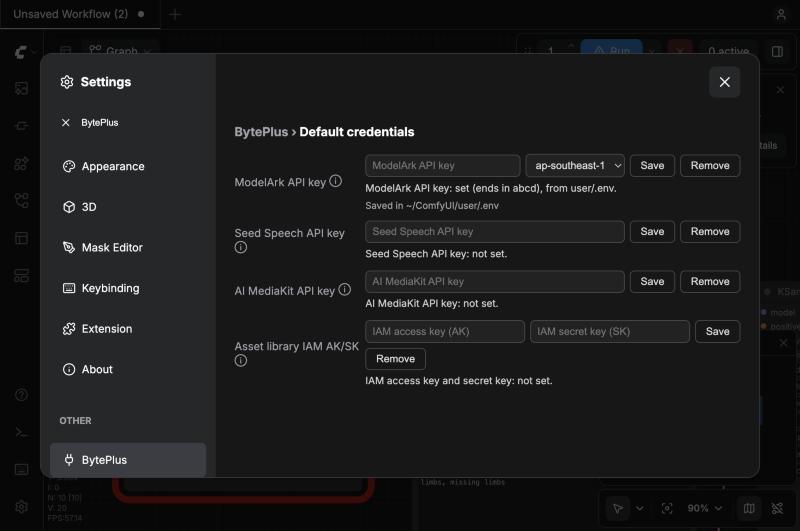
Open Settings (gear icon, or Ctrl+, / Cmd+,), search for BytePlus, paste a key and press Save.
- ModelArk keys are checked against BytePlus first; a wrong key is refused and nothing is saved.
- Keys are written to
user/.envin your ComfyUI folder and take effect immediately. - Settings only ever shows whether a key is set and its last four characters. The row also shows where the file is (Saved in ~/…/user/.env).
Option B: Edit user/.env
Create user/.env inside your ComfyUI folder and add only the lines you need:
BYTEPLUS_API_KEY=your-modelark-key
BYTEPLUS_REGION=ap-southeast-1
BYTEPLUS_SEED_SPEECH_API_KEY=your-seed-speech-key
BYTEPLUS_VOD_MEDIAKIT_API_KEY=your-mediakit-key
BYTEPLUS_ACCESS_KEY=your-iam-ak
BYTEPLUS_SECRET_KEY=your-iam-sk
The file is read on every run, so no restart is needed. A real environment variable with the same name wins over the file (Settings tells you when that happens). The pack never touches other lines in the file.
<details> <summary><b>Where is <code>user/.env</code>? Tips for creating it by hand</b></summary>The quickest way to find it: Settings → BytePlus shows the path under the ModelArk row. ComfyUI also prints the folder at startup (** User directory: …). For ComfyUI Desktop it is inside the base folder you chose at install:
- macOS:
~/ComfyUI-Installs/<install name>/ComfyUI/user/.env - Windows:
<base folder>\ComfyUI\user\.env
The file doesn't exist until you save a key.
- macOS: in Terminal,
nano <path>, paste the lines, then Ctrl+O, Enter, Ctrl+X, andchmod 600the file. Finder hides dot-files (Cmd+Shift+. shows them); in TextEdit choose Format → Make Plain Text first. - Windows: in Notepad choose Save as type: All files and name it
.env, or it is saved as.env.txt.
ComfyUI Desktop's Environment Variables field (in each installation's settings) also works and wins over .env, but Desktop stores those values unencrypted and advises against putting keys there. Prefer Settings → BytePlus.
Check that it works
Add BytePlus LLM, type Reply with OK, pick Seed 2.0 Mini, connect its output to Preview as Text (Preview Any in older ComfyUI) and press Run. It costs a few tokens.
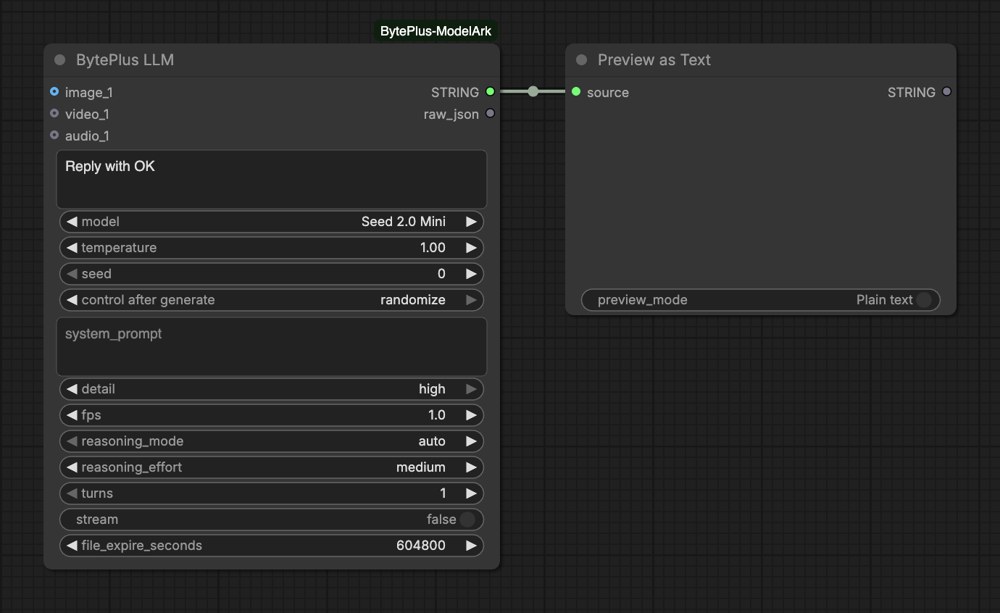
Change the prompt or seed between test runs: ComfyUI reuses the cached result of an unchanged node, so an identical run makes no new request.
Troubleshooting
| Symptom | Fix |
|---|---|
| No BytePlus page in Settings | Update the pack (ComfyUI-Manager → Update), restart ComfyUI and reload the page. |
| Invalid API Key (401) | The key and region don't match. Pick the key's region in Settings (or set BYTEPLUS_REGION). |
| No BytePlus API key is set… | No key is set. Save one in Settings or .env. |
| Invalid X-Api-Key on speech nodes | You used a ModelArk key. Seed Speech needs its own key. |
| Save says Requests from another origin are not accepted | ComfyUI is behind a proxy that hides the address you opened. Edit .env by hand. |
Keep your keys safe
- Never commit
user/.env. Settings creates it readable by you only. - ComfyUI has no login: anyone who can open your ComfyUI page (for example with
--listenon a shared network) can use your keys and replace them in Settings. Don't expose ComfyUI to networks you don't trust.
Node Reference
Model names map to dated model IDs in nodes/models_config.py. Activate each model in the ModelArk console for the region you use.
Image (ModelArk)
| Node | What it does | |---|---| | Seedream 4.5 & 5.0 | Text-to-image and image editing with Seedream 5.0 Pro, 5.0 Flash, 5.0 Lite, 4.5 and 4.0. | | Seedream 5.0 Layer Separation | Splits one image into a base image and up to 16 transparent layers (5.0 Pro or Flash). |
Seedream 4.5 & 5.0
- Sizes: presets for 1:1, 3:4, 4:3, 16:9, 9:16, 2:3, 3:2 and 21:9 at each supported resolution (5.0 Pro and Flash add 1.5K, priced like 1K on Pro); "adaptive" levels where the model picks the ratio; or a custom width × height from 1:16 to 16:1.
- Up to 10 reference images (14 on 5.0 Lite, 4.5 and 4.0).
max_imagesfor related image sets (Lite, 4.5, 4.0). Prompt optimization and "thinking" where supported. - Advanced: parallel generations, PNG output, transparent background on Pro and Flash (connect Load Image's
MASKtoreference_mask; themaskoutput holds the result's transparency).
Seedream 5.0 Layer Separation outputs the base image and mask, each layer and its mask, bounding boxes, a layer_stack for Create Layered Image, and a JSON list of layer names and descriptions. Its opt-in save_layers is the only setting in the pack that writes files itself.
Video (ModelArk)
| Node | Models | Highlights |
|---|---|---|
| Seedance Text to Video, Image to Video, First-Last-Frame to Video | seedance-1-0-pro, seedance-1-0-pro-fast (First-Last-Frame: Pro only) | 480p–1080p, 2–12 s, camera_fixed, watermark |
| Seedance 2.5 Text to Video, First-Last-Frame to Video, Reference to Video | 2.5 (1080p, 30 s), 2.5 Premium (4K, whitelist only), 2.0 (4K), 2.0 Fast, 2.0 Mini | Draft options for 2.5 and 2.5 Premium; output_format mp4 / mov on 2.5 |
| Seedance 2.5 Draft to Final Video | Reads the model from the draft | See Draft Mode |
| Video Query Tasks | All Seedance models, including retired ones | Lists your recent video tasks (by status, model or task ID) as JSON, to find a task ID again |
- Reference to Video takes up to 50 references on 2.5 (30 images, 10 videos, 10 audio clips) and 15 on 2.0 (9 + 3 + 3), connected or as
asset_Nlinks or assets.task_type: auto / reference / edit / extend. Reference videos can be down- or upscaled. - Batches: with
generation_countabove 1, every video reaches theVIDEOoutput (each with its own seed; the next node runs once per video), andlast_frameholds their last frames as one batch. - Advanced: offline inference, parallel generations, non-blocking runs.
Language (ModelArk)
BytePlus LLM answers in text with Seed 2.0 Pro / Lite / Mini, Seed 2.1 Turbo, DeepSeek V4.1 Flash or GLM 5.3 Flash.
- Context: up to 20 images and 4 videos. Seed 2.0 Lite and Mini also take up to 4 audio clips (120 minutes in total); the other models can't hear audio.
- Temperature and system prompt. Advanced: image detail, video fps, deep thinking with effort from minimal to max, multi-turn conversations and streaming. A second output returns the raw response JSON.
Asset Library (ModelArk)
Needs Dreamina Seedance Advanced Creation Rights and IAM AK/SK. See Private Assets.
| Node | What it does |
|---|---|
| Create Image Asset, Create Video Asset, Create Audio Asset | Adds media (connected, or an HTTPS link) to an asset group and outputs asset_id, group_id and an asset:// URI. |
| Asset Library | Lists your assets (virtual portraits or verified real people) as asset:// URIs. |
Speech (Seed Speech)
| Node | What it does |
|---|---|
| Seed Audio 1.0 | Speech, voiceovers, music and sound effects up to 120 s from a prompt, in 20 languages. |
| Seed Speech TTS | Text to speech with TTS 2.0 voices, TTS 1.0 speakers or cloned voices. |
| Seed Speech ASR | Speech to text in 50+ languages, with timings and SRT subtitles. |
| Seed Voice Clone | Trains a cloned voice from a 10–15 s clip and outputs its speaker_id. |
Seed Audio 1.0 (seed-audio-1.0)
reference_mode: text only; audio reference (up to three clips of up to 30 s, or speaker IDs / cloned voice IDs / URLs, referred to as@Audio1–@Audio3in the prompt); image reference; or a preset TTS 2.0 voice.- Sample rate, speed, loudness and pitch. Advanced: wav / mp3 / ogg_opus / pcm, sentence or word subtitles, audible and metadata watermarks.
generation_countruns up to 16 takes of the same prompt in parallel. Each take is billed separately (the API has no seed). Outputs are lists in the same order; failed takes are skipped unless all fail.
Seed Speech TTS
- Models:
seed-tts-2.0(voice list),seed-tts-1.0(speaker IDs),seed-icl-2.0/seed-icl-1.0(cloned voices). - Style instructions (
context_text), emotion and intensity, speed, volume, pitch, sample rate, language, trailing silence, subtitles and timestamps. - Advanced: language detection, Markdown / emoji / LaTeX / parentheses handling, 1-hour cache, tone fidelity for cloned voices.
Seed Speech ASR
seed-asr-fastsends a connected clip inline. The standard models (seed-asr-2.0/1.0, up to 5 h) only take URLs, so a connected clip is uploaded to Comfy.org storage first (Comfy.org login required); or pass a public audio URL.- Punctuation, number formatting, filler-word removal, speaker labels and hotwords. Advanced (ASR 2.0): dialogue context and an image for visual context, language detection, stereo channel split, silence-based segmentation, Traditional Chinese output, sensitive-word filtering.
Seed Voice Clone (Voice Replication 2.0)
- Trains into a voice slot (
S_…, bought in the Seed Speech console) or a postpaid custom voice ID, waits until it's ready, and outputsspeaker_idplus a demo clip. - Use the
speaker_idwith TTS modelseed-icl-2.0(custom_speaker_id) or in a Seed Audio reference slot. - Each slot can be trained 15 times. The first TTS call with the voice starts the slot's billing.
3D generation (ModelArk)
| Node | What it does | |---|---| | Hyper3D Gen2 | A textured 3D model from a text prompt (up to 400 characters), up to five images, or both. Mesh mode, material, polygon count, HD and 4K textures, T-pose, file format. | | Hitem3D 2.0 | A 3D model from one to four images (front, back, left, right), geometry only or with texture, at 1536 or 1536pro. |
Both nodes use the Seedance task endpoint, poll the task, download the result (the link lives 24 hours) and output it as a 3D file. They save nothing: connect Save 3D (Advanced) to view the model in ComfyUI's 3D viewer and keep a copy. Interrupting a run deletes the pending task.
Video and Image Enhancement (AI MediaKit)
Connected videos and images are uploaded to Comfy.org storage first (Comfy.org login required); the advanced video_url / image_url inputs take a public link instead. MediaKit result links expire after 24 hours, so the nodes download results right away.
| Node | What it does | |---|---| | vCube Video Enhance | Super-resolution up to 8K, artifact and noise removal, frame interpolation up to 120 fps. | | Video Smoothness Enhance | Repairs stutter and removes duplicate frames without changing the resolution (for example in Seedance videos). | | Image Quality Enhance | Upscales and restores images: super-resolution, denoising, deblurring, sharpening, portrait / text / colour enhancement. |
vCube Video Enhance (same inputs as ComfyUI's built-in vCube node)
standard(scene presetsaigc,common,ugc,short_series,old_film) orprofessional;hdornaturalstyle; resolution preset,sourceor custom short side;fpsandbitrate_level.- Sources up to 2560×1440 and 10 minutes.
- Also outputs a before/after comparison video (sweeping divider) and a
source_frame/enhanced_framepair for ComfyUI'sCompare Imagesslider (Nodes 2.0 only). - Advanced: exact
bitrate,comparisonon/off,compare_time.
Video Smoothness Enhance
periodic_stutter:repair(generates in-between frames;align_source_fpskeeps the frame rate and duration,insert_frame_indicesforces insertions) ordetect only.duplicate_frames:removeordetect only.- Sources up to 4K, and up to 35 s while a repair is on (detection alone has no length limit).
- Outputs the repaired video, a side-by-side comparison video, and the stutter and duplicate-frame counts. If MediaKit repairs nothing, the source passes through, no comparison is made, and the task is billed as detection only.
Image Quality Enhance
tool_version:standard(up to 8x, PNG output),professionalormax(generative, up to 30x, withgenerative_enhance_modegenerative_first/fidelity_first;maxaddsenable_correct_color).output_size: amultiple(default 2x) or atarget size. Size limits are checked before upload. Each image in a batch is enhanced separately.- Also outputs
original(the input resized to the result's size) for theCompare Imagesslider.
Guides
Reference Videos
Seedance only accepts reference videos as URLs, so videos connected to Reference to Video are uploaded to Comfy.org storage first.
- Requires a Comfy.org login (or Comfy.org API key) in ComfyUI, and doesn't work with
--disable-api-nodes. - Uploads are deleted after about 24 hours; the pack reuses an upload for up to 12 hours.
- To skip the upload, pass a link or asset instead (below).
Connected images and audio are sent inline; nothing is uploaded.
Reference Links and Assets
Reference to Video has asset_N inputs, and First-Last-Frame to Video has first_frame_asset_id / last_frame_asset_id. Each takes either:
- an asset ID or
asset://<ASSET_ID>from your private asset library (for example theasset_idoutput ofCreate Image Asset), or - a public
https://link to an image, video or audio file (type it into a String node and connect it).
For asset_N, links are recognized by file extension or content type; asset IDs are looked up in the asset library, which needs IAM AK/SK.
In the prompt, refer to references by position (Image 1, Video 1, …): connected inputs come first, then asset_N entries. You can also write asset1, asset2, … and the node replaces them with the matching position.
Private Assets
With Dreamina Seedance Advanced Creation Rights you can keep authorized media, such as virtual portraits or verified real people, in a private asset library and use it in Seedance 2 / 2.5.
Setup: save IAM AK/SK with asset-library permission in Settings → BytePlus ("Asset library IAM AK/SK") or in .env. Use an IAM sub-user whose policy only allows the asset library. STS session tokens can only be set in .env (BYTEPLUS_SESSION_TOKEN).
Create and use an asset:
- Add
Create Image Asset(or Video / Audio). Connect the media or set a public HTTPS URL. - Set an existing
group_id(for example a real-person group from the ModelArk console), or leave it empty and setgroup_nameto find or create a virtual-portrait group. - Run. The node waits until the asset is Active and outputs
asset_id,group_idandasset_uri. Re-running with the same image reuses the asset. - Connect
asset_idto anasset_Ninput ofSeedance 2.5 Reference to Video(orfirst_frame_asset_idon First-Last-Frame).
Good to know
- Real people: BytePlus verifies real people only in the ModelArk console (a QR-code invitation; see Add real-human assets). Create those groups there and pass their
group_id. - Existing assets:
Asset Librarylists them. Using an asset in Seedance only needs the API key, exceptasset_Nlooks up the asset's type with AK/SK. - Uploads: connected media is uploaded to Comfy.org storage first (Comfy.org login required); a URL input skips the upload.
- Rate limits: Entry 3, Advanced 120, Premium 300
CreateAssetrequests per minute. - Only use media you are authorized to use.
Draft Mode
Seedance 2.5 can render a quick 480p draft before the full-quality video:
- On a Seedance 2.5 node pick
Seedance 2.5 DraftorSeedance 2.5 Premium Draft, set the seed control to fixed, and run. The node outputsdraft_task_id. - Connect
draft_task_idtoSeedance 2.5 Draft to Final Video(or paste IDs, one per line) and run again. The draft node isn't re-run while its inputs are unchanged, so the final uses the draft you reviewed.
The final reuses the draft's prompt, references, duration, aspect ratio, seed and audio setting, and renders at 1080p (2.5) or 4K (2.5 Premium). Draft task IDs are valid for 7 days.
Example Workflows
Templates are in example_workflows/ and appear in ComfyUI's template browser: a starter for every node except the Seedance 1.0 ones (templates show current models only), 2.5 Model Updates (Seedream, Seedance 2.5 and the LLM together), plus pipelines that chain services:
| Template | What it does |
|---|---|
| Text to Image to Video | Seedream makes the first frame, Seedance animates it. |
| Seedance Video Extension | A Seedance 2.5 clip, then two Seedance 2.5 Reference nodes with task_type = extend, each continuing the previous clip's motion and sound; Concatenate Video joins the three into one 15 s video (the reference video goes through Comfy.org storage, so log in; needs ComfyUI 0.36+ for Concatenate Video). |
| Seed Prompt Writer | The LLM turns a short idea into a detailed Seedream prompt. |
| Generate and Enhance | Seedream → Image Quality Enhance; Seedance → vCube Video Enhance (ModelArk + MediaKit keys). |
| Virtual Portrait - Existing Asset | Uses an asset already in your library as an asset_N reference in Seedance 2.5: paste its ID, or look it up by name with Asset Library (IAM AK/SK + Advanced Creation Rights). |
| Virtual Portrait - New Asset | Uploads an image as a new virtual portrait asset and uses it in Seedance 2.5 in the same run. |
| Image to UGC Video | A product photo and a one-line brief become a 9:16 creator video: the LLM writes the script and the shot prompt, Seedance 2.5 Reference shoots it with the product as reference, Seed TTS adds the voiceover (ModelArk + Seed Speech keys). |
| Product Ad in One Click | A one-line brief: the LLM writes an image and a motion prompt, Seedream 5.0 Pro makes the hero shot, Seedance 2.0 animates it, vCube enhances it to 1080p (ModelArk + MediaKit keys). |
| Old Photo to Living Memory | Image Quality Enhance restores and upscales a photo, Seedance 2.0 animates the restored photo with subtle motion, Video Smoothness Enhance finishes the clip (a stand-in photo is generated so it runs as it is). |
| Podcast Clip | The LLM writes a HOST and GUEST dialogue, two Seed TTS voices speak it, Seed ASR makes SRT subtitles, Seedream paints the cover art. |
| Multilingual Dubbing | Seed ASR transcribes a speech clip, the LLM translates it, Seed TTS speaks the translation in another language. |
| Product Lookbook | One product photo and one prompt give four coherent lifestyle images with Seedream sequential generation. |
| Sound Design | The LLM turns a scene description into a sound-design prompt and Seed Audio renders two takes. |
| Consistent Character Shots | Seedream paints a character, Create Image Asset registers it, three Seedance 2.0 Reference shots use it as asset_1, Concatenate Video joins them (IAM AK/SK). |
| Character Sheet | A description becomes a three-panel identity sheet (back, front, face close-up) on plain gray, with the fixed sheet rules built into the prompt (ModelArk key). |
| Location Sheet | Six text boxes (place, era, dressing, style, light, lens) become a people-free reference still of a location. |
| Prop Sheet | One object on a clean seamless background, as a hero view or a three-panel sheet, for props that are held, recur or carry the story. |
| Character Sheet Cleanup | A Seedream 5.0 Pro edit that removes the head from the front full-body panel of a sheet so the close-up is the only readable face. |
| Hyper3D Text to 3D | A text prompt becomes a textured 3D model (Hyper3D Gen2), opened and saved with Save 3D (Advanced) (ModelArk key). |
| Hyper3D and Hitem3D Image to 3D | Seedream draws one object, Hyper3D Gen2 and Hitem3D 2.0 each build a 3D model from it, so you can compare them (ModelArk key). |
| Storyboard Grid | The LLM turns scene beats into a grid prompt and Seedream paints a numbered pencil-sketch storyboard in one image. |
| Seedance Task Query | Video Query Tasks collects a Seedance task by ID (or lists the latest tasks) and shows its status and model. |
| Video and Audio Assets | Create Video Asset and Create Audio Asset register media in your private library, Asset Library lists it, Seedance 2.5 Reference uses both as asset_1 and asset_2 (IAM AK/SK). |
Templates show current models only. The Seedance 1.0 nodes, the Seedream 4.5 / 4.0 options and the Seed Speech 1.0 models (seed-tts-1.0, seed-icl-1.0, seed-asr-1.0) are still in the pack, but no template uses them.
Development
# Template and docs tests (no ComfyUI needed)
python3 -m unittest tests.test_workflow_templates tests.test_agent_files tests.test_docs_data

# All tests (node tests need a ComfyUI checkout and a Python with torch and the BytePlus SDK; skipped otherwise)
COMFYUI_ROOT=/path/to/ComfyUI python -m unittest discover -s tests -t .

# Lint
uvx [email protected] check .
uvx [email protected] format --check .
CI runs these on every push and pull request, and weekly against ComfyUI's latest release and master, since the nodes are compared with ComfyUI's built-in ByteDance nodes. See CLAUDE.md for layout and conventions.
Planned: optional reference video upload via your own object storage (TOS or S3, presigned URL).