
Enzino H3 Studio
MiniMax H3 in one node: text, image, first + last, end frame or references to video with native stereo sound. Auto keyframe header, mid keyframe, audio drive, Turbo, one-click model downloads, player, history and shot chaining. by Enzino.
Nodes (8)
MiniMax H3 with the knobs hidden, and the lock showing
Every MiniMax H3 setting in one landscape node
The 4K-and-detail pass you'll forget is even switched on
② LoRAs is one widget holding a JSON stack — here's what's actually in it
① Models is a form, not a loader — and that's why it never says 'missing'
The node that makes the whole graph run — and why your MP4 still has your workflow in it
③ Prompt is where your clip's timing actually lives (not ④ Render)
The only node in the chain that touches your GPU
✦ Enzino H3 Studio
MiniMax H3 in ComfyUI, made simple. Text, a picture, two keyframes, an end frame or a set of references in, a video with native stereo sound out.
by Enzino · enzinoai.com · Ko-Fi · 🇫🇷 Lire en français · 📖 Full guide
Everything runs on ComfyUI's own MiniMax H3 implementation: no extra model code, no extra Python dependency.
Three ways to use it
| | | |
|---|---|---|
| 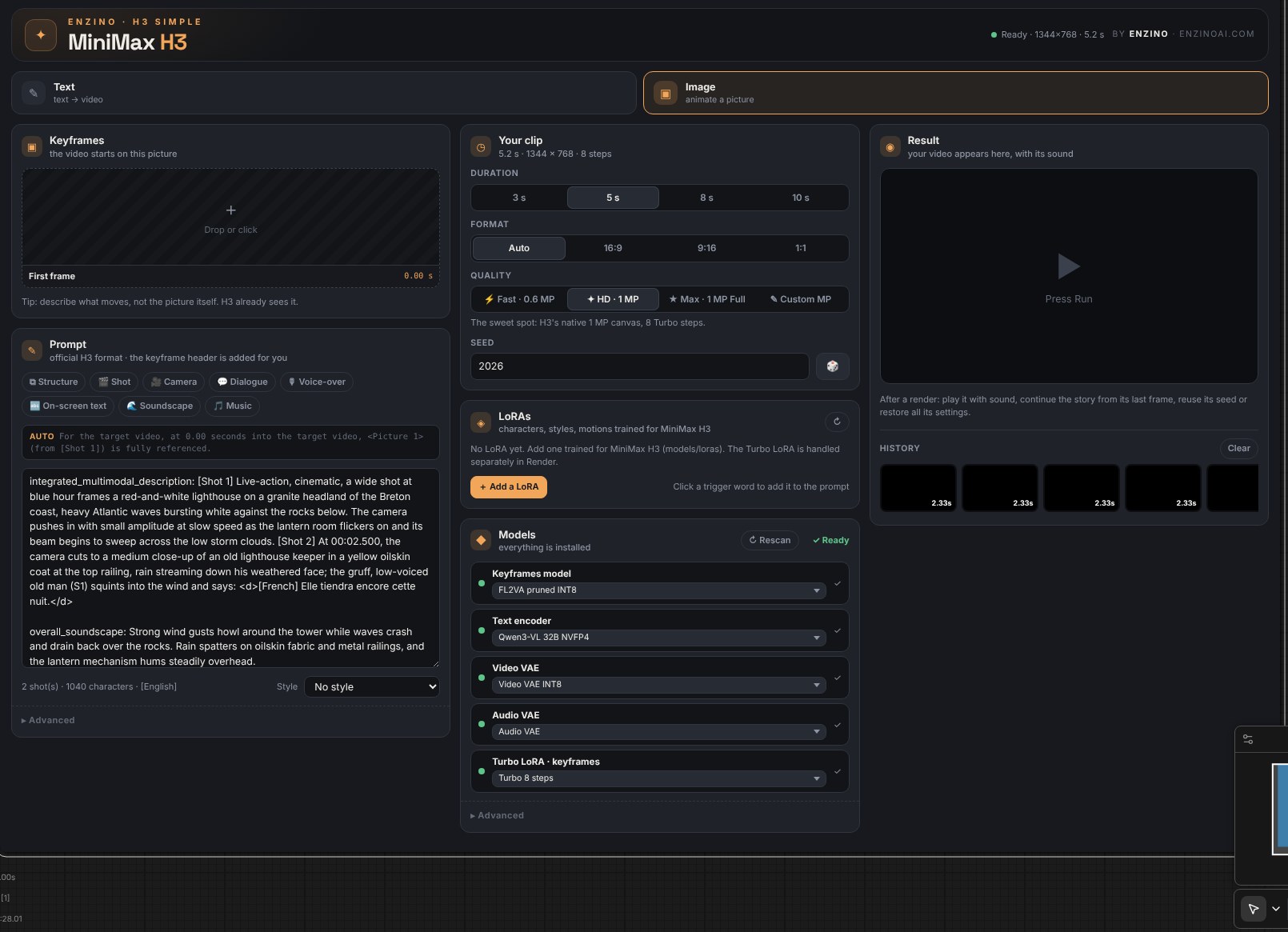 | ✦ Enzino H3 Simple | One card: picture, prompt, duration, format, quality, models and LoRAs. Everything else runs on its best automatic setting. The fastest way to a great clip. |
|
| ✦ Enzino H3 Simple | One card: picture, prompt, duration, format, quality, models and LoRAs. Everything else runs on its best automatic setting. The fastest way to a great clip. |
| 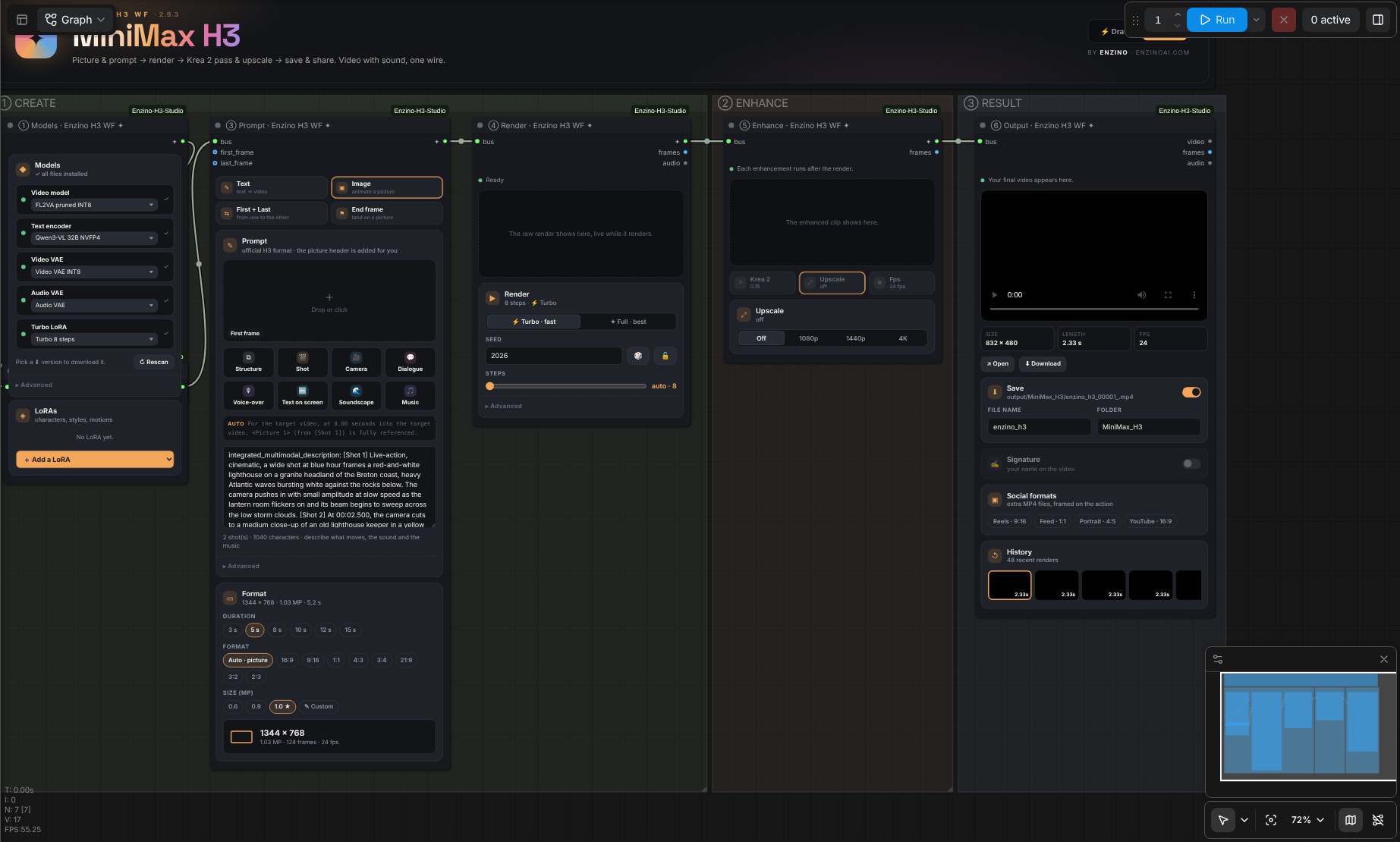 | ✦ Enzino H3 WF | Six readable steps joined by one wire: ① Models → ② LoRAs → ③ Prompt → ④ Render → ⑤ Enhance → ⑥ Output, with a ⚡ Draft / ✦ Final switch in the header. Open
 workflows/enzino_h3_wf.json. |
| 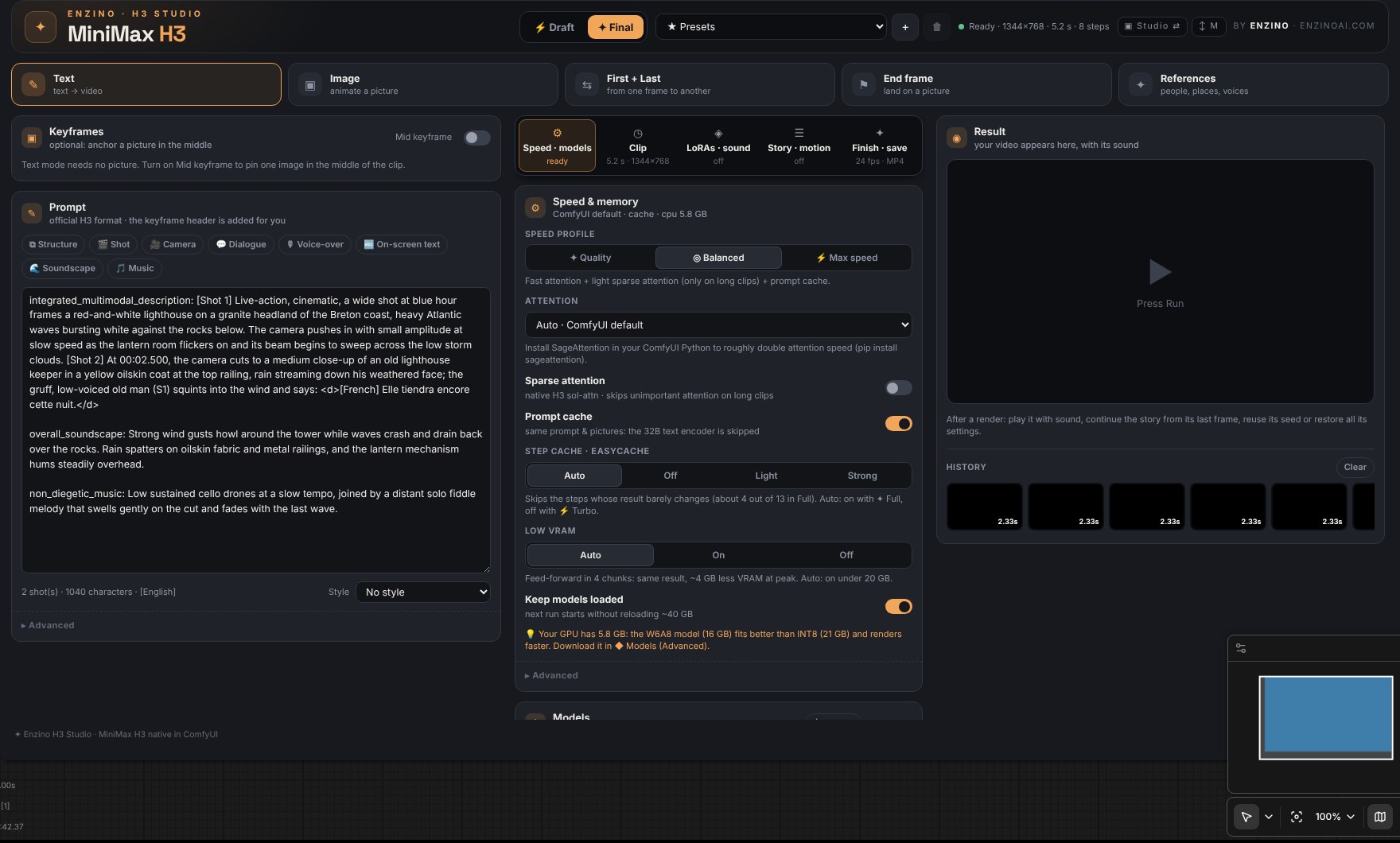 | ✦ Enzino H3 Studio | Every mode and every setting in one landscape node, with tabs (Speed · Clip · LoRAs · Story · Finish) and the result always in view. |
The three use the same engine: same quality, same speed and memory handling.
Free edition: ✦ Enzino H3 WF. Full edition ($11.99 on Ko-Fi): the WF, the Simple node and the Studio, plus the production tools below.
What's inside
| | | |---|---| | Modes | ✎ Text · ▣ Image · ⇆ First + Last · ✦ References (up to 9 pictures, cited in the prompt) · ⚑ End frame (Studio) | | Prompt | Official H3 format. The picture header is written for you (I2V, First + Last, End frame) with the right shot number and timing. Prompt helpers: small forms that write correct H3 sentences — ⧉ Structure, 🎬 Shot, 🎥 Camera (18 moves), 💬 Dialogue and 🎙 Voice-over (age, voice, tone, language, exact words, S1/S2 tracked), 🔤 On-screen text, 🌊 Soundscape, 🎵 Music. Live preview, inserted at the cursor | | Size | By pixel budget, like the official H3 selector: every format gets the same pixels (1 MP ★ = 1344×768 in 16:9, 992×992 in 1:1…), or your own budget from 0.3 to 3 MP | | Duration | 1–15 s on H3's 17k+5 frame grid, 24 fps | | Models | Every file of your folders is selectable (H3 models are recognised by their content, whatever their name). Missing files and other versions (W6A8, FP8, Hybrid FL+REF, FP16 VAE…) download from the list, resumable | | LoRAs | Your MiniMax H3 LoRAs with strength and on/off, trigger words one click away. Free: 3 · Full: 8 | | Render | ⚡ Turbo (Turbo LoRA 4/8 steps, or a model that is already Turbo — no LoRA needed) or ✦ Full (13 steps with step cache, 20 without) · seed 🎲 🔒 · live preview of the whole clip while it renders | | Speed | Auto attention (fastest installed: SageAttention → SageAttention 3 → Flash, falls back to PyTorch by itself if one fails) · step cache (native EasyCache, ~4 steps out of 13 skipped in Full) · native sparse attention · prompt cache (a seed change skips the 32B text encoder) · patched model reused between runs | | Memory | Built for 16 GB cards: low-VRAM feed-forward (same result, ~4 GB less at peak, automatic under 20 GB) · the text encoder and the video model never sit in RAM together when RAM is short (no Windows paging) · VRAM headroom kept for the computation · automatic retry if the card runs out of memory · tiled decode | | Upscale | 1080p · 1440p · 4K (Full), frame by frame: NVIDIA RTX Video Super Resolution when ComfyUI Nvidia VFX Nodes is installed, any upscale model (4x-UltraSharp…) or lanczos | | Result | Player with sound in the node, ↪ continue from the last frame, reuse seed, restore all settings, history | | Save | MP4 (H.264 + AAC stereo) with the workflow embedded, plus first and last frames |
✦ Full edition
| | | |---|---| | Krea 2 second pass | Every frame re-detailed by Krea 2 at a low denoise with the same noise on every frame. In fine detail only mode, only skin, hair and fabric texture is taken from Krea 2: colours, faces, shapes and motion stay H3's, and an anti-flicker filter smooths the added detail. Works great with IntoRealism Krea 2 Flash | | Story mode | Up to 12 shots chained into one long video, each starting on the last frame of the previous one, sound crossfaded (Studio) | | Motion control & retouch | A pose / depth video drives the motion (native H3 Fun ControlNet) · regenerate a box of a video over a time range, keep the rest (Studio) | | Variations | 2 to 4 seeds in one run, then ✦ Final from the best one (Studio) | | Finish | 48 / 72 fps (RIFE / FILM) · 4K upscale · text signature · extra Reels 9:16, Feed 1:1, Portrait 4:5, YouTube 16:9 files framed on the action | | Presets & Draft / Final | Enzino presets (Quick draft, Final 1 MP, Full + step cache, Cinema 4K, Reels, Low VRAM) and your own | | LoRAs | Up to 8 |
The Free edition is the complete ✦ Enzino H3 WF: Text, Image, First + Last and References, the prompt helpers, the full quality, all the speed and memory work and upscale up to 1440p. The Full edition adds the Simple node, the Studio (end frame, mid keyframe, your own sound) and the production tools above. A Studio or Simple workflow opened in Free shows a 🔒 card instead of a red node.
Install
- Copy
ComfyUI-Enzino-H3-StudiointoComfyUI/custom_nodes/. - Restart ComfyUI and reload the page (Ctrl+F5).
- Open
workflows/enzino_h3_wf.json(Full: alsoenzino_h3_simple.jsonandenzino_h3_studio.json), or add the nodes from the Enzino category. - Open the ◆ Models card: download what's missing, or pick your own files.
Requires a recent ComfyUI with native MiniMax H3 support. Language: Settings → Enzino → H3 Studio → Language (English / Français).
| Folder | Recommended file | Size |
|---|---|---|
| models/diffusion_models | minimax_h3_fl2va_pruned_int8_convrot.safetensors · on 16 GB, the W6A8 version (16 GB) fits better | 21 GB |
| models/diffusion_models | minimax_h3_ref2va_pruned_int8_convrot.safetensors (References, optional) — or one Hybrid FL+REF file for every mode | 21 GB |
| models/text_encoders | qwen3vl_32b_minimax_h3_nvfp4_awq.safetensors | 15.7 GB |
| models/vae | minimax_h3_video_vae_int8_convrot.safetensors (or FP16 for finer detail) · minimax_h3_audio_vae_fp32.safetensors | 2.8 · 0.6 GB |
| models/loras | minimax_h3_fl2v_turbo_8step_v1.0_comfyui_bf16.safetensors (not needed with a Turbo model) | 2 GB |
Optional: style embeddings, the sharp live-preview decoder taeh3 (23 MB), and for the Full edition the Fun ControlNet, RIFE / FILM and the Krea 2 files — all in the ◆ Models card.
Optional packs, used when installed: ComfyUI Nvidia VFX Nodes (RTX Video Super Resolution) · ComfyUI-MiniMaxH3Mod by Luisa (saved references, Studio).
Tips
- Image modes: describe what moves, not the picture — H3 already sees it.
- Dialogue:
the gruff old man (S1) says: <d>[French] Texte exact.</d>— H3 speaks 11 languages. - Small faces far away look soft: render at 1 MP (or 1.3–1.5 MP custom), use ✦ Full, the FP16 video VAE and a closer framing in the prompt; the Krea 2 pass adds texture on top.
- 16 GB card: install SageAttention (
pip install sageattentionin ComfyUI's Python), use the W6A8 model, explore in ⚡ Draft, then render the final at 1 MP and upscale.
MiniMax H3 weights are under the MiniMax H3 Community License; community models and LoRAs have their own licences. Read them before commercial use of your videos.