
Bulent Gercek Nodes
Prompt Builder, List Pick and String Line Count: text and list utility nodes for building and iterating prompts.
Nodes (3)
bulentgercek-nodes
Custom nodes for ComfyUI. All nodes live under the bulentgercek/text category.
Created by Bulent Gercek
Install
ComfyUI Manager, or clone into ComfyUI/custom_nodes/.
Nodes
Prompt Builder
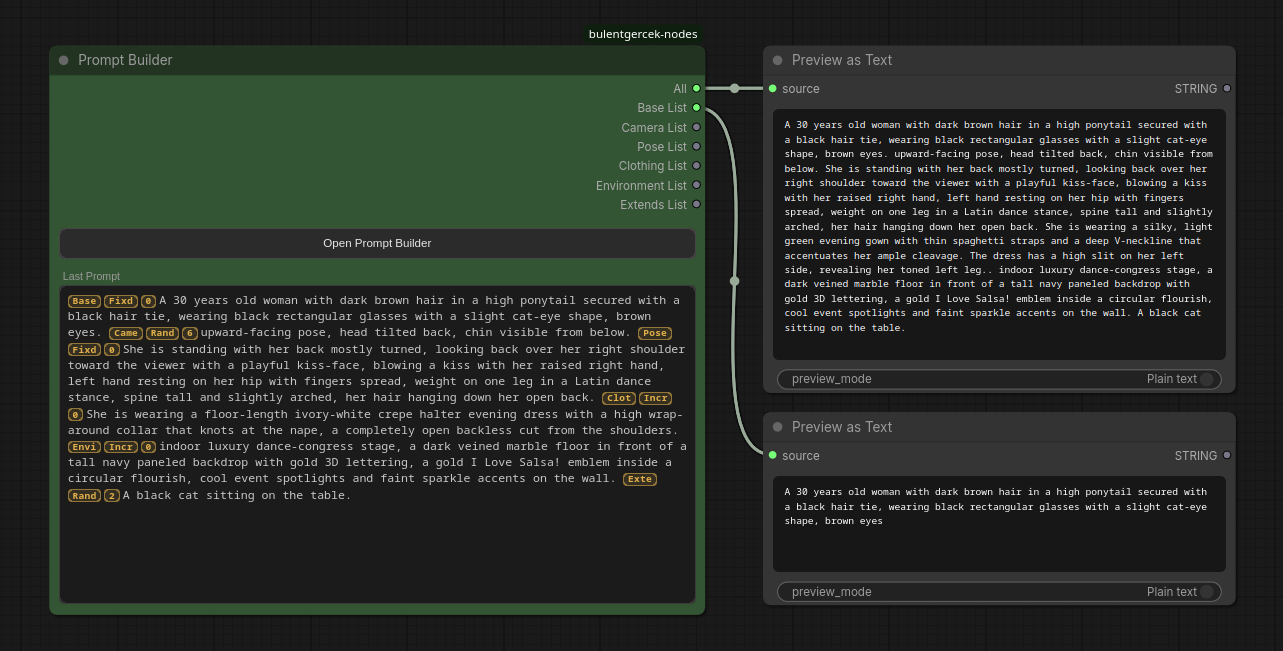
Builds one prompt string from several named categories, each holding its own list of lines. The categories are not graph inputs — they are data stored inside the node and edited in a pop-up modal, so the node itself stays small no matter how many lists you keep.
Outputs:
all(STRING): every enabled category's currently-picked line, joined with the delimiter. Always present.- One STRING output per category, labelled with the category name (
Base List,Camera List, …). The frontend adds and removes these slots as you add and remove categories, and existing wires follow a category when you rename or reorder it. Route e.g. theBase Listoutput straight into a FaceDetailer while the rest go elsewhere.
Each category has:
- a name — only a label, not part of the output;
- a multiline list, one item per line (blank lines are skipped);
- a mode —
fixed/increment/decrement/randomize, with the same walk semantics as List Pick; - a start_index;
- an enabled toggle — when off, the category drops out of
all, but its own output still emits its pick.
The Last Prompt box on the node previews the joined result: before a run, what the next run will produce; after a run, what it actually produced. Each segment is prefixed with three small badges in the gutter colour — category (first 4 letters), mode (Fixd / Incr / Decr / Rand) and picked index. The copy button always copies the plain text, without badges.
The editor modal
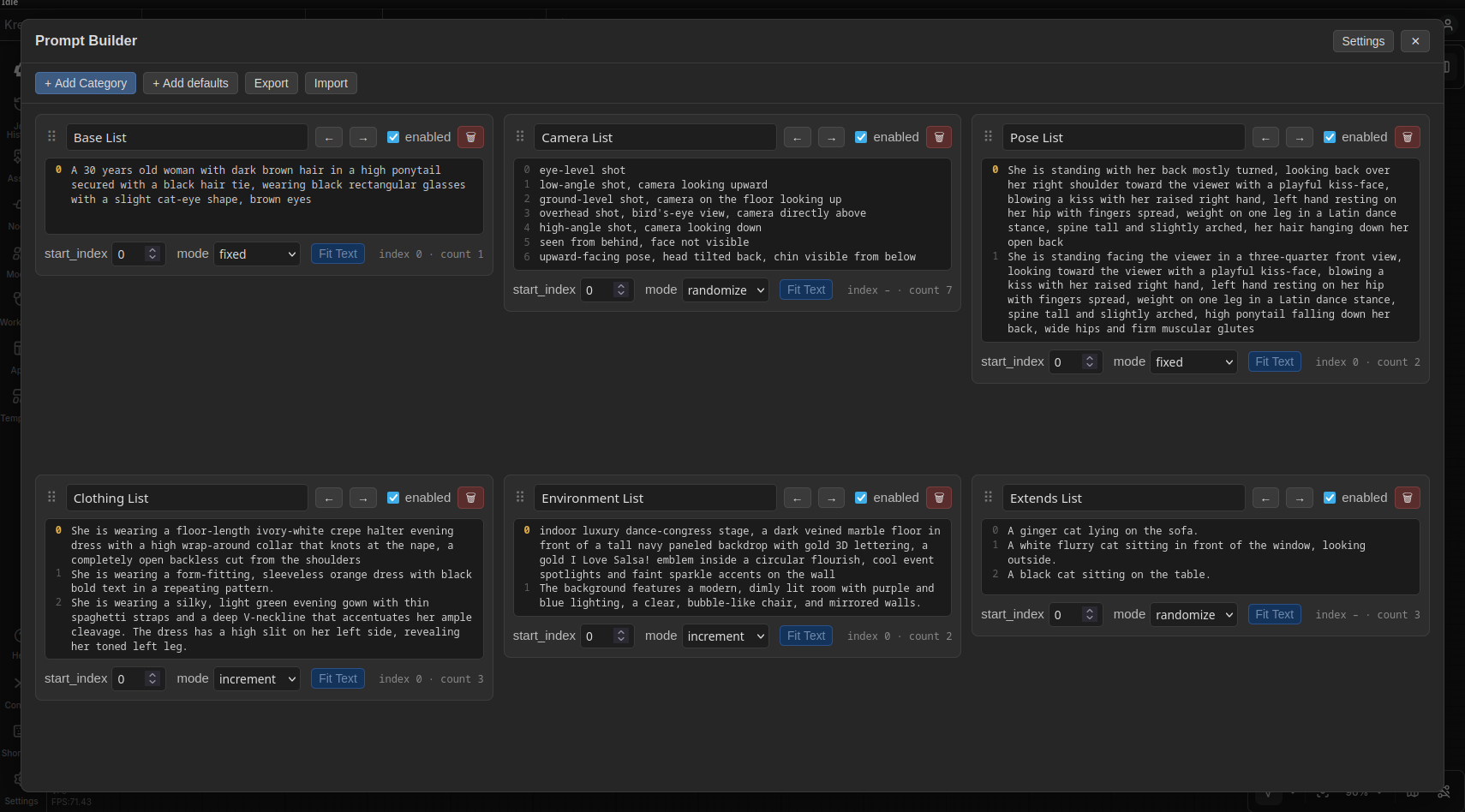
Open Prompt Builder opens a full-screen modal with one card per category:
- Drag the
⠿handle to reorder, or use the arrow buttons (they switch between ↑ ↓ and ← → depending on the column layout). - Each card's text box has a line-number gutter, a per-card Fit Text toggle (auto-grow the box to fit its content) and an
index · countreadout. + Add Categoryadds an empty one;+ Add defaultsinserts the names from Settings.Exportcopies the whole set (categories + delimiter) as JSON, or downloads it as a file, to move it to another node.Importreplaces this node's categories from that JSON.
Settings (top-right of the modal) are browser-wide, not per-workflow:
Default categories— the comma-separated names+ Add defaultsuses.Delimiter— the string joining the categories for this node (also the default for new nodes).Window layout— 1 / 2 / 3 / 4 fixed columns or auto-fill; all collapse to fewer columns as the window narrows.UI Size/List Text Size— scale the modal chrome and the category lists independently.Compact Rows— cap every card's text box height with an internal scrollbar, to keep the grid tidy.Toggle Fit Text All— turn auto-grow on for every category at once (and lock the per-card toggles while it is on).
State and reset
increment / decrement remember their position between runs, exactly like List Pick, but the state key is unique_id + ":" + category_id, so reordering categories never mixes up their counters. The state resets for a category when its start_index changes, its usable line count changes, or a new Queue action starts.
The category data lives in a hidden serialised categories widget, so it is saved and loaded with the workflow.
Server route: POST /bulentgercek/prompt_builder/reset — same contract as the List Pick route below.
List Pick
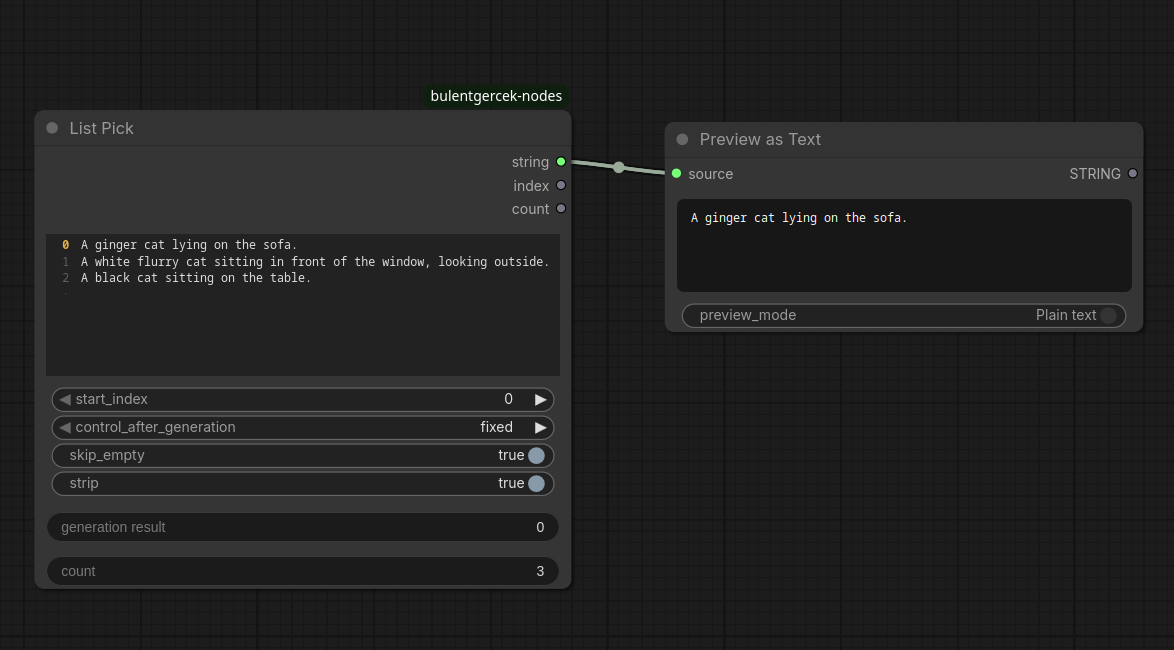
Picks one line out of a multiline string list and returns it as a string, together with the index that was picked and the total line count.
Inputs:
string_list(STRING, multiline): one item per line.start_index(INT): the starting point for picking. This is a starting point only, not a lower bound —incrementanddecrementare free to wrap around to any line in the list, including lines beforestart_index.control_after_generation(fixed / increment / decrement / randomize): how the index changes from one run to the next.skip_empty(BOOLEAN): if true, blank lines are removed before indexing and counting.strip(BOOLEAN): if true, leading/trailing whitespace is stripped from the returned string.
Outputs:
string: the picked line.index: the index that was picked.count: the number of usable lines (afterskip_emptyis applied).
Mode behavior:
fixed: always returnsstart_index. No internal state involved.increment/decrement: the first run after a reset (see below) returnsstart_index. Every following run in the same queue action moves by one step and wraps around the full list — passing the last line goes back to line 0, going below line 0 goes back to the last line. Example: 3 lines,start_index = 2,increment, four runs in a row → indices2, 0, 1, 2.randomize: returns a uniformly random index over the whole list on every run.
State and reset:
increment and decrement need to remember the last picked index between runs. This memory is kept server-side, per node, in a plain Python dict keyed by the node's id — ComfyUI does not give custom control_after_generation combos any built-in state of their own, unlike the native seed widget.
That memory is cleared, and the walk restarts from start_index, whenever any of the following happens:
start_indexis changed.- The number of usable lines changes (editing the list, or toggling
skip_empty). - A new Queue action is started in the UI.
The last point is what keeps this predictable across separate uses: queuing once with a batch count of N walks N steps forward from start_index within that one action, but the next time you press Queue, the walk starts over from start_index again — it does not keep drifting forward across unrelated queue presses.
Companion frontend (web/list_pick.js) adds:
- Two read-only rows on the node, "generation result" and "count", showing the last picked index and the current line count.
- A line-number gutter next to the text box. Before anything has run (or right after a reset), it highlights the line that the next run will pick. After a run, it highlights the line that was actually picked.
- A hook on the Queue action and on the server's queue-empty event, so the gutter and the "generation result" row snap back to previewing
start_indexas soon as the queue is empty, instead of staying on whatever was last generated.
Server route: POST /bulentgercek/list_pick/reset — accepts {"ids": [<node_id>, ...]} and clears the stored state for those node ids (or all state if no ids are given). Called by the frontend hook above; not meant to be called by hand.
String Line Count
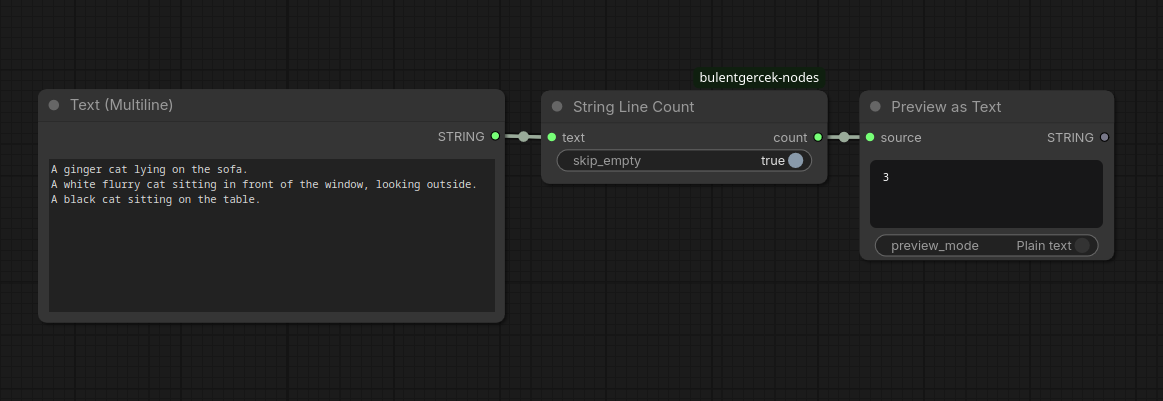
Counts the lines in a string.
Inputs:
text(STRING, forced input, multiline): the text to count lines in.skip_empty(BOOLEAN): if true, blank lines are not counted.
Outputs:
count(INT): the number of lines.
Support
If these saved you an afternoon: GitHub Sponsors
License
Apache License 2.0. See LICENSE and NOTICE. Modified copies must retain the original copyright notice and mark what was changed.
Versions 1.0.0 and 1.1.0 were released under MIT.