
ComfyUI_OllamaUnload
Unload one or all Ollama models mid-workflow to free VRAM before image sampling. Wire your prompt through the passthrough socket so the node runs before the sampler. Node name: Ollama Unload (free VRAM). Located under Add Node Ollama.
Ollama Unload - Custom node for ComfyUI
A single utility node that unloads one or all Ollama models from memory mid-workflow, freeing GPU VRAM before an image-generation step runs on the same card.
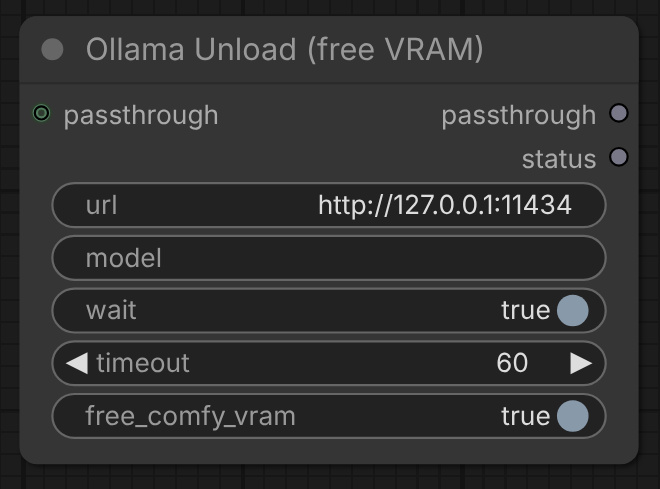
The node will be located under Add Node > Ollama. Node name: Ollama Unload (free VRAM).
Designed for use in conjunction with the stavsap/comfyui-ollama node pack (or any similar pack that runs Ollama from ComfyUI). Those packs generate from a model; this node frees the VRAM that model holds. It talks to Ollama directly over its HTTP API, so it does not depend on any specific pack and works alongside whichever one you use.
The problem it solves
Running Ollama (for LLM prompt building, captioning, vision analysis) and a diffusion model (Flux, SDXL, Wan) on one GPU means they compete for VRAM. A large model like gemma4:26b (17 GB) plus a Flux2 image model will not co-reside on a 24 GB card, so the sampler hits torch.OutOfMemoryError.
Setting keep_alive to 5+ minutes (on the Ollama Connectivity node from the stavsap/comfyui-ollama pack) keeps a multi-stage LLM chain fast: the model stays resident across all your stages instead of reloading 17 GB between each one. The downside is it is still resident when the image sampler starts, which causes the OOM. Setting keep_alive to 0 avoids the OOM but reloads the model every stage and is much slower.
This node gives you both: keep keep_alive at 5+ minutes on the Ollama Connectivity node so every LLM stage runs fast, then drop this node after the last LLM stage to evict the model the moment the LLM work is done, freeing the full card for image generation.
Example pipeline this is built for: 4 sequential Ollama stages (vision analysis, prompt write, edit, negative prompt) running on gemma4:26b, followed by a Flux2 image generation on the same GPU.
It uses Ollama's documented graceful unload (POST /api/generate with keep_alive: 0), not a process kill. Killing ollama serve just makes it respawn and reload the model.
Nodes included
- Ollama Unload (free VRAM) - unloads Ollama model(s) and optionally frees ComfyUI's own VRAM.
Inputs
| Input | Type | Default | Description |
|---|---|---|---|
| passthrough | any (optional) | - | Wire your final prompt/conditioning through here so the node runs BEFORE the sampler. See Usage. |
| url | STRING | http://127.0.0.1:11434 | Ollama base URL. |
| model | STRING | `` (empty) | Exact model to unload, e.g. gemma4:26b. Empty unloads every loaded model. A named model that is not currently loaded is skipped (it is never loaded just to unload it). |
| wait | BOOLEAN | true | Block until the model leaves Ollama memory (VRAM actually freed) before continuing. |
| timeout | INT | 60 | Max seconds to wait for the unload and the resident-memory poll. |
| free_comfy_vram | BOOLEAN | true | Also unload ComfyUI's own models and empty the CUDA cache. |
Outputs
| Output | Type | Description |
|---|---|---|
| passthrough | any | The value you wired into passthrough, passed through unchanged. |
| status | STRING | Human-readable result, e.g. unload requested: gemma4:26b; comfy vram freed. |
Usage (important: wiring forces correct order)
ComfyUI only guarantees a node runs before the nodes that consume its output. To make the unload happen before image sampling, put it inline in the prompt path:
your final prompt string -> [Ollama Unload].passthrough in
[Ollama Unload].passthrough out -> CLIP Text Encode -> KSampler
Now the sampler depends on the unload node, so ComfyUI must finish the unload (and free VRAM) before loading the image model. Leave model empty to free everything.
Recommended companion settings:
- Ollama Connectivity node (from stavsap/comfyui-ollama)
keep_alive: 5 minutes or more, so all LLM stages stay fast and the model stays resident between them. - ComfyUI launch: low
--reserve-vram(e.g.1) so image gen gets the whole card once the LLM is gone.
Testing
1. Unit tests (no ComfyUI, no Ollama needed)
HTTP is mocked, so this runs anywhere:
cd ComfyUI_OllamaUnload
python -m unittest test_ollama_unload -v
Expect 7 passing tests (specific unload, unload-all, nothing-loaded, unreachable-raises, URL normalization, not-loaded skip, still-resident warning).
2. Live unload test (real Ollama, no ComfyUI)
Load a model, then unload it through the core and watch VRAM free:
# terminal 1: watch the model and GPU
watch -n 0.5 'ollama ps; echo; nvidia-smi --query-gpu=memory.used,memory.free --format=csv,noheader,nounits'

# terminal 2: load a model, then unload via the node core
ollama run gemma4:26b "hi" --keepalive 5m
python -c "import ollama_unload_core as c; print(c.unload_ollama('http://127.0.0.1:11434', model='', wait=True, timeout=60, free_comfy_vram=False))"
In terminal 1 the model row disappears and free VRAM jumps the moment the command returns. Because wait=True, the call returns only after the model has actually left memory.
3. In ComfyUI
- Restart ComfyUI so the node loads. Confirm it appears once under Add Node > ollama and there is no import error in
user/comfyui.log. - Wire it inline as in Usage above.
- Run the workflow with the terminal 1 watch command open.
ollama psmust go empty before sampling starts, and the node'sstatusoutput should read the unload result.
Installation
ComfyUI Manager (recommended)
In ComfyUI, open Manager > Custom Nodes Manager, search for ComfyUI_OllamaUnload, click Install, then restart ComfyUI.
Manual install
Clone into your ComfyUI custom_nodes directory and restart ComfyUI:
cd ComfyUI/custom_nodes
git clone https://github.com/bradsec/ComfyUI_OllamaUnload
No extra dependencies (Python stdlib only).
Compatibility
Dual API: exports the legacy V1 NODE_CLASS_MAPPINGS and a V3 comfy_entrypoint (comfy_api). Verified on ComfyUI 0.25.0. On builds whose loader reads NODE_CLASS_MAPPINGS first, the V1 path is used and comfy_entrypoint is skipped, so the node is never registered twice.
Support
If you find this useful, please consider starring the repo. Stars help other people discover these nodes.