
ABC Preview
ABC score preview: sheet music beside highlighted source, with optional playback from a user-supplied soundfont, and a score timeline with duration and sections.
ComfyUI-ABCPreview
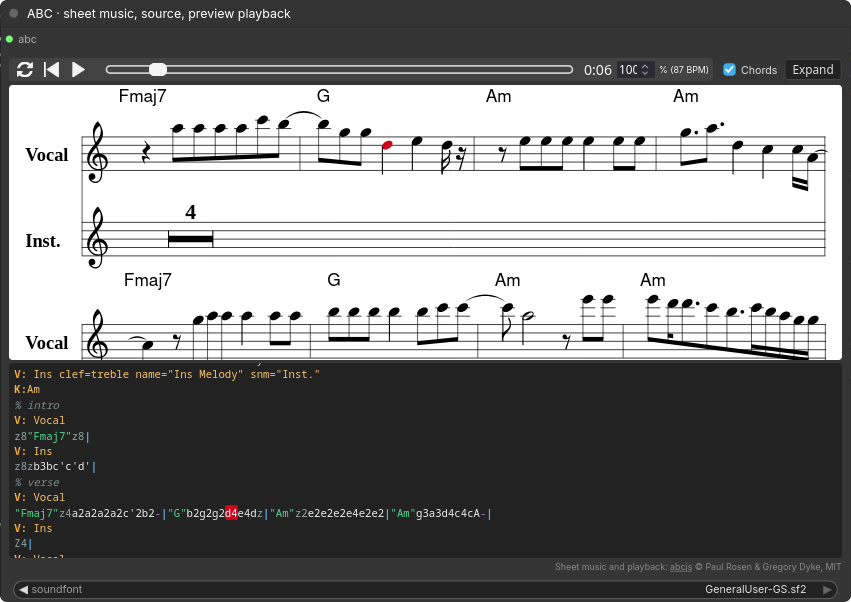
ABC Preview (Sheet Music + Playback) shows an ABC score in a node:
- sheet music rendered with abcjs;
- the ABC source with syntax highlighting;
- click a note in either view to locate it in the other;
- optional playback with play/pause, seek, loop, tempo, chords on/off, and notes highlighted in both views as they sound;
- Expand opens a larger side-by-side view (Esc or Close returns).
The node is a leaf output: connect any STRING with ABC. The view updates
after the node executes; it is a read-only preview, not an editor.
ABC Timeline (Duration + Sections) shows how long a score plays at its own
tempo and meter, as minutes and total seconds, with bars, tempo, meter and
key. Each % name comment line starts a section, drawn as a block sized by its
share of the song; sections with the same name share a color. It also outputs
the duration in seconds, for example to derive a generation length.
Timing follows the first voice. Each bar lasts one measure of the current
meter at the current tempo, including inline [Q:…] and [M:…] changes;
Z4 counts as four bars. Without Q:, it assumes 120 BPM and says so. This
is the score's nominal length: rendered audio can end earlier or run on.
Install
- ComfyUI-Manager: search for ABC Preview (Registry ID
comfyui-abcpreview) and install it. - comfy-cli:
comfy node install comfyui-abcpreview. - Manually:
git clone https://github.com/bno84/ComfyUI-ABCPreviewintoComfyUI/custom_nodes/.
Then restart ComfyUI. Requires ComfyUI 0.38.0 or newer; no extra Python packages.
Playback needs a user-supplied soundfont
No sounds are bundled or downloaded. Notation still works without a soundfont but playback stays disabled.
Put a General MIDI .sf2 file in ComfyUI/models/soundfonts/
(or a soundfonts: entry in extra_model_paths.yaml), refresh the browser,
and choose it. A saved selection first matches its installed path, then the same
filename anywhere in those soundfont folders. Moving a font into a subfolder
therefore does not require changing the workflow.
GeneralUser-GS.sf2 stays listed even when absent, so templates can request it
without a missing-required-model warning. It is not bundled or downloaded.
If the selected font is missing, the sheet and source still render and explain
how to enable playback. Select (none) to explicitly disable playback.
New standalone ABC Preview nodes still default to (none).
Vendored code
vendor/abcjs/ holds abcjs 6.7.2 from npm
MIT © Paul Rosen and Gregory Dyke
See vendor/abcjs/LICENSE.md.
Tests
node --test tests/*.mjs                    # tokenizer, extension wiring, timeline layout
python3 -m unittest discover -s tests      # renderer (needs numpy) and timeline timing