
comfyui_videofillergrid
A single node, VideoFillerGrid Assemble, that joins source clips and (generated) transition clips that bridge them into one video, following an order list, and writes it straight to disk.
Nodes (1)
ComfyUI VideoFillerGrid
A single node, VideoFillerGrid Assemble, that joins source clips and (generated) transition clips that bridge them into one video, following an order list, and writes it straight to disk.
How the pieces fit together
You provide N source clips and the N×N fillers that transition between every
ordered pair of them. A filler is addressed by its (source, target) pair; the
fillers arrive in cartesian order, so filler k is the s → t transition where
k = s×N + t.
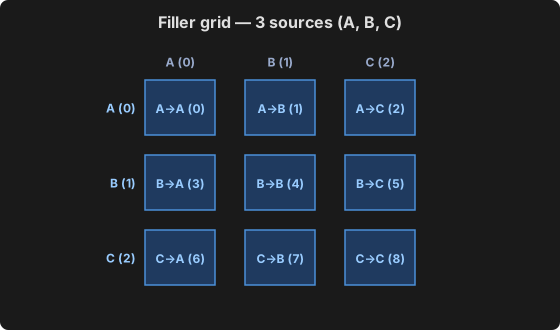
The node does not generate the fillers or decide the pairs — that is yours. A bundled subgraph, Gen Segments Order List (Looping), can emit a random order list from this grid (it does not exclude self-transitions).
The order file then walks the grid, one clipIndex,fillerIndex per line:
0,1        emit clip A, then filler A→B
1,3        emit clip B, then filler B→A
0,0        emit clip A, then filler A→A
Each unit contributes its source clip followed by its filler, so the cut reads
A → A→B → B → B→A → A → A→A → A — a chain stitched from the grid's cells.
Bad input
The node accepts any pairing: clipIndex and fillerIndex are independent, and
out-of-range indices are the only hard error. Pairing a clip with a filler whose
source is a different clip (e.g. 1,2 — clip B with filler A→C) is valid input
and will encode, but the cut will not make sense.
Install
Drop the folder into ComfyUI/custom_nodes/ and restart ComfyUI:
No extra dependencies. It uses av (PyAV) and torch, which ComfyUI already
ships, and torchaudio only when a filler's audio needs resampling.
Geometry, rate and audio
- Frame size comes from the first clip. Fillers are rescaled to match with
common_upscale(lanczos, centre) if they differ — handy while testing at a lower generation resolution. - Frame rate comes from the first filler, i.e. the generator's native rate.
- Audio is normalised to 48 kHz stereo. A source with no audio track contributes exact silence, so clips and fillers can be mixed freely.
- Segment audio is trimmed or zero-padded to exactly match its frames.
Looping cuts
Set seconds = 0 to disable truncation and write every unit whole.
This matters when the order is built so the closing filler leads back to the
first clip (t(i) = s((i+1) mod k)). Trimming to a duration would clip that
final filler part-way and the join back to the start would no longer land, so
the loop would visibly break. With seconds = 0 the cut ends exactly where the
closing filler ends, and playback on repeat is as seamless as any join inside
it.
Failure modes worth knowing
- Wrong
N. Iflen(fillers) != len(clips) ** 2the indices in the order file will not mean what you think. The node does not enforce it — a partial grid is legal — but it is almost always a sign of stale files. secondslonger than the material. The walk ends when the order runs out; you get everything, not a padded file.