
ComfyUI Extension
ComfyUI_ColorGrading
Custom node featuring three interactive color wheels for shadows, midtones, and highlights with independent threshold sliders and master intensity control.
bertoo87/ComfyUI_ColorGrading
Nodes1
On cloudLocal install
Categoryimage/color
Stars7
Updated7 months ago
Nodes (1)
Readme
ComfyUI Color Grading Wheels
Custom Node forr ComfyUI with 3 Color Wheels (Shadows, Midtones, Highlights), each with a threshold slider and a master intensity slider.
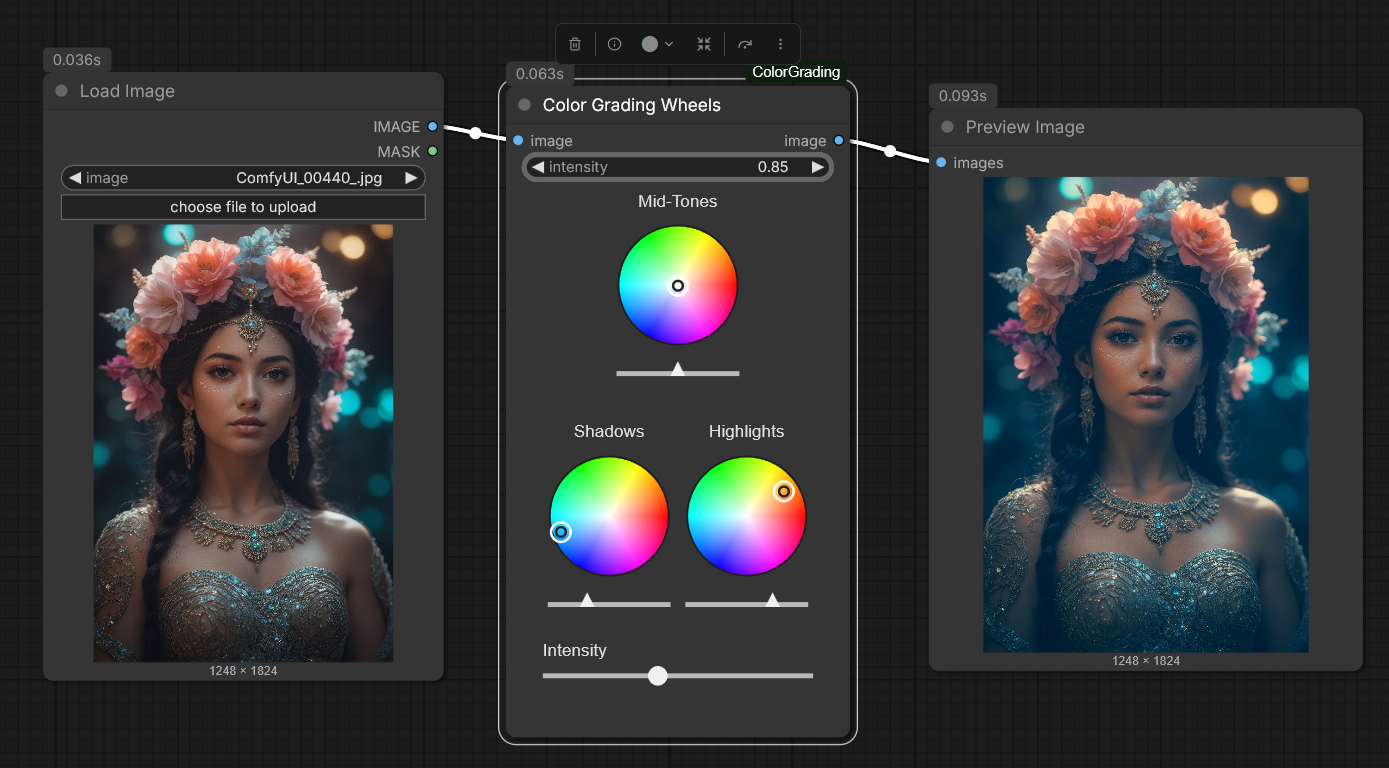
Features
- three interactive color wheels
- each color wheel with it's own threshold slider
- global intensity slider
Installation
- just place files into
ComfyUI/custom_nodes/ComfyUI_ColorGrading. - restart ComfyUI.
- search node in ComfyUI:
Color Grading Wheels.
Additional info
- the Node takes standard ComfyUI
IMAGEinput. - The color wheels write their values into hidden float-widgets, this way values are saved within the workflow.