
ComfyUI_PhaseStretchTransform
A ComfyUI custom node that applies the Phase Stretch Transform (PST) to images. PST is a physics-inspired edge detection algorithm that enhances features by simulating wave propagation through a dispersive medium.
Nodes (1)
ComfyUI Phase Stretch Transform Node
A ComfyUI custom node that applies the Phase Stretch Transform (PST) to images. PST is a physics-inspired edge detection algorithm that enhances features by simulating wave propagation through a dispersive medium.
Installation
- Clone or copy this folder into your ComfyUI
custom_nodesdirectory:ComfyUI/custom_nodes/Comfyui_PST/ - Install dependencies:
pip install numpy scipy - Restart ComfyUI.
The node will appear under image → processing in the node menu.
Node: Phase Stretch Transform
Inputs
| Name | Type | Default | Description |
|---|---|---|---|
| image | IMAGE | — | Input image (RGB or grayscale) |
| lpf_sigma | FLOAT | 0.21 | Gaussian low-pass filter sigma applied before PST. Higher values smooth the image more, reducing noise sensitivity. |
| phase_strength | FLOAT | 0.48 | PST phase strength (S). Controls how strongly phase variations are amplified. |
| warp_strength | FLOAT | 12.14 | PST warp strength (W). Controls the frequency-domain warping; higher values emphasise finer edges. |
| min_thresh | FLOAT | -1.0 | Lower phase threshold for binary edge extraction. |
| max_thresh | FLOAT | 0.003 | Upper phase threshold for binary edge extraction. |
| morph_flag | BOOLEAN | True | When enabled, applies morphological closing and opening to clean up the binary edge map. When disabled, outputs a soft (normalised) phase image instead. |
| output_mode | COMBO | grayscale | grayscale – white edges on black background. rgb_overlay – edges drawn in red over the original image. |
Outputs
| Name | Type | Description |
|---|---|---|
| edge_image | IMAGE | Processed edge map (binary or overlay depending on output_mode). |
| phase_image | IMAGE | Raw PST phase output normalised to 0–1, useful for further processing or visualisation. |
Algorithm
PST processes each image through the following steps:
- Convert input to grayscale (luminance weights: R×0.2126, G×0.7152, B×0.0722).
- Compute the 2D FFT and shift to centre zero frequency.
- Apply a Gaussian low-pass filter in the frequency domain.
- Apply the PST kernel — a warped phase ramp:
$$K(r) = \frac{W \cdot r}{1 + W \cdot r} \cdot e^{-j , S \cdot r , / , (1 + r)}$$
where $r$ is the radial frequency and $W$, $S$ are the warp and phase strength parameters.
- Compute the inverse FFT.
- Extract the phase angle of the complex result.
- Threshold the phase to produce a binary edge map, then apply morphological clean-up (if
morph_flagis enabled).
Parameter Tuning Guide
- More edges / finer detail — increase
phase_strengthorwarp_strength. - Fewer false edges / less noise — increase
lpf_sigmaor tighten the threshold range (min_threshcloser to 0,max_threshcloser to 0). - Soft/continuous edge map — disable
morph_flag; use thephase_imageoutput. - Overlay on original — set
output_modetorgb_overlay.
Example Workflow
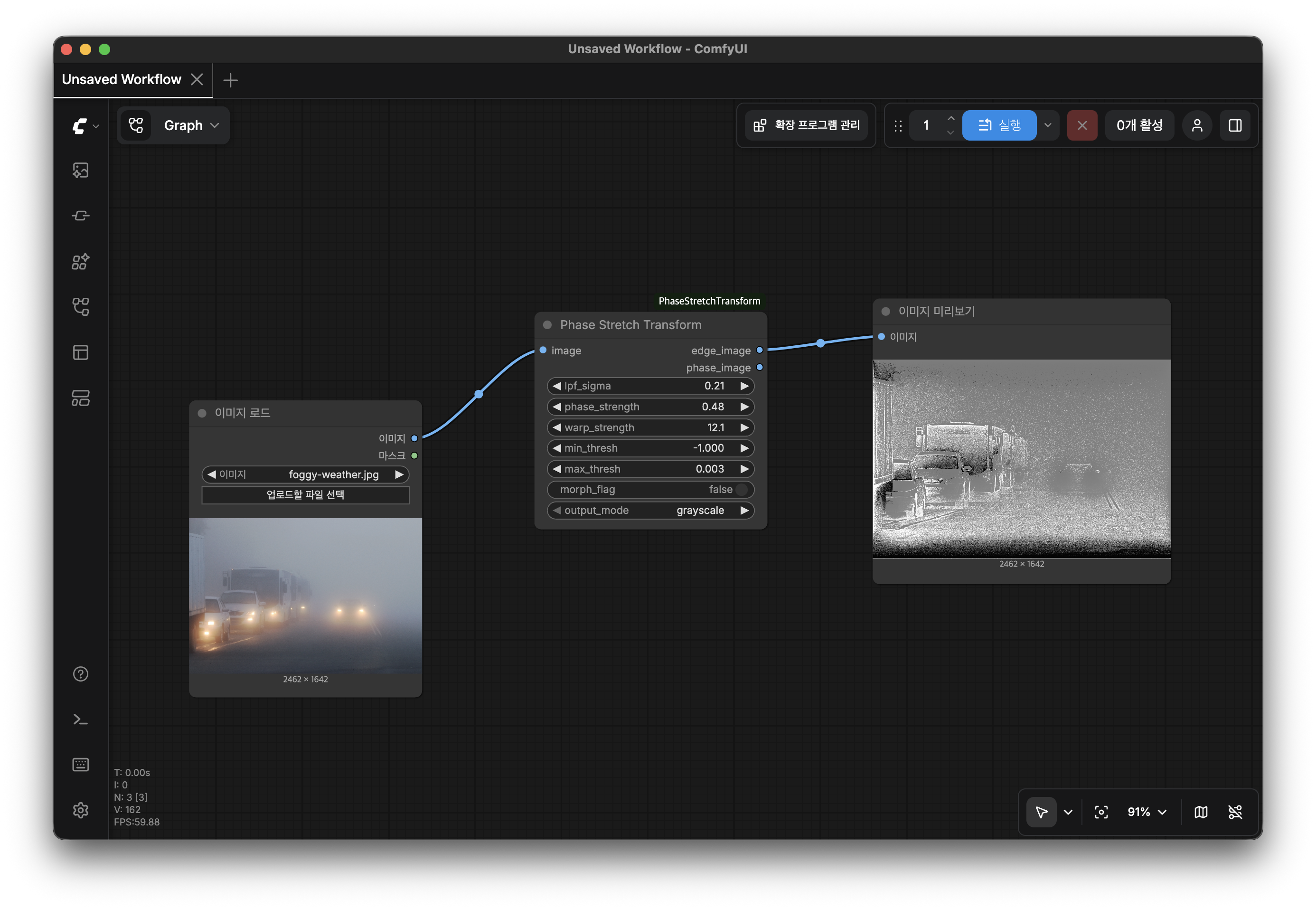
Load Image → Phase Stretch Transform → Preview Image
                       ↓
              (edge_image or phase_image)
Screenshots

Requirements
- Python ≥ 3.10
- numpy
- scipy
- torch (provided by ComfyUI)
License
MIT