
ComfyUI_Cross-Bi-Magnitude
A ComfyUI custom node package that aligns and stitches two images using Cross-Bimagnitude, the magnitude component of the Cross-Bispectrum from Higher-Order Statistics (HOS).
Nodes (2)
Cross-BiMagnitude Stitch — ComfyUI Custom Node
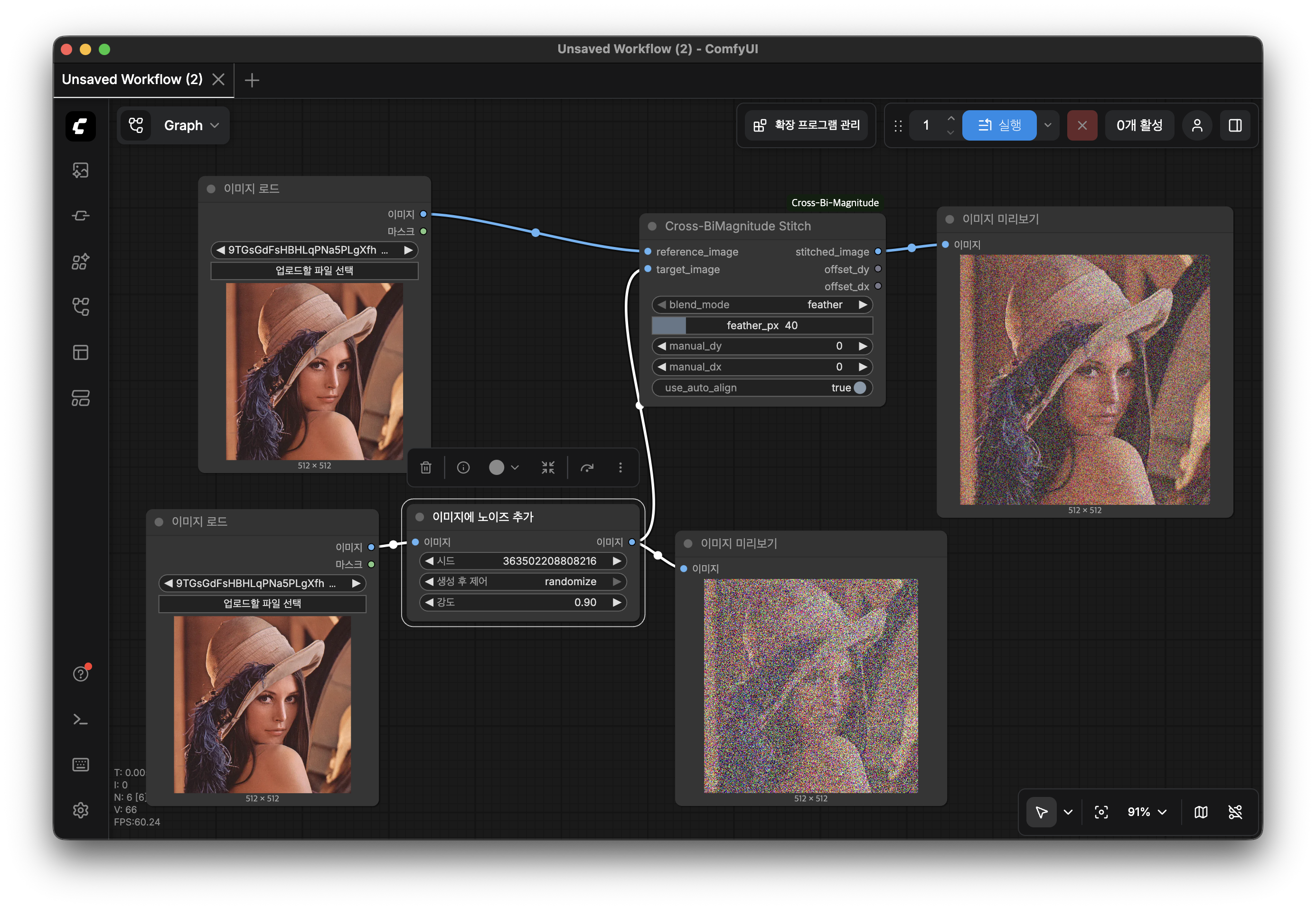
A ComfyUI custom node package that aligns and stitches two images using Cross-Bimagnitude, the magnitude component of the Cross-Bispectrum from Higher-Order Statistics (HOS).
Background
What is Cross-Bimagnitude?
The Cross-Bispectrum of two signals x and y is defined as:
B_xy(ω1, ω2) = E[ X(ω1) · X(ω2) · Y*(ω1 + ω2) ]
where X(ω) and Y(ω) are the Fourier transforms of x and y, and *
denotes the complex conjugate.
The Cross-Bimagnitude is simply its absolute value:
|B_xy(ω1, ω2)|
Unlike the ordinary cross-power spectrum (second-order), the bispectrum captures third-order statistical structure, making it more sensitive to non-Gaussian features and more robust to additive Gaussian noise.
How it is applied to image alignment
Computing the full 4-D Cross-Bispectrum for 2-D images is prohibitively expensive. This implementation uses a computationally tractable diagonal-slice approximation that retains the key magnitude weighting:
BM_weight(ω) = |X(ω)|^(2/3) · |Y(ω)|^(1/3)
The exponent 1/3 reflects the fact that the bispectrum is a product of
three spectral terms. This weight is then applied to the normalized
phase-correlation:
C(ω) = [ X(ω)·Y*(ω) / |X(ω)·Y*(ω)| ] · BM_weight(ω)
Taking the inverse FFT of C(ω) yields a correlation map whose peak
location gives the optimal translation (dy, dx) between the two images.
The reference and target images are then composited onto a common canvas and
blended in the overlap region.
Nodes
Cross-BiMagnitude Stitch
The main stitching node.
| Socket | Type | Description |
|---|---|---|
| reference_image | IMAGE (input) | The base image that defines the output coordinate frame |
| target_image | IMAGE (input) | The image to align and stitch onto the reference |
| stitched_image | IMAGE (output) | Combined result on an auto-sized canvas |
| offset_dy | INT (output) | Estimated vertical offset of target relative to reference |
| offset_dx | INT (output) | Estimated horizontal offset of target relative to reference |
Parameters
| Parameter | Default | Description |
|---|---|---|
| blend_mode | feather | How the overlap region is composited (see below) |
| feather_px | 40 | Width of the feather transition in pixels |
| use_auto_align | true | Use Cross-Bimagnitude auto-alignment. Disable to use manual offsets |
| manual_dy | 0 | Manual vertical offset (active when use_auto_align is off) |
| manual_dx | 0 | Manual horizontal offset (active when use_auto_align is off) |
Blend modes
| Mode | Behavior |
|---|---|
| feather | Smooth distance-based weight falloff at all image borders — recommended for most cases |
| linear | Equal 50 / 50 weight wherever the two images overlap |
| overlay | Target is placed on top of reference with no blending |
Cross-BiMagnitude Spectrum
A diagnostic / educational node that visualizes the intermediate frequency-domain data produced during alignment.
| Socket | Type | Description |
|---|---|---|
| reference_image | IMAGE (input) | Reference image |
| target_image | IMAGE (input) | Target image |
| bimagnitude_spectrum | IMAGE (output) | Cross-Bimagnitude weight map (frequency domain, fft-shifted) |
| correlation_map | IMAGE (output) | Bimagnitude-weighted phase-correlation map (spatial domain) |
Parameters
| Parameter | Default | Description |
|---|---|---|
| channel | luminance | Channel used for visualization (luminance, red, green, blue) |
| log_scale | true | Apply log compression to the spectrum for better visibility |
The bright spot at the center of the correlation map output corresponds to zero-displacement; the peak location away from center indicates the detected translation.
Installation
Copy the entire package folder into ComfyUI's custom_nodes directory and
restart ComfyUI:
cp -r cross_bimagnitude_stitch /path/to/ComfyUI/custom_nodes/
Both nodes will appear under the image/Cross-BiMagnitude category in the
node browser.
Requirements
All dependencies ship with a standard ComfyUI installation:
| Package | Purpose |
|---|---|
| numpy | FFT computation and array operations |
| scipy | ndimage utilities |
| torch | Tensor I/O with ComfyUI's IMAGE format |
No additional pip install is required.
File Structure
cross_bimagnitude_stitch/
├── __init__.py               # Package entry point; exports NODE_CLASS_MAPPINGS
└── cross_bimagnitude_node.py # All node logic and algorithm implementation
Algorithm Summary
reference_image ──► FFT2 ──► X(ω)
                                 \
                                  ├─► BM_weight = |X|^(2/3) · |Y|^(1/3)
                                  ├─► phase     = X·Y* / |X·Y*|
                                  └─► weighted  = phase · BM_weight
                                           │
                                        IFFT2
                                           │
                                       corr_map
                                           │
                                        argmax ──► (dy, dx)
target_image  ──► FFT2 ──► Y(ω)               │
                                        blend_images(ref, tgt, dy, dx)
                                               │
                                        stitched_image
Limitations and Notes
- Translation only. The current implementation estimates a pure 2-D
translation. Rotation, scale, or perspective differences between the two
images are not compensated automatically; use
manual_dy/manual_dxor pre-warp the images before stitching. - Overlap assumption. Best results are obtained when the two images share a meaningful overlapping region. If they do not overlap at all, the algorithm will still find the best translation according to the bimagnitude correlation, but the stitched canvas will simply place both images side by side.
- Identical sizes preferred. The FFT zero-padding handles different input sizes gracefully, but large size differences reduce alignment accuracy.
- Batch input. ComfyUI passes tensors in
(B, H, W, C)format. Only the first frame of each batch is processed; the output is always a single-frame batch.
References
- Nikias, C. L., & Mendel, J. M. (1993). Signal processing with higher-order spectra. IEEE Signal Processing Magazine, 10(3), 10–37.
- Sadler, B. M., & Giannakis, G. B. (1992). Shift- and rotation-invariant object reconstruction using the bispectrum. Journal of the Optical Society of America A, 9(1), 57–69.
- Reddy, B. S., & Chatterji, B. N. (1996). An FFT-based technique for translation, rotation, and scale-invariant image registration. IEEE Transactions on Image Processing, 5(8), 1266–1271.