
Iris-3B
Nodes for Iris-3B, a 3B pixel-space text-to-image model, plus its 4x upscaler and depth model with a 3D view. Simple, advanced and 4-step Turbo samplers, image to image, auto model download, low VRAM.
Nodes (13)
A 12 GB model to make a grayscale map (and the mask you'll actually reuse)
The third 12 GB checkpoint, and don't mix it up with the other two
The fun one, and it's a relief map rather than real geometry
Your whole LoRA folder shows up, and almost none of it will work
The 12 GB loader, and the one dropdown that decides whether it fits
Every dial Iris actually has, including the two nobody uses
Six dropdowns, and one of them is a hidden 3x tax
Four passes, eight seconds, and no CFG at all
Positive, negative, and the empty box you should probably leave empty
Why a single-file Qwen3-VL won't do
The 460 MB that turns 30 steps into 4
49 tiles, 47 seconds, and why the 4x is a restoration pass and not a redraw
A separate 12 GB fine-tune, not a second pass of your model
Iris-3B Comfy Nodes
<p align="center"> <a href="#install"><img src="https://img.shields.io/badge/Install-2b3137?style=for-the-badge" alt="Install"></a> <a href="#workflows"><img src="https://img.shields.io/badge/Workflows-2b3137?style=for-the-badge" alt="Workflows"></a> <a href="#models"><img src="https://img.shields.io/badge/Models-2b3137?style=for-the-badge" alt="Models"></a> <a href="#nodes"><img src="https://img.shields.io/badge/Nodes-2b3137?style=for-the-badge" alt="Nodes"></a> <a href="#turbo-4-steps"><img src="https://img.shields.io/badge/Turbo_4_steps-2b3137?style=for-the-badge" alt="Turbo 4 steps"></a> <a href="#image-to-image"><img src="https://img.shields.io/badge/Image_to_image-2b3137?style=for-the-badge" alt="Image to image"></a> <a href="#depth"><img src="https://img.shields.io/badge/Depth_and_3D-2b3137?style=for-the-badge" alt="Depth and 3D"></a> <a href="#upscale"><img src="https://img.shields.io/badge/Upscale-2b3137?style=for-the-badge" alt="Upscale"></a> <a href="#speed"><img src="https://img.shields.io/badge/Speed-2b3137?style=for-the-badge" alt="Speed"></a> <a href="#contributing"><img src="https://img.shields.io/badge/Contributing-2b3137?style=for-the-badge" alt="Contributing"></a> </p>ComfyUI nodes for Iris-3B, a 3B pixel-space text-to-image model from Sperid Labs, plus its 4x upscaler and depth model. Iris has no VAE, so everything goes straight to IMAGE.
Fast: about 1.5x faster than the other Iris node pack on a fresh start, and 4x to 9x faster on repeat runs on a 16 GB card, using about 5 GB less VRAM. Numbers below.
<p align="center"> <img src="assets/fox_girl_4x.jpg" width="49%" alt="fox girl holding a sign, upscaled 4x"> <img src="assets/bottle.png" width="49%" alt="galaxy in a bottle"> </p> <p align="center"> <img src="assets/fox_girl_depth.png" width="49%" alt="depth map of the fox girl, grayscale"> <img src="assets/bottle_depth.png" width="49%" alt="depth map of the bottle, inferno colors"> </p>Top left: 832x1216 at 50 steps, then the 4x upscaler (3328x4864). Top right: ComfyUI's classic bottle prompt. Bottom: their depth maps from the Iris depth model, grayscale and inferno. Every PNG here has its workflow embedded, so drag fox_girl.png, bottle.png, fox_girl_depth.png or bottle_depth.png into ComfyUI to get the exact graph and settings.


Install
Search for Iris-3B in ComfyUI-Manager, or clone into ComfyUI/custom_nodes:
git clone https://github.com/bani4kaskashka/Iris-3B-Comfy-Nodes
ComfyUI-Manager installs the one extra package (omegaconf) for you. If you cloned it, run pip install -r requirements.txt in ComfyUI's Python. It also needs transformers 4.57 or newer, which recent ComfyUI already has.
Workflows
Download one and drag it into ComfyUI, or open it from Templates once the pack is installed.
- Iris-3B Text to Image (Simple): resolution and quality presets
- Iris-3B Text to Image (Advanced): every sampler setting
- Iris-3B Text to Image (Turbo): 4 steps with the Turbo LoRA, about 8 s per image
- Iris-3B Image to Image: restyle or rework an image you load
- Iris-3B Upscale 4x: 4x upscale of any image
- Iris-3B Depth: depth map of any image, plus a 3D view you can orbit
All three text-to-image workflows end with a 4x upscale group (1024 to 4096) that's bypassed by default. Select the group and press Ctrl+B to turn it on.
Models
When a workflow opens with a model missing, ComfyUI lists it under Missing Models with a Download button. The loaders also download anything still missing on first run, so you only fetch what your workflow uses (about 44 GB for everything), so the workflows run as-is either way.
models/diffusion_models/iris-3b.safetensors            text to image (12 GB)
models/diffusion_models/iris-3b-upscaler.safetensors   4x upscaler (12 GB)
models/diffusion_models/iris-3b-depth.safetensors      depth (12 GB)
models/text_encoders/Qwen3-VL-4B-Instruct/             text encoder, the whole HF repo (8.3 GB)
models/loras/iris-3b-turbo-r2-1000.safetensors         Turbo LoRA, only for the Turbo workflow (460 MB)
To get them yourself, the three Iris files are model.safetensors, upscaler/model.safetensors and depth/model.safetensors from speridlabs/iris-3b, renamed as above. The configs come with this pack.
hf download Qwen/Qwen3-VL-4B-Instruct --local-dir models/text_encoders/Qwen3-VL-4B-Instruct
The text encoder has to be the original HF folder. Single-file or fp8 Qwen3-VL text encoders won't work, because Iris reads 12 hidden layers from it.
Nodes
- Load Iris-3B Model: loads the DiT.
bf16uses 6 GB of VRAM.fp32is the shipped precision but needs a lot more than 16 GB. - Load Iris Text Encoder (Qwen3-VL-4B): lists HF folders in
text_encoders. - Iris Text Encode: positive and negative prompt. Leave the negative empty to use the null prompt the model was trained with.
- Iris Sampler (Simple): mode (text to image or image to image), resolution (1 MP sizes from 21:9 to 9:21, or match the input image), quality (fast = 30 steps, balanced = 50, best = 100), prompt adherence (cfg 2, 3 or 4.5), image strength (denoise 0.3, 0.5 or 0.7), seed and batch size.
- Iris Sampler (Advanced): every setting: steps, cfg, seed, batch size, mode, denoise, shift, solver order, CFG interval, any width/height in multiples of 16, and keep_model_on_gpu.
- Load Iris LoRA: adds an Iris LoRA from
models/lorasto the model, for the Simple and Advanced samplers. Chain several to stack them (they stack with Turbo too). Train your own with Iris-3B Trainer. LoRAs are applied live while sampling, so the base model is never modified and strength 0 gives exactly the base image. - Load Iris Turbo LoRA and Iris Sampler (Turbo): 4-step generation with the Turbo LoRA. Pick resolution, steps (4 is what it was trained for), seed and batch size. More below.
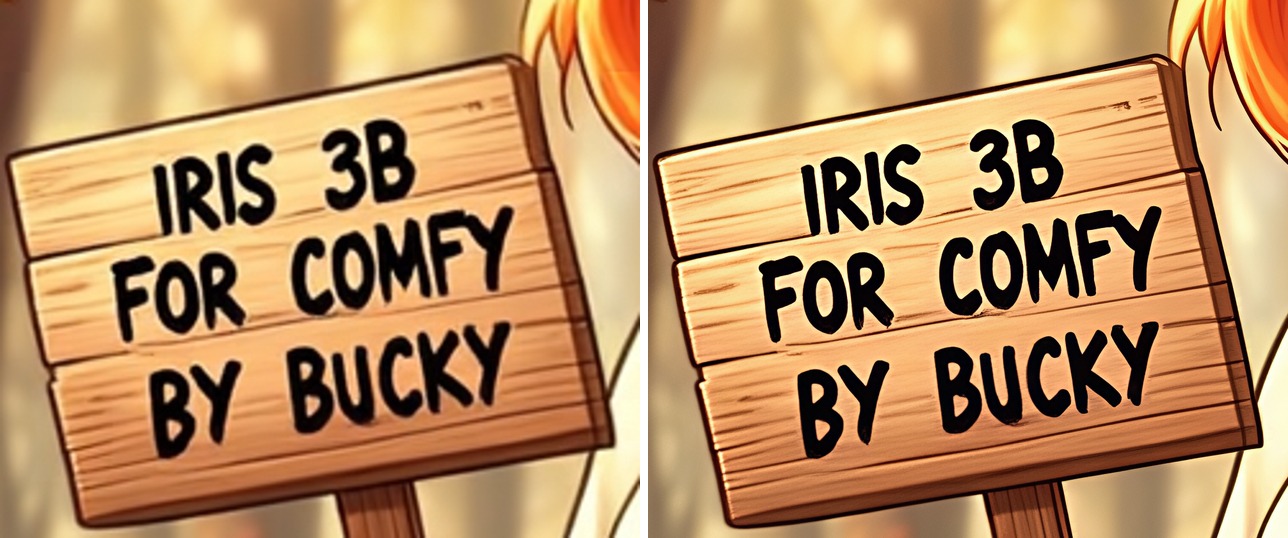
- Load Iris Upscaler and Iris Upscale: Iris fine-tuned for restoration and 4x upscaling. It's a single pass per 1024 px tile with overlapping tiles and a wavelet color fix. It works on any IMAGE, not just Iris output. With
limit_input_sizeon, big inputs are shrunk first (short side 512, long side 1024), so the output stays at or under 2048x4096. Turn it off for a full 4x of any size. - Load Iris Depth Model and Iris Depth: Iris fine-tuned for monocular depth, one pass per image. Outputs a depth IMAGE (near = white, ready for depth ControlNets, or an inferno colormap) and the same map as a MASK. It's relative depth, not metric, scaled to each image's 2nd to 98th percentile.
max_sidecaps the size the model sees (default 1024). - Iris Depth to 3D: turns the depth into a colored point cloud or mesh (
.plyin your output folder). Connect it to ComfyUI's Preview 3D to orbit around it.fovis the photo's assumed field of view.
Both samplers use DPM-Solver++ on the flow schedule. The defaults match the model card (cfg 3, shift 4). Live previews follow ComfyUI's preview setting and cost nothing, since Iris predicts pixels directly.
Turbo (4 steps)
The Iris-3B Turbo LoRA by pentaCoxian is a DMD2 distillation that makes a 1024x1024 image in 4 model passes with guidance baked in. On the 9060 XT that's about 8 s per image instead of 54 s at the fast 30-step preset.
Use the Turbo workflow, or put Load Iris Turbo LoRA between the model loader and Iris Sampler (Turbo). The LoRA downloads on first use. It's applied live while sampling, so the base model stays untouched and you can switch between Turbo and the normal samplers without reloading anything. Strength 1 is what it was trained for.
It was trained at about one megapixel, so stick to the 1 MP sizes. Its card notes less variety than the full sampler and sometimes weaker text, so use the normal samplers when you want maximum quality.
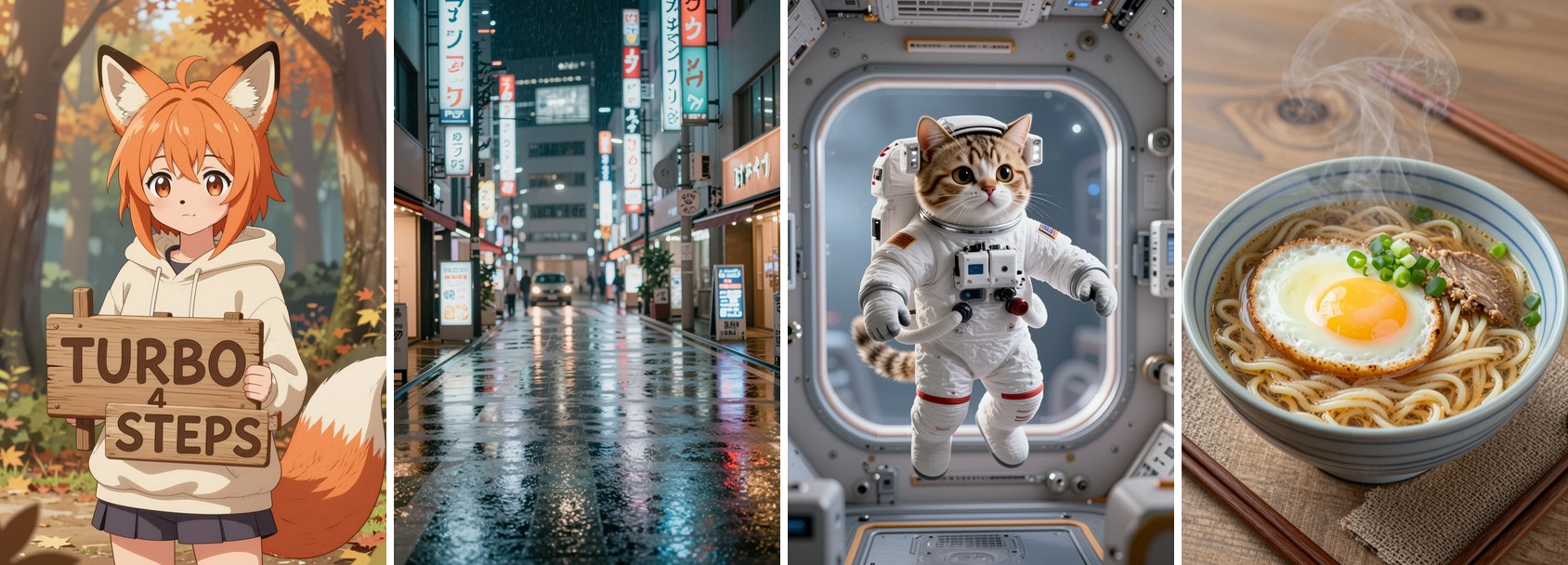
Image to image
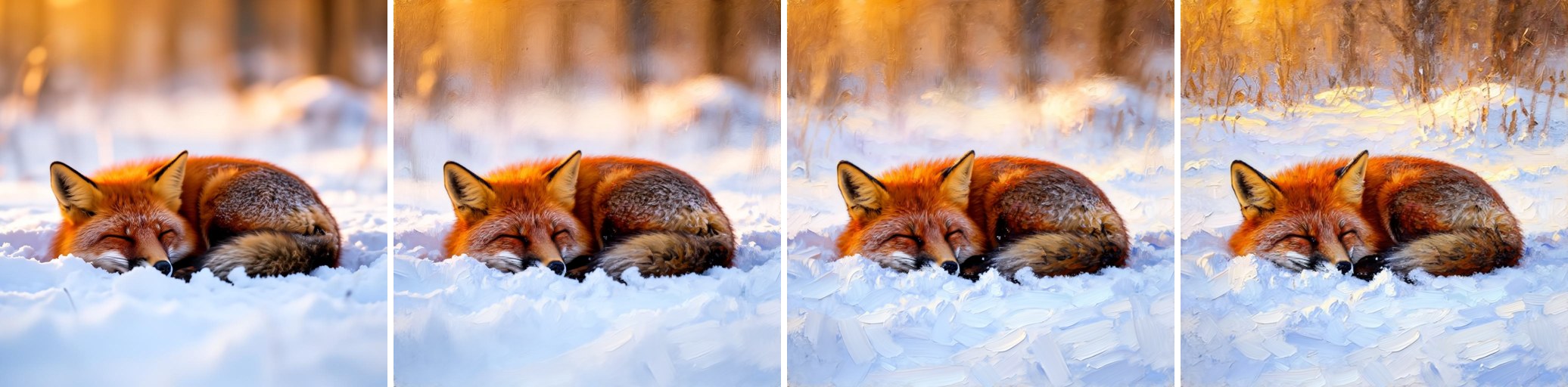
Set the sampler's mode to image to image and connect an IMAGE. The image is noised partway and diffused back, so lower strength keeps more of it. It takes the same time as a normal run with the same steps.
Source, then subtle (0.3), medium (0.5) and strong (0.7), prompted as an oil painting:
Depth
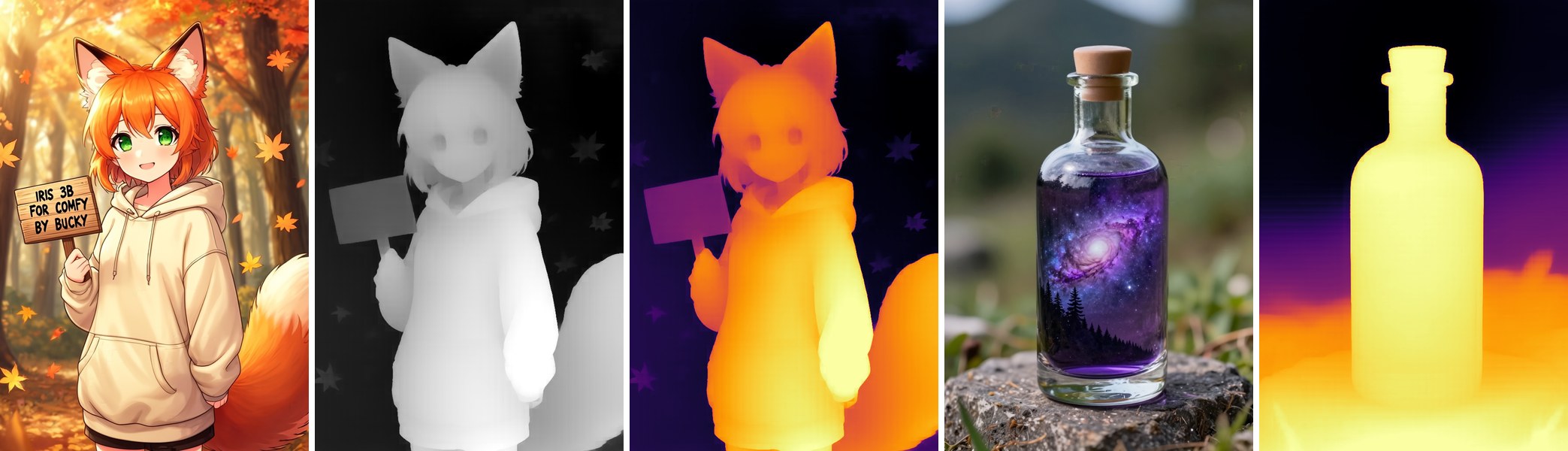
The Depth workflow also builds a 3D point cloud and opens it in Preview 3D. Click Fit to Viewer, then drag to orbit and scroll to zoom. Photo, depth and the 3D view:

Upscale
Bicubic on the left, Iris 4x on the right:
Speed
Measured on an RX 9060 XT (16 GB, ROCm on Windows), 1 MP images, against the other Iris node pack with its default settings:
| | This pack | Other pack | |---|---|---| | First run | 1.8 s/step | 2.8 s/step | | Second run | 1.8 s/step | 7.3 s/step | | Third run | 1.8 s/step | 16.4 s/step | | Peak VRAM | 7.7 GB | 12.5 GB |
Each model here visits the GPU only for its own step and sits in system RAM otherwise, so nothing piles up and spills over on a 16 GB card. Expect to need around 22 GB of free system RAM with all three models loaded. 4x upscaling 1024 to 4096 is 49 tiles, about 47 s.
On AMD, start ComfyUI the normal way (main.py), which turns on the AOTriton flash attention kernels. Without them attention falls back to a slow path.
Contributing
Got a fix, a new feature or support for another Iris model? Open a pull request here instead of starting a separate repo. This pack is the one on ComfyUI-Manager and the Comfy Registry, so anything merged here reaches everyone who has it installed with their next update, and people don't have to pick between packs that conflict with each other.
Bug reports and ideas go in issues.
Credits
Made by Bucky (bani4kaskashka). The model code in vendor/bucky_iris3b is from speridlabs/iris-3b (Apache-2.0, see vendor/LICENSE and vendor/NOTICE), renamed so it can't clash with other packs that bundle their own copy. Only the inference parts are included. The Turbo LoRA and its 4-step schedule are by pentaCoxian (Apache-2.0); this pack downloads the adapter and runs it with its own code. This pack is also Apache-2.0; if you redistribute it or build on it, keep the LICENSE and NOTICE files.