
NN-custom-nodes
A collection of utility nodes for ComfyUI workflows.
Nodes (22)
The bool switch that doesn't run the branch you didn't pick
Match one image's contrast to another, automatically
One node for all your color-correction chores
RGB channel gains without the math
Brightness and contrast that behave themselves
AMD's sharpening shader, ported to your image batches
Restore the contrast your footage lost to a limited range
Turn a pile of images into a tidy grid
Crop by percentage, not by pixel math
The node that fixes a bug you didn't know you had
A preview that doesn't explode when nothing's connected
Resize a whole batch without guessing the math
Stop doing aspect-ratio math in your head
Save images with names that don't collide and metadata that survives
Quick, clean upscaling that isn't a model
A tiny gatekeeper that tells you when a socket is empty
Take a file path apart without the regex
Scale a resolution with a ceiling, not a surprise
A gentle VRAM reset that rides along in your workflow
The node that figures out how many frames your video needs
See every video frame at once with a contact sheet
Roll a fresh prompt on every queue
NN-custom-nodes
Execution Profiler
A lightweight execution profiler for ComfyUI that tracks node processing times and displays performance information directly in the workflow editor.
- Measures execution time for every executed node
- Displays timing badges on nodes in the frontend
- Tracks nested subgraph execution time
- Logs slow nodes to the console
- Configurable timing thresholds and colors
- Sends real-time profiler events to the UI
During execution, nodes receive live timing information:
- Node execution duration
- Slow node highlighting
- Subgraph accumulated execution time
- Execution status events
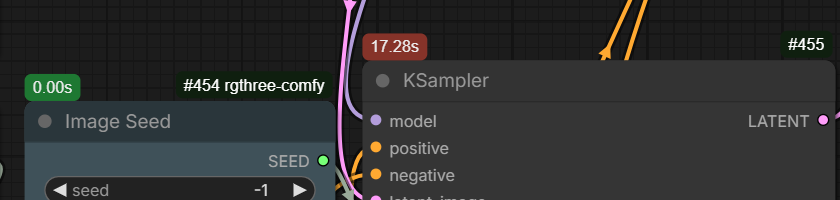
This helps identify workflow bottlenecks and optimize slow pipelines.
📐 Image Resolution
Calculates an image resolution based on width, height, aspect ratio, and orientation settings.
- Supports common aspect ratios
- Automatically calculates missing dimensions
- Maintains target pixel count when changing aspect ratios
- Rounds dimensions to a configurable divisor
- Supports portrait and landscape orientation
🎬 Video Resolution
Calculates video dimensions and frame count based on resolution, aspect ratio, duration, and frame rate.
- Supports image/video aspect ratios
- Calculates total frames automatically
- Keeps dimensions aligned for video models
- Supports portrait and landscape videos
🔍 Resolution Scale
Scales an existing resolution while keeping dimensions aligned and optionally limiting maximum size.
- Upscale or downscale resolutions
- Maintains aspect ratio
- Prevents exceeding maximum resolution
- Rounds dimensions for model compatibility
🎲 Wildcard Processor
A dynamic prompt expansion system for creating randomized prompts using wildcard files, selection blocks, variables, and reusable prompt templates.
Useful for:
- Prompt variation generation
- Batch image generation
- Large prompt libraries
- Reproducible randomized workflows
Features:
-
Random choice blocks
- Select random options using
{one|two|three} - Select multiple options with count syntax
{2$$one|two|three}or{1-2$$one|two|three} - Support variable-length selections with custom separator
{1-2$$, $$one|two|three|four}
- Select random options using
-
Weighted prompt options
- Control selection probability using weighted choices:
{0.8::red|0.2::blue}
- Control selection probability using weighted choices:
-
External wildcard files
- Load reusable prompt lists from wildcard text files
- Supports nested wildcard paths:
__characters/age____styles/*__
-
Custom variables
- Define reusable prompt values:
{!style=cinematic portrait!}
- Reuse variables:
{$style}
- Define reusable prompt values:
-
Seed-based reproducible results
- Same seed produces the same wildcard selections and prompt expansion
-
LoRA tag cleanup
- Automatically removes LoRA tags:
<lora:name:strength>
- Automatically removes LoRA tags:
-
- Comment handling
- Full-line comments using
# - Hash symbols inside prompts are preserved:
# character ...→ ignoreddark #1 style→ kept
- Inline block comments:
portrait /* test variation */
✨ Image CASharpening (Batch)
Applies Contrast Adaptive Sharpening (CAS) to images with batch processing support.
- GPU accelerated sharpening
- Batch-friendly processing
- Adjustable sharpening strength
- Optional CPU/GPU execution
✂️ Image Inset Crop
Crops an image by percentage values from each side.
- Percentage-based cropping
- Supports image batches
- Keeps crop positioning predictable
🔍 Image Upscale By
Upscales images using high-quality bicubic interpolation with anti-aliasing.
- Supports large batches
- GPU/CPU processing selection
- Memory-efficient chunk processing
👁️ Image Preview Gate
Provides a fallback preview image when no image is connected.
Useful for optional image inputs in workflows.
🎨 Image Color Range
Expands or remaps image color range.
Useful for restoring contrast from limited-range images.
🎚️ Image Adjust Contrast/Brightness
Adjusts image brightness and contrast.
🌈 Image Adjust Color
Adjusts individual RGB channel intensity.
🎛️ Image Adjust
Combined image adjustment node.
Supports:
- Brightness
- Contrast
- Saturation
- RGB channel adjustments
🎯 Contrast Adjust (Ref)
Matches image contrast to a reference image using luminance statistics.
Useful for:
- Style matching
- Consistent image batches
- Reference-based workflows
🖼️ Image Grid
Creates a grid layout from multiple images.
- Supports image batches
- Automatic cropping to target aspect ratio
- Configurable columns
- Resolution limiting
🎞️ Video Timeline
Creates a contact sheet/timeline preview from video frames.
Useful for:
- Reviewing generated animations
- Comparing frame sequences
- Debugging video workflows
📐 Image Resize (Batch)
Resizes image batches with resolution limits and model-friendly dimension alignment.
- Batch processing
- GPU acceleration
- Automatic maximum resolution limiting
- Dimension rounding support
💾 Image Saver
An advanced image saving node with support for multiple formats, automatic filename generation, batch saving, and workflow metadata preservation.
- Supports PNG, JPEG, and WebP output formats
- Automatic timestamp-based filenames
- Handles image batches
- Prevents filename collisions by creating unique filenames
- Preserves ComfyUI workflow and prompt metadata
- Supports PNG transparency (RGBA)
- Configurable quality settings
- Optional lossless WebP output
Supports dynamic filename placeholders:
-
%date- Inserts the current date
- Format:
YYYY_MM_DD - Example:
2026_08_07
-
%timestamp- Inserts the current date and time
- Format:
YYYY-MM-DD_HH-MM-SS - Example:
2026-08-07_00-47-30
-
%time- Inserts the current time
- Format:
HH-MM-SS - Example:
00-47-30
📁 Path Info
Extracts information from a file path and separates it into directory, filename, and path components.
Useful for workflows that need to manipulate saved image paths or process generated files.
🧹 Soft Clear Cache
Releases unused ComfyUI resources by unloading models, clearing GPU cache, and running garbage collection. Useful for long workflows or when managing limited VRAM.
🖼️ Image Optimize
Optimizes image tensors by ensuring they are stored in contiguous memory format. This can improve compatibility and performance for some operations.
🔍 InputCheck
Checks whether an input value is connected or empty.
🔀 Bool Switch
Selects between two inputs based on a boolean condition.
Uses lazy evaluation, meaning only the selected input is evaluated when needed.
Configuration
The extension uses a settings.toml file to configure global behavior for wildcards and the execution profiler.
Configuration file:
Wildcards Settings
[wildcards]

# Directory containing wildcard text files
path = "wildcards"

# Cache loaded wildcard files
# Disable to reload wildcard files without restarting ComfyUI
cache = true

# Remove LoRA tags from processed prompts
cleanup = true

# Separator used when selecting multiple wildcard options
delimiter = ", "

# Maximum recursive expansion passes
max_iterations = 5
Profiler Settings
[profiler]

# Enable execution profiler
enable = true

# Print execution times to console
console_log = false

# Minimum execution time before logging
console_log_threshold = 0

# Decimal precision for displayed times
precision = 2

# Time threshold for slow node highlighting
slow_time = 10

# Frontend colors
active_color = "#4fc3f7"
badge_color = "#1e7832"
badge_color_slow = "#962828"