
LoRA INT8 Quantizer & Loader
Save disk space by storing LoRA and LoKr files as INT8: about half the size for bf16/fp16, a quarter for fp32. Quantizer, folder batch and loader nodes. Storage saving only; VRAM use is unchanged.
ComfyUI-INT8-LoRA
Store LoRA / LoKr files as INT8 to shrink them on disk: about half the size for bf16/fp16 LoRAs and about a quarter for fp32 LoRAs. Files are dequantized in memory when loaded and applied through ComfyUI's normal LoRA path. Nothing in ComfyUI is monkeypatched.
Heads up: this node pack was written with AI assistance. I ran it on my own MOSS and Anima LoRAs and compared generations, and it comes with a unit test suite, but I can't promise it covers every setup. Please check results on your own LoRAs and keep your originals.
| Source dtype | Size after INT8 | Example (measured) | | --- | --- | --- | | fp32 | ~25% | 1134.0 MiB -> 283.7 MiB | | bf16 / fp16 | ~50% | 553.5 MiB -> 277.2 MiB |
INT8 uses one byte per value against four (fp32) or two (bf16/fp16), plus a few scale values and the small tensors that stay in float, so real files land a fraction of a percent above the ideal 25% / 50%. The saving is on disk only: once loaded, the LoRA is expanded back to float, so RAM and VRAM use are the same as with the original.
Nodes (category loaders/INT8 LoRA)
- Quantize LoRA to INT8 – pick a LoRA from
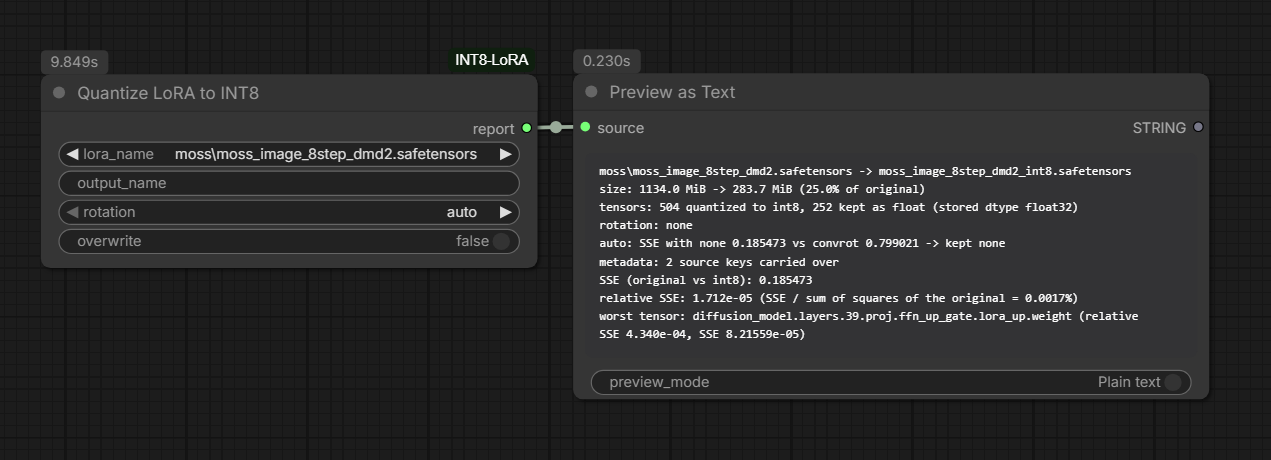
models/loras, get an INT8 copy inmodels/loras_int8. It never modifies the source file and will not overwrite an existing output unlessoverwriteis on. Thereportoutput (connect it to a Preview Any node, labelled Preview as Text in newer ComfyUI; it is also logged to the console;rotationisauto,noneorconvrot) shows the size change and the SSE between the original and the INT8 factors. - Quantize LoRA Folder to INT8 – pick a subfolder of
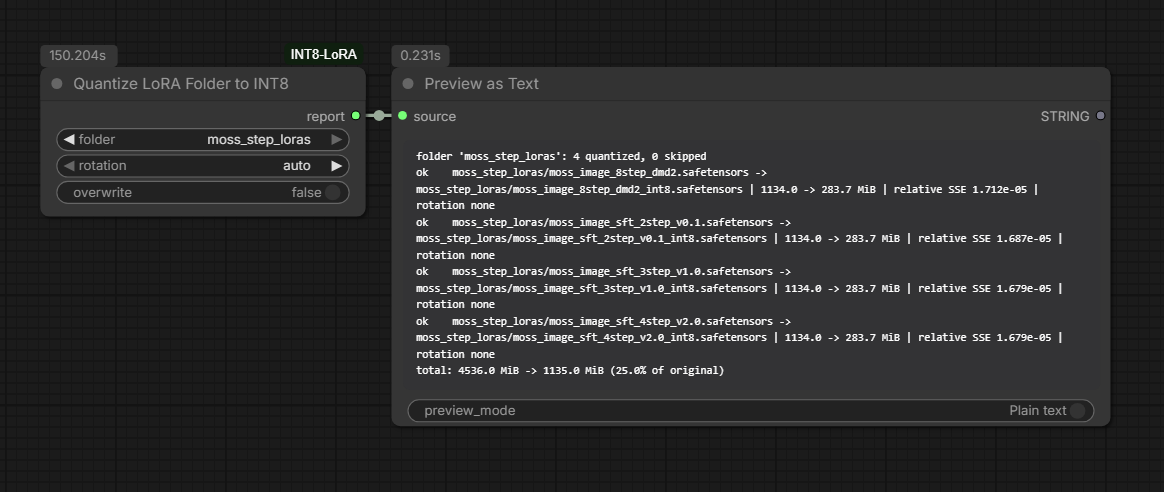
models/lorasand every LoRA under it (including nested folders) is quantized in one run. The folder structure is kept undermodels/loras_int8(styles/a.safetensorsbecomesstyles/a_int8.safetensors). Files that are not LoRAs, are already INT8, already have an INT8 copy (unlessoverwriteis on) or cannot be read are skipped and listed in the report with the reason; they never stop the batch. Only.safetensorsfiles are processed. Cancelling the run stops after the current file. - Load INT8 LoRA – one INT8 LoRA applied to the model only.
- Load INT8 LoRA (Model + CLIP) – one INT8 LoRA applied to both model and CLIP.
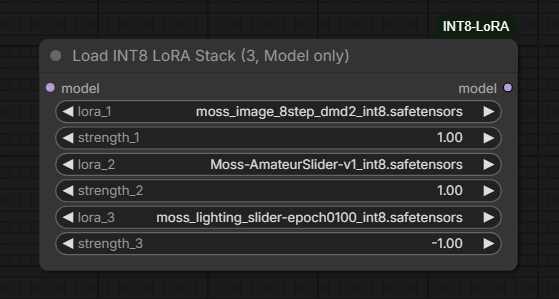
- Load INT8 LoRA Stack (3, Model only) – up to three INT8 LoRAs on the model;
slots set to
Noneare skipped.
After quantizing, refresh the node definitions (press R in ComfyUI, or reload
the page) so the new INT8 files show up in the INT8 loaders' dropdowns. Those
lists are read when ComfyUI loads the node definitions, so files created while
ComfyUI is running are not listed until you refresh.
INT8 files are kept in their own folder, so they do not appear in stock LoRA loaders (including rgthree's Power Lora Loader), which cannot read them.
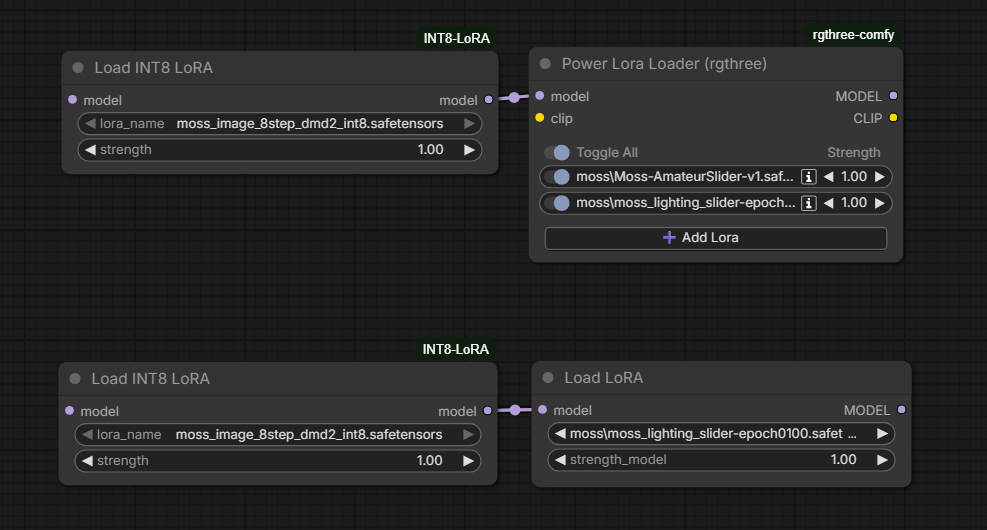
Mix and match. INT8 LoRAs and normal LoRAs can be used together. The INT8
loaders output an ordinary MODEL, so you can chain them with the stock Load
LoRA node, rgthree's Power Lora Loader or any other LoRA loader, in either
order. The screenshot below has the INT8 loader first, with its model output
connected to the next loader. Use INT8 files for the LoRAs you want to store
smaller and keep the rest as they are.
Screenshots
Quantizing a LoRA. The report shows the size change, which rotation auto
kept, and the error:
Quantizing a whole subfolder (four LoRAs, 4536 MiB down to 1135 MiB, with the per-file report):
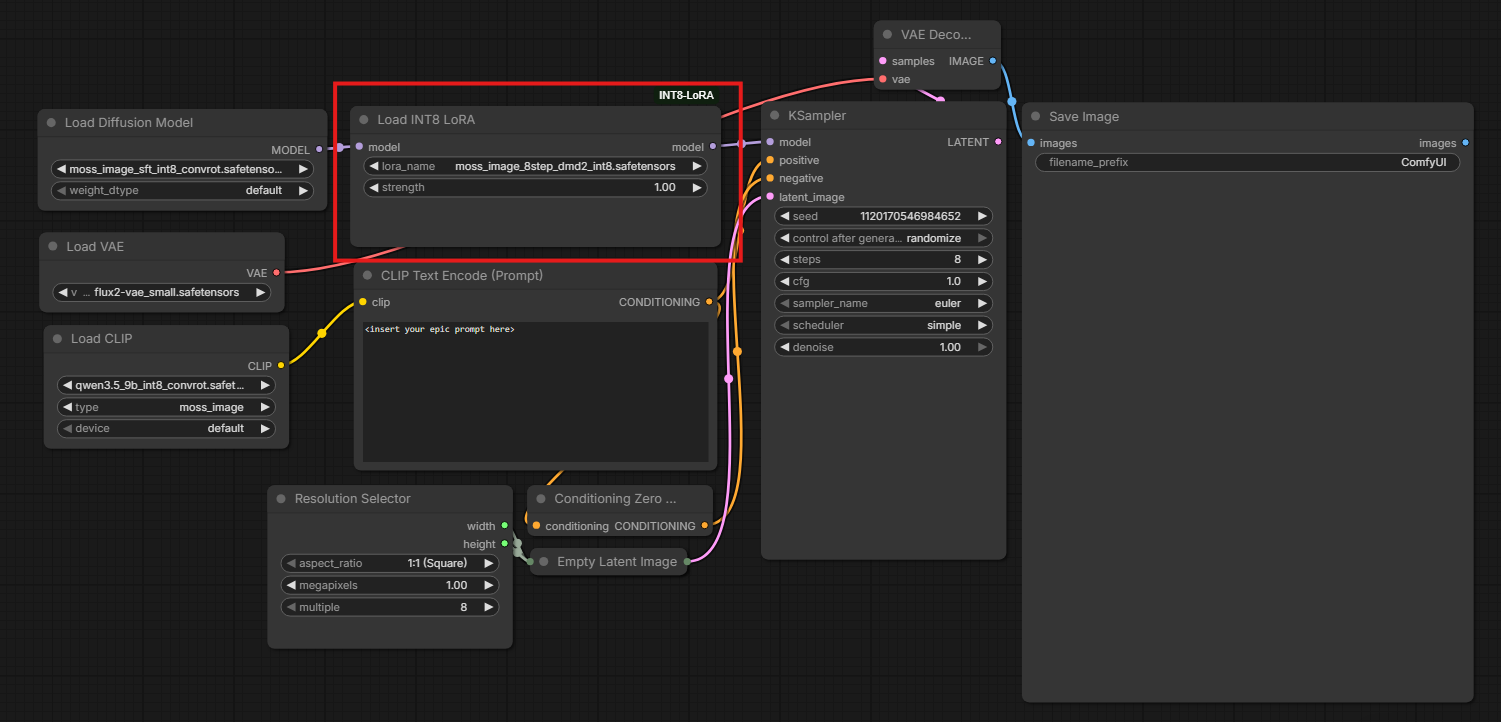
Using an INT8 LoRA in a workflow (the red box marks the INT8 loader):
Mixing INT8 and normal LoRAs: the INT8 loader feeds its model output into
rgthree's Power Lora Loader (top) or into the stock Load LoRA node (bottom),
which apply the regular LoRAs on top:
Stacking three INT8 LoRAs in one node (strengths can be negative, as in ComfyUI's own loaders):
Example workflow
example_workflows/int8_lora_reference.json
shows where Load INT8 LoRA goes in a text-to-image graph. ComfyUI picks up
workflows from a custom node's example_workflows folder as templates. It is a
reference, not something that runs as-is: it uses the author's model files
(moss_image_sft_int8_convrot, qwen3.5_9b_int8_convrot, flux2-vae_small),
so swap in your own models and convert your LoRA first.
Notes
- This saves storage, not memory. INT8 files are expanded back to float when they are loaded, so VRAM and RAM use during generation are about the same as with the original LoRA. The benefit is smaller files on disk and less to store, copy or download.
- The report's SSE compares the stored factors (up/down, LoKr factors) with their INT8 reconstruction, including the cast back to the stored dtype. It does not measure error on the final weight change or on generated images, so check images before deleting an original.
- Tensors under 1024 elements, alphas and
dora_scalestay in float. - The source file's header metadata (kohya
ss_*training info, trigger words, model spec fields) is copied into the INT8 file, and the loaders hand it to ComfyUI the same way the stock LoRA loader does. Some nodes read it, for example in-context LoRAs. Older ComfyUI versions without that argument just skip it. Only.safetensorssources have metadata to copy. - Rotation.
convrotapplies a Hadamard rotation (same construction as PotatoForge's ConvRot) before quantizing. It helps LoRAs with a few large outlier values and does nothing or slightly hurts others, so the default,auto, quantizes both ways and keeps whichever has the lower total SSE (noneon a tie). The report shows both SSE values.noneandconvrotforce one choice. The rotation is undone when the file is loaded, so it does not change what ComfyUI sees.
See FORMAT.md for the file layout.
Tests
python -m unittest discover -s tests
License
Copyright (C) 2026 bakapotatolord
This program is free software: you can redistribute it and/or modify it under the terms of the GNU General Public License as published by the Free Software Foundation, either version 3 of the License, or (at your option) any later version. It is distributed in the hope that it will be useful, but WITHOUT ANY WARRANTY. See the LICENSE file for the full text.