
ComfyUI Extension
ComfyUI-VIBE
Implementation of VIBE (Visual Instruction Based Editor) as a custom node for ComfyUI that enables image editing using natural language instructions leveraging Sana1.5 and Qwen3-VL models.
ato-zen/ComfyUI-VIBE
Nodes1
On cloudLocal install
CategoryVIBE
Stars10
Updated9 months ago
Readme
ComfyUI-VIBE 🎨
<table> <tr> <td width="320" align="center" valign="top"> <a href="https://youtube.com/shorts/6ChWRx5K2CQ" target="_blank"> <img src="examples/I2I-woman-in-a-hat.png" width="300"><br> <strong>▶️ Play Video Demo</strong> </a> </td> <td valign="top"> Implementation of <b>VIBE</b> (Visual Instruction Based Editor) as a custom node for <a href="https://github.com/comfyanonymous/ComfyUI">ComfyUI</a>. Edit images using natural language instructions (e.g., "make it winter", "change the dog to a cat").<br><br> VIBE leverages the efficient <b>Sana1.5-1.6B</b> diffusion model and <b>Qwen3-VL-2B-Instruct</b> for fast, high-quality image manipulation.<br><br> <h3>✨ Features</h3> <ul> <li><b>Instruction-based Editing:</b> No complex prompting required.</li> <li><b>Latent Support:</b> Connect an <code>Empty Latent Image</code> to define output resolution.</li> <li><b>Fast Inference:</b> Powered by Sana1.5's linear attention.</li> <li><b>Local Model Support:</b> Runs entirely on your hardware.</li> </ul> </td> </tr> </table>⚡ Easy Installation (via ComfyUI Manager)
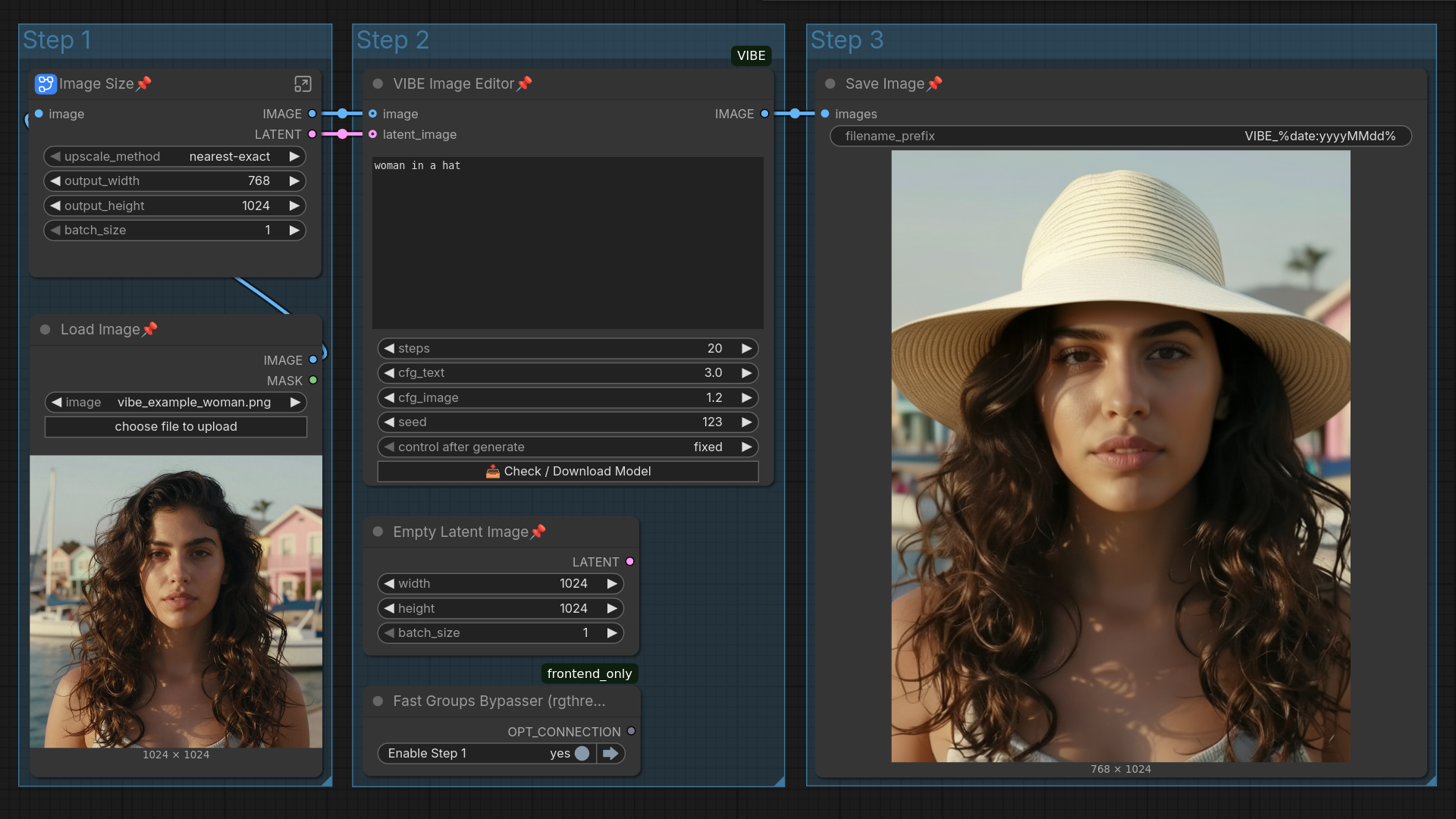
- Load this workflow into ComfyUI.
- Open ComfyUI Manager and click "Install Missing Custom Nodes".
- Restart ComfyUI after the installation finishes.
- Once reloaded, locate the VIBE Image Editor node (in Step 2) and click the "Check / Download Model" button. This will automatically download the necessary weights.
🖼️ Example Workflow
Drag and drop this image into ComfyUI to load the workflow:
🚀 Installation
-
Clone the repository: Navigate to your
ComfyUI/custom_nodesfolder and run:git clone https://github.com/ato-zen/ComfyUI-VIBE -
Install dependencies: Open terminal in the
ComfyUI-VIBEfolder and run:pip install -r requirements.txt
📂 Model Setup
This node looks for models in: ComfyUI/models/vibe/
-
Create the target folder:
mkdir -p models/vibe cd models/vibe -
Download the weights: Clone from Hugging Face (requires git-lfs):
git clone https://huggingface.co/iitolstykh/VIBE-Image-Edit
Structure should look like:
📂 ComfyUI/
└── 📂 models/
    └── 📂 vibe/
        └── 📂 VIBE-Image-Edit/
            ├── model_index.json
            ├── 📂 scheduler/
            ├── 📂 text_encoder/
            ├── 📂 tokenizer/
            ├── 📂 transformer/
            └── 📂 vae/
📜 Credits & Acknowledgements
- Original Project: VIBE: Visual Instruction Based Editor
- Model Authors: Grigorii Alekseenko, Aleksandr Gordeev, Irina Tolstykh, et al.
- Based on: Sana and Qwen3-VL.
ComfyUI Node implementation by ato-zen.