
ComfyUI-LoRA-Lens
Stop guessing. Compare LoRA checkpoints with matched tests, face-aware ranking, and blind human voting.
Nodes (4)
The Node You Never Click That Decides if Your LoRA Test Means Anything
The Test-Run Conductor That Moved Into the Dashboard — and What It Still Teaches You
The Grid-Maker That Waits Until Every Cell Is Filled
The Un-Glamorous LoRA Loader That Makes Fair Comparisons Possible
ComfyUI LoRA Lens
Stop guessing. Compare LoRA checkpoints with matched tests, face-aware ranking, and blind human voting.
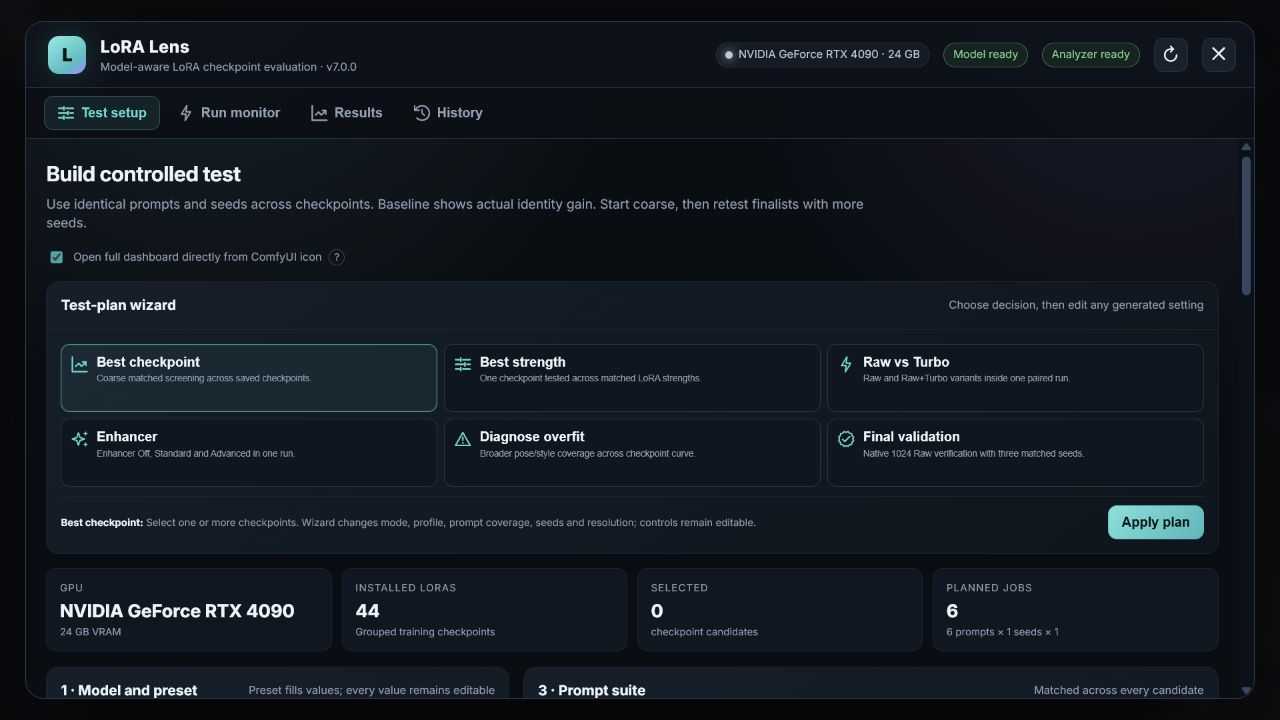
LoRA Lens replaces giant test graphs and subjective thumbnail hunting with a controlled evaluation dashboard inside ComfyUI. Every candidate receives the same prompt, seed, resolution, base model, and sampling settings. The result is a reproducible comparison rather than a collection of unrelated lucky generations.
Highlights
- Categorized native adapters for Krea 2, FLUX.1, Z-Image, and Anima.
- Turbo, Schnell, Aesthetic, Raw, Base, and Dev variants remain separate and explicit.
- Universal API-workflow adapter for future models and custom-node pipelines.
- Checkpoint comparison, strength sweeps, Raw-versus-Turbo tests, and overfit diagnosis.
- Dual face-recognition ensemble: CVLFace ViT KP-RPE AdaFace plus InsightFace AntelopeV2.
- Dataset-wide reference centroid, top-k matching, quality diagnostics, and outlier rejection.
- Blind pairwise human tournaments with local real-photo references, finalist runoffs, and AI/human agreement reporting.
- Full-size arrow-key image viewer, ratings, run history, evidence ZIP export, and OneTrainer checkpoint watcher.
- No hidden subject words: the exact trigger and optional class are shown before generation.
Requirements
- A current ComfyUI installation.
- Python 3.10–3.12 recommended.
- NVIDIA GPU strongly recommended for the face analyser; CPU inference is possible but slow.
- One or more LoRA files in
ComfyUI/models/loras. - The model files required by the selected native adapter, or a working ComfyUI API workflow.
The first analyser setup downloads several gigabytes of recognition weights. LoRA Lens shows installation status in the header and does not hide missing-model errors.
Installation
ComfyUI Manager
Search for ComfyUI LoRA Lens in ComfyUI Manager after it is listed in the registry, install it, and restart ComfyUI.
Manual
Clone this repository into ComfyUI's custom_nodes folder:
git clone https://github.com/astropuzzo/ComfyUI-LoRA-Lens.git
The resulting directory should be:
ComfyUI/custom_nodes/ComfyUI-LoRA-Lens
Install Python dependencies with the Python environment used by ComfyUI:
python -m pip install -r ComfyUI/custom_nodes/ComfyUI-LoRA-Lens/requirements.txt
Restart ComfyUI. The analyser installer continues non-blocking in the background. See Installation for Stability Matrix, portable Windows, Linux, and troubleshooting notes.
Quick start
- Click the LoRA Lens icon in ComfyUI's left navigation.
- Choose a model category, family, and variant. Missing prerequisites are listed before a run can start.
- Select the LoRA checkpoints to compare.
- Enter the exact trigger token or phrase. An optional subject/class is never inserted unless you type it.
- Review the resolved prompts, matched seeds, resolution, and sampling values.
- Include a no-LoRA baseline, then create the run.
Always-on acceleration, style, detail, or compatibility LoRAs can be added as an ordered auxiliary stack. They are applied identically to every candidate and remain active in the control column, so the checkpoint comparison stays fair.
Stop run now cancels this run's submitter, removes its pending prompts, interrupts its active prompt, and requests model/VRAM cleanup. Release VRAM can repeat the cleanup manually without restarting ComfyUI. 7. Optionally load real reference photos beside the blind pairwise tournament, then complete the identity votes. 8. Retest only the finalists with more seeds at the model's native resolution.
Do not compare models trained for different base architectures in one run. A fair checkpoint test keeps every variable fixed except the candidate LoRA.
Model support
Native adapters currently cover:
| Family | Variants | Native workflow | |---|---|---| | Krea 2 | Raw, Turbo | Qwen3-VL encoder, Qwen Image VAE, Krea 2 loader | | FLUX.1 | Dev, Schnell, Krea Dev | Dual CLIP/T5XXL, FLUX latent workflow | | Z-Image | Base, Turbo | Qwen 3 4B, AuraFlow model sampling, SD3 latent | | Anima | Base, Aesthetic, Turbo | Qwen 3 0.6B, Qwen Image VAE, Anima sampling defaults |
This list is not the compatibility ceiling. Use Import any API workflow for SD 1.5, SDXL, Pony, Illustrious, custom quantizations, GGUF loaders, or any new model with a working ComfyUI graph. See Model adapters.
How ranking works
The automatic analyser compares each detected candidate face with a cleaned set of reference embeddings. It combines a quality-weighted identity centroid with the strongest individual reference matches, then ensembles two independent recognition systems. Face quality changes confidence; it does not reward an image merely for being sharper or more frontal.
Automatic scores are evidence, not truth. The blind tournament intentionally hides candidate identity so your preference can be compared with the model ranking instead of being influenced by filenames or steps. Real reference photos loaded in the tournament remain browser-local and visible beside every duel. If the first round is inconclusive, start a top-2, top-3, or top-4 finalist runoff; previous votes remain archived in the run evidence.
Privacy
Reference images, LoRAs, prompts, scores, and generated images stay in your local ComfyUI folders. The plugin does not upload them. Model weights are downloaded from their documented upstream repositories during analyser setup.
Documentation
- Installation and prerequisites
- Using LoRA Lens
- Native and custom model adapters
- Troubleshooting
- Contributing
- Changelog
License
LoRA Lens code is released under the MIT License. Model weights and base models retain their own licenses; some, including Anima or FLUX variants, may restrict commercial use. Check each upstream model card before distribution or commercial use.