
ComfyUI Scene Camera Action
Interactive 3D scene staging, actor acting, and camera directing suite of custom nodes for ComfyUI.
Nodes (8)
Drive an actor around your 3D set with WASD, no keyframing required
Record real camera cuts against your 3D set and hand the video to Seedance or MiniMax
SceneNode is the Staging node under an old name — and it's all about the scene JSON
StageNode is Staging's old name — the real topic is where your stages live on disk
Build the 3D set your AI video actually has to obey
UBActingNode is Acting under an old UB name — and it's where multi-actor chaining happens
UBDirectingNode is Directing's old name — and a guided tour of how the video capture actually works
UBStagingNode is just Staging wearing its old name — here's why the alias exists
ComfyUI-scene-camera-action




Interactive 3D scene staging, actor acting, and camera directing suite for ComfyUI.
Created by @arturitu / Unboring.net.
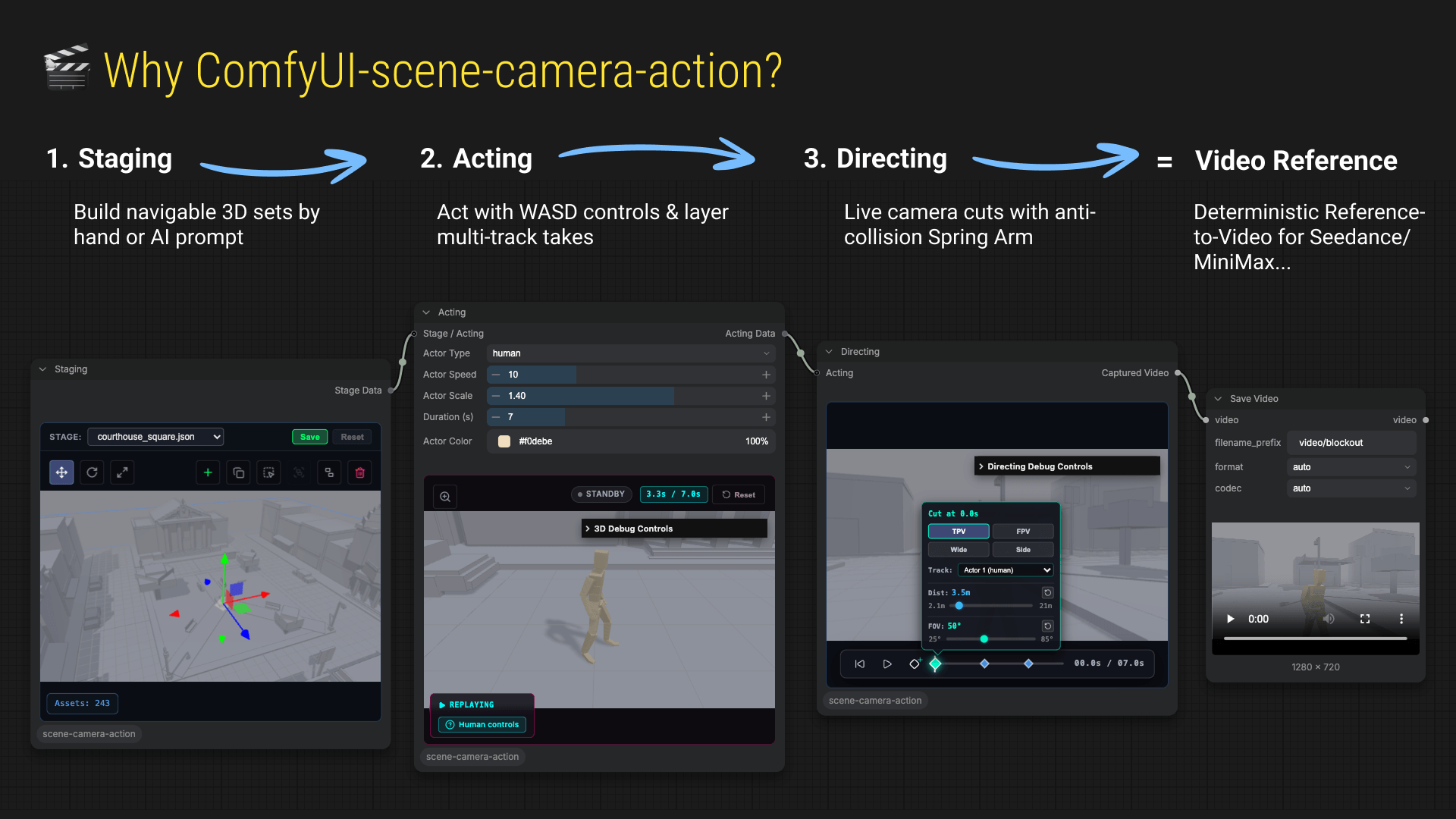
Stop prompting movement into a black box. ComfyUI-scene-camera-action turns AI video generation into an interactive, playable 3D previz studio:
- Staging: Build navigable 3D blockout sets with instant colliders — manually or via AI prompts (
SKILL.md). - Acting: Playable
WASDcontrols & multi-track actor chaining with live ghost replays (no keyframing!). - Directing: Live camera cuts with anti-collision Spring Arm, outputting crisp 720p HD reference video (
VIDEO) for models like Seedance 2.5 / 2.0 Fast or MiniMax H3 Reference-to-Video.
⚡ Quick Installation
Option 1: ComfyUI Manager (Recommended - 1-Click Install)
- Open ComfyUI.
- Open Manager ➔ Custom Nodes Manager.
- Search for
Scene Camera Action(orcomfyui-scene-camera-action). - Click Install, then restart ComfyUI.
Option 2: Comfy Registry CLI (comfy-cli)
comfy node install comfyui-scene-camera-action
Option 3: Manual Git Clone
Open your terminal in your ComfyUI directory:
cd ComfyUI/custom_nodes
git clone https://github.com/arturitu/ComfyUI-scene-camera-action.git
pip install -r ComfyUI-scene-camera-action/requirements.txt
Windows Portable Users: Run this from your
ComfyUI_windows_portableroot folder:python_embeded\python.exe -m pip install -r ComfyUI\custom_nodes\ComfyUI-scene-camera-action\requirements.txt
Restart ComfyUI after installation. The nodes will appear in the scene-camera-action category.
🎯 Ready-to-Use Example Workflows (Drag & Drop)
We provide pre-built workflows in the examples/ folder so you can start directing immediately without any setup:
| Workflow | Description | Download |
| :--- | :--- | :--- |
| 🟢 Basic 3D Previz (Recommended) | 0 AI models required! Pure 3D Previz pipeline (Staging ➔ Acting ➔ Directing ➔ Save Video) with race_track.json preset & Car actor ready to drive, including AI reference video integration. | basic_previz_workflow.json |
| 👥 Multi-Actor Chaining | industrial_ruin.json preset with Human and Quadruped actors on distinct spawn points, synchronized ghost replays, and AI reference video integration. | multi_actor_workflow.json |
💡 How to load a workflow:
- Method A: Download any
.jsonfrom above and drag & drop it directly into your ComfyUI browser window. - Method B: Click Load in ComfyUI and select the file from
ComfyUI/custom_nodes/ComfyUI-scene-camera-action/examples/.
🎬 3-Step Creator Guide (No Programming Required)
https://github.com/user-attachments/assets/dd5c0d21-573a-467f-9d4b-1218e2c90cac
1. Staging (StagingNode) — Build your 3D Environment
- Load Presets: Pick built-in 3D environments from the preset dropdown (
courthouse_square,gas_station,liberty_beach,industrial_ruin,warehouse, etc.). - Interactive Viewport: Orbit (Left Click + Drag), Pan (Right Click + Drag), and Zoom (Scroll).
- Transform & Compose: Add primitives, move, rotate, and scale assets. Use
Shift + Clickfor multi-selection and Grouping (Group/Ungroup). - Output: Connects
Stage Datadownstream into the Acting node.
2. Acting (ActingNode) — Drive & Record Performances
- 3 Actor Archetypes:
- 🚶 Human: Rigged 3D character with automatic walking, running, and idle locomotion.
- 🚗 Car: Vehicle physics with dynamic steering, acceleration, and drift.
- 🐕 Quadruped: 4-legged animal archetype with full locomotion animations.
- Game-Like WASD Controls: Move around the stage in real time using
W,A,S,D. - Practice Rehearsal Mode: Test movement loops freely before recording.
- Multi-Actor Chaining: Connect multiple Acting nodes in series. Sequence independent actors while watching synchronized live ghost replays of previous takes!
- Output: Combines stage geometry and actor trajectories into
Acting Data.
3. Directing (DirectingNode) — Compose Camera Cuts & Capture HD Video
- Smart Camera Rigs: Switch between Third-Person (TPV), First-Person (FPV), Tracking Side, and Auto-Framing Master Wide.
- Anti-Collision Spring Arm: Real-time obstacle avoidance prevents camera clipping against walls and geometry.
- Visual Cut Timeline: Add and edit camera cuts on the fly along the playback timeline.
- Direct-to-Generative Output: Outputs crisp 720p HD
Captured Video(VIDEO) ready to plug into reference-to-video AI models!
🤖 Transform Prompts into 3D Scenes (SKILL.md)
Generate proportioned 3D previz scenes from natural language prompts or reference images using the included stage-builder skill with any AI coding agent (Antigravity, Claude Code, Codex, Cursor, Pi, etc.).
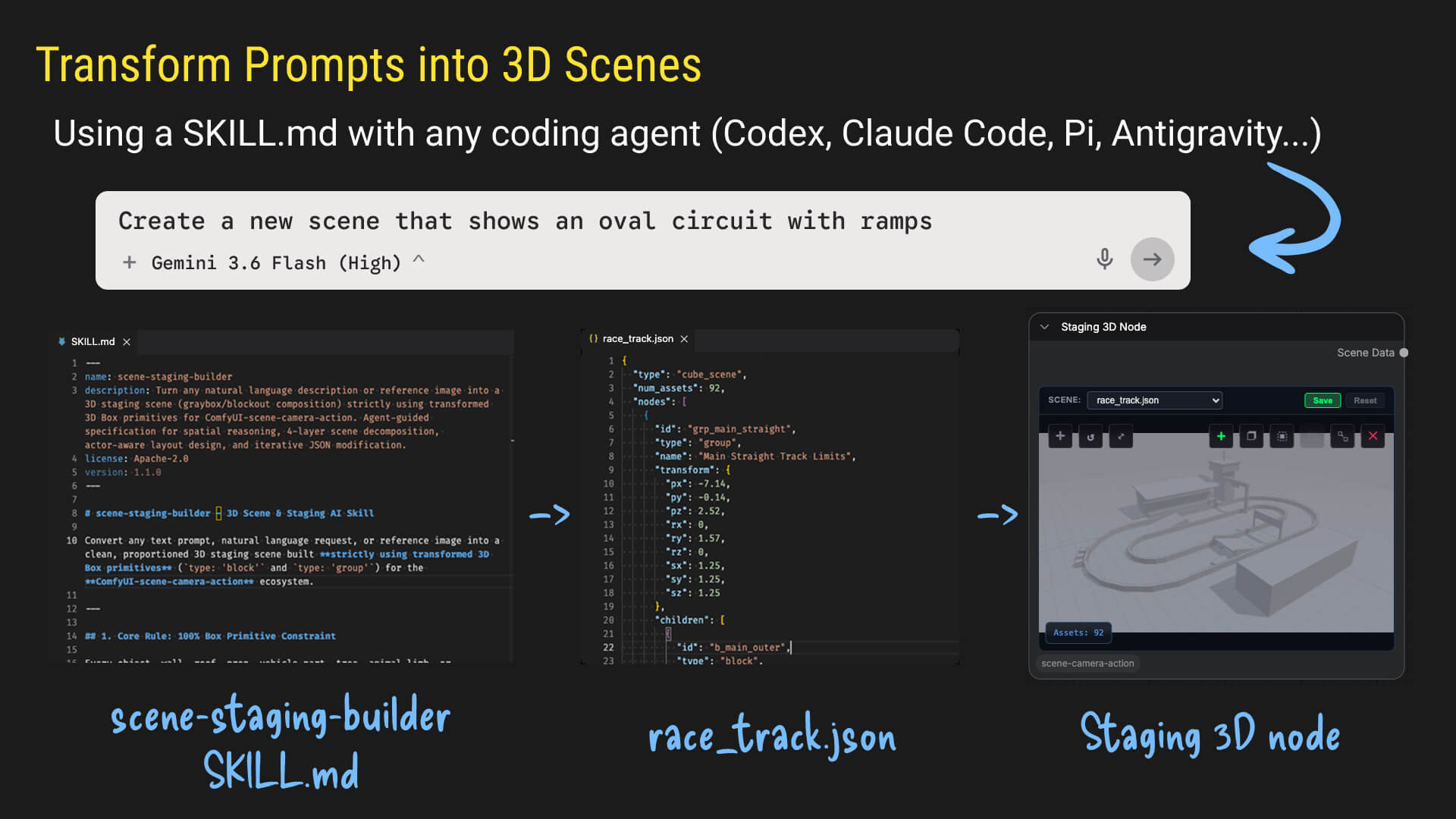
The skills/stage-builder/SKILL.md instruction set equips AI coding assistants with 3D spatial reasoning to output clean 3D SceneState JSON preset files saved to presets/.
💡 FAQ & Troubleshooting
<details> <summary><b>Q: Directing node gives an error saying "Directing canvas is disabled. Connect an Acting node and record motion first."</b></summary> <b>A:</b> Directing requires actor motion to frame the cameras. Make sure you select the Acting node, click <b>Record</b>, and move your actor using <code>WASD</code> before queuing the Directing node. </details> <details> <summary><b>Q: Does this require a powerful GPU to run the 3D viewport?</b></summary> <b>A:</b> No! The 3D viewport runs on standard WebGL in your browser and features <i>Demand-Based GPU Rendering</i>, meaning it automatically pauses rendering during graph navigation for lightweight performance. </details> <details> <summary><b>Q: How do I feed the video into Seedance / MiniMax?</b></summary> <b>A:</b> The Directing node outputs standard ComfyUI <code>VIDEO</code>. Simply connect the <b>Captured Video</b> wire into the video input of your chosen reference-to-video model (e.g., Seedance 2.5 / 2.0 Fast or MiniMax H3 Reference-to-Video). </details>🚀 Release History
🚀 Shipped - v0.5.0: Quadruped Actor (Current Version)
- Rigged Quadruped Actor: New 4-legged animal archetype (
QuadrupedActor) with full locomotion animations (idle, walk, run, sit/crouch) built onSkinnedActor. - Configurable Actor Scaling: Adjust actor sizes dynamically with automatic camera framing and speed scaling.
- Practice Rehearsal Mode: Loop actor movement in real time to test trajectories before recording.
- Demand-Based GPU Rendering: Pauses WebGL rendering during graph navigation for lightweight performance.
- Stage Distance Fading & UI Upgrades: Smooth edge fading, modern Lucide icons, and optimized node payloads.
https://github.com/user-attachments/assets/d8abce40-8af8-486d-b8ac-fbcf2a661968
📦 Shipped - v0.4.0: Multiple Actors
- Multi-Actor Chaining: Sequence and record multiple independent actors (humanoids and vehicles) on the same stage with synchronized playback.
- Camera Spring Arm (Anti-Collision): Real-time obstacle avoidance prevents camera clipping against walls and geometry during dynamic camera moves.
- Actor Color Customization: Dynamic mesh coloring to visually distinguish different actors across the 3D viewport and node timeline.
- Universal Stage Builder: Universal 3D geometric engine with 5 core primitives and new presets (
courthouse_square,gas_station). - Vue.js Architecture: Modernized modular reactive UI components (
StagingWidget,ActingWidget,DirectingWidget).
https://github.com/user-attachments/assets/2d03f9fe-42a2-4472-9543-373252dcf670
📦 Shipped - v0.3.0: Animated Humanoid
- Animated 3D Humanoid Model: Custom 3D human model with bone structure and armature animations.
- Configurable Spawn Points: UI selection for actor starting locations across Staging and Acting nodes.
- 3D Scene Presets: Built-in previz tracks (
liberty_beach,industrial_ruin,warehouse,test-collider).
https://github.com/user-attachments/assets/590b10b8-fe3f-4f4b-b1be-99f3fc646010
👉 See it in action on LinkedIn
📦 Shipped - v0.2.0: Car Actor
- Natural Language 3D Scene Builder (
SKILL.md): Transform prompts or reference images into 3D stage compositions using any AI coding assistant. - Multi-Archetype Actor Physics Engine: Support for Humanoid and Vehicle (
CarActor) movement physics. - Hierarchical Scene Management: Grouping (
Group/Ungroup), multi-selection, and transform snapping.
https://github.com/user-attachments/assets/fc99bde7-7900-4fb1-9181-6c82dc451373
👉 See it in action on LinkedIn
📦 Shipped - v0.1.0: Starting Point
- Initial PoC Custom Nodes: Proof-of-concept custom nodes (
Staging,Acting,Directing). - Basic 3D Prev-viz: Asset placement, single capsule actor control, and multi-camera timeline cuts.
https://github.com/user-attachments/assets/fde67050-c33d-406c-87e5-64b9d0544381
👉 See it in action on LinkedIn
📄 License
MIT License. Built with ❤️ by @arturitu / Unboring.net.