
Artfat LLM Prompter
All-in-one LLM/VLM prompt engine for ComfyUI: one node turns reference images (or text) into a generation prompt via a resident llama.cpp model, then encodes it straight to CONDITIONING. Presets, dual-image compositing, batch captioning, built-in CLIP Text Encode fallback, cache-correct.
ComfyUI — Artfat LLM Prompter
One all-in-one LLM/VLM node for ComfyUI. It turns reference images (or plain text)
into a generation prompt using a resident llama.cpp model, then encodes that
prompt straight into CONDITIONING — no separate loader, sampler-params or
CLIP Text Encode nodes needed.
(image_1 / image_2 / text) --> LLM --> prompt --> CLIP --> CONDITIONING
         reference_image  --> LLM --> identity block (described once, reused)
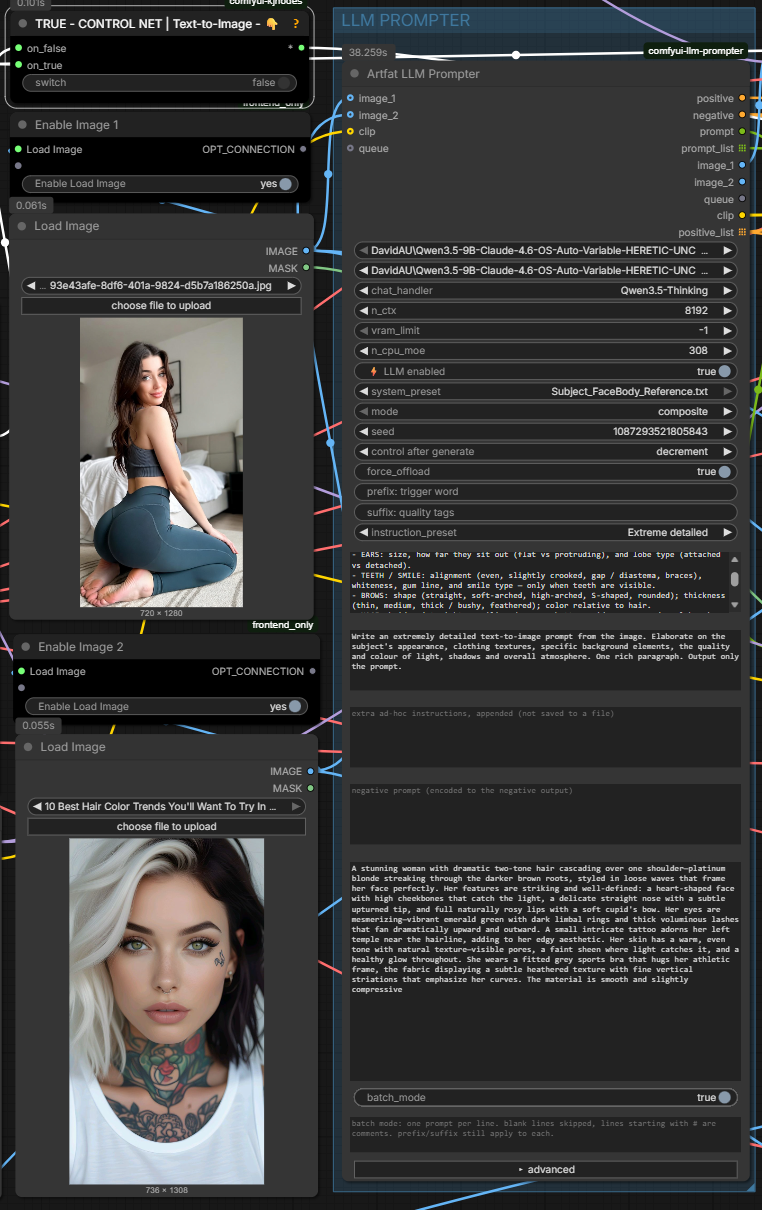
Two reference images → one node → prompt → image: the subject from Image 1 dropped into the café setting of Image 2.
Why one node
- Resident model — the GGUF is loaded once and kept in VRAM. Repeat runs are fast; it only reloads when a load-relevant setting changes.
- Editable
final_prompt— the generated prompt lands in an editable, copyable box undernegative. Tweak it by hand, or (with the LLM off) type your own prompt there — that text is what gets encoded to CLIP. - Freeze with a
fixedseed — setcontrol_after_generate = fixedand, once a prompt is infinal_prompt, the node reuses it verbatim straight into the sampler: the LLM is not called and the model is not even loaded. Switch torandomize(or clear the box) to generate a fresh one. Iterate on the image at zero LLM cost. - One face across a whole batch — connect
reference_imageand the identity is described once, then prepended to every caption verbatim. Six frames stop being six subtly different women. See Fixed identity across a batch. - Built-in CLIP Text Encode — turn
llm_enabledoff and the node just encodes yourfinal_prompttext as plain positive/negative CONDITIONING. - Low-VRAM friendly —
vram_limit,n_cpu_moe(MoE expert offload), KV-cache quantization, an optionalforce_offload, and it frees the diffusion model from VRAM before loading the LLM so llama.cpp doesn't spill to shared system RAM (much faster on 12 GB cards).
Features
- Dual reference images (
image_1,image_2) with composite (one prompt) or batch (one caption per image — dataset captioning) modes. .txtsystem presets bundled with the node (plus any you add inmodels/LLM/prompts/) + instruction presets (Describe / Tags / Cinematic / Replace subject / Appearance only / …). Both auto-fill an editable box so you see and can tweak the text live.- A free
user_presetfield for ad-hoc instructions (not written to any file). reference_image+ref_preset/ref_description/refresh_ref— a fixed identity block, described once and reused for every frame in a batch. Reference presets live in their ownprompts/reference/folder with a separate dropdown, so a scene preset can never end up describing a person.- Editable
final_promptbox — the LLM writes its result there (copy or hand-edit it); with the LLM off it becomes your manual prompt box. Afixedseed freezes it (reuse, no LLM run, no model load);randomizeregenerates. prefix/suffix— e.g. auto-prepend a LoRA trigger word before CLIP encode (applied in both LLM-on and LLM-off modes).- Positive and negative CONDITIONING outputs.
- Reasoning-model support (
<think>blocks stripped by default). - Progress bar for batch runs; image pass-through outputs; optional
queuechain input.
Also a plain CLIP Text Encode (no learning curve)
New to this and just want a prompt box? Turn ⚡ LLM enabled off. The node skips the model and
encodes only your final_prompt to CLIP — type your positive prompt straight into that box, put
your negative in negative, and with clip connected the positive / negative outputs are
ready-to-use CONDITIONING, exactly like the CLIP Text Encode you already know.
With the LLM off, the LLM-only fields (system_prompt, instruction, user_preset) grey out and
are ignored — they never leak into your prompt. prefix / suffix still apply if set.
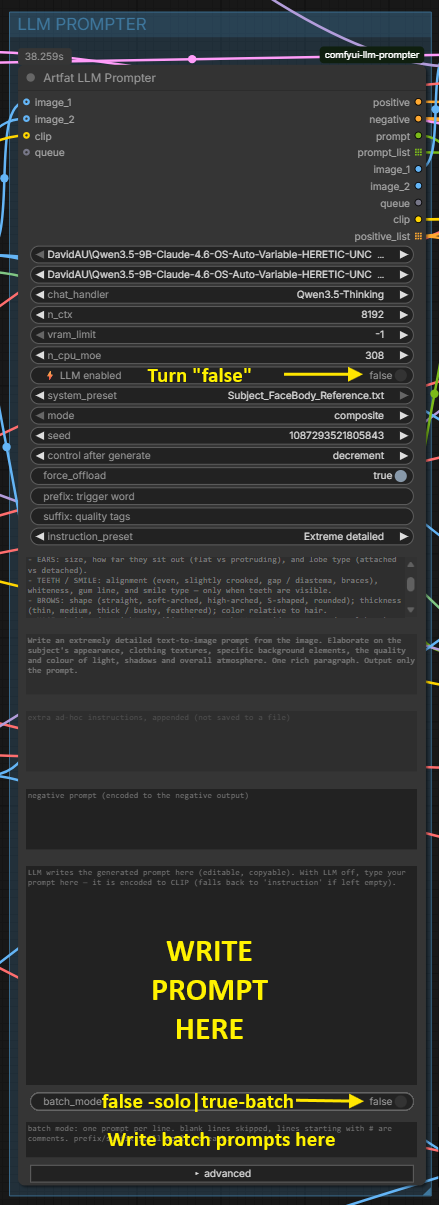
Toggle ⚡ LLM enabled off, then write your prompt into final_prompt — the node encodes it to
positive / negative just like a CLIP Text Encode.
Prefer feeding the prompt from an external node? Right-click the node →
Convert final_prompt to input (and/or negative) and wire any text / note node into it.
Both ways work — type in the box, or drive it from outside, whatever you're used to.
Example: compose across two images
Set mode = composite, connect both image_1 and image_2, and refer to the two
references as Image 1 and Image 2 in the instruction. For example — put the subject
from one reference into the scene of the other:
Take the same girl as in reference Image 1 and place her, in the exact same setting as reference Image 2, sitting in a summer street café taking a phone selfie with an outstretched arm and smiling. Write a detailed generation prompt, like the one you'd write for Image 2, but with the girl from Image 1.
The node feeds both images to the model (image_1 → "Image 1", image_2 → "Image 2"), so the
generated prompt keeps Image 2's setting with Image 1's subject. Short, concrete instructions that
name the images explicitly work best.
Two-image compositing depends on the model. It needs a VLM that accepts multiple images — the Qwen-VL / Qwen3.5 family and MiniCPM-V handle it well. Single-image models (LLaVA, Moondream) effectively see only one. If the second image seems ignored, switch to a multi-image model. Single-image captioning works on any VLM.
Fixed identity across a batch (reference_image)
Captioning a dataset frame by frame has one recurring failure: the model describes the face it sees in each frame, and those descriptions drift. Six images become six subtly different women, and a LoRA trained on that learns the average of all six.
reference_image fixes it by moving identity out of the per-frame call entirely.
How it works
- The reference is described once, using
ref_preset— a face-only instruction. - That text lands in
ref_description, visible and editable on the node. - Every frame's caption gets it prepended verbatim. Same words, every time.
- The reference image itself is never sent with the frames, so the model cannot look at the frame's own face and re-describe it.
The description is cached by a hash of the reference pixels plus the ref_preset text. Same hash
means the stored block is reused with no LLM call for the reference at all; swap the image or
change the preset and it is described exactly once more. The cache is process-local — after a
ComfyUI restart the text saved in your workflow is used as-is.
Setting it up
| Field | Set it to |
|---|---|
| reference_image | A clean, well-lit shot of the face. Frontal works best |
| ref_preset | A face-only preset from prompts/reference/ — e.g. Face_Only_Identity_Im1 |
| instruction_preset | Scene only (face comes from ref_description) |
| mode | batch |
The one thing that breaks it
🔴 With reference_image connected, each caption call carries exactly one image. An
instruction that says "take the face from the FIRST image" now sends the model hunting for a
picture that is not there — it falls back to the frame's own face and invents an identity, which
is the very drift you connected the reference to prevent.
Use a scene-only instruction: describe framing, pose, clothing, light, environment — never the face. The node detects two-image wording and prints a warning, but it cannot fix the preset for you.
The same rule applies to ref_preset in the other direction: it must contain nothing
scene-specific. No clothing, no pose, no lighting, no background — that block goes onto every
caption in the batch, so anything scene-specific in it will contradict every frame.
refresh_ref
Ticking it re-describes the reference even though nothing changed. Use it after hand-editing
ref_preset, or when you want a second opinion on the same face. Clearing ref_description
does the same thing.
Editing the block by hand
ref_description is yours to rewrite. Whatever is in that box is what gets prepended — the node
does not check it against the image. If the model got an eyebrow colour wrong, fix the sentence
once and every future caption in every future batch carries the corrected version.
Install
A — you already have llama-cpp-python installed
(e.g. from another LLM/VLM node pack). Just clone it — nothing else needed:
cd ComfyUI/custom_nodes
git clone https://github.com/artfat-creator/artfat-comfyui-llm-prompter.git
B — you don't have it yet
Clone and install the requirements (this is what pulls in llama-cpp-python):
cd ComfyUI/custom_nodes
git clone https://github.com/artfat-creator/artfat-comfyui-llm-prompter.git
python -m pip install -r artfat-comfyui-llm-prompter/requirements.txt
⚠️ Use ComfyUI's own Python, not the system one — otherwise the packages land in the wrong environment and the node still won't load:
- portable:
..\..\python_embeded\python.exe -m pip install -r artfat-comfyui-llm-prompter\requirements.txt- venv / pinokio: use that environment's
python.exeinstead of plainpython
Either way, fully restart ComfyUI afterwards (not just a browser refresh). The node appears
as Artfat LLM Prompter — type artfat in the node search to find it.
Close ComfyUI before running pip. If it's running, files are locked and the numpy upgrade can't finish cleanly — you'll see
WARNING: Failed to remove contents in a temporary directory ...\~umpy.libs. If that happens: close ComfyUI, delete the leftover~umpyand~umpy.libsfolders in.venv\Lib\site-packages(orpython_embeded\Lib\site-packages), then start it again. Installingllama-cpp-pythonmay also downgrade numpy (e.g. 2.4 → 2.3) — that's expected and fine for ComfyUI.
Running several ComfyUI installs? Comfy Desktop can create
ComfyUI (2),ComfyUI (3)… — clone into thecustom_nodesof the instance you actually launch, and install the requirements with that instance's Python. Installing into a different copy is the most common reason the node "doesn't show up".
Note: llama-cpp-python is a hard dependency — without it the node won't register at all
(it won't even show up in the menu). If the node is missing, that's the first thing to check.
requirements.txt installs a plain CPU llama-cpp-python so the node always loads. The
GPU (CUDA) build is set up automatically — see GPU acceleration below.
Node is red after loading a workflow? / Manager says a node pack is missing
Some exported workflows carry a stale pack id (e.g.
comfyui-workflow-encrypt) that ComfyUI Manager can't resolve — it's a metadata glitch, not a real package, so "Apply Changes" will never fix it and the node stays red no matter how many restarts.Fix: install this node manually with the
git cloneabove, then fully restart ComfyUI. If a node still looks broken after that, right-click it → Fix node (recreate), or delete it and add it again from the node menu.
GPU acceleration (CUDA)
The node runs the LLM on your NVIDIA GPU automatically. The catch llama-cpp-python has:
its CUDA build must match your ComfyUI's torch CUDA major — a mismatched wheel (e.g. a
CUDA 12.8 build on a CUDA 13 torch) loads but silently falls back to CPU, because
ggml-cuda.dll links cudart64_<major>.dll, shipped by torch. The node handles this for you:
install.py— runs via ComfyUI-Manager after install (or run it by hand). It reads yourtorch.version.cudaand installs the matching JamePeng wheel (cu124 / cu126 / cu128 / cu130 / cu131) for your exact Python. Windows + NVIDIA.- If the LLM still runs on CPU (CPU-only build, or a CUDA mismatch after a ComfyUI update bumped your torch CUDA), the node prints a clear warning at model-load time with the exact reinstall command for your torch CUDA version.
Run the installer manually (Windows portable example — ComfyUI fully closed, else the llama DLLs are locked):
..\..\python_embeded\python.exe install.py
Verify it's on GPU: load a model — the console should print offloaded N/N layers to GPU
and VRAM usage rises. (llama_supports_gpu_offload() is unreliable and returns False even on a
working build, so check the load log / VRAM, not that function.)
Non-NVIDIA / non-Windows: the node still works on CPU (slower). macOS (Metal) and Linux users
install a matching llama-cpp-python build manually from the
JamePeng releases.
ComfyUI crashes / closes when the LLM runs (llm_enabled on)
A hard crash the moment the LLM runs — the ComfyUI window closes, or the console dumps a long
Extension modules: … list and dies — is a broken llama-cpp-python install, not a workflow
bug. The crash is in llama's GPU backend, which lives in ComfyUI's Python environment, so
uninstalling the node in Manager does not fix it (that only removes the node folder; the broken
llama package stays). Fix it in this order:
-
Close ComfyUI completely — quit the whole app, not just the browser tab. The llama
.dllis locked while it runs and can't be replaced otherwise. -
Re-run
install.pywith ComfyUI's own Python — this force-reinstalls the correct CUDA llama build. Run it from the node folder (custom_nodes/comfyui-llm-prompter):- portable:
..\..\python_embeded\python.exe install.py - venv / Comfy Desktop / pinokio: use that environment's
python.exe(the path shown asPython executable:in your startup log), e.g."...\ComfyUI\.venv\Scripts\python.exe" install.py
Then start ComfyUI again.
- portable:
-
Update your NVIDIA driver (latest Game Ready / Studio, then reboot). An outdated driver on a newer CUDA can hard-crash llama on the GPU even when everything else is correct.
-
Still crashing? Run the LLM on CPU to unblock yourself: set
vram_limitlow (or GPU layers to 0) in the node. Slower but stable — and it confirms the problem is the GPU llama build, not the node or your workflow.
Models
Put GGUF files in ComfyUI/models/LLM/. For image input (VLM) also download the matching
mmproj-*.gguf from the same repo into that folder, and pick the chat_handler that matches the
model family.
For image input you need a vision model (VLM) — not a plain text LLM. Look for “VL”, “Vision”, or “multimodal” in the model name and an
mmproj-*.gguffile in the repo — that projector is what lets the model see the image. Without it the model is text-only (still fine for rewriting/expanding a text prompt, just no image understanding).
Recommended models
| Model (GGUF) | chat_handler | Notes |
|---|---|---|
| DavidAU Qwen3.5-9B — Claude-4.6 HERETIC Thinking | Qwen3.5 / 3.6 / 3.8 (thinking) | vision (mmproj), uncensored, reasons then answers — the node strips the reasoning so only the prompt reaches CLIP |
| Qwen3-VL-8B-Instruct · 4B | Qwen3-VL (no thinking) | official vision-language, lighter / faster |
| unsloth Qwen3.5-9B | Qwen3.5 / 3.6 / 3.8 (no thinking) | general Qwen3.5 build |
| Qwen3.8-27B (any -mtp build) | Qwen3.5 / 3.6 / 3.8 (thinking) | 27B, needs ~16 GB VRAM at Q4_K_M. 27B, needs ~16 GB VRAM at Q4_K_M |
| Gemma 3 4B | Gemma3 | lightest vision model — grab its mmproj; great for low VRAM. Turn force_offload = on so it unloads after each prompt (Gemma 3 1B / 270M are text-only, no images) |
Dropdown entries are families, not releases. Qwen3.6 and Qwen3.8 GGUFs both report
qwen35 as their architecture, so they share one entry: Qwen3.5 / 3.6 / 3.8. There is no
separate Qwen3.8 item and there does not need to be.
Each family that supports reasoning has two entries. (thinking) lets the model reason before
answering and the node strips the reasoning, so only the prompt reaches CLIP. (no thinking)
skips it and is faster. With a thinking entry, raise max_tokens to 2048 or more: the reasoning
spends the same budget as the answer, and it is stripped only after generation, so a low limit
cuts the prompt off mid-sentence.
Handler names changed in v0.4.0 to show this. Workflows saved with the old names keep working, the node resolves them automatically.
Any VLM whose family is in the chat_handler dropdown works — MiniCPM-V, GLM-4.x-V, Gemma 3,
LLaVA, and more. For a -Thinking handler the model reasons before answering and the node keeps
only the final prompt.
System-prompt presets are plain .txt files. A full set ships with the node (in its own
prompts/ folder) so they show up in the dropdown right after install — nothing to download.
To add your own or tweak one, drop a .txt into ComfyUI/models/LLM/prompts/; a file there
overrides a bundled preset of the same name, so your edits survive node updates.
Inputs
The essentials stay visible; the sampler / KV-cache / image-token knobs tuck behind the collapsible ▸ advanced section — compact by default, everything on demand.
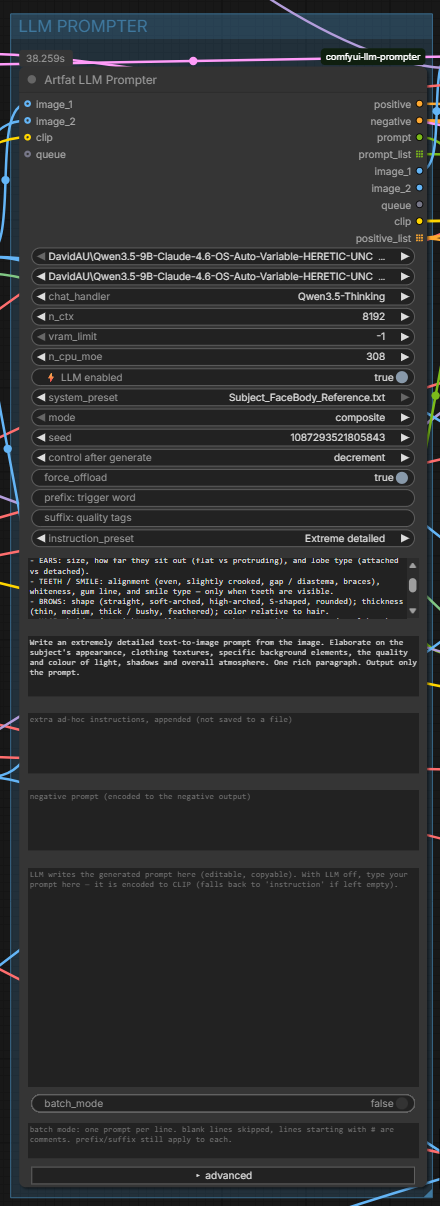
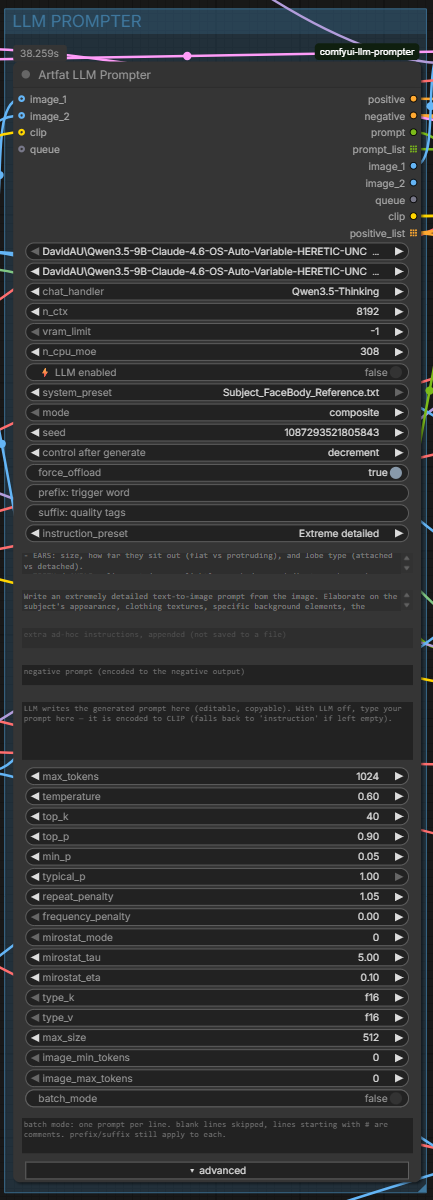
| Input | What it does |
|---|---|
| model / mmproj | GGUF LLM + optional vision projector |
| chat_handler | Chat template — must match the model |
| n_ctx | Context length (default 8192) |
| vram_limit | VRAM budget in GB for the LLM (-1 = all layers on GPU) |
| n_cpu_moe | Keep MoE experts of the first N layers on CPU (frees VRAM) |
| llm_enabled | Off = skip the LLM and encode only final_prompt (the LLM-only fields below grey out and are ignored) |
| system_preset / system_prompt | Style/engine (.txt preset auto-fills the editable box) — LLM only |
| instruction_preset / instruction | Task / output format (preset auto-fills the box) — LLM only |
| user_preset | Extra ad-hoc instructions, appended — LLM only |
| negative | Negative prompt → negative output |
| final_prompt | The generated prompt (editable, copyable). LLM on: the model writes its result here. LLM off: type your own prompt here — it's what gets encoded to CLIP |
| prefix / suffix | Wrap the final prompt (trigger words, quality tags) — applied in both LLM on and off |
| mode | composite (images → one prompt) or batch (each image → its caption) |
| seed | Prompt seed. control_after_generate = fixed freezes final_prompt (reuse it, no LLM run, no model load); randomize generates a fresh prompt each queue |
| force_offload | Unload the LLM after running (frees VRAM; next call reloads) |
| advanced | max_tokens, temperature, top_k, top_p, min_p, typical_p, repeat_penalty, frequency_penalty, mirostat_*, type_k/type_v (KV quant), max_size, image_min/max_tokens |
| image_1 / image_2 / clip / queue | optional |
| reference_image | Identity reference — optional. Described once with ref_preset, and that text is prepended to every caption, so every frame in a batch carries the exact same face. The image itself is never sent with the frames, so the model cannot re-describe the face and drift between captions. Re-described only when this image changes, or on refresh_ref. Pair it with a scene-only instruction so the face is not described twice |
| ref_preset | Preset for the one call that describes reference_image. Lives in prompts/reference/, separate from the scene dropdown. Face-only presets work best — the block goes onto every caption, so it must contain nothing scene-specific (no clothing, pose, light or background) |
| ref_description | The identity block itself, filled in by the node and reused verbatim while the reference does not change. Editable: your text is what gets prepended. Clear it (or tick refresh_ref) to have the reference described again |
| refresh_ref | Describe reference_image again even though it has not changed. Use after editing ref_preset by hand, or for a second opinion on the same face |
| mtp_speculative / mtp_draft_max | Speculative decoding via the NextN heads in an -mtp GGUF — see MTP. Skipped automatically when the model has no NextN tensors or an mmproj is loaded |
| batch_mode / batch_prompts | Run a list of ready prompts instead of the LLM — see Batch prompts |
Outputs
positive (CONDITIONING) · negative (CONDITIONING) · prompt (STRING) ·
prompt_list (STRING list, for batch) · image_1 / image_2 (pass-through) · queue ·
clip (pass-through, so a bypassed node still routes CLIP downstream) ·
positive_list (CONDITIONING list — one per prompt in batch mode)
Batch prompts
Already have your prompts written? Paste them in and get one image per line from a single Queue — the LLM is skipped entirely.
- Turn
batch_modeon. - Paste your prompts into
batch_prompts. - Wire the
positive_listoutput toKSampler.positive(keepnegativewired from the regularnegativeoutput).
ComfyUI runs the graph once per list item, so ten prompts give you ten images.
Formatting. Two accepted layouts, auto-detected:
- One prompt per line — the default when no numbering is present.
- A numbered list (
1.,2., …) — the text from one marker to the next is treated as one prompt, so a prompt may span several lines. Anything before the first1.(a header or description) is dropped. Decimals are safe:f2.8,2.5,5:30are never mistaken for markers.
Lines starting with # are comments, blank lines are skipped, and prefix / suffix
still wrap every prompt — so a trigger word stays applied across the whole batch.
Not the same as
reference_image.batch_modeskips the LLM entirely, so nothing is described and the reference is never consulted. For captioning a dataset with a fixed identity, leavebatch_modeoff and usemode = batchinstead — see Fixed identity across a batch.
Seed = freeze / regenerate
The seed's control_after_generate is the switch between reusing and regenerating the prompt:
fixed+ a prompt already infinal_prompt→ the node reuses it verbatim straight to CLIP → the sampler. The LLM is not called and the model is not loaded, so you can re-run the sampler (or tweak other nodes) at zero LLM cost. Hand-editfinal_promptand your edit is what's used.randomize/increment/decrement, or an emptyfinal_prompt→ the LLM runs and writes a fresh prompt into the box.- Seed only varies the generated text when
temperature > 0.
How it knows:
control_after_generateis a front-end setting the Python side can't read directly, so the node's web script mirrors "is itfixed?" into a hiddenfreezeflag at queue time — no seed guessing, no one-run lag.
VRAM / offload
Keep force_offload off to keep the LLM resident (fast repeat prompting). Turn it on
only on low-VRAM systems to free VRAM for diffusion — the trade-off is a model reload on the
next LLM call. The node also frees the LLM when ComfyUI unloads all models, and evicts the
diffusion model from VRAM before loading the LLM — otherwise llama.cpp's GPU layers spill into
shared system RAM and load/inference crawl (the sampler reloads the diffusion model on its next run).
By VRAM (LLM running next to a diffusion model)
| GPU VRAM | Suggested setup |
|---|---|
| 8 GB | A lighter model (Qwen3-VL-4B) or a Q4 9B with force_offload = true so the LLM unloads before sampling. Set type_k / type_v = q8_0 and a few n_cpu_moe layers. |
| 12 GB (shared) | 9B at Q4_K_M. Either force_offload = true for heavy diffusion models, or keep it resident and raise n_cpu_moe to push MoE experts to CPU. Use vram_limit to cap the LLM's share. |
| 16 GB | 9B at Q5 / Q6 kept resident (force_offload = false) → instant repeat prompting. |
| 24 GB+ | 9B or larger at Q6 / Q8 fully on GPU, resident, comfortably beside diffusion. |
Running the LLM on its own (no diffusion in the same graph)? Everything fits far more easily — keep it resident and enjoy near-instant prompts.
Power tips
- Any field can become an input. Right-click the node → Convert … to input (or just drag a
wire onto the widget) for
final_prompt,system_prompt,instruction,user_preset,negative,prefix,suffix, or even numeric fields likeseed— then drive them from external text / primitive nodes. - Let the model think, keep the output clean. Pick a
-Thinkingchat handler (e.g.Qwen3.5 / 3.6 / 3.8 (thinking)) for better prompts; the node always strips the reasoning so only the final prompt reaches CLIP. - Batch a dataset. Set
mode = batch, feed a batch of images intoimage_1, and readprompt_list— one caption per image, ready for LoRA training. - Keep one face across that dataset. Connect
reference_imageand switch the instruction toScene only (face comes from ref_description). The identity is described once and prepended to every caption, so the model cannot drift from frame to frame — see Fixed identity across a batch. - Share VRAM with diffusion. On tight VRAM turn
force_offloadon (frees the LLM after each run) and/or raisen_cpu_moeon MoE models. Keepforce_offloadoff for instant repeat prompting.
MTP speculative decoding (text-only)
Some GGUF releases ship an -mtp twin containing trained NextN heads. Those heads let the
model draft its own next tokens, so speculative decoding works with no second draft model
loaded. Turn on mtp_speculative to use them.
Measured on Qwen3.8-27B Q4_K_M, RTX 3090, same seed and prompt, ~250 tokens:
| | tokens | sec | tok/s | |---|---|---|---| | off | 249 | 14.13 | 17.62 | | on | 250 | 7.46 | 33.51 |
That is +90% for +430 MiB of VRAM. Treat it as one data point, not a promise: the gain depends on how predictable the text is, and other models and quants will differ. Upstream reports that on some extreme quants MTP is actually slower, so measure before relying on it.
The toggle is safe to leave on. It means "use MTP if this model has it", never "enable or fail". Before loading, the node reads the GGUF header and checks for NextN tensors, and it quietly falls back to a normal load, printing why, in each of these cases:
- the model has no MTP tensors (asking llama.cpp for an MTP context on a plain model is a hard error, not a fallback)
llama-cpp-pythonis older than 0.3.48, which is where the speculative API arrived- an mmproj is loaded. MTP is text-only. Images enter the sequence as negative placeholder
token ids, the drafter re-evaluates that prefix, and generation dies with
invalid negative token id. So on image runs MTP stands down and text runs still get the speedup.
mtp_draft_max controls how many tokens are drafted per step. 2 is what upstream suggests for
27B. Higher values draft more but waste more work when a guess is rejected.
For Qwen3.8 builds pick Qwen3.5 / 3.6 / 3.8 (thinking): they are qwen35 internally, so there is no separate Qwen3.8 entry.
Requires llama-cpp-python 0.3.48 or newer; install.py handles that for you.
Changelog
0.5.0 — the reference face is described once, not once per frame
- Reference description is cached by content hash.
reference_imageused to be re-described on every frame, so a batch of six produced six subtly different faces. The description is now keyed by a hash of the reference pixels plus the ref preset text: the same hash reuses the stored block with no LLM call at all, a swapped image or a changed preset produces exactly one fresh description. The cache is process-local, so a ComfyUI restart starts clean and the text saved in the workflow is used as-is. ref_descriptionis written back to the node. The identity block that gets prepended to every caption is now visible and editable, instead of being regenerated invisibly on each run.refresh_refforces one re-description when you want it regardless of the hash.- Reference presets live in
prompts/reference/with their own dropdown. They describe a PERSON, not a scene, and mixing the two silently prepended an identity block to every caption in a batch. The scene lister only collects*.txtfrom its own directory, so a subdirectory is skipped and the split costs nothing. - Two new presets.
Ref face (Image1) + frame (Image2)takes the face from the first image and everything else from the second.Scene only (face comes from ref_description)describes only what changes between frames and never the face, so it cannot contradict the identity block that is prepended to it. - Prefix/suffix wrapping is idempotent. Re-running a node no longer stacks another copy of the wrapper onto text that already has it.
- Warns when a two-image preset runs with a single image, instead of quietly producing half a description.
- New bundled prompts:
AA_Outfit_Smartphone_Default,Ref_Face_Plus_Frame,Scene_NoFace_Im2,reference/Face_Only_Identity_Im1. Updated:Face detailed_Edit mode_Im1/Im2,K1_Krea2_HighDetailed,V0_MiniMax_H3_Video. - UI:
ref_preset/ref_description/refresh_refnow sit directly under the batch fields, and the MTP knobs moved out of the visible column — they are set once per model and never touched again.
0.4.1 — clearer handler names
- Handler entries now state the mode:
(thinking)/(no thinking). The four separate Qwen3.5 / 3.6 items became oneQwen3.5 / 3.6 / 3.8pair, since those builds all reportqwen35as their architecture and there is no separate Qwen3.8 handler to look for. - Workflows saved with the pre-0.4.1 names keep working; the node resolves the old labels.
- Fixes
MiniCPM-v4.6never receivingenable_thinking— it was missing from the family check.
0.4.0 — MTP speculative decoding + llama 0.3.48
- MTP speculative decoding. New
mtp_speculativetoggle uses the NextN heads baked into an-mtpGGUF as a built-in draft model. Measured +90% tok/s on Qwen3.8-27B Q4_K_M / RTX 3090 (17.62 → 33.51) for +430 MiB VRAM. One machine, one prompt — your mileage will differ. - The toggle never breaks a run. The GGUF header is checked for NextN tensors before loading,
and MTP is skipped with a printed reason when the model has none, when
llama-cpp-pythonis older than 0.3.48, or when an mmproj is loaded (MTP is text-only — image tokens are negative placeholder ids that the drafter cannot re-evaluate). mtp_draft_maxexposes the draft depth, default 2.- Fixed:
MiniCPM-v4.6disappeared from the handler list. 0.3.48 renamedMiniCPMv46ChatHandler→MiniCPMV46ChatHandler; the node now accepts several class names per handler and takes the first that imports, so a rename upstream no longer silently drops an entry. install.pyno longer re-downloads on every run. It compares the exact wheel URL recorded indirect_url.jsonand exits early when the right build is already installed (pip drops the local+cu130segment, so comparing versions alone cannot tell CUDA builds apart).install.pyrefuses to replace locked DLLs. ComfyUI-Manager runs install scripts inside the running ComfyUI process; ifllama_cppis already imported,--force-reinstallwould delete the old package and fail to write the new one, leaving a broken install. It now detects that and prints the command to run with ComfyUI closed instead.- Clearer handler names. Entries now say
(thinking)/(no thinking), and the four separate Qwen3.5 / 3.6 items became oneQwen3.5 / 3.6 / 3.8pair, since those builds all reportqwen35as their architecture. Workflows saved with the old names still resolve. - Targets
llama-cpp-python0.3.48.
0.3.0 — automatic GPU setup + llama 0.3.44 compatibility
- Automatic CUDA-matched GPU install.
install.pynow detects your ComfyUI'storch.version.cudaand installs the matching JamePeng wheel (cu124 / cu126 / cu128 / cu130 / cu131) for your exact Python — no manual wheel-picking. - Fixes silent CPU fallback. A llama wheel whose CUDA major doesn't match torch's
(e.g. a cu128 wheel on a cu130 torch) loads but runs on CPU, because
ggml-cuda.dllcan't find itscudart64_<major>.dll. This was the #1 "why is the LLM slow" issue; now the right wheel is installed automatically. - Reliable GPU detection + clear warning. Replaced the unreliable
llama_supports_gpu_offload()(it returnsFalseeven on working builds) with a realggml-cuda.dll↔ torch-CUDA check. If the LLM would run on CPU (CPU-only build, or a CUDA mismatch after a ComfyUI update), the node prints a load-time warning with the exact reinstall command for your torch CUDA. requirements.txt: ships a plain CPUllama-cpp-pythonfallback so the node always loads; GPU selection moved toinstall.py(a hardcoded cu128 wheel used to break cu130 users).- llama-cpp-python 0.3.44 vision fix. 0.3.44 renamed the chat handler's projector attribute
clip_model_path→mmproj_path(newmtmdmultimodal API). The node now accepts both, so image (VLM) input keeps working on new and old builds.
Credits
- lihaoyun6/ComfyUI-llama-cpp — engine design this builds on
- JamePeng/llama-cpp-python — llama.cpp bindings with VLM handlers
- ComfyUI
License
MIT © artfat-creator