
Face Style Preset (for FaceDetailer)
All-in-one face styling node for ComfyUI: curated style presets with auto-fill prompts, FaceDetailer parameters, and a dynamic searchable LoRA stack. Outputs CONDITIONING + modified MODEL ready for FaceDetailer / KSampler.
Nodes (1)
ComfyUI Face Style Preset (for FaceDetailer)
All-in-one face styling node for ComfyUI's FaceDetailer (Impact Pack). One node replaces a LoRA loader, two CLIPTextEncode nodes, and the parameter setter that normally feeds FaceDetailer.
- 🎨 12 curated style presets — Magazine, Smartphone (5 variants), Vintage
Film, Cinematic Noir, Fashion Editorial, Boudoir, plus
User_ManualandNonemodes - ⚡ Live auto-fill — pick a preset and positive / negative prompts and face parameters snap into the widgets
- 🧬 Dynamic LoRA stack — add / remove LoRA slots on the fly, with a searchable autocomplete dropdown
- 🔌 CLIP encoding built in — outputs
CONDITIONINGdirectly, no separateCLIPTextEncodeneeded - 📐 FaceDetailer-ready —
guide_size,denoise,feather,bbox_dilation,bbox_crop_factoroutputs wire straight into Impact Pack's FaceDetailer - ✏️ Everything editable — preset values are starting points, every widget remains independently adjustable
- 💾 Workflow-safe — LoRA stack persists in saved workflows via a hidden JSON field
Screenshot
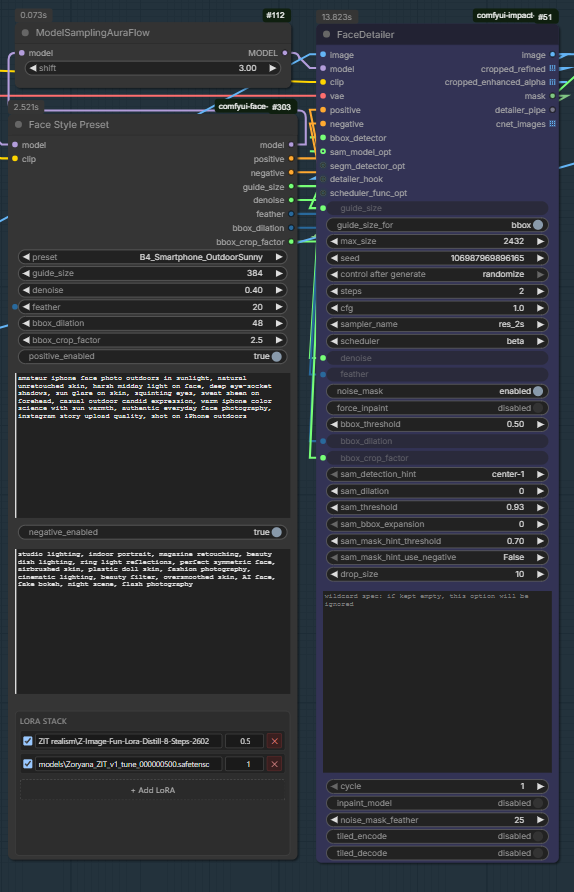
A typical Z-Image Turbo workflow: Face Style Preset feeds modified model
through ModelSamplingAuraFlow into FaceDetailer.model, while its
positive / negative CONDITIONING and guide_size / denoise / feather
/ bbox_dilation / bbox_crop_factor numeric outputs wire straight into
the matching FaceDetailer inputs. The LoRA stack shown uses B4_Smartphone_OutdoorSunny
preset with your character LoRA + a Z-Image Fun detail LoRA.
Installation
Option 1 — ComfyUI Manager (once published to the registry)
Search "Face Style Preset" in ComfyUI Manager → Install.
Option 2 — Manual
cd <ComfyUI>/custom_nodes
git clone https://github.com/artfat-creator/ComfyUI-Face-Style-Preset-for-FaceDetailer-.git
Or download the ZIP and extract it to
<ComfyUI>/custom_nodes/ComfyUI-Face-Style-Preset-for-FaceDetailer-/.
Restart ComfyUI. The node appears under the Face Tools category.
No additional Python dependencies — uses only ComfyUI's own modules and the standard library.
Requirements
- ComfyUI (recent)
- Python ≥ 3.10
- ComfyUI-Impact-Pack for FaceDetailer (only if you want to wire the output parameters into it)
Quick start
- Add the node: right-click → Add Node → Face Tools → Face Style Preset.
- Wire
MODELandCLIPfrom your checkpoint (or upstream LoRA loader) into the corresponding inputs. - Pick a preset from the dropdown — positive / negative texts and face parameters fill in automatically.
- Optionally tweak any widget by hand. Your edits stick until you change the preset again.
- Click + Add LoRA to stack character / style / detail LoRAs. Type to filter the file list, set strength, toggle each on/off.
- Wire outputs:
model→ directly toKSampler.modelandFaceDetailer.modelfor SD1.5 / SDXL / Flux, or throughModelSamplingAuraFlow/ModelSamplingSD3first for Z-Image Turbo / AuraFlow / SD3positive/negative→KSamplerand/orFaceDetailerCONDITIONING inputsguide_size/denoise/feather/bbox_dilation/bbox_crop_factor→ matchingFaceDetailerparameters (right-click each widget on FaceDetailer → Convert widget to input to enable the connection)
Presets
| Key | Label | guide_size | denoise | Use case |
|---|---|---:|---:|---|
| User_Manual | User Manual (custom) | 384 | 0.40 | Type your own — JS leaves widgets alone |
| None | None (empty) | 384 | 0.40 | Reset to empty / safe defaults |
| A_Magazine_Cinematic | Magazine / Cinematic | 512 | 0.47 | Glossy editorial |
| B0_Smartphone_Default | Smartphone default | 384 | 0.38 | iPhone candid |
| B1_Smartphone_YoungSelfie | Young casual selfie | 384 | 0.38 | Friend snap |
| B2_Smartphone_IndoorCasual | Indoor casual | 384 | 0.38 | Warm tungsten room |
| B3_Smartphone_NightOut | Night out / club | 384 | 0.40 | Flash party photo |
| B4_Smartphone_OutdoorSunny | Outdoor sunny | 384 | 0.40 | Harsh midday sun |
| B5_Smartphone_LowLight | Low light dim | 384 | 0.40 | Candlelit / dim ambient |
| B6_Smartphone_iPhone15Pro_Ultrawide | iPhone 15 Pro ultrawide | 384 | 0.38 | Wide environmental portrait |
| B7_Smartphone_JustWokeUp | Just woke up | 384 | 0.38 | Sleepy morning bedroom |
| B8_Smartphone_PostShower | Post shower | 384 | 0.40 | Wet hair, dewy skin, steam |
| B9_Smartphone_PreGoingOut | Pre going out | 384 | 0.38 | Half-done makeup, vanity |
| B10_Smartphone_TiredAfterWork | Tired after work | 384 | 0.38 | Couch slump, dim lamp |
| B11_Smartphone_LaughingCandid | Laughing candid | 384 | 0.40 | Friend-caught mid-laugh |
| B12_Smartphone_OnlyFans_AmateurNude | OnlyFans creator | 384 | 0.40 | Ring light, curated bedroom |
| B13_Smartphone_LingerieBedroom | Lingerie bedroom | 384 | 0.40 | Sensual amateur self-shot |
| B14_Smartphone_MirrorNudeSelfie | Mirror nude selfie | 384 | 0.38 | Raw amateur full body |
| B15_Smartphone_DiscordLeak | Discord leak aesthetic | 384 | 0.42 | Webcam quality 720p |
| B16_Smartphone_TikTokRingLight | TikTok ring light | 384 | 0.38 | Content creator vertical |
| B17_Smartphone_SnapchatGeofilter | Snapchat snap | 384 | 0.38 | Ephemeral location snap |
| B18_Smartphone_CarSelfie | Car selfie | 384 | 0.38 | Driver's seat, seatbelt |
| B19_Smartphone_GymMirror | Gym mirror | 384 | 0.40 | Post-workout sweat |
| B20_Smartphone_Restaurant | Restaurant table | 384 | 0.40 | Candlelit dinner |
| B21_Smartphone_HotelRoom | Hotel room vacation | 384 | 0.38 | Travel vibe |
| G1_BW_FilmGrain | B&W film grain | 448 | 0.45 | Kodak Tri-X / HP5 |
| G2_BW_Digital | B&W digital | 512 | 0.45 | Modern monochrome |
| H1_Y2K_Digicam | Y2K digicam | 384 | 0.42 | 2000s flash photography |
| H2_Tumblr_2010s | Tumblr 2010s | 384 | 0.42 | Pastel indie sadgirl |
| H3_Polaroid_Instax | Polaroid instant | 384 | 0.42 | Instant film warm cast |
| H4_DisposableCamera | Disposable camera | 384 | 0.42 | Kodak FunSaver flash |
| H5_WebcamLaptop | Webcam streamer | 384 | 0.40 | Ring light cam aesthetic |
| C_Vintage_Film | Vintage film | 448 | 0.42 | 35mm analog |
| D_Cinematic_Noir | Cinematic noir | 512 | 0.50 | Dramatic chiaroscuro |
| E_Fashion_Editorial | Fashion editorial | 512 | 0.48 | Vogue / Harper's |
| F_Boudoir_Intimate | Boudoir intimate | 448 | 0.42 | Soft warm romantic |
Preset behaviour
| Preset | What auto-fill does |
|---|---|
| User_Manual | Nothing. JS does not touch widgets — full manual control. |
| None | Clears positive / negative text, sets safe defaults (384 / 0.4 / 20 / 32). |
| Any named preset | Populates all six widgets with the preset's values. Edits afterwards stick. |
LoRA stack
The bottom of the node hosts a dynamic LoRA list — same idea as rgthree's Power Lora Loader, scoped to face / style work.
- + Add LoRA — appends an empty row
- Filter — click the LoRA name field and type any part of a filename to filter the autocomplete list
- Toggle — checkbox on the left enables / disables that slot without removing it
- Strength — numeric input, range
-10.0 … 10.0(negative values invert the LoRA) - ✕ — remove the row
Slots are applied in the listed order. Empty names, disabled toggles, and
strength 0.0 are skipped. Both MODEL and CLIP receive the same strength.
The list is stored as JSON in a hidden widget (lora_stack_json) so the
configuration is saved with the workflow.
If you load a workflow on a machine where a LoRA file is missing, the row shows an orange border and tells you which file is missing — the LoRA is silently skipped at runtime so the rest of the workflow still runs.
Adding your own preset
Open face_presets.json next to the node and add an entry:
"X_Cyberpunk_Neon": {
  "label": "X. Cyberpunk Neon",
  "description": "Neon-lit cyberpunk aesthetic.",
  "positive": "neon-lit cyberpunk portrait, vibrant magenta and cyan rim lights, ...",
  "negative": "daylight, natural light, soft palette, ...",
  "guide_size": 512,
  "denoise": 0.47,
  "feather": 20,
  "bbox_dilation": 32,
  "bbox_crop_factor": 3.0
}
Restart ComfyUI (or hard-refresh the page with Ctrl+Shift+R). The new
preset shows up in the dropdown and the JS auto-fill picks it up via the
/face_style_preset/presets server endpoint.
JSON schema
Required fields per preset:
positive— string (positive prompt text)negative— string (negative prompt text)guide_size— number, 64 … 2048denoise— number, 0.0 … 1.0feather— integer, 0 … 64bbox_dilation— integer, 0 … 256bbox_crop_factor— number, 1.0 … 10.0 (FaceDetailer default is 3.0)
Optional (documentation only — not consumed by the node):
label— human-readable namedescription— short explanation
How it works
                     ┌──────────────────────────┐
   MODEL ──────▶─────│  Face Style Preset       │
   CLIP  ──────▶─────│                          │
                     │  [ LoRA stack applied ]  │
                     │           ↓              │
                     │   modified MODEL + CLIP  │
                     │           ↓              │
                     │  encode positive prompt  │
                     │  encode negative prompt  │
                     └──┬───┬───┬────┬─────┬────┘
                        │   │   │    │     │
                        ▼   ▼   ▼    ▼     ▼
                      model pos neg  guide_size / denoise
                                     feather / bbox_dilation /
                                     bbox_crop_factor

  Typical downstream wiring:

    model      ──► (optional) ModelSamplingAuraFlow / ModelSamplingSD3
                       │
                       ├──► KSampler (main pass)
                       └──► FaceDetailer.model (face pass)

    positive   ──► KSampler.positive   AND/OR   FaceDetailer.positive
    negative   ──► KSampler.negative   AND/OR   FaceDetailer.negative

    guide_size, denoise, feather, bbox_dilation, bbox_crop_factor
               ──► FaceDetailer (right-click each widget on FaceDetailer
                                 → "Convert widget to input")

  Note: for Z-Image Turbo / AuraFlow / SD3 the modified MODEL must pass
  through the matching ModelSampling node before reaching KSampler or
  FaceDetailer. For SD1.5 / SDXL / Flux you usually wire the model output
  directly.
Architecture notes
- The Python backend (
face_style_preset.py) defines a single node registered asFaceStylePresetunder the Face Tools category. It parses the JS-managedlora_stack_jsonwidget, applies LoRAs viacomfy.sd.load_lora_for_models, then runsclip.encode_from_tokensto produce CONDITIONING. - The frontend extension (
web/face_style_preset.js) hooks thepresetwidget callback for auto-fill, hides the JSON widget, and renders a custom DOM widget for the LoRA stack. - Server routes registered in
__init__.py:GET /face_style_preset/presets— returns the contents offace_presets.jsonGET /face_style_preset/loras— returns the list of LoRA filenames from ComfyUI'slorasfolder
Compatibility
- Tested against modern ComfyUI builds with the standard
comfy.sdAPI. - Works with any model architecture where
clip.encode_from_tokensreturns(cond, pooled). This covers SD1.5, SDXL (with caveats for two-CLIP encoders), Flux, Z-Image-Turbo, and most distilled / fine-tuned derivatives. If you hit an exotic CLIP variant, open an issue. - LoRA loading uses ComfyUI's native loader — supports
.safetensors, LoRA, LoCon, LoKr, LoHA, etc.
Troubleshooting
Node doesn't appear after install / update. Delete the
__pycache__ folder inside ComfyUI-Face-Style-Preset-for-FaceDetailer-/ and restart ComfyUI.
Python bytecode caches can stick around when files are replaced.
JS UI not loading (no LoRA stack widget). Hard-refresh the browser
(Ctrl+Shift+R). The browser caches JS files aggressively.
guide_size won't connect to FaceDetailer. Make sure FaceDetailer's
matching widget is converted to an input (right-click → Convert widget
to input). The connector colour should be green (FLOAT) — this node
outputs FLOAT. If you see a colour mismatch with a third-party detailer,
it expects a different type and you may need a converter node.
Preset auto-fill is silent. Check the browser console (F12) for
[FaceStylePreset] log lines. The extension logs at setup how many
presets and LoRAs it loaded.
LoRA file shows orange border. That filename isn't in ComfyUI's
loras folder. Either fix the name or copy the file in. The LoRA is
silently skipped at runtime in this state.
License
MIT — see LICENSE.
Acknowledgments
- ComfyUI by comfyanonymous
- ComfyUI-Impact-Pack by ltdrdata — FaceDetailer reference implementation
- rgthree-comfy — Power Lora Loader inspired the dynamic LoRA UI pattern
Changelog
2.3.0 — Style and context expansion (11 new presets)
B18_Smartphone_CarSelfie— driver's seat selfie with seatbeltB19_Smartphone_GymMirror— post-workout gym mirror sweat sheenB20_Smartphone_Restaurant— candlelit restaurant table date nightB21_Smartphone_HotelRoom— vacation hotel room travel moodG1_BW_FilmGrain— classic Kodak Tri-X / Ilford HP5 monochromeG2_BW_Digital— modern Fujifilm Acros / Leica Monochrom polishH1_Y2K_Digicam— 2000s Sony Cybershot harsh flash + MySpace vibeH2_Tumblr_2010s— pastel indie sadgirl Lana Del Rey aestheticH3_Polaroid_Instax— instant film soft focus warm color castH4_DisposableCamera— Kodak FunSaver harsh flash + grainH5_WebcamLaptop— streamer / cam girl ring light webcam aesthetic
Total preset count: 36 (was 25).
2.2.0 — Amateur photography expansion (13 new presets)
B5_Smartphone_LowLight— dim ambient amateur, ISO grain, single warm lightB6_Smartphone_iPhone15Pro_Ultrawide— 0.5x ultrawide with barrel distortionB7_Smartphone_JustWokeUp— morning bed, sleepy bare face, pillow creasesB8_Smartphone_PostShower— wet hair, dewy skin, steam, bathroom mirrorB9_Smartphone_PreGoingOut— half-done makeup, vanity lights, anticipationB10_Smartphone_TiredAfterWork— couch slump, dim lamp, exhaustedB11_Smartphone_LaughingCandid— friend-caught mid-laugh with motion blurB12_Smartphone_OnlyFans_AmateurNude— content creator with ring light catchlightB13_Smartphone_LingerieBedroom— amateur lingerie self-shotB14_Smartphone_MirrorNudeSelfie— raw full-body nude in mirrorB15_Smartphone_DiscordLeak— webcam quality 720p leaked screenshot vibeB16_Smartphone_TikTokRingLight— TikTok creator with subtle beauty filterB17_Smartphone_SnapchatGeofilter— Snapchat snap aesthetic with filter
Total preset count: 25 (was 12).
2.1.0 — Match FaceDetailer parameter names
- Renamed output
bbox_padding→bbox_dilation(matches Impact Pack'sFaceDetailer.bbox_dilationparameter exactly) - Added new output
bbox_crop_factor(FLOAT) → wires straight intoFaceDetailer.bbox_crop_factor. Controls how much area around the detected face bbox is cropped for the detail pass. - Per-style defaults for
bbox_crop_factor:- Magazine / Fashion / Boudoir → 3.5 (more context for refined work)
- Smartphone variants / Vintage Film → 2.5 (tighter, candid)
- Noir / User_Manual / None → 3.0 (FaceDetailer default)
2.0.0 — All-in-one rework
- One unified node replacing the previous two (
FaceStylePreset+FaceStylePresetWithOverride) - Built-in CLIP encoding → outputs
CONDITIONINGdirectly - Dynamic LoRA stack with add / remove and searchable autocomplete
MODEL/CLIPinputs threaded through LoRAs- Hidden
lora_stack_jsonwidget persists the stack inside saved workflows - Server endpoint
/face_style_preset/lorasfor the LoRA file list guide_sizeis now FLOAT to match Impact Pack's FaceDetailer signature- Added
User_ManualandNonepresets
1.0.0 — Initial release
- Two preset nodes (basic + with override) outputting plain text and numeric values
- 10 curated face style presets