
Artfat Face Consistency
Face-identity consistency scoring for ComfyUI (cv2 YuNet+SFace, CPU). Inline pass/fail sort + batch contact-sheet.
Nodes (2)
ComfyUI — Artfat Face Consistency
Face-identity consistency scoring, built on OpenCV's YuNet (detector) +
SFace (recognizer). Pure cv2 + numpy on CPU — it never touches VRAM,
so it runs happily alongside the sampler.
Two nodes, one shared scoring core (identical to the face_consistency_sort.py
script):
Installation
Clone into your ComfyUI custom_nodes folder and restart:
cd ComfyUI/custom_nodes
git clone https://github.com/artfat-creator/ComfyUI-Artfat-FaceConsistency
Restart ComfyUI — the nodes appear under the artfat category.
If the nodes don't show up — or a saved workflow loads them looking broken / with missing widgets — fully restart ComfyUI once more. If it persists, right-click the node → Fix node (recreate), or just delete it and re-add it from the
artfatmenu. (This is normal after a node's inputs change.)
Dependencies: opencv-python + numpy (both ship with ComfyUI). The detector
models (yunet.onnx, sface.onnx) are bundled in models/ — nothing extra to
download, and the default YuNet detector works out of the box.
Optional YOLO detector (more robust on full-body / small faces) needs:
ultralytics— already present in most ComfyUI installs; otherwisepip install ultralytics.- A face
.ptmodel. Download e.g.face_yolov8m.ptfrom Bingsu/adetailer on Hugging Face and place it inComfyUI/models/ultralytics/bbox/. (If you already use ComfyUI-Impact-Pack / ADetailer, you very likely have these models already.)
Artfat Face Consistency (Sort) — inline gate
Score each generated frame against a reference identity and sort it to disk.
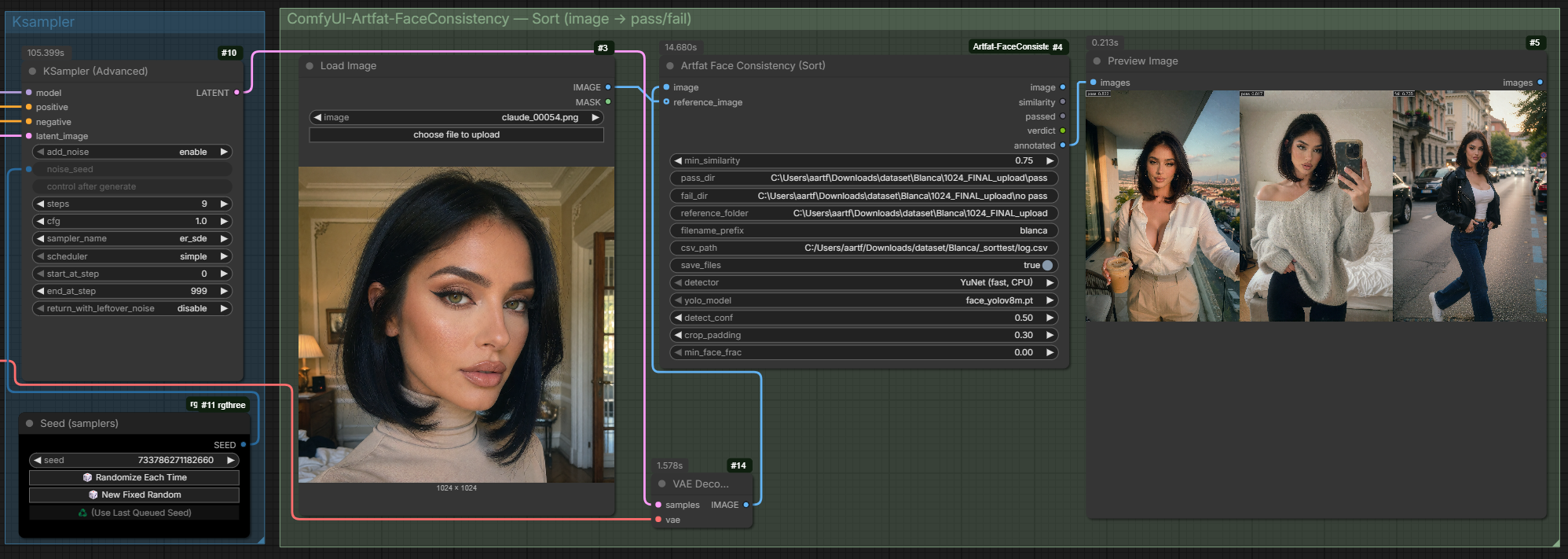
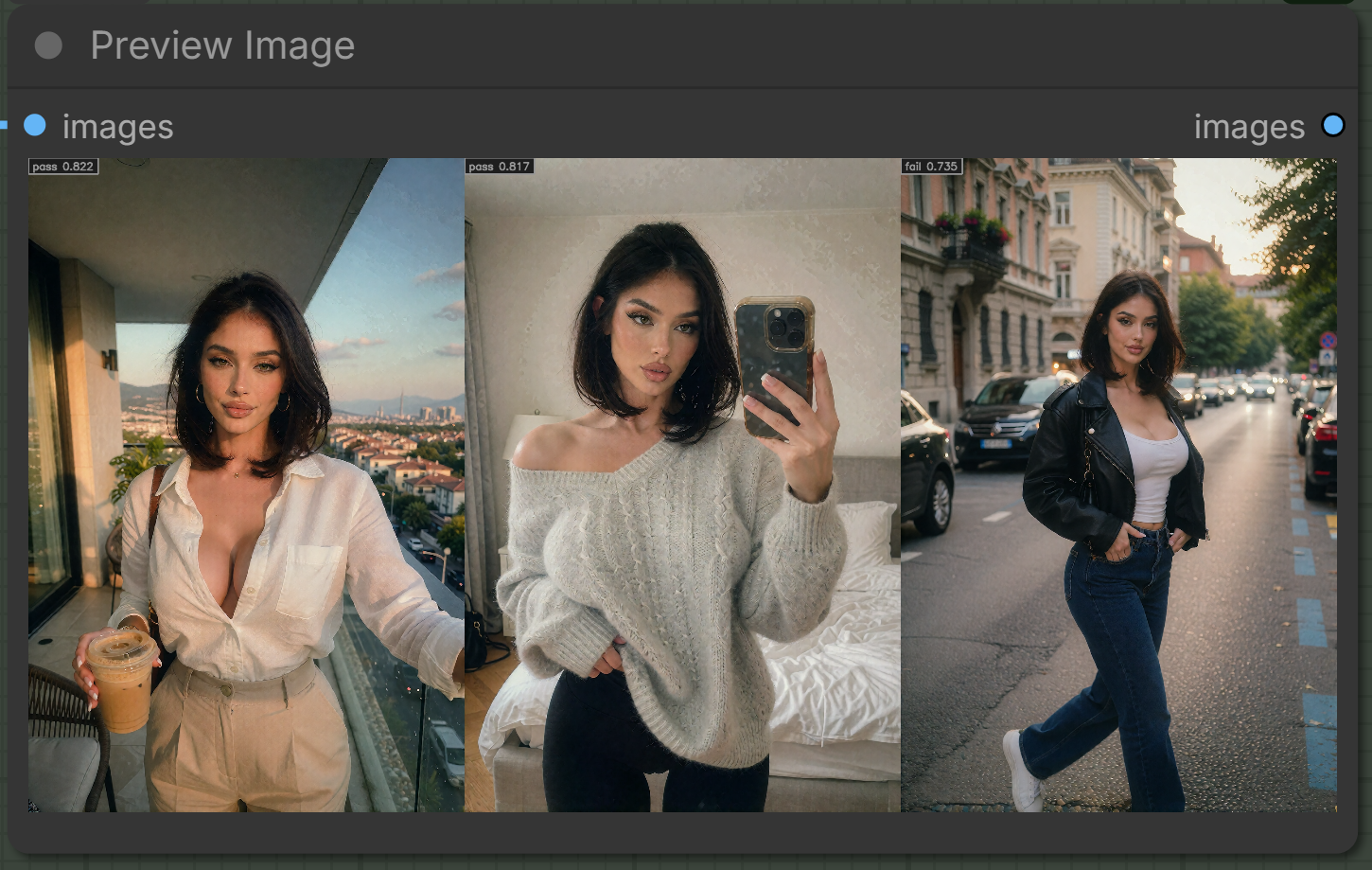
It discriminates, it doesn't just pass everything — the same reference, three frames, one rejected:
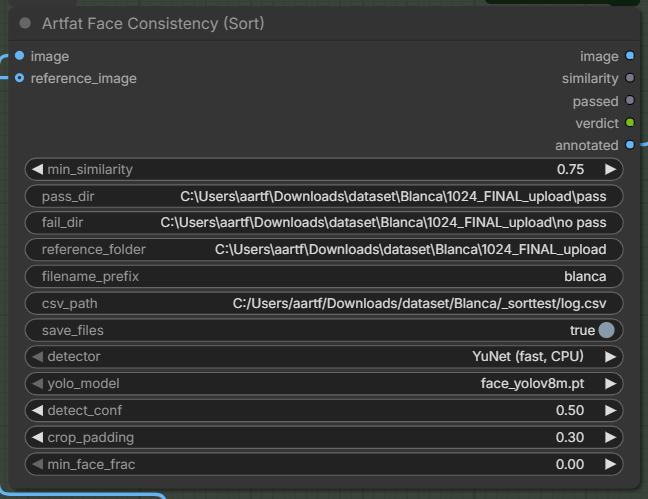
- Inputs:
image,min_similarity(flat cosine pass threshold),pass_dir,fail_dir; optionalreference_image(IMAGE batch 1..N),reference_folder,filename_prefix,csv_path,save_files; adaptive-threshold controls (adaptive_threshold,sim_large,sim_small,frac_large,frac_small,borderline_margin,borderline_dir) — see below. - Outputs:
image(passthrough),similarity(FLOAT),passed(BOOLEAN),verdict(STRING),annotated(IMAGE with a score badge). - Passing frames go to
pass_dir, failing/no-face tofail_dir(borderline toborderline_dirif set), with the score baked into the filename (blanca_00007_sim0.782_pass.png) and appended to CSV.
Adaptive threshold — size-aware gate
A single flat min_similarity is unfair across shot sizes: a face embeds from
its pixels, so a small/far face in a full-body shot legitimately scores lower
than a close-up of the same person. One threshold either rejects good
full-body frames or lets weak close-ups through.
Turn on adaptive_threshold and the pass bar scales with how big the face
is in frame (face_frac = face-box area ÷ frame area):
- face at/above
frac_large→ judged atsim_large(strict, for close-ups) - face at/below
frac_small→ judged atsim_small(lenient, for far/full-body) - in between → linear.
min_similarity is still used when adaptive_threshold is off (unchanged
old behaviour — nothing breaks in existing graphs).
Defaults: sim_large 0.60, sim_small 0.50, frac_large 0.15, frac_small 0.03.
Borderline band (optional): set borderline_margin > 0 and frames just
below the threshold ([threshold − margin, threshold)) are marked
borderline and routed to borderline_dir (or fail_dir if empty) for manual
review. The band is one-sided — at/above the threshold is already a pass, so
only the just-missed frames get flagged.
Calibrate from your own data: set a csv_path. Each row now logs
face_frac and the threshold actually applied alongside similarity, so after
one pack you can read where your persona's real frames land per face size and
set sim_* / frac_* from the distribution instead of guessing.
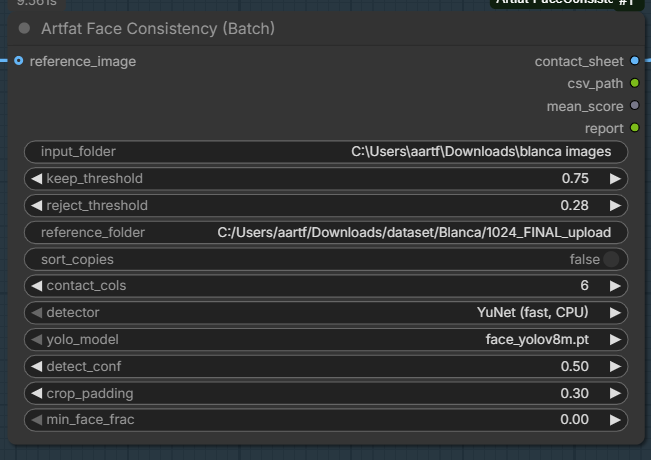
Artfat Face Consistency (Batch) — folder analysis
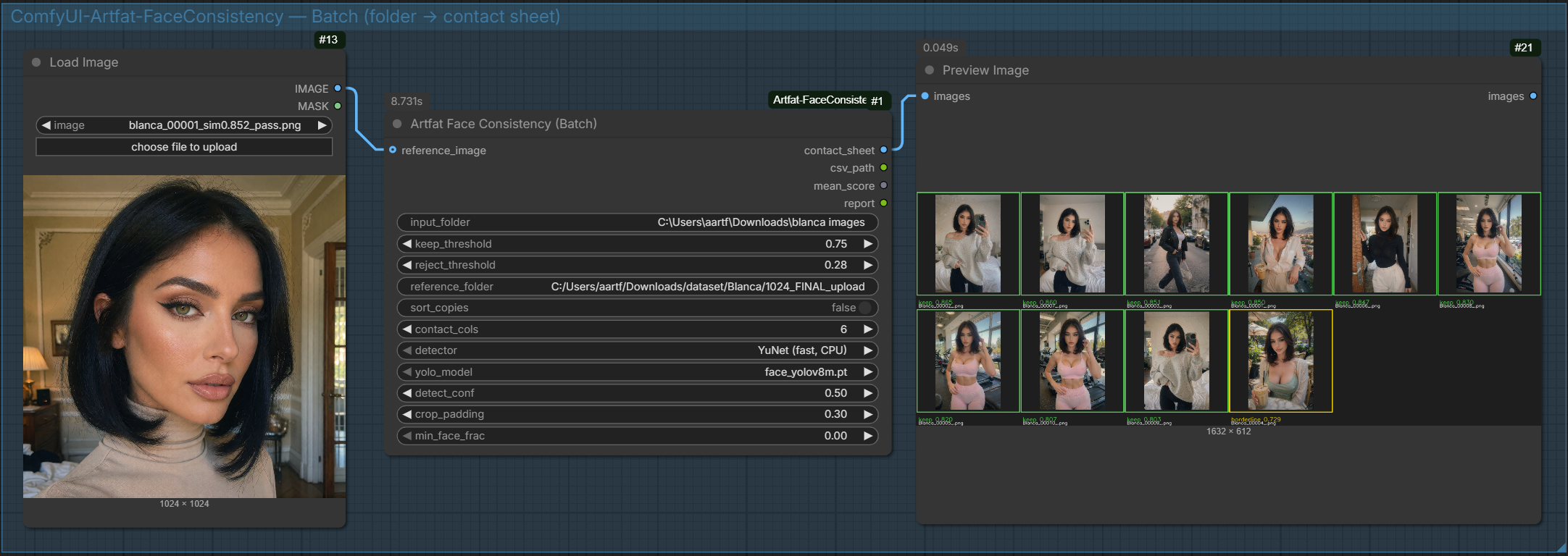
Point it at a folder of ready images + reference(s); get a labelled contact sheet, a CSV, and (optionally) keep/reject copies.
- Inputs:
input_folder,keep_threshold,reject_threshold; optionalreference_image,reference_folder,sort_copies,contact_cols; the same adaptive-threshold controls as the Sort node (adaptive_threshold,keep_large/keep_small,reject_large/reject_small,frac_large/frac_small) — here they scale both the keep and reject thresholds by face size. - Outputs:
contact_sheet(IMAGE → Preview),csv_path,mean_score(FLOAT, near-zero detector glitches dropped),report. - No reference given → auto-medoid of the input set.
- CSV logs
face_fracand the appliedkeep_thr/reject_thrper image.
Reference handling
reference_image (an IMAGE batch of 1..N) and reference_folder are merged
and averaged into one centroid. More references = a steadier anchor — a
dataset centroid beats a single frame, which beats a self-medoid.
Detector: YuNet vs YOLO
Both nodes expose a detector choice plus capture settings:
- YuNet (fast, CPU) — default, pure cv2, zero VRAM. Excellent on portraits / upper-body. Can score low on a small face in a busy full-body shot.
- YOLO (robust, full-body) — finds the face even when small/angled, crops it
with padding, then re-aligns with YuNet so SFace gets a big clean face. Uses a
.ptface model (auto-discovered frommodels/ultralytics/bbox,models/upscale_models, etc.). Requiresultralytics(ships with most ComfyUI installs;pip install ultralyticsotherwise).
Capture settings (apply to YOLO): detect_conf (lower = catches harder/smaller
faces), crop_padding (context around the face before scoring), min_face_frac
(ignore faces smaller than this fraction of the frame — skips background people).
| Sort node | Batch node |
|---|---|
|  |
|  |
|
Example workflows
Drag either file from example_workflows/ onto the ComfyUI canvas, then repoint
the placeholder paths (your_model.safetensors, your_persona_lora.safetensors,
C:/path/to/..., reference_face.png) at your own model / LoRA / folders.
face_consistency_generate.json— txt2img with a persona LoRA (split UNET + CLIP + VAE loaders, e.g. Krea2/Flux) → the Sort node gates each generation against a reference face (the intended live use: generate → auto-pass/fail).face_consistency_batch.json— minimal Batch curation: a reference image + a folder → a labelled contact sheet.
Notes
- Near-zero cosine (
< 0.1) usually means SFace failed to embed that crop (a detector glitch), not a real identity mismatch — the Batch mean drops these so one bad crop doesn't skew the score. - Models (
yunet.onnx,sface.onnx) ship inmodels/. - Roadmap: a
Sample Until Consistentnode (owns the sampler, retries on a new seed until it passes) — deferred.
Changelog
0.2.0
- Adaptive, size-aware thresholds on BOTH nodes. New
adaptive_thresholdtoggle scales the bar withface_frac: Sort scales its pass threshold (sim_large/sim_small), Batch scales both keep and reject (keep_large/keep_small,reject_large/reject_small) — betweenfrac_large/frac_small. So full-body/far frames of the same person aren't failed for having a smaller face. Off by default — existing graphs unchanged. - Borderline band (
borderline_margin+borderline_dir) routes near-threshold frames to manual review. - CSV now logs
face_fracand the appliedthresholdper frame, for calibrating the curve from real data. face_core.embed_bgr()now returns(embedding, n_faces, face_frac).
0.1.0
- Initial release: Sort (inline gate) + Batch (folder contact sheet), YuNet/YOLO detectors, centroid references, CSV logging.
MIT.