
Ariadne Mark — Watermark & C2PA Export
Export AI-generated images and video with invisible watermarks, C2PA and receipts using your own Ariadne Mark SDK kit.
Ariadne Mark for ComfyUI
Export AI-generated images and video with invisible watermarks, signed C2PA provenance and a verification receipt. Free, open-source nodes using your own Ariadne SDK kit.
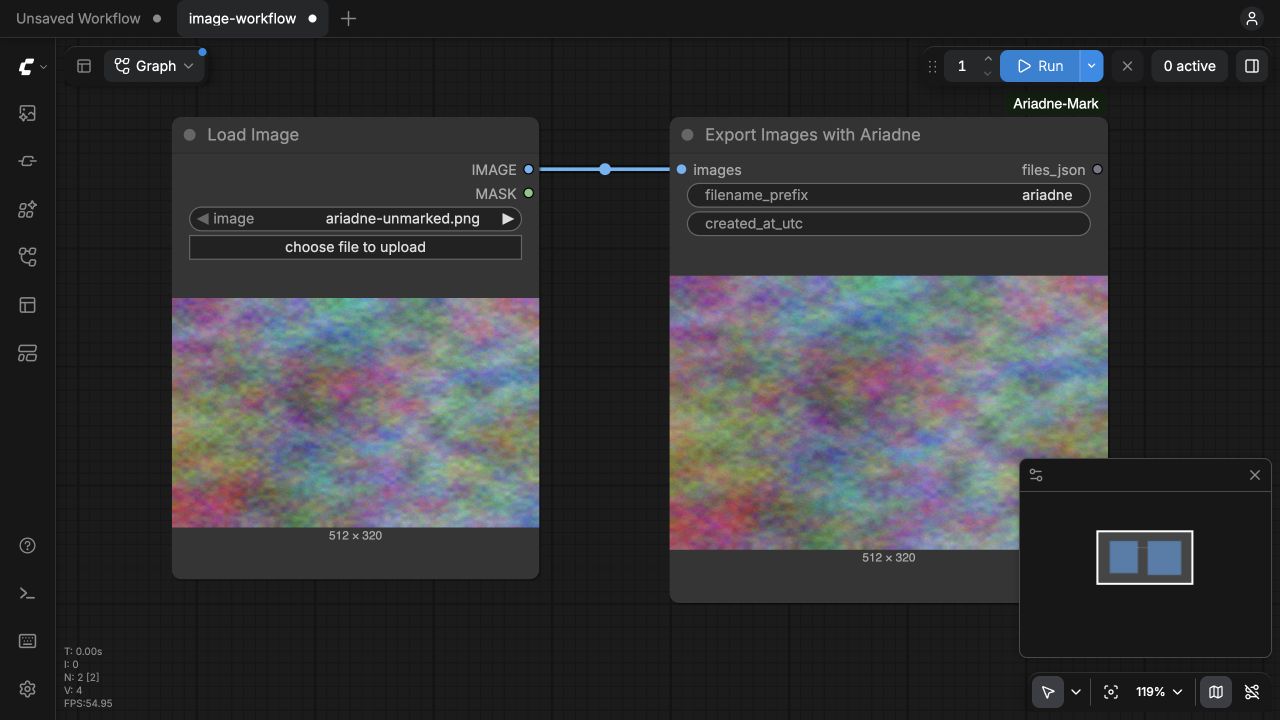
Your image generator → Export Images with Ariadne → marked PNG files + receipts
Your frames → Create Video → Export Video with Ariadne → marked MP4 + receipt
Your final saved PNG/JPEG/MP4 → Mark Saved File with Ariadne
The adapter uses the existing Ariadne Mark 0.7.3a4 SDK in an isolated process. It does not install another Torch, replace ComfyUI's dependencies, change watermark algorithms, download models at execution time, or upload media to an Ariadne service.
Install
Follow the step-by-step ComfyUI watermarking and C2PA setup guide for installation, SDK-kit configuration, image/video nodes and verification.
Published as ariadne-mark-nodes v0.1.0 in the Comfy Registry, by @ariadne-mark. The exact Registry package was installed and exercised on the qualification server.
With the official Python Comfy CLI, the tested direct Registry installation is:
comfy --workspace /absolute/path/to/ComfyUI --skip-prompt --no-enable-telemetry node registry-install ariadne-mark-nodes --version 0.1.0
This installs the nodes. Configure your separate Ariadne SDK kit below, then restart ComfyUI. In ComfyUI-Manager, use the Registry package ID ariadne-mark-nodes; catalogue refresh and your Manager version affect when new entries appear.
For a manual GitHub installation, clone this repository into ComfyUI/custom_nodes/ComfyUI-Ariadne-Mark. Install requirements.txt using your Comfy environment, then restart ComfyUI. This supplies the nodes; provision the SDK kit below separately.
Qualified on ComfyUI 0.45.0 on Linux x86-64 CPU with the exact SDK image documented in the server qualification. The Docker runner always requests linux/amd64; Windows/macOS host operation is not qualified by this release. The native Comfy V3 extension API is required.
Connect your SDK kit once
- Follow the SDK deployment-kit setup. Build/download the exact qualified artifacts and initialize a kit with your public publisher/system information. Provision models explicitly. Keep the kit outside Comfy input, output, temp and web directories.
- Copy
ariadne-comfy.example.jsonto a private location, fill in the absolute kit path and immutable local Docker image ID, and setARIADNE_COMFY_CONFIG=/absolute/path/ariadne-comfy.local.jsonin the environment that launches ComfyUI. - Restart ComfyUI and add a node from Ariadne Mark. No credentials or runner commands are stored in the workflow.
The Docker command is an operator-owned array, usually ["docker"]. It uses an already-installed image, does not pull, exposes no ports or Docker socket, and mounts only the kit. The existing SDK production credential/TSA rules apply. network: "none" is suitable for development; explicitly provision bridge and production TSA access when required. Verify the image's release provenance; an arbitrary local image ID is not independent publisher authentication.
For an already qualified, separate Linux SDK environment, use:
{
  "schema_version": 1,
  "kit_directory": "/absolute/private/path/to/ariadne-kit",
  "runner": {"kind": "cli", "command": ["/absolute/sdk-venv/bin/ariadne"]},
  "timeout_seconds": 900
}
SDK models, signer material, timestamps and registry stay in the kit. This plugin does not issue production certificates or enroll a C2PA product. A development kit produces development-signed outputs.
Use the nodes
| Node | Connect | Result |
| --- | --- | --- |
| Export Images with Ariadne | A batch of final generated IMAGE tensors | Exact marked PNGs with native previews and receipts |
| Export Video with Ariadne | Native Create Video, codec none, 8-bit sRGB | A visually marked, signed MP4 and video preview |
| Mark Saved File with Ariadne | Final PNG/JPEG/MP4 in Comfy input/output | A new marked file; original bytes reach the SDK unchanged |
Video profiles are Economy5s (default), Economy2s and Resilient. SDK trade-offs remain unchanged. The video node marks visual frames; original audio means non-synthetic source audio, not generated speech/music. Unsupported synthetic-audio workflows are rejected by the SDK.
For an encoded/file-backed native VIDEO, save the final rendition first and use Mark Saved File. This avoids silently stripping known upstream Content Credentials during a re-encode. The tensor nodes target your own new generated outputs; use the underlying SDK's supported altered-content workflow for editing existing signed media.
Place all crops, resizing, color conversion and encoding before marking. These are terminal export nodes: files_json describes the saved artifacts, and the UI downloads their exact bytes. They intentionally do not return an IMAGE tensor that a later Save Image node could re-save without C2PA.
created_at_utc accepts an actual earlier generation time with timezone. Blank records this node's final-rendition materialization time; the adapter does not infer model execution time. A filename prefix uses up to 64 letters, digits, underscores or hyphens.
Files, failures and resource use
Outputs live under ComfyUI/output/ariadne/<prefix>_<job>/ with .receipt.json and an export.json index. The adapter waits for a successful SDK batch and checks each receipt/hash before publishing that directory. Missing configuration, SDK failure, timeout or a changed output raises an error: there is no original-file fallback.
One isolated SDK process handles the image batch. Models are reused within that batch, not across separate node executions; do not apply resident-worker SDK timings to a cold node call. The Docker runner is bounded to 2 CPU/4 GiB, with a configurable 10–3600 s deadline. No Comfy model/GPU configuration is modified. Concurrent use of the same kit returns a busy error after five seconds rather than launching overlapping exporters.
Generated inputs and successful intermediate media are removed; the kit registry/manifests persist. Private job logs and failed SDK outputs remain under the kit for operator troubleshooting and retention. Apply your own cleanup policy to those adapter-owned jobs; never remove signing keys or registry state as a cache cleanup.
Verify an output
Download the exact PNG/MP4 from the node, then use the Ariadne verifier or a standard C2PA reader. An image preview is not the signed artifact. Inspect evidence and measured mode trade-offs.
Examples, catalogue and contributing
examples/ contains API workflows and a UI workflow for an image export. Replace the sample loader with your generator. No large generation model is required for the included verification smoke workflows.
Registry package · Publisher · Publishing run.
Version 0.1.0 uses the same qualified node implementation recorded in qualification/source-hashes.json. The Registry source commit is 6a118f960cef359ab2e8e23845e45d51c4f67dc6; subsequent GitHub documentation changes do not replace that immutable package. Registry availability is not a Comfy Cloud compatibility qualification.
Maintainers publish deliberately using the manual Publish Comfy Registry GitHub workflow. The scoped publisher key is stored as the repository secret REGISTRY_ACCESS_TOKEN; it is never put into node widgets, workflows, command-line arguments or source files.
Report reproducible integration issues via GitHub, including node/SDK/Comfy versions and sanitized logs. See the SDK for format limits and legal implementation guidance. Tools support compliance work; the plugin is not legal certification.
License
Apache-2.0 for this adapter. ComfyUI, the separately installed SDK and model components retain their own licences. No model weights or SDK binaries are redistributed here.