
ApoStudio
LLM chat, vision, prompt enhancement and image captioning nodes for ComfyUI via any OpenAI-compatible server.
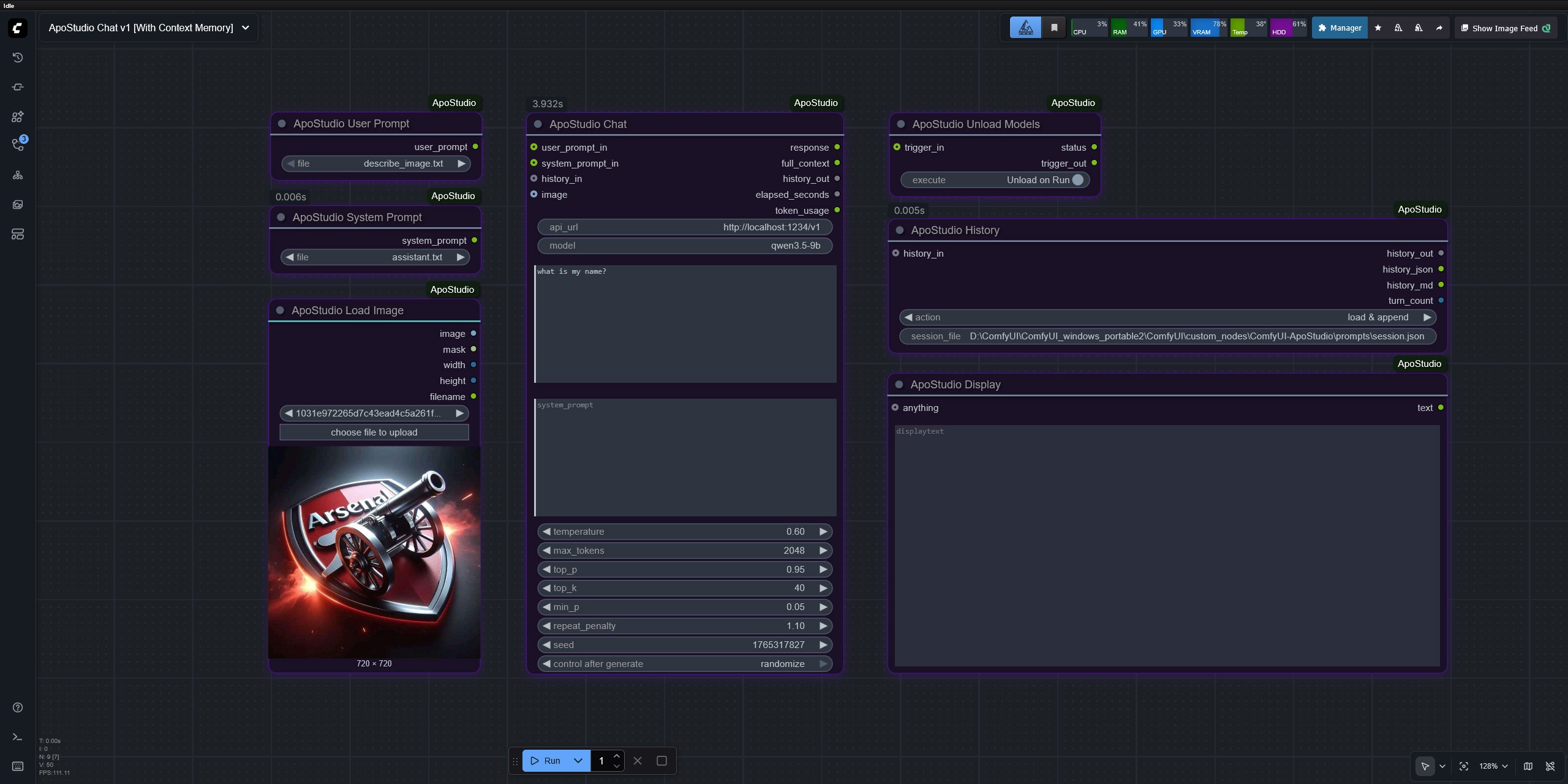
Nodes (7)
A chat box in your ComfyUI graph — prompts, captions, and all the text in between
Show Any, without the third-party node — ApoStudio Display prints anything in the node body
Multi-turn chat in ComfyUI, the sneaky way — conversation state lives in a file
An image loader that also hands Chat the picture — and fixes your sideways phone photos
Your LLM's job description, saved as a file — personas you never have to retype
Kick your LLM out of VRAM when the chat is over — LM Studio gets evicted by CLI
Stop retyping prompts — ApoStudio User Prompt is a dropdown over a folder of files

ApoStudio
ComfyUI custom node package for LLM-powered workflows.
Chat, prompt enhancement, image captioning, and multi-turn conversation via any OpenAI-compatible server — LM Studio, Ollama, OpenAI API, and more.
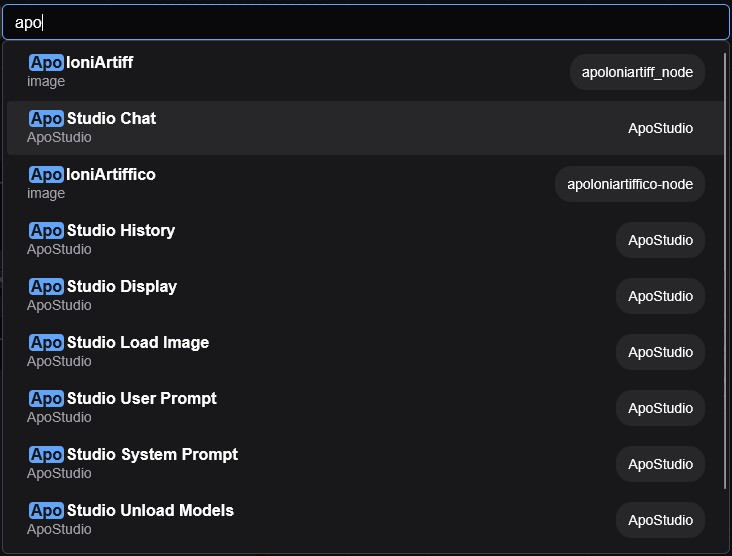
Finding ApoStudio Nodes
Double-click the ComfyUI canvas and search "apo" to find all nodes instantly.
Example Workflows
Chat with Context Memory
Full multi-turn conversation with persistent history across workflow runs.
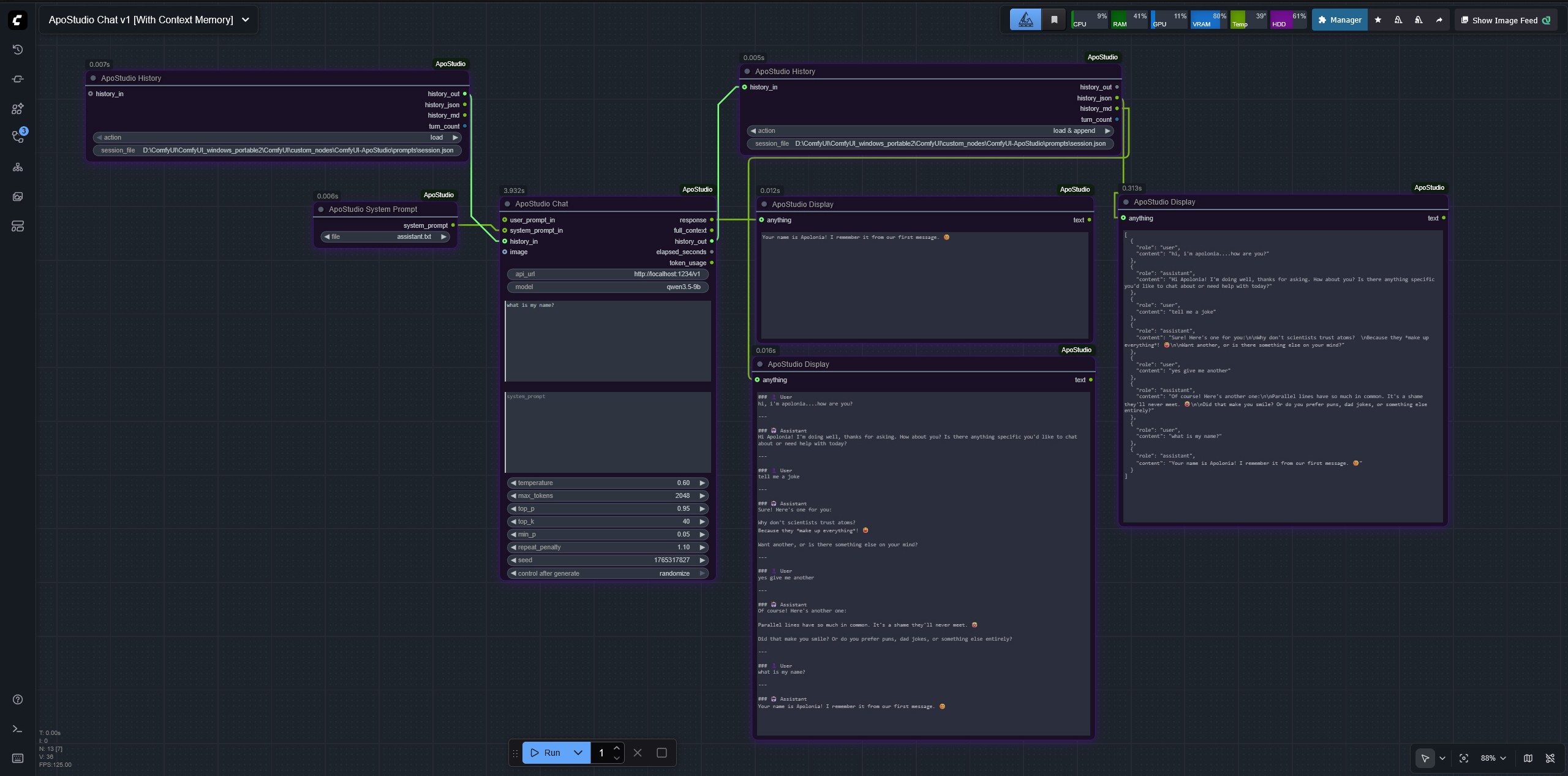
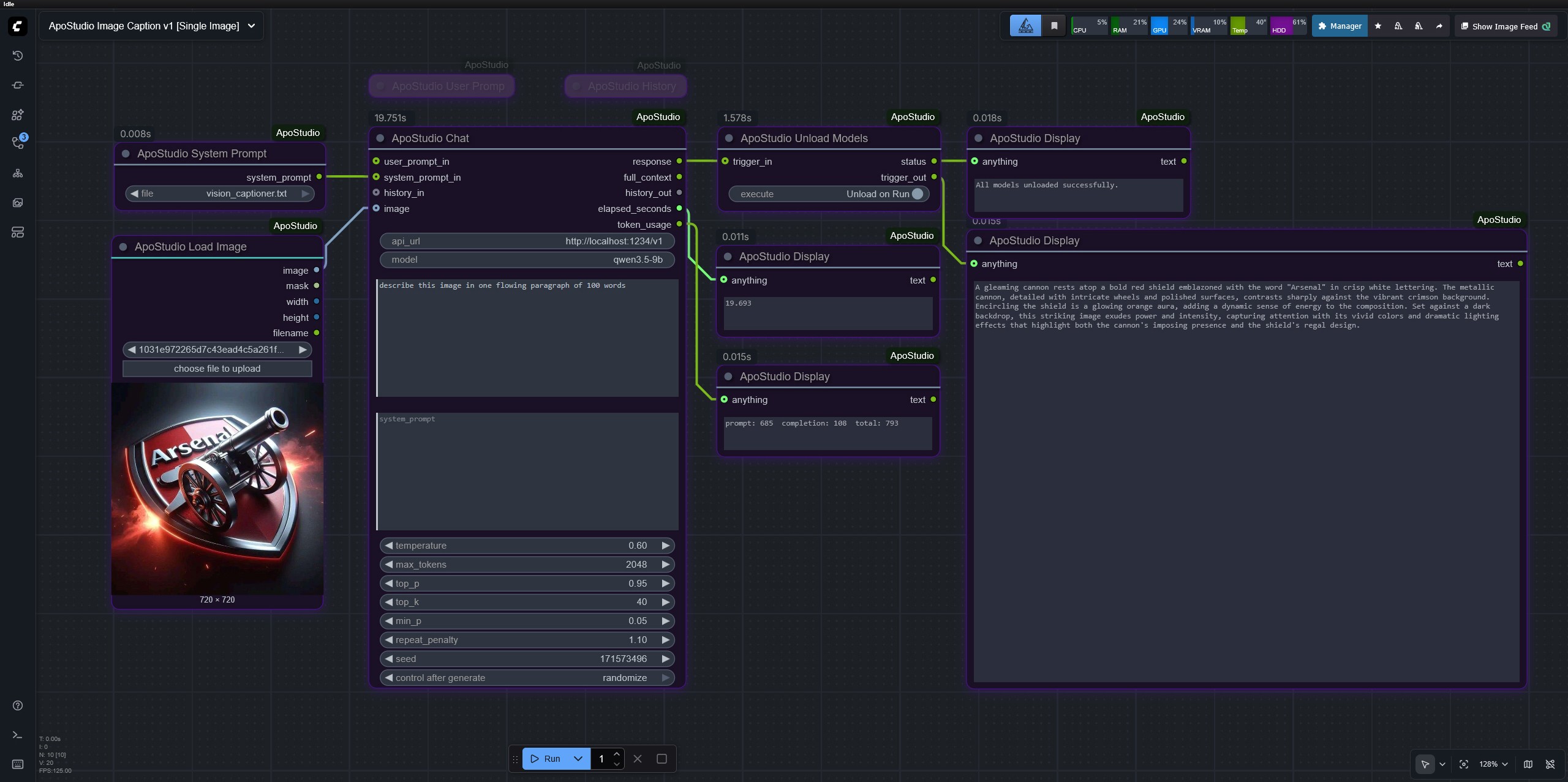
Image Captioning
Single image captioning using a vision model.
Node Reference
ApoStudio Chat
The core node. Sends a prompt to your LLM server and returns the response. Handles text-only, vision, and multi-turn conversation depending on what is connected.
Required inputs
| Input | Type | Default | Notes |
|-------|------|---------|-------|
| api_url | STRING | http://localhost:1234/v1 | OpenAI-compatible endpoint |
| model | STRING | enter-model-id-here | Exact model ID as shown in your server |
| user_prompt | STRING | (empty) | Typed user message. Overridden if user_prompt_in is connected |
| system_prompt | STRING | (empty) | Typed system prompt. Overridden if system_prompt_in is connected |
| temperature | FLOAT | 0.7 | 0.0 – 2.0. Higher = more creative, lower = more deterministic |
| max_tokens | INT | 2048 | Maximum response length |
| top_p | FLOAT | 0.95 | Nucleus sampling threshold |
| top_k | INT | 40 | Top-K sampling |
| min_p | FLOAT | 0.05 | Minimum probability threshold |
| repeat_penalty | FLOAT | 1.1 | Penalises repetition. 1.0 = off |
| seed | INT | -1 | -1 = random each run |
Optional inputs
| Input | Type | Notes |
|-------|------|-------|
| user_prompt_in | STRING | From User Prompt node — overrides typed text |
| system_prompt_in | STRING | From System Prompt node — overrides typed text |
| history_in | APO_HISTORY | Conversation history from a History node (load action) |
| image | IMAGE | Connect any IMAGE for vision/captioning tasks |
Outputs
| Output | Type | Notes |
|--------|------|-------|
| response | STRING | The LLM's reply text |
| full_context | STRING | Full message array sent to API as JSON — useful for debugging |
| history_out | APO_HISTORY | Updated conversation history — wire to History node (load & append) |
| elapsed_seconds | FLOAT | Response time in seconds |
| token_usage | STRING | prompt: X completion: Y total: Z |
Supported input combinations
| What you connect | What happens | |-----------------|--------------| | User prompt only | Sends as a plain user message | | System prompt only | Model responds to the system prompt directly | | Both prompts | System sets context/role, user carries the request | | Image only | Model describes the image | | Image + user text | Image with a specific instruction | | Image + system prompt | System sets role, image is the user message | | All three | Full vision task with role, instruction, and image |
ApoStudio User Prompt
File picker for user prompts. Reads .txt, .md, and .json files from the prompts/user/ folder inside the package directory. Drop your own files into that folder — the dropdown refreshes automatically on every run without restarting ComfyUI.
For .json files, the node extracts the value of the first matching key it finds: prompt, user_prompt, content, text, or message. If none match, the full JSON is returned as a string.
Input: file dropdown
Output: user_prompt STRING → wire to Chat's user_prompt_in
Tip: Leave the Chat node's user_prompt text area empty when using this node — the connected input takes priority automatically.
ApoStudio System Prompt
Identical to User Prompt but reads from prompts/system/. Use this to load different roles and personas without retyping them.
Ships with three ready-to-use system prompts:
assistant.txt— general-purpose helpful assistantvision_captioner.txt— detailed image analysis for captioning and description tasksprompt_enhancer.txt— expands rough ideas into full, detailed diffusion model prompts
Input: file dropdown
Output: system_prompt STRING → wire to Chat's system_prompt_in
ApoStudio History
Manages multi-turn conversation history by reading from and writing to a JSON session file on disk. Because ComfyUI cannot loop data within a single run, history is persisted between runs via the file system.
How it works: One History node loads the previous session at the start of each run. Another History node saves the updated session after Chat completes. Both nodes point to the same session file.
Inputs
| Input | Type | Notes |
|-------|------|-------|
| action | Dropdown | See actions table below |
| session_file | STRING | Full path to your session JSON file, e.g. C:/chats/session.json |
| history_in | APO_HISTORY | Wire Chat's history_out here on the save-side node |
Actions
| Action | Which node | What it does |
|--------|-----------|--------------|
| load | Left node (before Chat) | Reads history from the session file and outputs it to Chat's history_in |
| load & append | Right node (after Chat) | Receives Chat's history_out, saves the full updated conversation to the session file |
| clear | Either node | Deletes the session file and resets history to empty. Run once then switch back |
| save | Either node | Manually saves incoming history to the session file without loading |
Outputs
| Output | Type | Notes |
|--------|------|-------|
| history_out | APO_HISTORY | Wire left node's output to Chat's history_in |
| history_json | STRING | Full conversation as raw JSON — wire to Display for debugging |
| history_md | STRING | Full conversation formatted as readable Markdown — wire to Display for reading |
| turn_count | INT | Number of completed assistant replies in the current session |
Wiring for multi-turn chat:
[History: load] ──history_out──► Chat (history_in)
                                  Chat (history_out) ──► [History: load & append]
                                  Chat (response) ──► Display
                [History: load & append] ──history_md──► Display (full conversation)
Starting a fresh conversation: Switch the right History node action to clear, run once, then switch back to load & append. The session file will be deleted and history resets.
Important: Both History nodes must point to the exact same session_file path.
ApoStudio Unload Models
Unloads all models from VRAM using the LM Studio CLI (lms unload --all). Wire it after your Chat node to automatically free VRAM at the end of a workflow run. Use the execute toggle to quickly disable it without disconnecting anything.
Inputs
| Input | Type | Notes |
|-------|------|-------|
| execute | BOOLEAN | Unload on Run / Skip — toggle off when iterating quickly |
| trigger_in | STRING (optional) | Wire Chat's response here to ensure it runs after Chat completes |
Outputs
| Output | Type | Notes |
|--------|------|-------|
| status | STRING | CLI result message — wire to Display to confirm unload |
| trigger_out | STRING | Passes trigger_in through — wire to Display to close the execution chain |
Wiring:
Chat (response) ──► Unload (trigger_in) ──trigger_out──► Display
Note: Requires the LM Studio CLI (
lms) installed and available on your system PATH. This node is specific to LM Studio and will not work with other servers.
ApoStudio Display
Universal display node. Accepts any input type and renders it as readable text directly in the node body after each run. Replaces the need for third-party Show Any nodes within ApoStudio workflows.
Wire any output from any node into anything — STRING, FLOAT, INT, APO_HISTORY, lists, or dicts are all handled. Lists and dicts are formatted as readable JSON automatically.
Input: anything — accepts any type
Output: text STRING — passes the displayed text downstream for chaining
ApoStudio Load Image
Image loader with a file picker for your ComfyUI input/ directory. Supports jpg, jpeg, png, webp, bmp, tiff, and gif (first frame only). Includes EXIF orientation auto-correction so rotated phone photos load upright.
Input: image dropdown + "choose file to upload" button
Outputs
| Output | Type | Notes |
|--------|------|-------|
| image | IMAGE | Tensor ready to wire into Chat's image input |
| mask | MASK | Alpha channel as mask, or solid white if no alpha |
| width | INT | Image width in pixels |
| height | INT | Image height in pixels |
| filename | STRING | Base filename of the loaded image |
Installation
1. Clone or download
cd ComfyUI/custom_nodes
git clone https://github.com/apoloniart/ApoStudio
Or download the ZIP and extract so the folder is at ComfyUI/custom_nodes/ApoStudio/ (or any name — the package works regardless of folder name).
2. Install dependencies
Windows portable install:
python_embeded\python.exe -m pip install -r custom_nodes\ApoStudio\requirements.txt
Standard install:
pip install -r custom_nodes/ApoStudio/requirements.txt
Dependencies (requests, Pillow) also auto-install on first ComfyUI startup.
3. Restart ComfyUI
You should see in the terminal:
[ApoStudio] Loaded — 7 nodes registered.
All nodes appear under the ApoStudio category. Search "apo" in the node finder to see them all.
4. <ins>Comfy Manager Install:</ins>
My nodes have minimal requirements, so you can safely install via Comfy Manager without the fear of dependencies breaking your entire Comfy. After installation, rename the folder to ComfyUI-ApoStudio
Adding your own prompt files
Drop .txt, .md, or .json files into:
prompts/user/— for user promptsprompts/system/— for system prompts
Files appear in the dropdown on the next workflow run. No restart needed.
JSON format: Any JSON file with one of these keys will have its value extracted automatically: prompt, user_prompt, system_prompt, content, text, message.
Server compatibility
| Server | Default URL |
|--------|------------|
| LM Studio | http://localhost:1234/v1 |
| Ollama | http://localhost:11434/v1 |
| OpenAI API | https://api.openai.com/v1 |
| LiteLLM / vLLM / text-generation-webui | Set your own URL |
The Unload Models node uses LM Studio's CLI and is LM Studio-specific. All other nodes work with any OpenAI-compatible server.
File structure
ApoStudio/
├── __init__.py                      ← Package entry point, node registration
├── requirements.txt                 ← pip dependencies (requests, Pillow)
├── pyproject.toml                   ← ComfyUI Registry metadata
├── README.md                        ← This file
├── CHANGELOG.md                     ← Version history
├── LICENSE                          ← MIT licence
├── assets/
│   └── screenshots/
│       ├── ApoStudio-Nodes.jpg      ← Node collection overview
│       ├── ApoStudio-Chatv1.jpg     ← Chat workflow with context memory
│       ├── ApoStudio-ImageCaption.jpg ← Image captioning workflow
│       └── ApoStudio-Search.jpg     ← How to find nodes in ComfyUI
├── nodes/
│   ├── __init__.py                  ← Package marker
│   ├── apo_chat.py                  ← ApoStudio Chat
│   ├── apo_history.py               ← ApoStudio History
│   ├── apo_prompts.py               ← ApoStudio User Prompt & System Prompt
│   ├── apo_unload.py                ← ApoStudio Unload Models
│   ├── apo_display.py               ← ApoStudio Display
│   └── apo_load_image.py            ← ApoStudio Load Image
├── prompts/
│   ├── user/
│   │   ├── describe_image.txt       ← Example: image description prompt
│   │   └── enhance_prompt.txt       ← Example: diffusion prompt enhancer
│   └── system/
│       ├── assistant.txt            ← General-purpose assistant
│       ├── vision_captioner.txt     ← Image analysis and captioning
│       └── prompt_enhancer.txt      ← Diffusion model prompt expansion
└── web/
    └── js/
        └── apo_display.js           ← Frontend JS for Display node rendering
Attribution
You are very welcome to fork ApoStudio and augment my work to fit your own requirements if you feel the need to do so, but please have the kindness to credit & link me as the original creator, in accordance with the MIT license That would mean a lot to me, and is the decent thing to do 🤗
See NOTICE for the full attribution request.