
ApoGalleria
Visual prompt-library manager for Ideogram 4 (ApoGalleria-Ideo4), plus sibling converters that turn its capt...
Nodes (4)
Reuse one Ideogram 4 caption on Flux.2 without rewriting it
Ideogram 4 drew the boxes. This node hands them to FLUX 3 Klein in the format it reads.
ApoGalleria-Ideo4 is a prompt library, not a prompt generator
Turn a structured Ideogram 4 caption into prose for everything else
✨ApoGalleria - Visual Aesthetics Library Ideo4✨
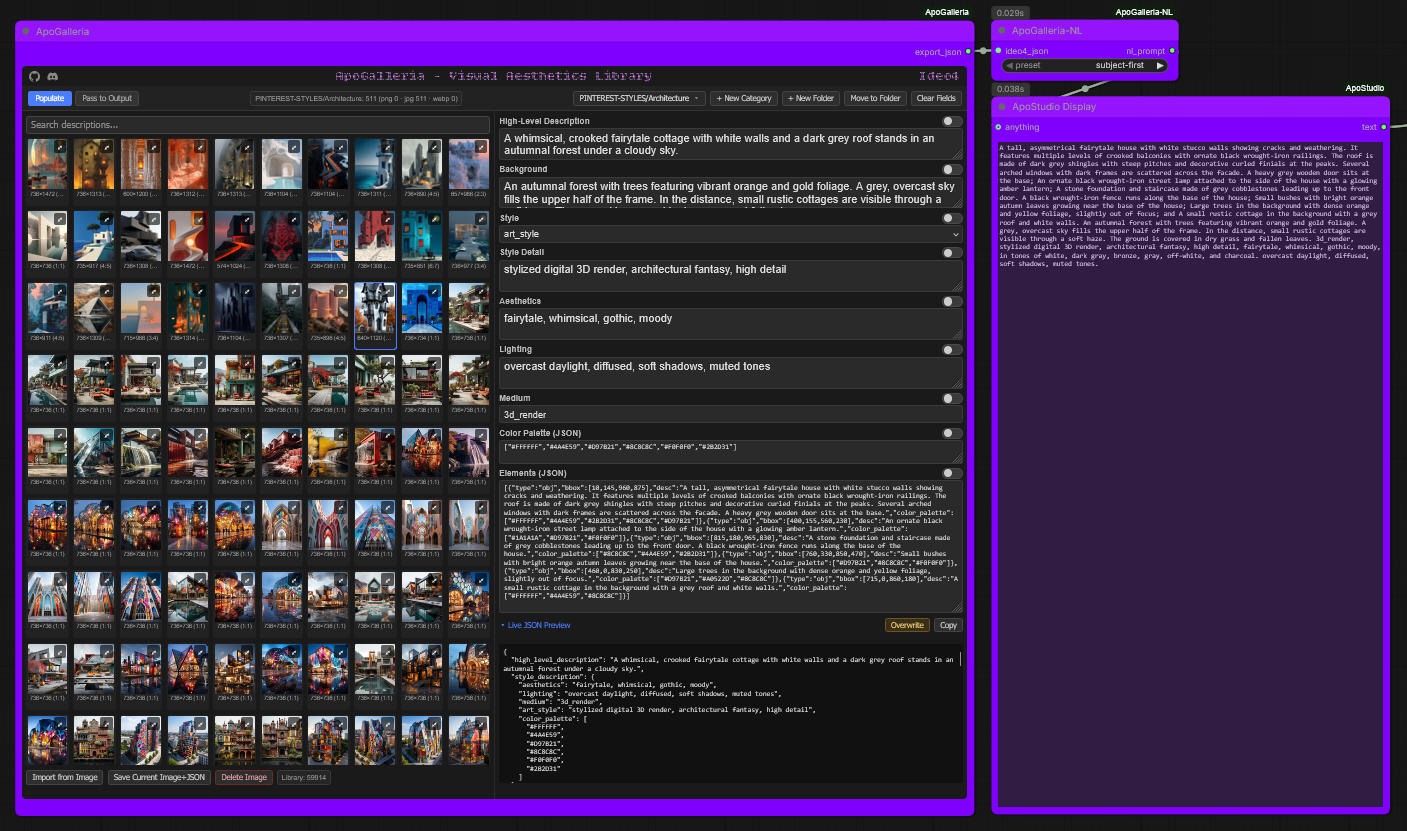
ApoGalleria is my powerful custom node suite designed for inspiration on tap. Generate images from a stored library of reference image/JSON captioned pairs. Real-time importing, viewing, and editing of captions right within ComfyUI. Coded specifically for Ideo4, and captioned in Ideo4 structured JSON.
My sibling nodes convert Ideo4 JSON captions on the fly for inference across multiple model architectures.
To satiate my new custom nodes I also built a colossal Visual Aesthetics Library that contains ~60,000 pieces of captioned art inspiration, available directly from me. Both are personal projects created to fill my exact needs.
ApoGalleria-Ideo4
<ins>My core node:</ins>
ApoGalleria - Visual Aesthetics Library Ideo4
Build up your own libraries of image/JSON pairs, browse them in a split gallery + field-editor UI, lock the fields you like, mix-and-match across multiple saved entries, and
pass the finished JSON straight into Kijai's Ideogram 4 Prompt Builder node's import_json input via this node's export_json output.
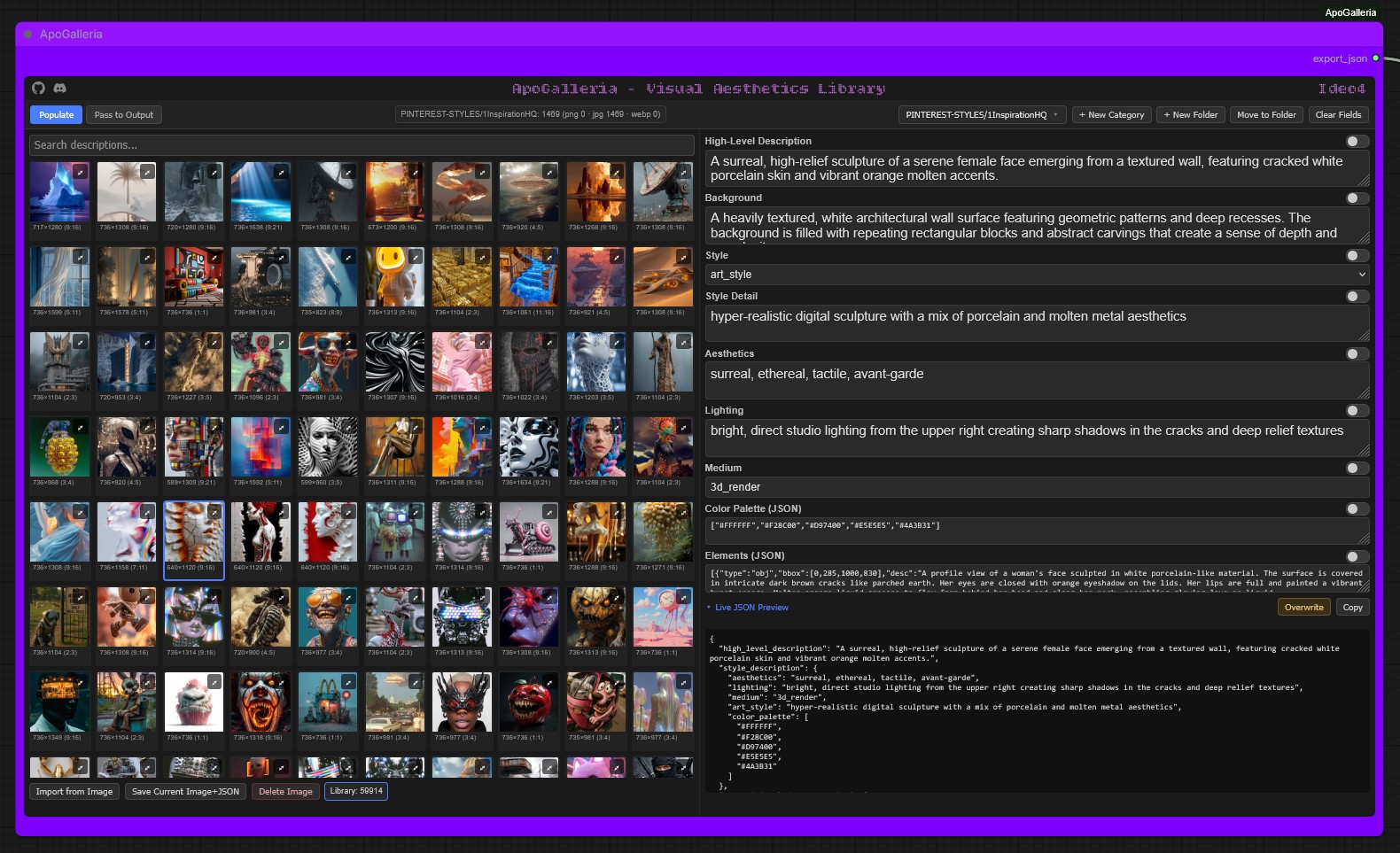
Split UI:
-
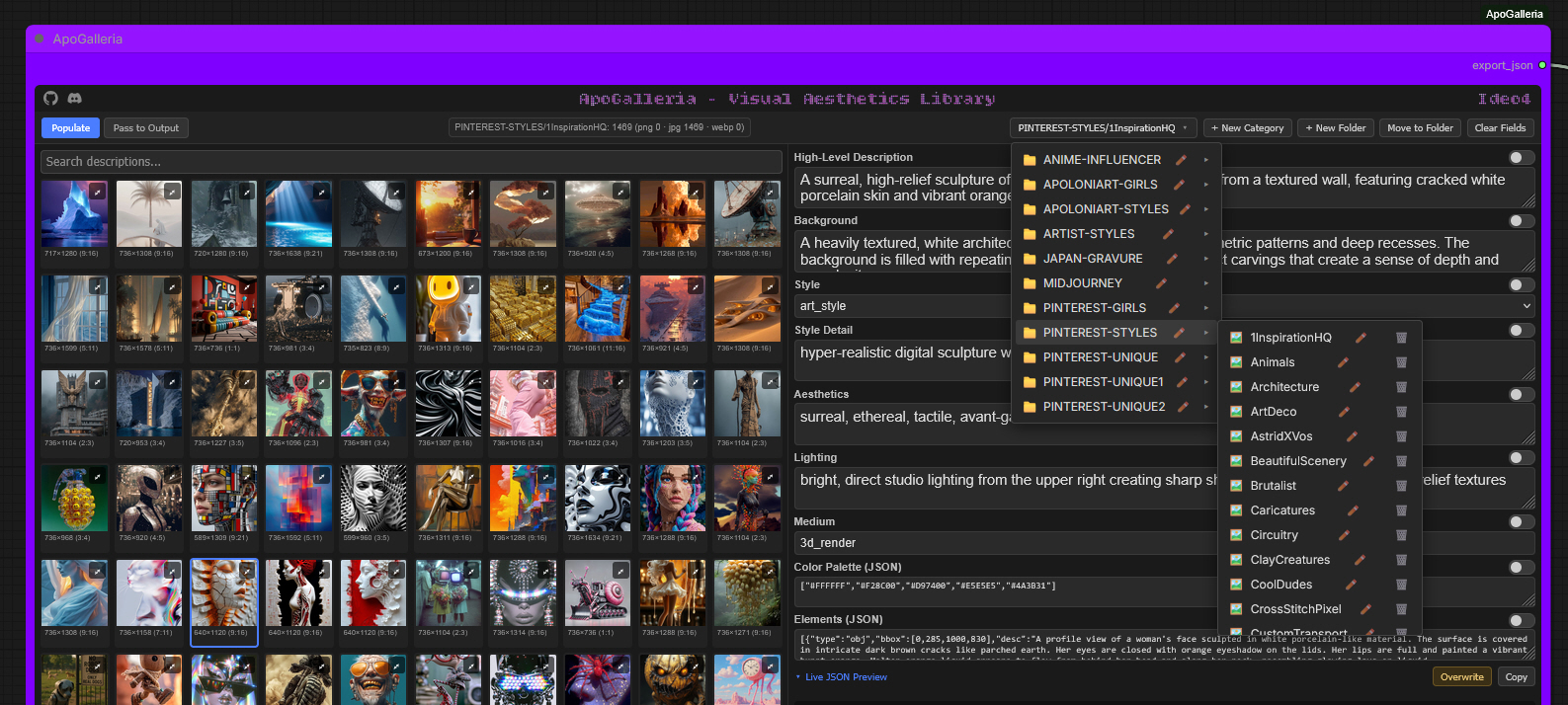
Left (Populate mode): grid gallery of stored images, searchable by description, with a nested folder-tree category picker (create categories and grouping folders on the fly, rename/move/delete from the same flyout).
-
Right: editable natural-language fields —
high_level_description,background,style(photo / art_style), the matchingstyle detailtext,aesthetics,lighting,medium, and the rawcolor_palette/elementsJSON blobs.
Field locking: every field has its own lock toggle. Locked fields hold their value no matter which library image you click next — so you can graze across several saved entries, locking one good field at a time, to build a unique combined description.
<ins>Mode toggle:</ins>
-
Populate— Library is active; selecting an entry fills all unlocked fields.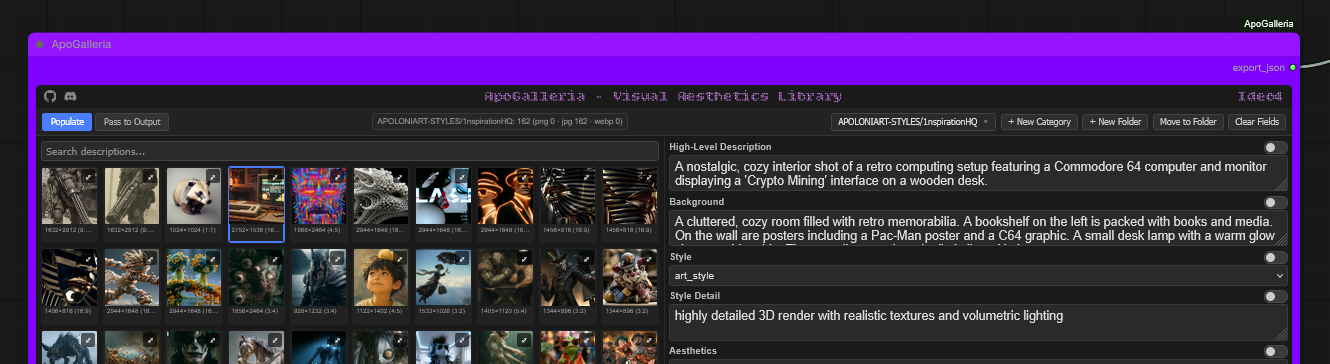
-
Pass to Output— Library is disabled; the current field state (locked + unlocked mix, plus any manual edits) is assembled into the full schema and emitted on theexport_jsonoutput.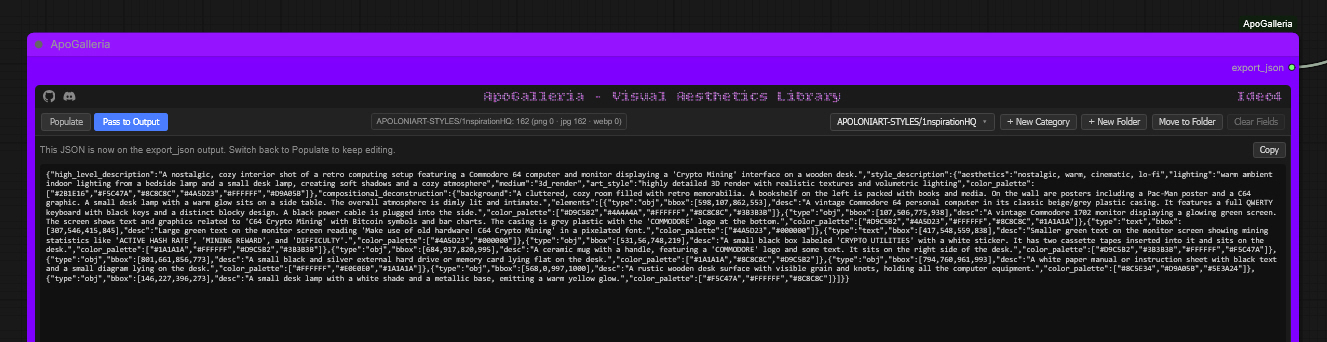
<ins>Importing into the library:</ins>
Using ApoGalleria-Ideo4 to import images directly:
- [PNG] Select
Import from Imageselect your desired PNG generated by your Ideogram 4 pipeline, selectSave Current Image + JSONand ApoGalleria-Ideo4 will save the image to the library in the current selected folder, and pull the embedded description metadata straight out of it creating a sidecar JSON file — no manual JSON authoring needed.
 2. [JPG/WEBP] Require a pre-captioned JSON/txt sidecar file alongside the image. The process to save to the library is as above, but both image and JSON/txt files must be selected and saved together.
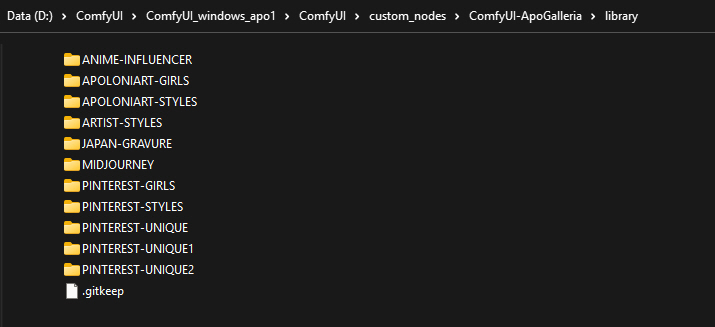
3. Create your Category folders, inside those create your collections sub-folders that contain your Image/JSON pairs, then drop them all straight into the main library directory to build collections instantly. <ins>[No spaces in any folder or sub-folder name, or they will not be recognised]</ins>
<ins>Live editing & Overwriting:</ins>
You can edit any loaded JSON caption in real-time, in node. Once you are happy with the finished description you can either pass to output for inference, 1-click copy the JSON for a manual file save, or you can choose to overwrite the existing JSON/txt file. This is extremely helpful for tweaking JSON/txt captions that are slightly off, correcting little descriptive anomalies, or changing things to suit your needs.
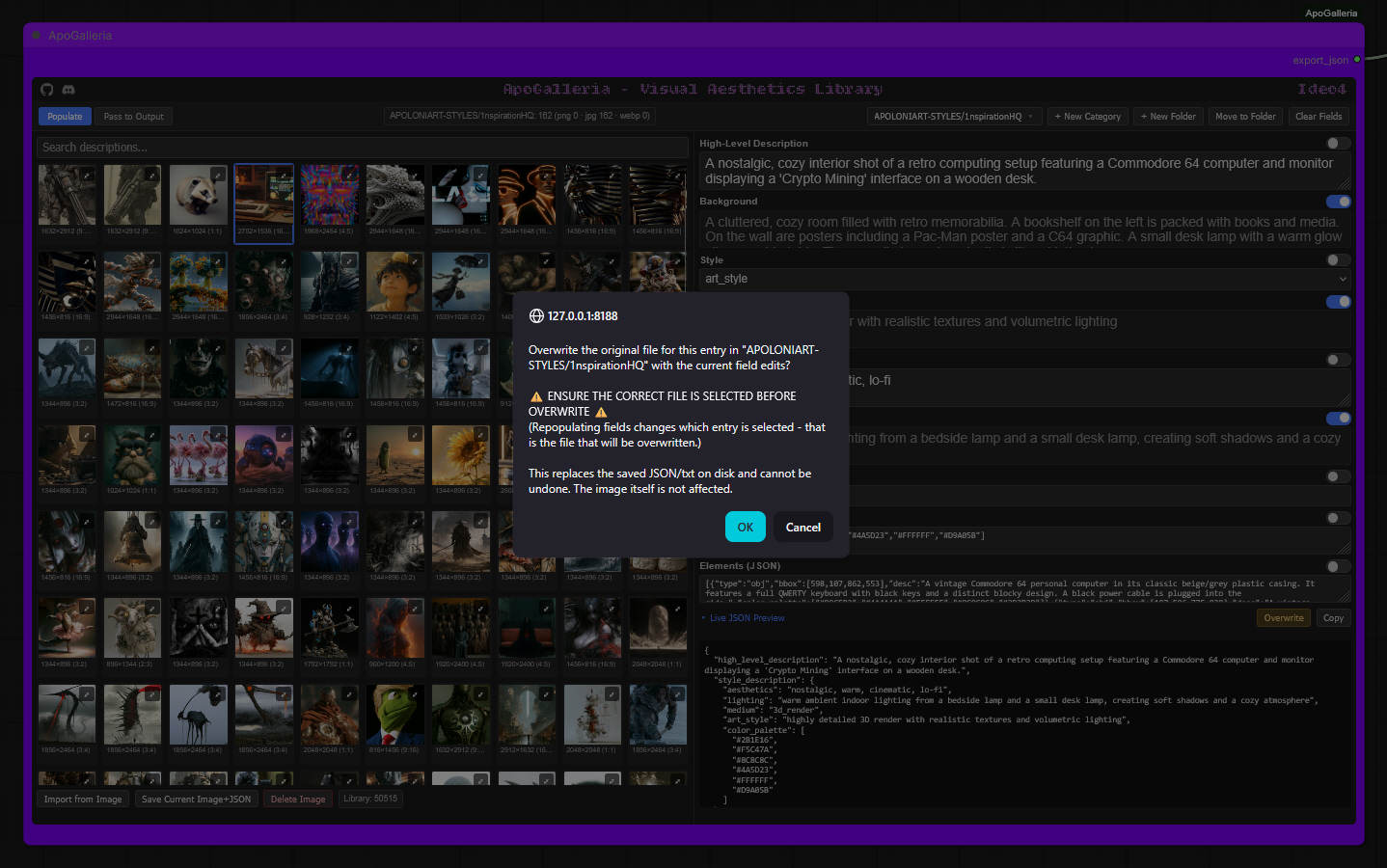 If you choose to overwrite the existing JSON/txt caption, you will be presented with a safety verification warning to avoid accidental overwrite.
It informs you that the current selected image is the file which will be overwritten, this is very important to confirm, especially when mixing and compiling unique descriptions from multiple library image/captions.
If you choose to overwrite the existing JSON/txt caption, you will be presented with a safety verification warning to avoid accidental overwrite.
It informs you that the current selected image is the file which will be overwritten, this is very important to confirm, especially when mixing and compiling unique descriptions from multiple library image/captions.
Schema
{
  "high_level_description": "string",
  "style_description": {
    "style": "photo | art_style",
    "photo": "string",         // present when style == photo
    "art_style": "string",     // present when style == art_style
    "aesthetics": "string",
    "lighting": "string",
    "medium": "string",
    "color_palette": ["#hex", "..."]
  },
  "compositional_deconstruction": {
    "background": "string",
    "elements": [
      {
        "type": "obj | text",
        "bbox": [0, 0, 0, 0],   // [ymin, xmin, ymax, xmax] on a 0-1000 grid
        "desc": "string",
        "text": "string",          // optional, for type == text
        "color_palette": ["#hex", "..."]  // optional, per-element
      }
    ]
  }
}
Storage
Image/caption pairs live under library/<category>/<entry_id>.<ext> +
library/<category>/<entry_id>.json (or .txt, fully equivalent) inside
this node's own library/ directory. Categories are leaf folders that hold
entries; grouping folders hold only subfolders, never entries — both are
managed from the flyout picker in the node UI.
 Never delete or replace the
 library/ folder wholesale — this is where
your saved image/caption pairs live.
ApoGalleria-Flux2
A sibling converter node. Takes the export_json output from
ApoGalleria-Ideo4 and converts it on the fly into Flux.2's structured
JSON prompt schema, ready to feed into Flux.2 conditioning.
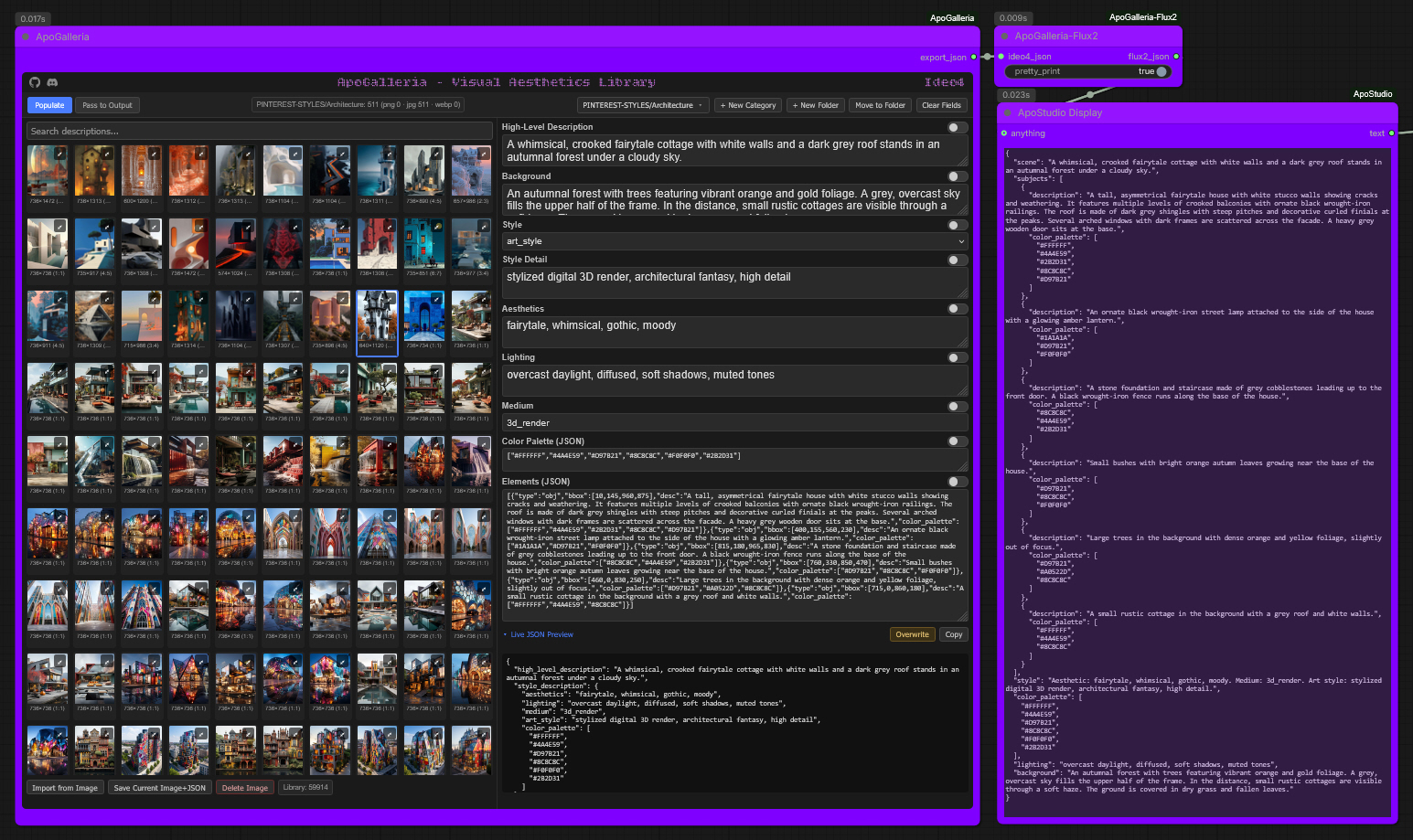
This node has no UI, no storage, and no library of its own — it's a pure passthrough-transform.
ApoGalleria-Ideo4 (export_json) --> ApoGalleria-Flux2 (ideo4_json)
                                          |
                                          v
                                     flux2_json --> [your Flux.2 conditioning]
Inputs:
ideo4_json(STRING, required) — theexport_jsonstring from ApoGalleria-Ideo4pretty_print(BOOLEAN, optional, defaultTrue) — indent the output JSON
Output:
flux2_json(STRING) — Flux.2-structured JSON prompt
Schema mapping
Flux.2's structured-prompt schema (per Black Forest Labs' official prompting
guide) is flatter and more loosely typed than Ideogram 4's strict nested
schema — no bounding-box/coordinate concept, and no art_style/photo
mutual exclusivity concept.
| Ideo4 field | → | Flux2 field |
|---|---|---|
| high_level_description | → | scene |
| style_description.aesthetics | → | folded into style ("Aesthetic: ...") |
| style_description.medium | → | folded into style ("Medium: ...") |
| style_description.art_style or .photo | → | folded into style ("Art style: ..." / "Photo style: ...") |
| style_description.lighting | → | lighting |
| style_description.color_palette | → | color_palette |
| compositional_deconstruction.background | → | background |
| compositional_deconstruction.elements[].desc | → | subjects[].description |
| compositional_deconstruction.elements[].bbox | → | dropped — no plain-English position is fabricated |
| compositional_deconstruction.elements[].text | → | subjects[].text (only if present on the source) |
| compositional_deconstruction.elements[].color_palette | → | subjects[].color_palette (only if present on the source) |
| (no Ideo4 source) | → | mood, composition, camera — omitted entirely, never fabricated |
If a field has no value in the source, it is left out of the output rather
than written as an empty string or null.
ApoGalleria-Flux3
Converts Ideo4 JSON into a prompt for FLUX 3 Image Klein (distilled and base), plus a matching width / height. Klein reads one continuous English prose caption. In layout mode the caption is followed by a table of boxes, which is the format BFL's own prompt upsampler writes:
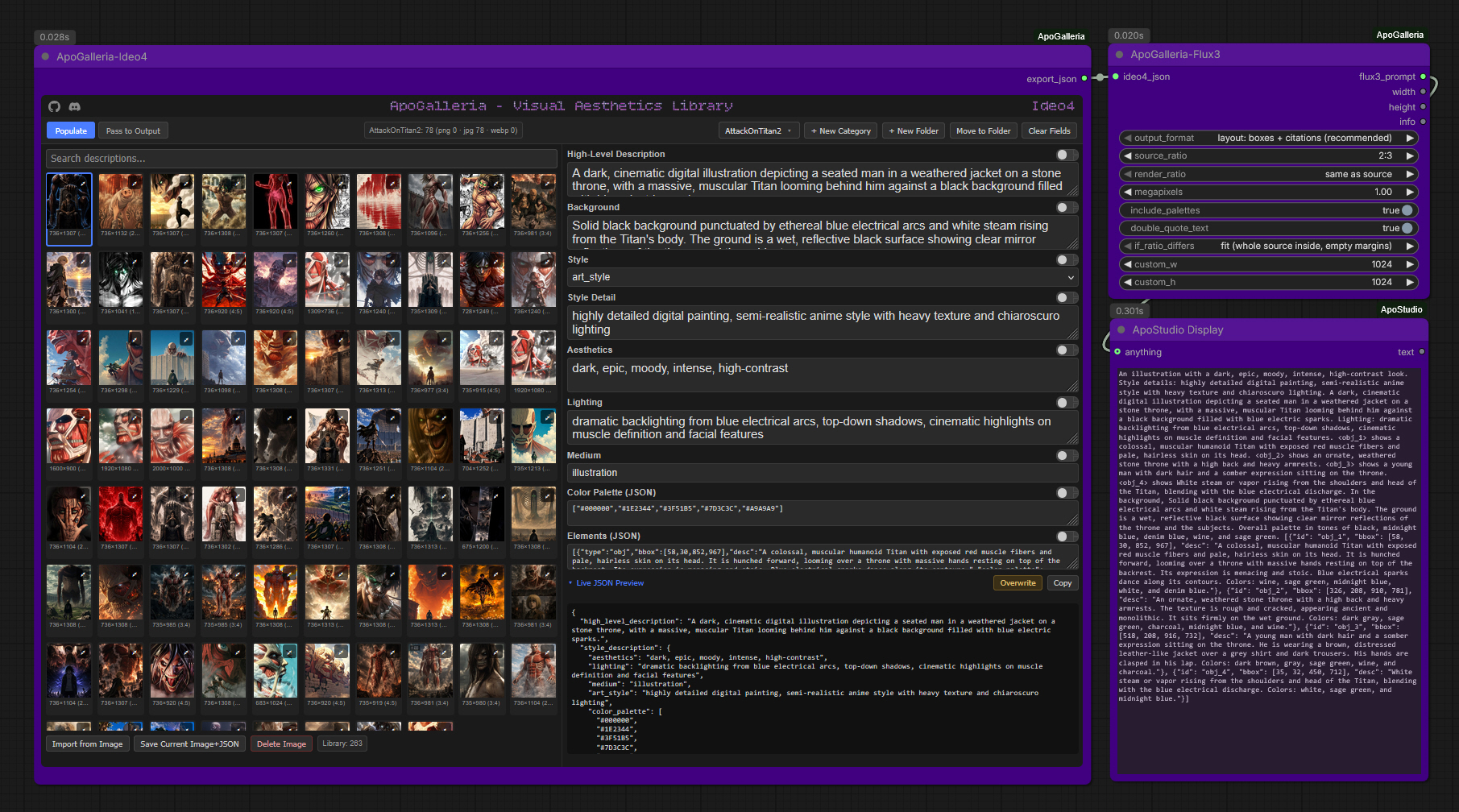
<caption> [{"id":"obj_1","bbox":[y_min,x_min,y_max,x_max],"desc":"..."}, ...]
Ideo4 boxes are already [y_min, x_min, y_max, x_max] on a 0-1000 grid, so they pass straight through. Wire flux3_prompt into CLIPTextEncode and leave any prompt upsampler off (this node already writes the finished format). Wire width / height into the latent size.
Options
| Input | What it does |
|---|---|
| output_format | layout: boxes + citations (default, the trained format) / layout: boxes, no citations / prose only (positions written in words, no boxes) |
| source_ratio | The aspect ratio the Ideo4 entry was captioned at. Pick from the list, or custom and set custom_w / custom_h |
| render_ratio | same as source (default, no distortion) or any other ratio |
| if_ratio_differs | Only used when render ≠ source. fit: whole source inside the canvas, empty margins. fill: source covers the canvas, edges cropped. stretch: boxes unchanged (layout distorts) |
| megapixels | Output area. 1.0 = 1024x1024 at 1:1. Sides are snapped to multiples of 16 and clamped to 64-4096 |
| include_palettes | Add colour names per element and an overall palette sentence |
| double_quote_text | Turns 'SMALL' in descriptions into "SMALL" (Klein expects rendered text in double quotes). Apostrophes such as Pelé's are left alone |
Citations
In the cited format each caption sentence points at its box row with a tag like <obj_1> or <Text_1>. That tag is how the model ties a sentence to a rectangle. Elements without a valid box stay in the prose without a tag.
Aspect ratios
Boxes are stored as fractions of the image, so they are stretched onto whatever canvas you render. Render at a different ratio than the source and everything distorts. Keep render_ratio on same as source and the node outputs the matching width/height.
Outputs
flux3_prompt, width, height, info (warnings: skipped boxes, text mismatches, long prompts).
Schema mapping
| Ideo4 field | → | Klein prompt |
|---|---|---|
| style_description.medium, .aesthetics | → | opening sentence ("A photograph with a ... look.") |
| style_description.photo or .art_style | → | "Photographic details: ..." / "Style details: ..." |
| high_level_description | → | scene sentence |
| style_description.lighting | → | "Lighting: ..." |
| elements[] | → | one sentence each (cited or plain); full desc goes in the box row |
| elements[].text | → | the text "..." verbatim, line breaks as \n; appended to the row desc if missing from it |
| elements[].bbox | → | box row (or a position phrase in prose-only mode) |
| elements[].color_palette, style_description.color_palette | → | named colours (optional) |
| compositional_deconstruction.background | → | last sentence ("In the background, ...") |
Missing fields are skipped; nothing is invented.
ApoGalleria-NL
A shared sibling converter node. Takes the export_json output from
ApoGalleria-Ideo4 and composes it into a single natural-language
paragraph, for architectures that prompt with descriptive prose rather than
a structured schema.
Covers
- Z-Image Turbo | Krea2 | Qwen-Image | Flux (1) | WAN 2.2 | Magic WAN
- Flux2, when used in its natural-language prompting mode (as opposed to Flux2's JSON mode, which ApoGalleria-Flux2 handles separately)
These architectures all share the same target format — flowing, descriptive sentences, not comma-separated tags and not a JSON structure — so one shared converter serves all of them rather than building five nearly identical nodes.
Like ApoGalleria-Flux2, this node has no UI, no storage, and no library of its own. It's a pure passthrough-transform.
ApoGalleria-Ideo4 (export_json) --> ApoGalleria-NL (ideo4_json)
                                          |
                                          v
                                     nl_prompt --> [your text encoder / CLIP node]
Inputs:
ideo4_json(STRING, required) — theexport_jsonstring from ApoGalleria-Ideo4preset(dropdown, required) —subject-first(default) orscene-first
Output:
nl_prompt(STRING) — a single flowing natural-language paragraph
Dual Ordering presets
<ins>This node has two presets</ins>: Both carry the same underlying detail and end the same way, in style then lighting — they differ in narrative shape, not just which sentence leads:
- subject-first (default): opens with the people/objects in the image as one flat listed clause, then background, then style, then lighting.
- scene-first: establishes the scene first (overall description, then background), then places the subject(s) within that already-established setting ("Within this setting, a young woman..."), then style, then lighting — a genuinely different narrative flow, not a reordering of the same flat clauses.
Try both against the same caption — which reads better tends to depend on whether the image is more about an overall scene or a specific subject. Basically like an extra seed, great for experimenting and variation!
Color palette handling
Ideo4 captions store color_palette as hex codes, which don't read
naturally in prose. This node resolves each hex value to its nearest named
color (e.g. #F4E1C1 → "warm cream") and folds them into a clause like
"in tones of warm cream, sage green, and burnt terracotta." Hex values
never appear directly in the output.
Schema mapping
| Ideo4 field | → | Role in the paragraph |
|---|---|---|
| high_level_description | → | opening sentence in scene-first; not used in subject-first |
| compositional_deconstruction.elements[].desc | → | opening clause in subject-first (flat list); "placed within the scene" clause in scene-first |
| compositional_deconstruction.elements[].text | → | folded into that element's clause as the text "…" is visible [in the <position>] — casing preserved exactly as written in the source, never altered |
| compositional_deconstruction.elements[].bbox | → | used only to derive the text clause's position phrase above (e.g. "upper-left", "centered"); omitted entirely — never guessed — when bbox is missing or malformed |
| compositional_deconstruction.background | → | second sentence, both presets |
| style_description.medium | → | folded into the style sentence |
| style_description.art_style or .photo | → | folded into the style sentence |
| style_description.aesthetics | → | folded into the style sentence |
| style_description.color_palette | → | folded into the style sentence, as a named-color clause |
| style_description.lighting | → | closing sentence, both presets |
Missing fields are simply skipped — nothing is fabricated to fill a gap.
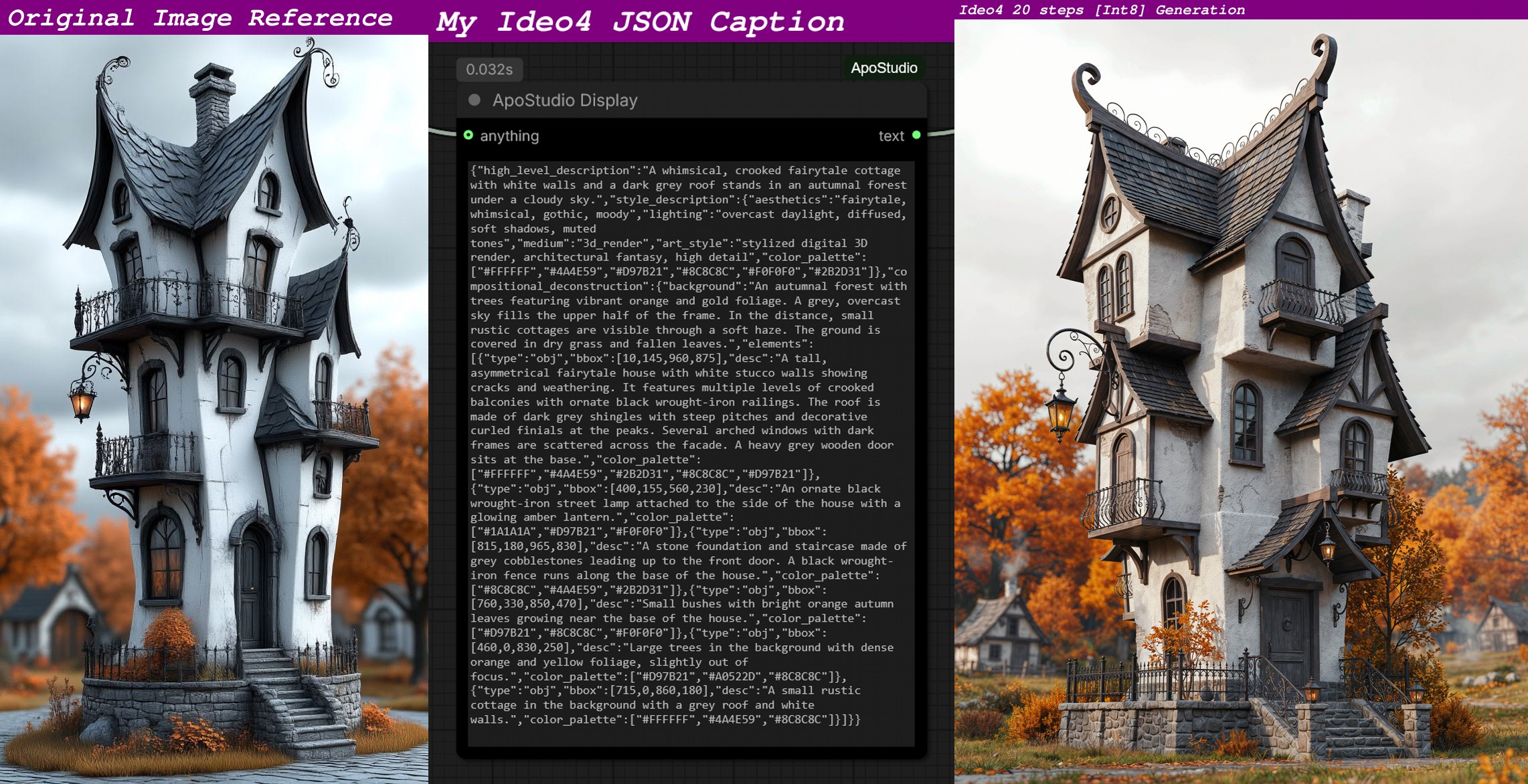
Ideo4 Ground Truth & conversion node output examples
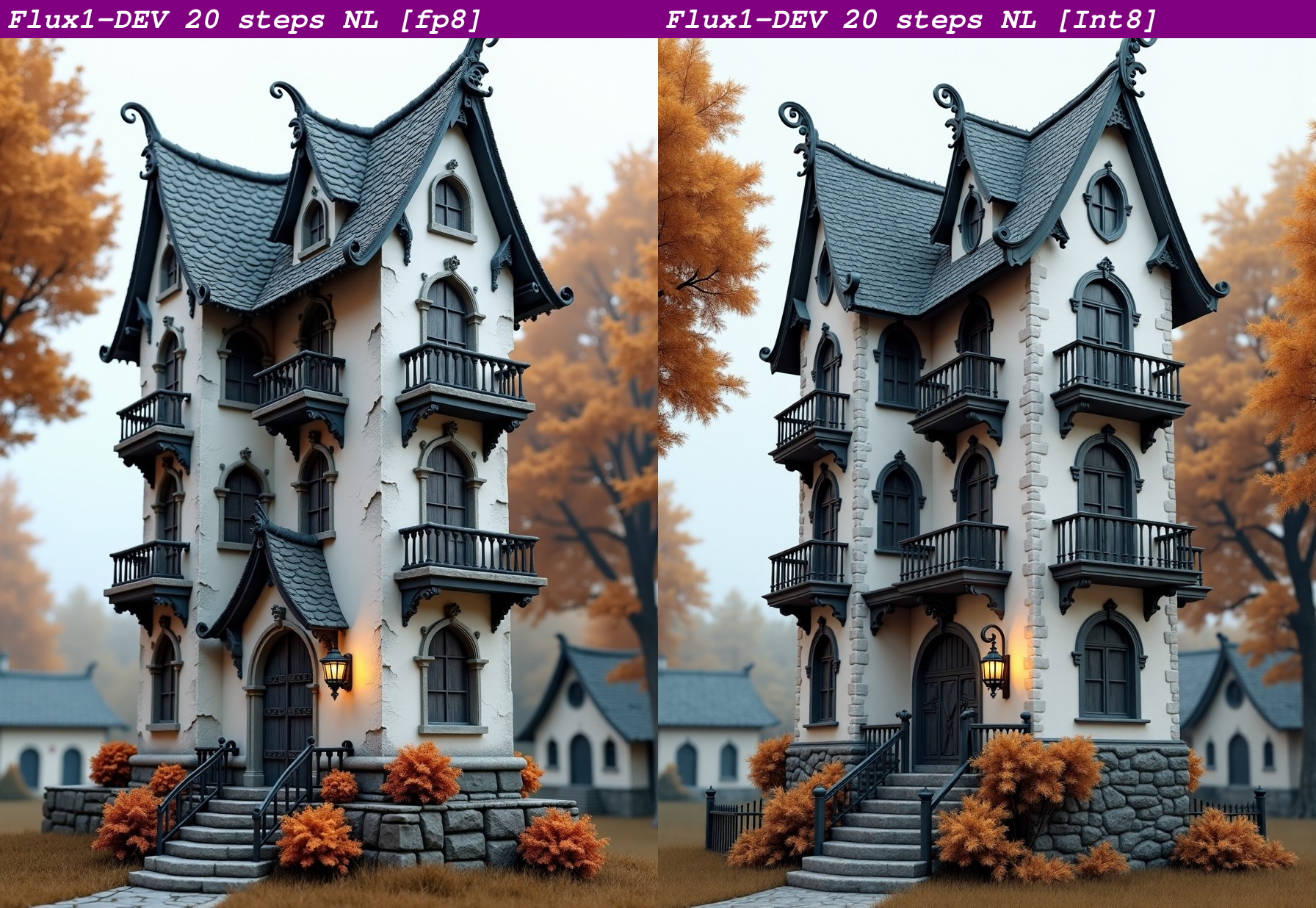
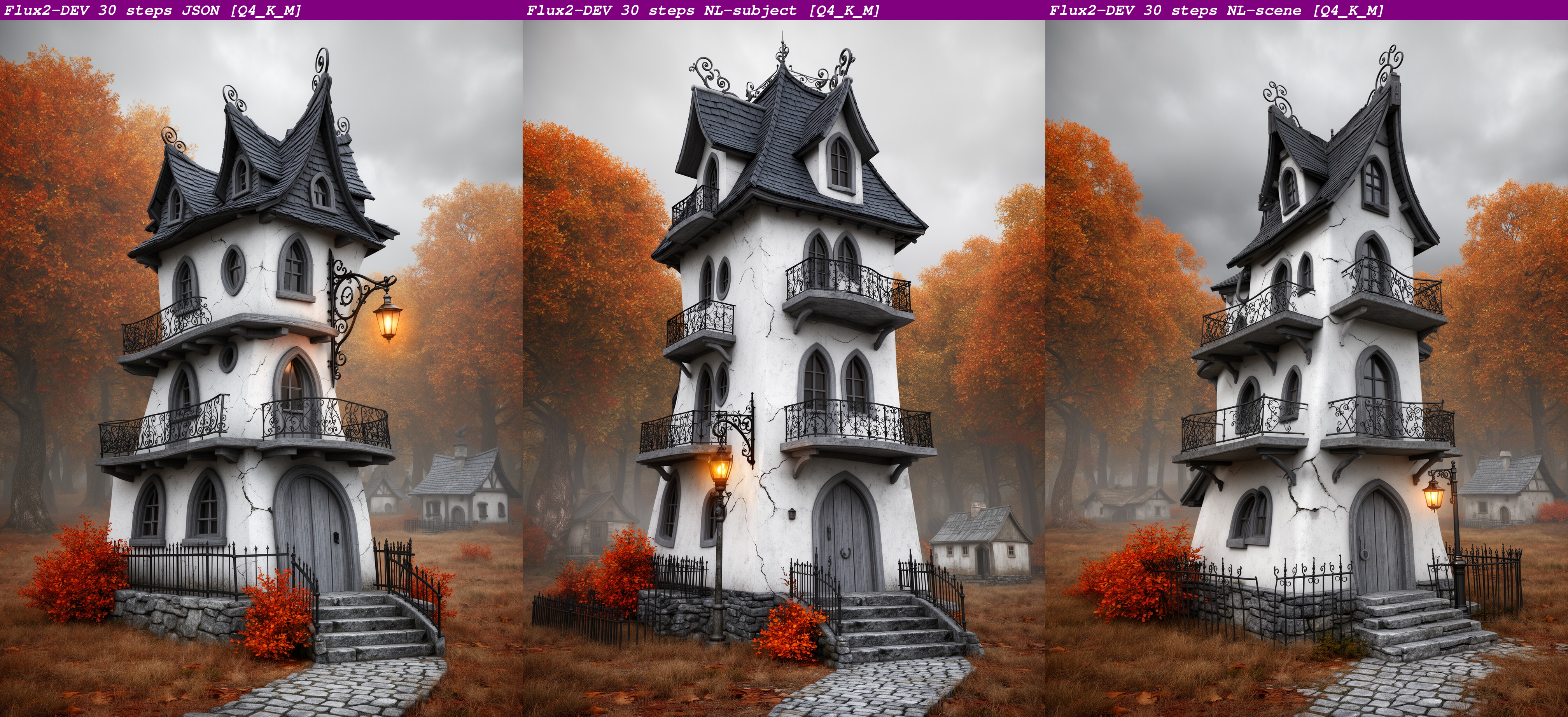
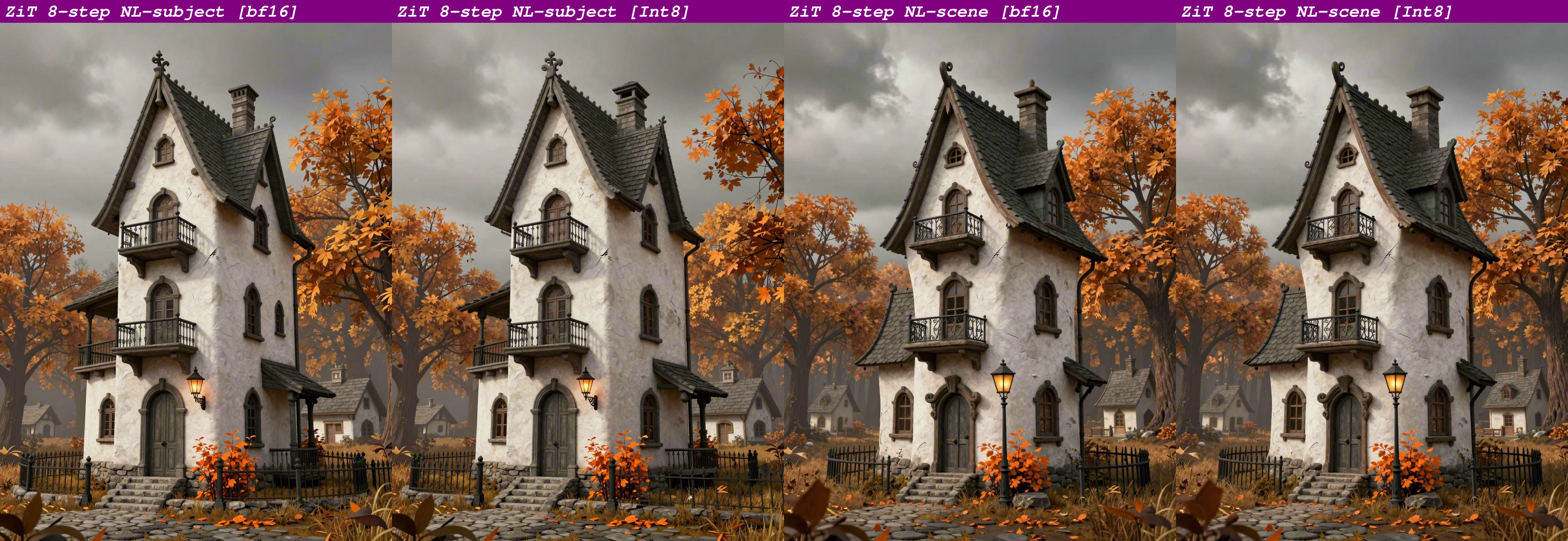
All comparison examples were run from the same Ideo4 image/caption, with a locked seed.
Flux1-DEV
Flux2-DEV
Z-Image Turbo
WAN 2.2 & Magic WAN
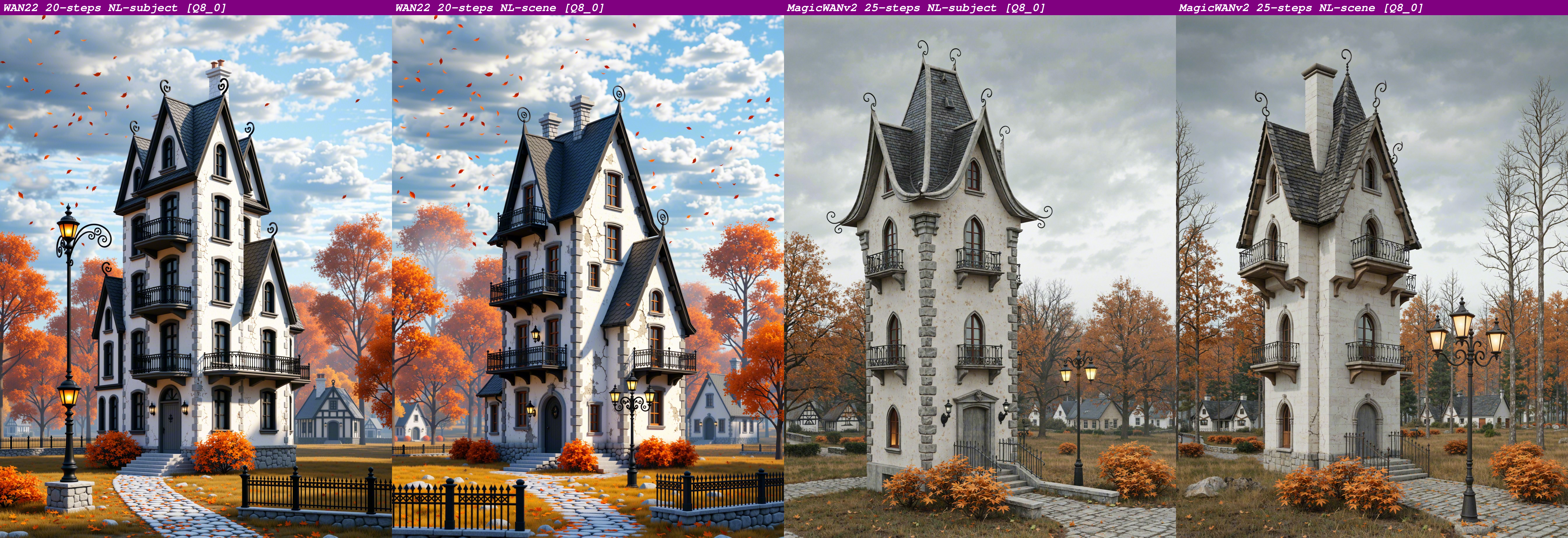 Proof of concept examples for the architectures I currently have.
Installation
-
<ins>Comfy Manager Install [recommended]:</ins>
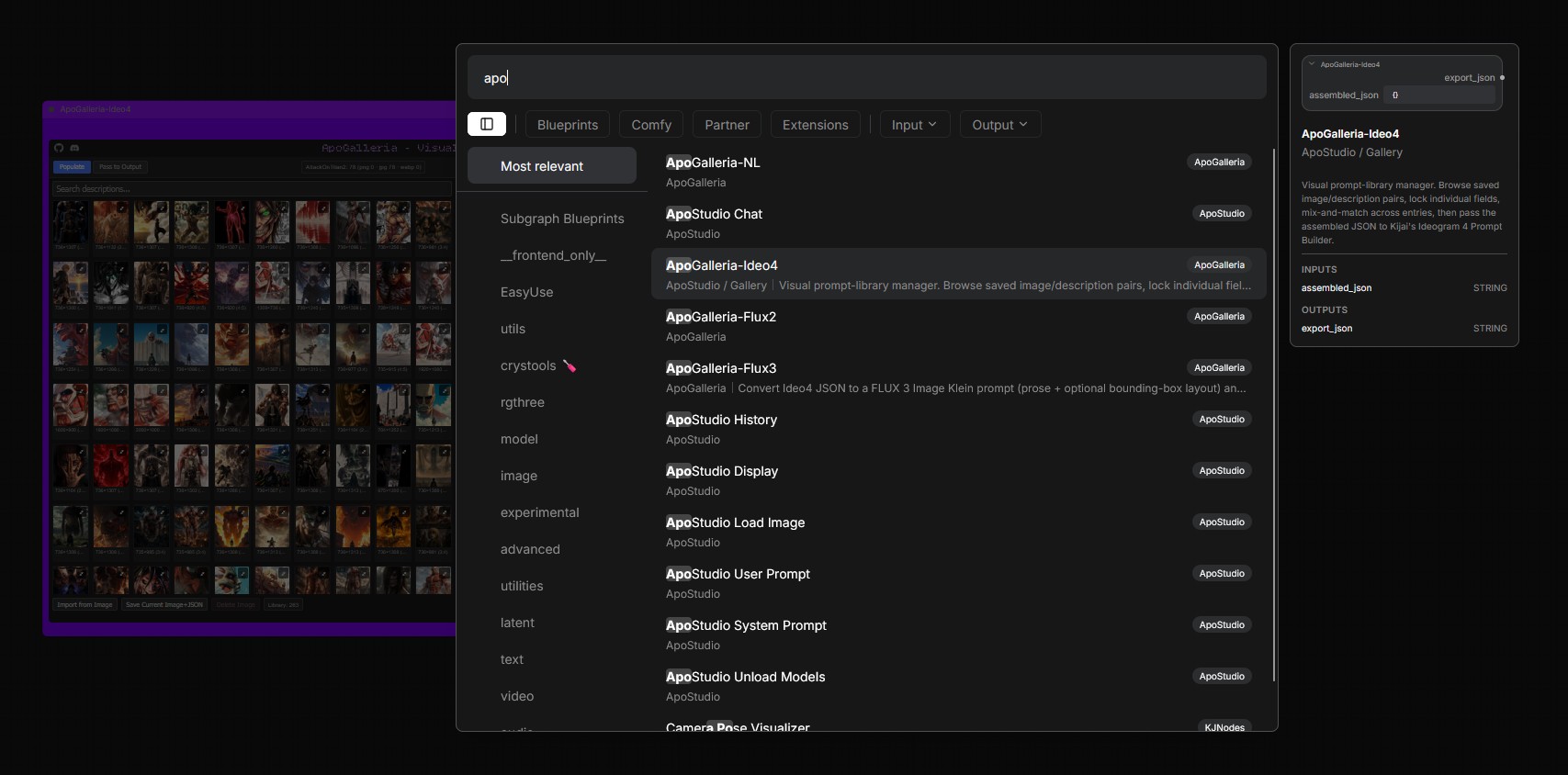
My nodes have absolute minimal requirements, so you can confidently & safely install via Comfy Manager, without the fear of dependencies breaking your entire Comfy. Search APO in manager. After installation, rename the folder to ComfyUI-ApoGalleria
-
<ins>Manual Install [git clone]:</ins>
cd ComfyUI/custom_nodes git clone https://github.com/ApoloniArt/ApoGalleria ComfyUI-ApoGalleria -
Install dependencies:
# Windows portable: python -m pip install -r ComfyUI-ApoGalleria\requirements.txt # Standard install: pip install -r ComfyUI-ApoGalleria\requirements.txt -
Restart ComfyUI.
-
All four nodes appear under the ApoGalleria category in the node menu: ApoGalleria-Ideo4, ApoGalleria-Flux2, ApoGalleria-NL, ApoGalleria-Flux3.
-
Updating my nodes:
  cd ComfyUI/custom_nodes/ComfyUI-ApoGalleria
  git pull
Typical workflow
                                  +--> ApoGalleria-Flux2 --> flux2_json
                                  |
ApoGalleria-Ideo4 --(export_json)-+
                                  |
                                  +--> ApoGalleria-NL --> nl_prompt
                                  |
                                  +--> ApoGalleria-Flux3 --> flux3_prompt, width, height
Build and curate your caption library once in ApoGalleria-Ideo4, then wire
its export_json output directly to Ideo4, or whichever sibling node matches your target
model — or both at once, if you generate across multiple architectures
from the same library.
Visual Aesthetics Library
Looking for a ready-made reference library to drop into ApoGalleria-Ideo4? See my Visual Aesthetics Library for a colossal ~60,000 image/caption reference library.
Available directly from me via my Discord 👉 ApoloniArt 👈
Unavoidable Annoyance & Comfy Anomalies
Display/operational disparity between normal ComfyUI and Nodes 2.0 sigh 😔 [My nodes function perfectly in both, but due to Nodes 2.0 being a pain in the ass to code for, there are differences in display & operation] Both have their benefits, and I honestly can't decide which I like best. See which you prefer
<ins>Normal Comfy mode:</ins> Scrolling in-node is automatic via mouse wheel, but visuals disappear when you zoom out to under ~57%. I've no idea why that now happens, I'm sure it wasn't like that before.
<ins>Nodes 2.0 mode:</ins> Scrolling in-node is manual via scroll bar, but visuals do not disappear when zooming out. Pass to Output renders a different look due to Nodes 2.0 coding. Not any issue at all, just looks unsightly to me.
PRO TIP: Spawn my main node, select an image, then click on Live JSON Preview to open it. Doing this will keep the node to it's minimal size and not require manual resizing time and again. If you resize my node before opening Live JSON Preview, opening it will expand the node further, and you'll keep resizing it back down. Just an annoying little display issue that doesn't really bother me 🤷♀️
Attribution
You are very welcome to fork ApoGalleria and augment my work to fit your own requirements if you feel the need to do so, but please have the kindness to credit & link me as the original creator, in accordance with the MIT license That would mean a lot to me, and is the decent thing to do 🤗
See NOTICE for the full attribution request.
Changelog
v1.1.0 — 2026-10-23
- Added: ApoGalleria-Flux3 node for FLUX 3 Image Klein. Prose prompt with optional 0-1000 bounding-box layout table (cited / uncited), aspect-ratio-safe width/height output, fit / fill / stretch box remapping, optional palettes and quote normalisation.
v1.0.3 — 2026-09-17
- Corrected: Toml file repository URL corrected, ApoGalleria republished with correct URL for Comfy Manager install.
v1.0.2 — 2026-09-09
- Fixed: ApoGalleria-NL silently dropped any
elements[].textfield from the source Ideo4 JSON, so images with on-image text (signs, titles, labels) rendered without that text at all. Text is now correctly folded into the generated prose asthe text "…" is visible [in the <position>].- Casing is preserved exactly as written in the source (never lowercased or otherwise altered) — rendered text needs its literal casing to produce the correct visual.
- Placement is derived from the element's real
bboxcoordinates when present (translated into a coarse position like "upper-left" or "centered") and simply omitted — never guessed — whenbboxis missing or malformed. - Applies to both ordering presets (
subject-firstandscene-first).
v1.0.1 — 2026-09-09
- Fixed: the logo header font (Bitcount Ink) failed to load on current
ComfyUI frontend versions, silently falling back to a plain system font.
Root cause: newer ComfyUI frontends enforce a strict default Content
Security Policy that blocks any cross-origin font/stylesheet request,
including the previous
fonts.googleapis.comlink. The font is now self-hosted and served same-origin via a dedicated backend route (/apogalleria/font/…), matching the same explicit-Content-Type pattern already used for serving the widget's JS.
Made with love by ApoloniArt because I wanted inspiration on tap. With ApoGalleria and Visual Aesthetics Library, I never have to worry again. Neither will you 💜 Questions, feedback, or requests? Hit me up on Discord, I'm very friendly 😘