
ApoDesign
Retro graphic styles for ComfyUI: dithered bitmap art, ASCII text art and pixel art from images and video, with one-click looks, palettes and your own saved looks.
🧬<ins>Nodes</ins>
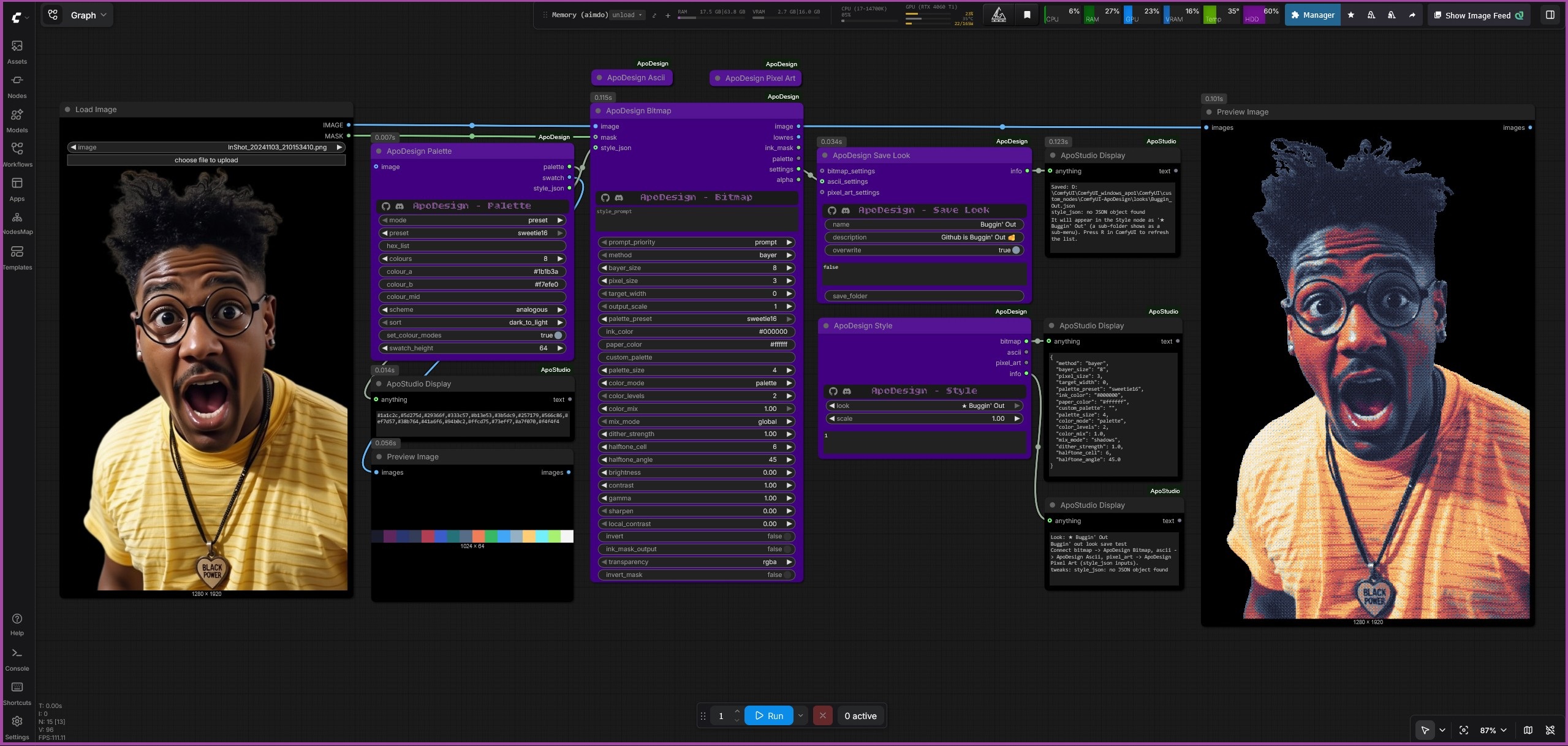
| Node | What it does | |---|---| | ApoDesign Bitmap | Dither and halftone art: Mac Plus, Game Boy, newspaper and engraving looks. 12 dither methods, any palette. | | ApoDesign Ascii | Text art drawn as an image and returned as plain text. Ramp, shape-matching and braille modes, custom fonts. | | ApoDesign Pixel Art | Flat colour, crisp edges, small palette, selective outlines, painterly simplify. | | ApoDesign Style | The easy way in: pick one of 47 built-in looks (or your own) and connect it to any render node. | | ApoDesign Palette | Build a palette from a preset, hex codes, an image, a gradient or a colour scheme. | | ApoDesign Save Look | Save the settings you tuned as your own look, so it appears in the Style list. |
Also: PNG transparency and masks in every render node, video and batch support that stays steady between frames and light on memory, and a plain-English style_prompt or JSON style_json input on every render node.
💭<ins>Creating your own Looks</ins>
Tune a node, connect its settings output to ApoDesign Save Look, name it, run, press R: your look is now in the Style list, marked with a star. You can also have an LLM write looks for you (a ready-made system prompt is in looks/_LLM_system_prompt.txt) or write them by hand. Folders become menus. Full guide: docs/style-and-looks.md.
✍🏻<ins>Node guides</ins>
See the docs folder: a page per node, the Style / Save Look guide, all 47 built-in looks, Palette, Transparency, Video and memory, a generated reference of every widget, and Testing.
⚙️<ins>Installation</ins>
<h3 align="left">Option 1: Comfy Manager Install [recommended]</h3>ApoDesign has no extra requirements (torch, numpy and Pillow already ship with ComfyUI), so you can install it via Comfy Manager without any fear of breaking your Comfy. Search APO in Manager. After installation, rename the folder to ComfyUI-ApoDesign.
<h3 align="left">Option 2: Manual Install [git clone]</h3>cd ComfyUI/custom_nodes
git clone https://github.com/ApoloniArt/ApoDesign ComfyUI-ApoDesign
No Git? On GitHub press Code > Download ZIP, unpack it, and put the folder into ComfyUI/custom_nodes/ named ComfyUI-ApoDesign.
- Restart ComfyUI fully (close the console window too). All 6 nodes appear under ApoDesign in the Add Node menu.
Update: in Comfy Manager press Update, or for a manual install run git pull inside custom_nodes/ComfyUI-ApoDesign, then restart. Your own looks and looks_folder.txt are not part of the repository, so an update never touches them (see Style, Save Look and your own looks).
🤔<ins>Check your Install</ins>
Double-click RUN_TESTS.bat in the ComfyUI-ApoDesign folder. It prints one PASS / FAIL line per test (details in docs/testing.md).
🏃🏻♀️➡️<ins>Quick Start</ins>
- Add Load Image, ApoDesign Style and ApoDesign Pixel Art.
- Connect the image to Pixel Art's
image, and Style'spixel_artoutput to Pixel Art'sstyle_json. - Pick a look in Style (try Game Boy (green)), add Preview Image, run.
- Switch the look and run again. Connect Style's
bitmaporasciioutput to the other nodes to get the same look in those.
Prefer words? Type gameboy palette, atkinson dither, 96 wide, high contrast into any render node's style_prompt. The node's settings output shows exactly what it understood.
🫱🏻🫲🏻<ins>Attribution & Licenses</ins>
ApoDesign is MIT licensed, see LICENSE. If you use it in a project, a mention of "ApoDesign by ApoloniArt" is very much appreciated 🥰
See NOTICE for the full attribution request.
Bundled fonts: DejaVu Sans Mono Bitstream Vera licence, and Bitcount Ink SIL Open Font License 1.1.
Development details and version updates can be found in CHANGELOG.md
<div align="center">
Developed by ApoloniArt ⚢🌈

