
ComfyUI-APIMaster
ComfyUI nodes for image and video generation through APIMaster and other OpenAI-compatible gateways. No extra Python dependencies.
Nodes (5)
One node holds the key, the other four just borrow it
References work great, the mask is a URL (that's the trap)
The 30-second node that explains your mystery 400
Gpt-image-2 inside your graph, and why 4k keeps timing out
Sora 2 clips straight into your output folder
ComfyUI-APIMaster
Image and video generation nodes for ComfyUI, backed by APIMaster or any other OpenAI-compatible gateway.
No extra Python dependencies. The nodes use the standard library plus the
torch / numpy / Pillow that ComfyUI already ships, so installing them cannot break
your environment.
| Node | What it does |
| --- | --- |
| APIMaster Config | Endpoint + key, passed to the other nodes |
| APIMaster Text to Image | gpt-image-2, doubao-seedream-5-0-pro-260628, gemini-3.1-flash-image, Midjourney → IMAGE |
| APIMaster Image to Image | Reference images (and an optional mask) → IMAGE |
| APIMaster Video | seedance, kling, MiniMax-H3, grok-imagine-video → an MP4 in your output folder |
| APIMaster List Models | Prints what the endpoint actually serves right now |
Install
ComfyUI Manager
Search for APIMaster in ComfyUI Manager and install. Restart ComfyUI.
Manual
cd ComfyUI/custom_nodes
git clone https://github.com/apimaster-ai/ComfyUI-APIMaster
# nothing to pip install
Restart ComfyUI.
Set your key
Paste your key into the api_key field of the APIMaster Config node.
Clear it before you share. Widget values are saved inside the workflow JSON, and workflow JSON gets shared — posted in issues, embedded in generated PNGs, published on model sites. Empty the
api_keyfield before sharing a workflow or an image made with it.
The node reads the key from that field only. It does not read the APIMASTER_API_KEY
environment variable or ~/.apimaster/config.json (the file
apimaster-cli saves its key in):
custom nodes on the Comfy Registry may not read credentials from the environment or
files outside ComfyUI. Versions up to 0.1.4 read the variable, and up to 0.1.3 the file.
Example workflows
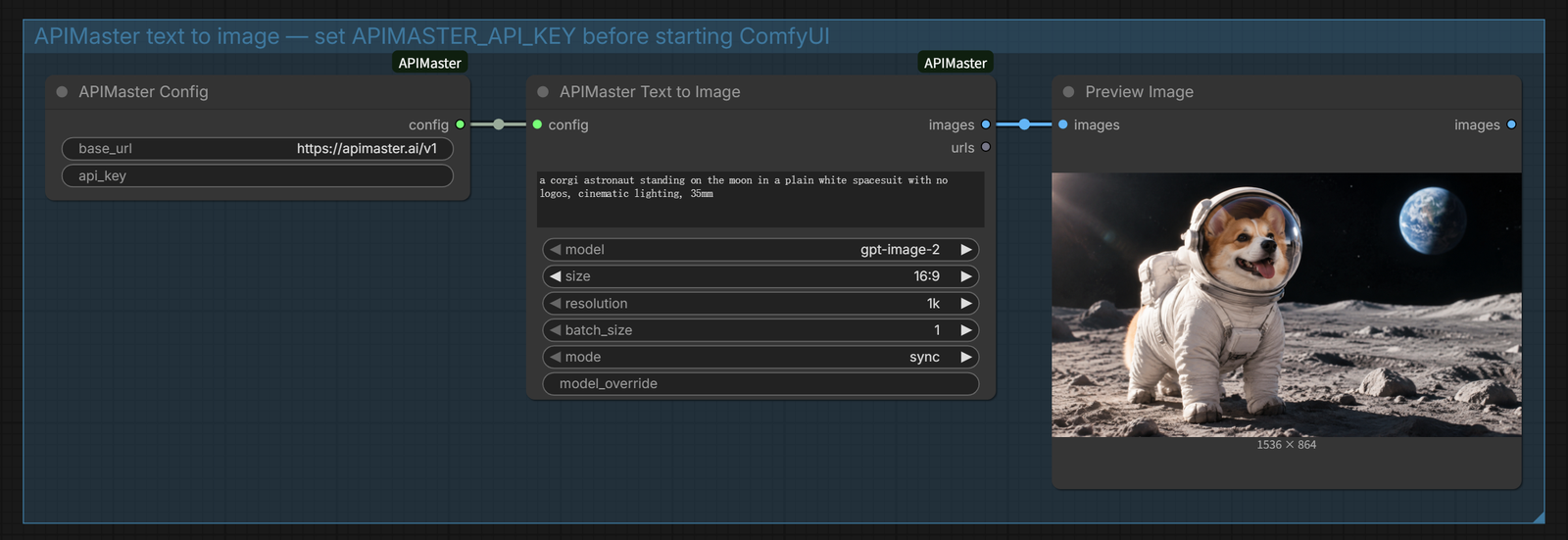
Drag either file from example_workflows/ onto the ComfyUI canvas:
text_to_image.json— prompt →gpt-image-2→ previewimage_to_video.json— load an image →seedance-2.5→ MP4
Notes that will save you time
Sync vs async for images. Sync mode returns the image in one request and is simpler.
For 2k and especially 4k it can exceed the gateway's own timeout and come back as a
408 — switch the node's mode to async and it submits the job and polls instead.
Aspect ratio in image-to-video. Always set aspect_ratio explicitly. A portrait
reference image with no aspect set is treated as 16:9 by the gateway, and you get a
letterboxed result.
Video is slow. seedance-2.5 took about 15 minutes for a 4-second clip. The node
waits up to 30 minutes and keeps polling through brief network drops; 720p is the safe
resolution, higher tiers depend on the model.
Advanced image parameters change the price. Quality, background and output-format options narrow which upstream channels can serve a request, which can route you to a more expensive one. The nodes send only the fields you actually set.
Batch sizes. If the endpoint returns images of different sizes in one batch, the node
raises instead of silently resizing. Set n=1 or pass an explicit size.
Which models are available
Model catalogs change. Drop an APIMaster List Models node into any workflow, set
filter to image or video, and run it — the list is printed to the node and to the
console. Or from a terminal:
npx @apimaster/cli models --kind image
Use it with another provider
The nodes are not hardcoded to APIMaster. Point base_url at any OpenAI-compatible
endpoint that implements /images/generations, and use the model_override field for a
model id that is not in the dropdown.
Paste that endpoint's key into the config node. When you load a workflow someone else
shared, check its base_url before typing your key in: the key goes to whatever server
that field names.
Development
python -m unittest discover -s tests -v
The tests run against a local mock server built into the repo — no key, no network, no tokens spent.
Four of them exercise the ComfyUI IMAGE contract (tensor → data URI → bytes → tensor)
and need torch, so they skip on a plain Python install. Run them inside ComfyUI's own
environment for full coverage:
# from ComfyUI/custom_nodes/ComfyUI-APIMaster
../../.venv/Scripts/python.exe -m unittest discover -s tests    # Windows
../../venv/bin/python -m unittest discover -s tests             # macOS / Linux
Verified on ComfyUI with all five nodes appearing in /object_info, and both example
workflows validated against that live node registry.
Troubleshooting
| Symptom | Cause |
| --- | --- |
| HTTP 401 | Key has stray whitespace or quotes, or the api_key field is empty |
| HTTP 404 | base_url is missing the /v1 suffix |
| HTTP 400 ... use the Images API | A chat model id was selected for an image node |
| HTTP 402 | Out of balance |
| HTTP 408 | Sync generation timed out — switch to async |
| Nodes missing after install | Restart ComfyUI; check the console for an import error |
License
MIT