
ComfyUI-Strata-Control
ComfyUI nodes to unload Strata before generation and reload it afterward, with optional memory cleanup and usage reporting.
Nodes (4)
ComfyUI-Strata-Control
A lightweight ComfyUI custom node pack for Strata, designed to unload Strata before generation and reload it afterward.
It provides a manual control panel, dedicated Load / Unload nodes, and a standalone memory cleanup node, with memory usage reporting.
Strata control operations require an already-running Strata HTTP server. The standalone memory cleanup node does not require a Strata connection.
Features
- Manual Status, Load, and Unload buttons.
- Dedicated workflow nodes for unloading Strata before generation and loading it afterward.
- A standalone ComfyUI memory cleanup node that does not call the Strata API.
- Optional passthrough connections for establishing execution dependencies.
- Cache-disabled Load, Unload, and Memory Cleanup nodes.
- Optional pre-load memory cleanup, disabled by default.
- Sequential memory cleanup and GPU synchronization before sending the Load request.
- RAM and supported GPU memory measurements in cleanup reports.
- Configurable Strata server URL and request timeout.
- Optional Bearer authentication through a server-side environment variable.
- Server-side HTTP requests to avoid browser CORS restrictions.
Included Nodes
All nodes are listed under the Strata Control category.
| Node | Description | |---|---| | Strata Control - Panel | Provides manual Status, Load, and Unload buttons. | | Strata Control - Unload | Sends a Strata model-unloading request when executed by the workflow. | | Strata Control - Load | Optionally cleans up ComfyUI memory, then sends a Strata model-loading request. | | Strata Control - Memory Cleanup | Performs local ComfyUI memory cleanup without calling the Strata API. |
The Memory Cleanup node attempts both model unloading and memory cleanup. It is not limited to clearing unused VRAM caches.
Requirements
- A working ComfyUI installation.
- Python 3.9 or newer.
- ComfyUI's existing
aiohttp,psutil, and PyTorch dependencies. - An already-running Strata server for Panel, Load, and Unload operations.
- Network access from the ComfyUI server to the Strata server.
No additional pip installation should be necessary in a standard compatible ComfyUI environment.
Installation
Using Git
Run the following command from your ComfyUI root directory:
git clone https://github.com/andrewcell/ComfyUI-Strata-Control.git custom_nodes/ComfyUI-Strata-Control
Restart ComfyUI, then hard-refresh your browser to reload frontend extensions.
Manual Installation
- Download and extract the repository.
- Place the extracted folder inside
ComfyUI/custom_nodes. - Ensure the folder is named
ComfyUI-Strata-Control. - Restart ComfyUI.
- Hard-refresh your browser.
The directory structure should look like this:
ComfyUI/
└── custom_nodes/
    └── ComfyUI-Strata-Control/
        ├── __init__.py
        ├── README.md
        ├── images/
        │   ├── unload.png
        │   └── load.png
        └── web/
            └── control_panel.js
Search for Strata Control in the node menu.
Configuration
Strata Connection Settings
Panel, Load, and Unload provide the following settings:
| Setting | Default | Description |
|---|---|---|
| base_url | http://127.0.0.1:8080 | Root URL of the Strata server. Do not append /v1. |
| timeout_s | 300 | HTTP request timeout in seconds. Allowed range: 1–1800. |
| api_key_env | STRATA_API_KEY | Name of the ComfyUI server environment variable containing the Bearer token. |
Load also provides:
| Setting | Default | Description |
|---|---|---|
| cleanup_before_load | false | Performs local ComfyUI memory cleanup and GPU synchronization before sending the Load request. |
timeout_s applies to the HTTP request. It does not limit the duration of local memory cleanup.
Standalone Cleanup Settings
Memory Cleanup does not require a server URL or API key.
| Setting | Default | Description |
|---|---|---|
| enabled | true | Enables local memory cleanup. When disabled, the node passes through its input and reports that cleanup was skipped. |
Server Address
Requests originate from the ComfyUI server, not from your browser.
- Use
127.0.0.1when Strata and ComfyUI run on the same host and network namespace. - Use the Strata host's address when it runs on another machine.
- If ComfyUI runs inside a container,
127.0.0.1refers to that container.
Use the server root URL:
http://127.0.0.1:8080
Do not use:
http://127.0.0.1:8080/v1
The current implementation rejects URLs containing embedded credentials, query strings, fragments, or non-root paths.
Authentication
If your Strata server requires Bearer authentication, set an environment variable before starting ComfyUI.
Linux:
export STRATA_API_KEY="your-api-key"
python main.py
Windows PowerShell:
$env:STRATA_API_KEY = "your-api-key"
python main.py
Leave api_key_env set to STRATA_API_KEY, or change it to another environment variable name.
The extension reads the variable and sends:
Authorization: Bearer <value>
If the variable is missing or empty, no Authorization header is sent.
Important: The api_key_env field expects an environment variable name, not the actual API key.
Restart ComfyUI after changing the environment used to launch it.
Strata Control - Panel
Add a Strata Control - Panel node and configure its server address.
The panel provides three buttons:
| Button | Request | Purpose |
|---|---|---|
| Status | GET /health | Queries the server's health response. |
| Load | POST /load | Requests model loading. |
| Unload | POST /unload | Requests model unloading. |
Load and Unload display a confirmation dialog before sending the request.
The last_result field displays the response or an error message.
Successful responses are also logged to the browser console.
Manual Request Behavior
Panel buttons send requests immediately. They do not enter the ComfyUI execution queue.
Use them only when it is safe to change Strata's model state. A manual request may conflict with an active Strata request or another workflow.
The panel's Load button does not perform pre-load memory cleanup.
To use that feature, execute Strata Control - Load with
cleanup_before_load enabled.
Executing the Panel as part of a graph does not automatically load or unload Strata. Its graph function only passes through its optional input and returns an informational message.
The panel's last_result display is separate from its graph result output.
Clicking a button updates the display, not the graph output.
Strata Control - Load / Unload
These nodes send HTTP requests when ComfyUI executes them as part of a workflow.
Inputs
| Input | Available On | Description |
|---|---|---|
| base_url | Load / Unload | Strata server root URL. |
| timeout_s | Load / Unload | HTTP request timeout. |
| api_key_env | Load / Unload | Environment variable name for optional authentication. |
| cleanup_before_load | Load only | Enables local memory cleanup before the Load request. Defaults to false. |
| trigger | Load / Unload | Optional dependency input. Its value is returned through passthrough. |
Outputs
| Output | Description |
|---|---|
| passthrough | Returns the value received by trigger after the operation succeeds. |
| result | JSON-formatted operation information as a string. Load includes memory measurements and cleanup status. |
If trigger is not connected, passthrough returns None.
Both nodes are registered as output nodes, so they can execute without a downstream connection.
Their execution cache is disabled. Each time the node executes in a queued workflow, it sends a new HTTP request.
Load Does Not Start the Server
Load sends a model-loading request to an already-running Strata HTTP server.
It does not launch Strata or restart a stopped server process.
Likewise, Unload requests model unloading. It does not terminate the Strata HTTP server process.
Strata Control - Memory Cleanup
This node performs local ComfyUI memory cleanup without sending any Strata API request.
Use it when you want to:
- Run cleanup independently.
- Inspect cleanup results through Preview as Text.
- Separate cleanup and Strata loading into explicit workflow stages.
Use Memory Cleanup Instead of Load
If you only want to clean up ComfyUI memory without loading Strata, replace the Load node with Memory Cleanup in the same workflow position.
For example:
Final IMAGE
    │
    ▼
Strata Control - Memory Cleanup
    │ passthrough
    ▼
Save Image
The trigger and passthrough connections serve the same purpose:
the downstream node waits until cleanup succeeds.
Unlike Load, Memory Cleanup does not contact Strata or load its model.
Its result output contains only the cleanup report.
The image passed through the node remains referenced and is not deleted by cleanup. If cleanup fails, the downstream Save Image node does not execute.
Inputs
| Input | Description |
|---|---|
| enabled | Enables cleanup. Defaults to true. |
| trigger | Optional dependency input. Its value is returned through passthrough. |
Outputs
| Output | Description |
|---|---|
| passthrough | Returns the value received by trigger after cleanup succeeds, or immediately when disabled. |
| result | JSON-formatted cleanup report, or a skipped status when disabled. |
If trigger is not connected, passthrough returns None.
The node is registered as an output node and has its execution cache disabled.
Cleanup Only
Strata Control - Memory Cleanup
    │ result
    ▼
Preview as Text
Separate Cleanup and Load
Final IMAGE
    │
    ▼
Strata Control - Memory Cleanup
    │ passthrough
    ▼
Strata Control - Load
    │ passthrough
    ▼
Save Image
Set cleanup_before_load to false on Load to avoid running cleanup twice.
The image passed through these nodes remains referenced. Cleanup does not delete it.
In this arrangement, Save Image waits for both cleanup and loading to succeed.
Memory Cleanup Behavior
The standalone Memory Cleanup node and Load's optional pre-load cleanup use the same cleanup function.
Cleanup Sequence
When cleanup is enabled, the updated function:
- Waits for pending GPU work to complete.
- Records memory usage before cleanup.
- Runs garbage collection and releases unused runtime/device caches, including CUDA IPC collection where available.
- Calls ComfyUI's model-unloading function.
- Runs garbage collection again after model unloading.
- Calls ComfyUI's device-cache cleanup function.
- Waits for pending GPU work to complete.
- If requested, performs a best-effort OS-specific memory trim.
- Records memory usage after cleanup and returns a report.
The standalone Memory Cleanup node enables OS-specific trimming through
cleanup_comfyui_memory(trim_os_memory=True).
The helper's default is trim_os_memory=False; other callers, including
Load's optional pre-load cleanup, must explicitly pass True to enable trimming.
This internal argument is not a new node widget.
When used inside Load, the Strata Load request is sent only after the synchronous cleanup function returns successfully.
OS trimming errors are reported in os_memory_trim rather than raised by
the trim helper. A top-level cleanup_completed status does not by itself
mean OS trimming succeeded; inspect os_memory_trim.status.
Other cleanup failures can still raise an error and prevent the Load request.
OS-Specific Memory Trimming
| Platform | Method | Behavior |
|---|---|---|
| Windows | EmptyWorkingSet() | Requests removal of as many pages as possible from the current process's working set. Does not release private commit. |
| Linux | malloc_trim(0), when available | Attempts to return unused allocator-managed heap memory to the operating system. Not equivalent to Windows working-set trimming. |
| Other platforms / missing API | Skipped | Reports a skipped status without calling unsupported APIs. |
Windows API loading occurs only inside the Windows branch. Linux does not
attempt to load Windows DLLs. On Linux, a missing malloc_trim symbol is
reported as skipped. Its return value of zero means no memory was returned,
not an API failure.
Working-set trimming is a one-time request, not a permanent RSS limit. Python execution, report generation, server activity, and later workflow operations can bring pages back into the working set. A nonzero or growing RSS after trimming does not by itself indicate failure or a memory leak. Re-accessing trimmed pages can add page-fault overhead, so trimming is most useful when handing memory over to another workload rather than repeatedly trying to keep RSS near zero.
Linux trimming only affects free memory managed by the allocator exposing
malloc_trim. It does not promise to release all library caches, live tensors,
pinned allocations, or memory managed by alternative allocators.
Cleanup Scope
The cleanup process attempts to release memory through:
- ComfyUI model unloading.
- Python garbage collection.
- ComfyUI's GPU cache cleanup function.
- Explicit release of unused CUDA allocator caches where available.
It does not forcibly delete:
- Live tensors still referenced by the workflow.
- Data retained by ComfyUI's execution cache.
- Objects retained by custom-node caches.
- The value connected to
trigger. - Memory used by other processes.
- GPU driver or runtime allocations.
Cleanup completion does not mean that all RAM or VRAM is empty.
No minimum free-memory threshold is enforced. Other processes may also allocate memory after cleanup.
Windows Commit Size
A reduction in physical memory usage does not necessarily mean that the ComfyUI process's Commit size will decrease by the same amount.
Live references, caches, and retained allocations may keep private committed memory high.
Cleanup does not guarantee that Windows Commit size returns to its startup value.
Device Support
The cleanup process uses ComfyUI's memory-management functions.
Explicit GPU synchronization is implemented for CUDA, XPU, and MPS where those backends are available.
Detailed GPU memory measurements are currently implemented only for
devices exposed through torch.cuda.
For other backends, the report includes RAM measurements and a note that detailed GPU metrics are unavailable.
Memory Reports
Standalone Cleanup Report
Memory Cleanup returns the cleanup report directly through result.
| Field | Description |
|---|---|
| enabled | Whether cleanup was enabled. |
| status | skipped or cleanup_completed. |
| method | Identifier of the primary cleanup implementation. |
| elapsed_seconds | Cleanup duration, when enabled. |
| before | Memory measurements before cleanup. |
| after | Memory measurements after cleanup. |
| delta | Differences between the cleanup measurements. |
| scope | Description of the cleanup scope. |
| os_memory_trim | OS-specific trim result when included by the updated implementation. Inspect its own status. |
When disabled, the node returns only the enabled state and skipped status.
Load Report
Load returns a combined cleanup and loading report.
| Field | Description |
|---|---|
| action | Operation name: load. |
| status | load_request_succeeded when the request passes the implemented response checks. |
| cleanup | Cleanup report, or a skipped status when cleanup is disabled. |
| load.elapsed_seconds | Duration of the Load request. |
| load.before | Memory measurements immediately before the Load request. |
| load.after | Memory measurements after the Load response. |
| load.api | Strata API response information. |
Load measurements are recorded even when pre-load cleanup is disabled.
RAM Measurements
| Field | Description |
|---|---|
| system_total_bytes | Total system RAM. |
| system_available_bytes | System-wide available RAM. |
| comfyui_rss_bytes | Resident memory of the ComfyUI process. |
The updated RAM snapshot also includes:
| Field | Description |
|---|---|
| comfyui_private_commit_bytes | Private committed memory of the ComfyUI process on Windows; null on other platforms. |
GPU Measurements
For each supported GPU:
| Field | Description |
|---|---|
| device_total_bytes | Total device memory reported by the runtime. |
| device_free_bytes | Available device memory. |
| device_used_bytes | Total device memory minus available device memory. |
| torch_allocated_bytes | Memory allocated through the ComfyUI process's PyTorch allocator. |
| torch_reserved_bytes | Memory reserved by the ComfyUI process's PyTorch allocator. |
Interpreting Deltas
All memory values are recorded in bytes.
For cleanup deltas:
| Field | Meaning of a Positive Value |
|---|---|
| comfyui_rss_released_bytes | ComfyUI's measured resident memory decreased. |
| system_available_increase_bytes | System-wide available RAM increased. |
| device_free_increase_bytes | Available GPU memory increased. |
| torch_allocated_released_bytes | PyTorch allocated memory decreased. |
| torch_reserved_released_bytes | PyTorch reserved memory decreased. |
comfyui_private_commit_released_bytes records the decrease in Windows
private committed memory. It is null when the measurement is unavailable.
In the updated cleanup implementation, decrease/increase deltas are clamped
to zero with max(0, ...). A zero can therefore mean no change or a change
in the opposite direction; inspect before and after for the actual values.
RSS decrease is not necessarily equal to system-wide available RAM increase.
Neither should be described as private-commit release.
OS Trim Report
Example on Windows:
"os_memory_trim": {
  "status": "completed",
  "method": "windows_empty_working_set"
}
On Linux, the method is linux_malloc_trim and a completed call includes
released_any: true if the allocator reports returning memory, otherwise
false. Disabled, unsupported, and unavailable cases use status: "skipped";
caught failures use status: "error" with an error message.
Optional Pinned-Memory Diagnostics
Development builds may include pinned_memory snapshots. These are not
required for cleanup. If the report says inconsistent_stats, do not treat
its values as a reliable measurement of pinned-cache size, and do not turn
an invalid negative cache estimate into a claim of zero cache.
The allocation-based pinned_memory_diagnostic test should be removed from
normal cleanup reports after debugging because it performs an additional
16 MiB pinned allocation. These diagnostics do not establish the owner of
all retained private commit.
System-wide RAM and device-wide GPU measurements can be affected by other processes. They do not isolate memory changes caused solely by this node.
The ComfyUI process's PyTorch measurements do not include allocations owned by a separate Strata process.
Workflow Examples
Unload Workflows
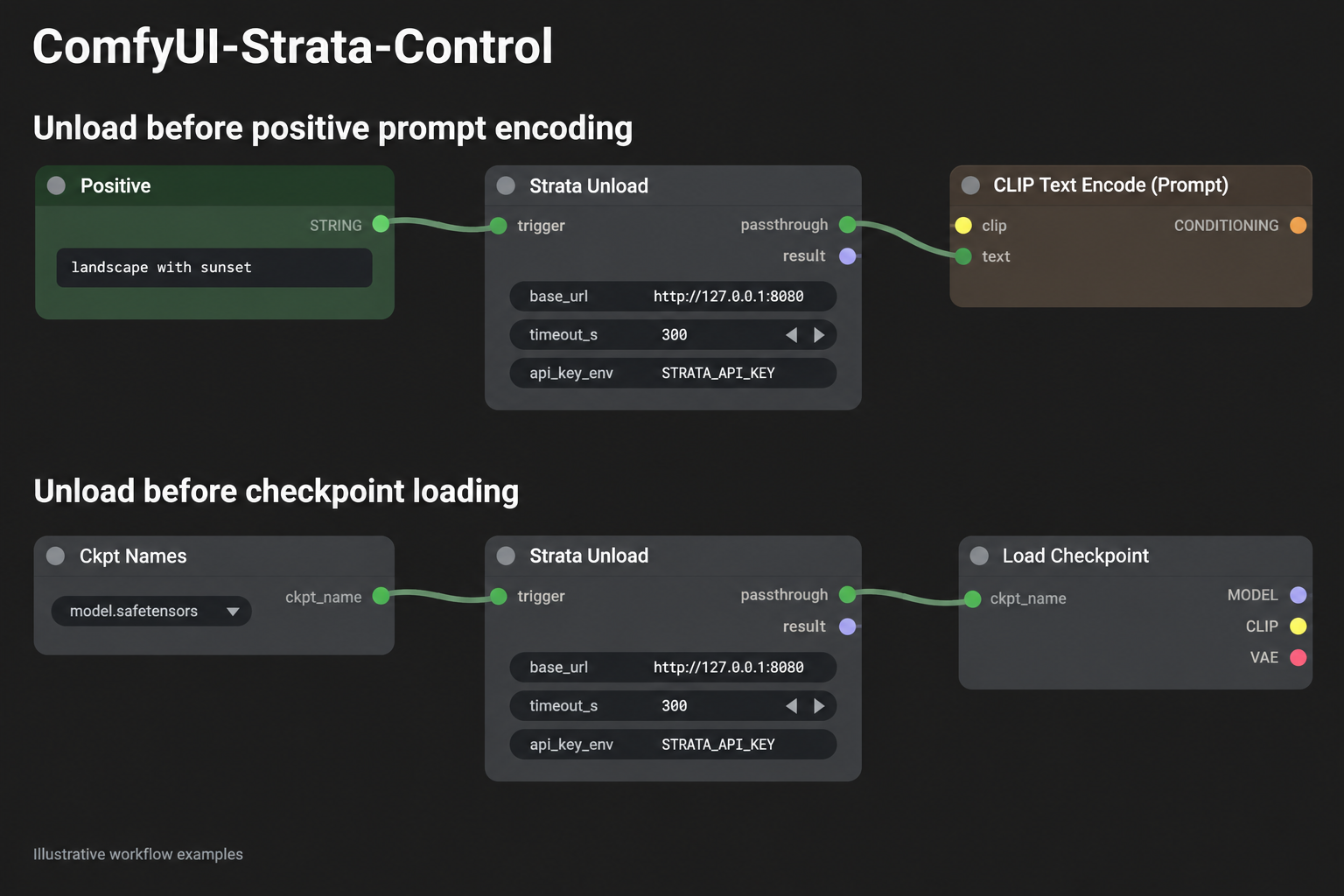
Examples of unloading Strata before:
- Positive prompt encoding.
- Checkpoint loading.
Connect the upstream value to trigger, then connect passthrough
to the downstream node to establish an execution dependency.
Gating the positive prompt encoder does not delay independent model-loader branches. Gate each relevant loader branch separately.
Load Workflows
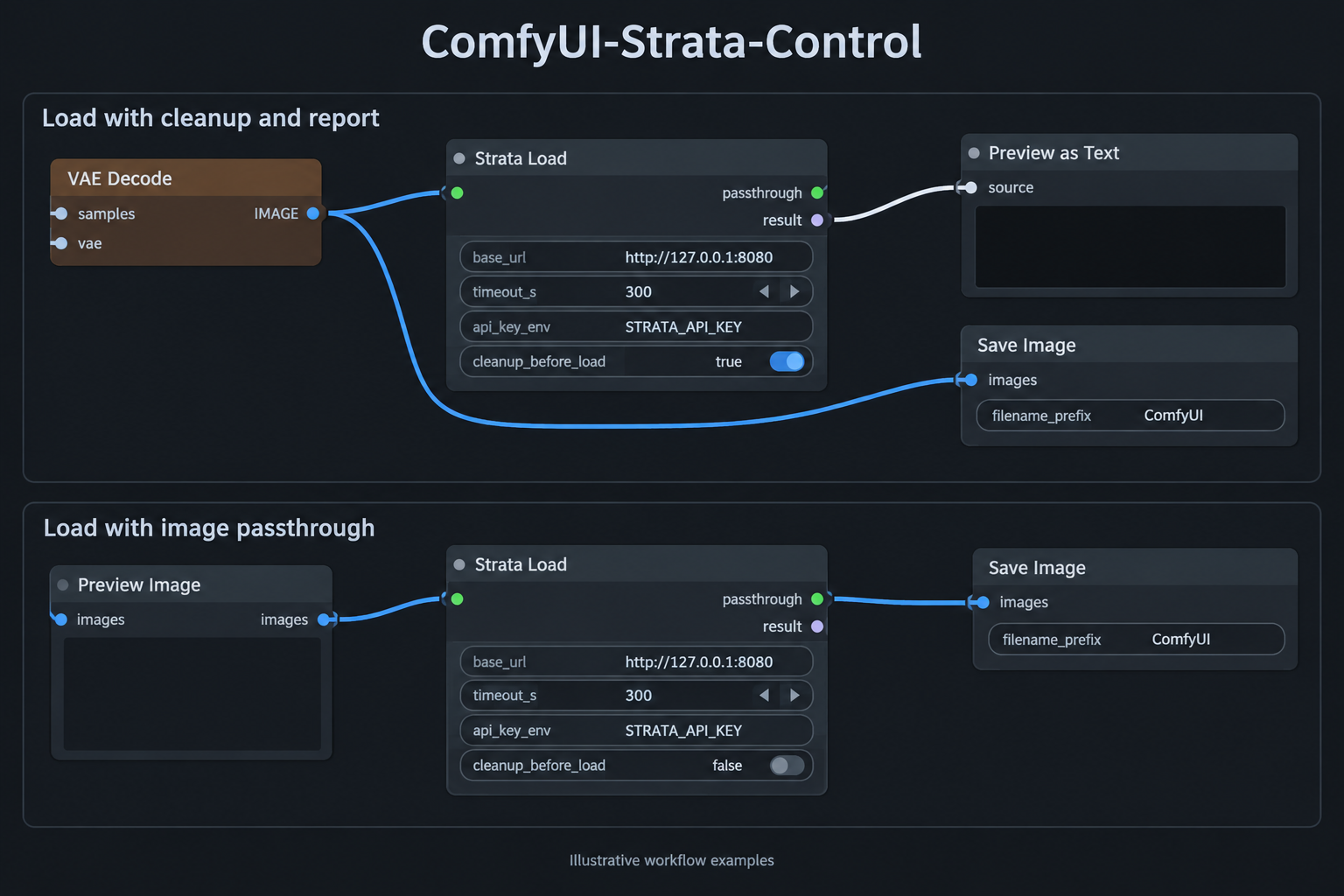
Examples of loading Strata with:
- Pre-load memory cleanup enabled and
resultconnected to Preview as Text. - Image passthrough connected to Save Image, with cleanup disabled.
cleanup_before_load defaults to false.
When enabled, local cleanup and GPU synchronization finish before the Load request is sent.
The result output includes cleanup status, memory measurements,
and the Load API response.
In the passthrough example, Save Image waits for the Load request to succeed. A cleanup or Load failure prevents that downstream save operation.
Illustrations may show earlier node titles without the Strata Control - prefix.
Execution Ordering
Placing a node on the canvas does not establish its order relative to independent graph branches.
Use trigger and passthrough to create an explicit dependency.
Unload Before Text Encoding
Prompt STRING
    │
    ▼
Strata Control - Unload.trigger
    │
    └── passthrough
            │
            ▼
    CLIP Text Encode.text
The text encoder waits for the unload request to succeed.
This does not delay independent checkpoint, UNet, CLIP, or VAE loader branches.
Unload Before Model Loading
Where supported, convert a model loader's filename widget into an input and route that value through Unload.
Checkpoint name STRING
    │
    ▼
Strata Control - Unload.trigger
    │
    └── passthrough
            │
            ▼
    Load Checkpoint.ckpt_name
Keep the following limitations in mind:
- The loader must support converting the relevant widget to an input.
- The loader must accept the connection's type.
- The passthrough uses a wildcard conven