
ComfyUI-Inpaint-CropStitch-NB2
Fork of ComfyUI-Inpaint-CropAndStitch adapted for Nano Banana 2. Adds NB2 Mask Generator, exact-resolution cropping and feathered alpha compositing in the stitch step.
Nodes (15)
NB2 Crop — the crop half of the Nano Banana workaround
NB2 Stitch — the second half that decides whether your edit looks pasted-on
NB2 Mask Generator — the manual rectangle for people who know exactly where to edit
NB2 Add Alpha — one trick for softer Nano Banana seams
Florence-2 Smart Region Selector — say 'face' or 'glasses', get a mask back
Nano Banana 2 Edit — the 'generate' step in the crop-and-stitch roundtrip
OpenAI GPT Image Edit — the mask-capable editor this pack exists to feed
SAM 3 Image Segmenter — 'garment' and nothing else comes back
SAM 3 Smart Region Selector — SAM 3 with training wheels, in the good way
Seedream 4.5 Edit — the maskless editor that still lands where you want it
NB2 Smart Region — turn any semantic mask into a Nano Banana-ready rectangle
Smart Mask Crop — the focused-region editor's front end
Smart Mask Multi Stitch — four independent edits, one final image
Smart Mask Stitch — paste a masked edit back without the rectangle showing
Smart Object Isolate Crop — show the editor the garment and nothing else
ComfyUI-Inpaint-CropStitch-NB2
Fork of ComfyUI-Inpaint-CropAndStitch by lquesada, adapted for post-production retouching with Nano Banana 2 and local masked editing.
All credits for the original crop/stitch engine go to lquesada.
Demo
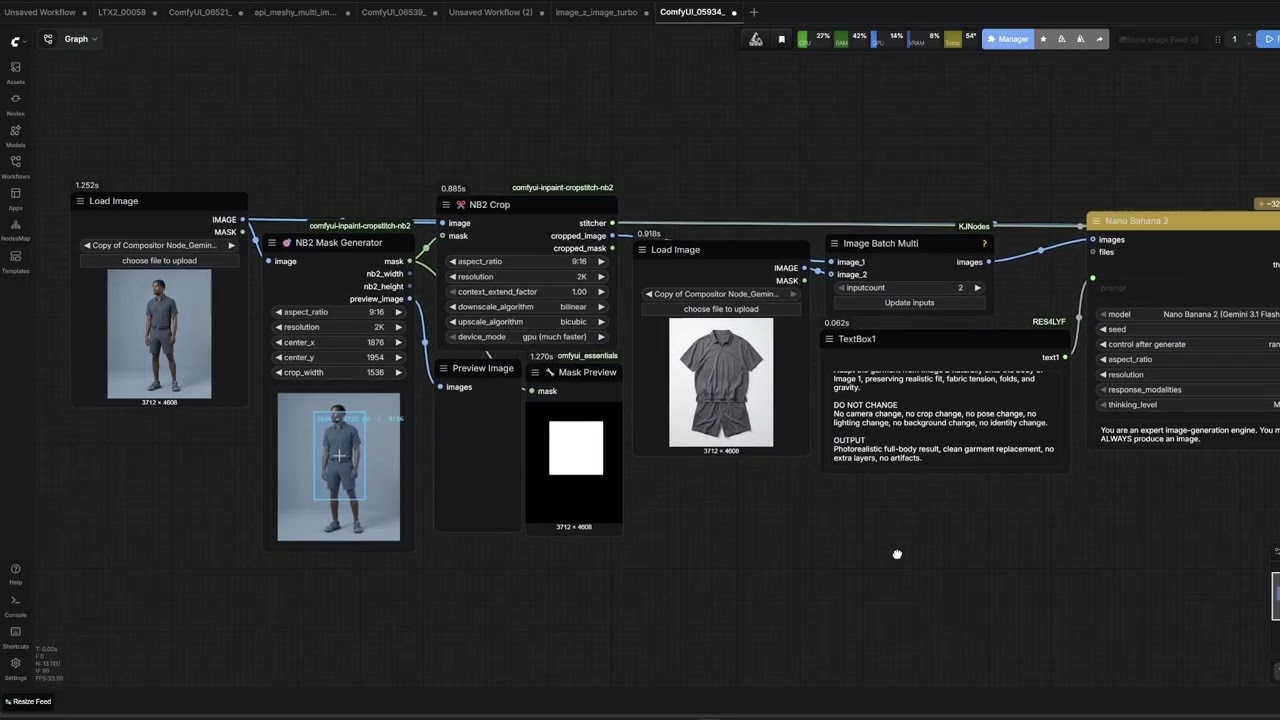
Why These Nodes Exist
Traditional inpainting requires a mask: you draw the area to regenerate and the model fills it in.
Nano Banana 2 is different — it is a generation model, not a true inpainting model. It does not accept a mask directly. It takes a clean image crop and generates a new image at a fixed resolution.
These nodes bridge that gap in two ways:
- NB2 crop/stitch path — use a semantic region or manual region to define a rectangular crop, generate only that crop with NB2, and stitch it back into the original image.
- Local mask crop/stitch path — use a semantic mask to crop a focused local edit region, run a true mask-based editor such as GPT Image, then stitch the result back.
Resolution Design
Nano Banana 2 produces images at fixed resolutions. These nodes are built around those exact sizes:
| Aspect ratio | 1K | 2K | 4K | |---|---|---|---| | 16:9 | 1376 × 768 | 2752 × 1536 | 5504 × 3072 | | 9:16 | 768 × 1376 | 1536 × 2752 | 3072 × 5504 | | 1:1 | 1024 × 1024 | 2048 × 2048 | 4096 × 4096 |
- Use
1Kfor small touch-ups, faces, or small objects. - Use
2Kfor medium-size retouching regions. - Use
4Kwhen you need maximum detail or the retouch area is large.
You can mix generation resolution and crop size. Example:
crop_width = 2752  (2K-sized area on the original)
generate at 4K     -> NB2 outputs 5504×3072
stitch             -> downscales 5504×3072 to 2752×1536, composites back
Nodes
Florence-2 Smart Region Selector (FAL API)
External Florence-2 region selector integrated into this repo. It calls FAL's Florence API, returns a ComfyUI mask, and is intended to feed NB2 Smart Region or Smart Mask Crop.
| Input | Type | Description |
|---|---|---|
| image | IMAGE | Source image |
| region_type | choice | glasses, face, upper_body, lower_body, full_body, object |
| custom_text | STRING | Required only when region_type = object |
| selection_mode | choice | largest or merge_all |
| detection_mode | choice | auto, segmentation, or grounding_bbox; auto uses bbox for face |
| padding_percent | FLOAT | Expands the detected region bbox for downstream crop sizing |
| return_rect_mask | BOOLEAN | Return a rectangular bbox mask instead of the raw semantic mask |
| api_key | STRING | Optional direct API key input. Leave blank if using an env var |
| api_key_env_var | STRING | Env var name fallback, default FAL_KEY |
| mask_blur_percent | FLOAT | Optional soft blur applied to the returned mask |
| upload_max_dimension | INT | Longest edge before upload; lower to 1536 or 1024 if the remote host closes the connection |
Outputs: mask, mask_image, info, center_x, center_y, crop_width, crop_height
Built-in region defaults: glasses -> 16:9, face -> 1:1, upper_body -> 1:1, lower_body -> 1:1, full_body -> 9:16. These hints are stored in the info output and can drive downstream auto sizing.
Security notes:
- The repo does not store any API key.
- Bundled visual workflows leave
api_keyempty. API prompt examples use__FAL_KEY__as a placeholder that you must replace before posting to/prompt. - FAL nodes resolve keys in this order: direct
api_key, environment variable fromapi_key_env_var(defaultFAL_KEY), this repo's optionalconfig.ini, then a siblingfal-flux-nodes/config.iniif that node pack is installed. - For safer usage, prefer setting
FAL_KEYin the environment or paste the key only for the current ComfyUI session. - If you paste a key into the node and save the workflow yourself, ComfyUI may persist that widget value into the workflow JSON.
Typical flow:
NB2Florence2RegionSelector -> mask -> NB2 Smart Region -> NB2 Crop -> Nano Banana 2 -> NB2 Stitch
SAM 3 Image Segmenter (FAL API)
External SAM 3 selector integrated through FAL. It returns the same outputs as the Florence selector, so it can feed NB2 Smart Region, Smart Mask Crop, or Smart Object Isolate Crop without changing the downstream workflow.
Endpoint: fal-ai/sam-3/image
| Input | Type | Description |
|---|---|---|
| image | IMAGE | Source image to segment |
| prompt | STRING | Text prompt such as bra, pants, glasses, or wheel |
| selection_mode | choice | largest, first, or merge_all when multiple masks are returned |
| padding_percent | FLOAT | Expands the selected mask bbox for downstream crop sizing |
| return_rect_mask | BOOLEAN | Return a rectangular bbox mask instead of the raw SAM mask |
| api_key | STRING | Optional direct FAL API key. Leave blank if using an env var |
| api_key_env_var | STRING | Env var fallback, default FAL_KEY |
| mask_blur_percent | FLOAT | Optional soft blur applied to the returned mask |
| return_multiple_masks / max_masks | BOOLEAN / INT | Ask SAM 3 for multiple candidates, up to 32 |
| point_prompts_json / box_prompts_json | STRING | Optional JSON lists for point or box prompts |
Outputs: mask, mask_image, info, center_x, center_y, crop_width, crop_height
Recommended flow:
SAM 3 Image Segmenter -> mask -> Smart Object Isolate Crop -> Seedream 4.5 Edit -> Smart Mask Stitch
For two independent garment passes:
SAM 3 "bra"   -> Smart Object Isolate Crop -> Seedream 4.5 Edit \
SAM 3 "pants" -> Smart Object Isolate Crop -> Seedream 4.5 Edit  -> Smart Mask Multi Stitch -> final image
SAM 3 Smart Region Selector (FAL API)
Preset-driven SAM 3 selector with the same output contract as Florence. Use this when you want dropdown presets for common targets while keeping object available for custom text.
| Input | Type | Description |
|---|---|---|
| image | IMAGE | Source image to segment |
| region_type | choice | face, upper_body, lower_body, full_body, garments such as bra/pants, accessories, car, vehicle, wheel, or object |
| custom_text | STRING | Required only when region_type = object |
| api_key | STRING | Optional direct FAL API key. Leave blank if using an env var |
| api_key_env_var | STRING | Env var fallback, default FAL_KEY |
For SAM masks, set downstream depad_florence = false. Keep depad_florence = true only for Florence-style masks that need letterbox correction.
NB2 Mask Generator
Interactive node that generates a rectangular mask at an exact position on the original image, with an aspect ratio that matches an NB2 resolution.
| Input | Type | Description |
|---|---|---|
| image | IMAGE | Source image used for dimensions and preview |
| aspect_ratio | choice | auto, 16:9, 9:16, 1:1 |
| resolution | choice | 1K, 2K, 4K |
| center_x | INT | Horizontal center of the crop rectangle |
| center_y | INT | Vertical center of the crop rectangle |
| crop_width | INT | Width of the crop rectangle on the source image |
Outputs: mask, nb2_width, nb2_height, preview_image
NB2 Smart Region
Automatic NB2 rectangle fitting from a semantic mask. Use this when you already have a region mask from Florence2, SAM, or any segmentation node.
| Input | Type | Description |
|---|---|---|
| image | IMAGE | Source image |
| region_mask | MASK | Semantic mask to fit |
| aspect_ratio | choice | auto, 16:9, 9:16, 1:1 |
| resolution | choice | 1K, 2K, 4K |
| padding_percent | FLOAT | Expands the detected region before rectangle fitting |
| crop_scale | FLOAT | Additional scale multiplier after fitting |
| depad_florence | BOOLEAN | Remove Florence2's internal square letterbox padding (default True) |
Outputs: mask, nb2_width, nb2_height, preview_image, center_x, center_y, crop_width, crop_height, info
When aspect_ratio = auto, the node resolves the crop shape from Florence region metadata first, then falls back to the mask bbox if no region hint is available.
depad_florence — Florence2 pads images to a square internally before processing. Without this correction the detected bbox shifts sideways or vertically on non-square images. Leave
Truewhen the mask comes fromFlorence2Run (kijai). Set toFalseonly if your mask is already at the exact source image resolution (e.g. from a hand-drawn mask or SAM).
Typical flow:
NB2Florence2RegionSelector or Florence2Run (kijai) -> mask -> NB2 Smart Region -> NB2 Crop -> Nano Banana 2 -> NB2 Stitch
OpenAI GPT Image Edit
External GPT Image 2 editor integrated into this repo through FAL. This node now follows the simpler payload shape used by fal-flux-nodes, while exposing FAL/OpenAI keys as node inputs instead of relying on a shared config file.
| Input | Type | Description |
|---|---|---|
| image_1 | IMAGE | Base image to edit |
| prompt | STRING | Edit instruction |
| api_key | STRING | Optional direct FAL API key input |
| api_key_env_var | STRING | FAL env var fallback, default FAL_KEY |
| openai_api_key | STRING | Optional — leave blank. FAL handles OpenAI auth on the backend. You do not need a real OpenAI key. Wire your FAL key here only as a last resort if you see a key validation error |
| openai_api_key_env_var | STRING | OpenAI env var fallback, default OPENAI_API_KEY — ignored when openai_api_key is blank |
| image_2 ... image_6 | IMAGE | Optional reference images sent together with image_1 |
| mask_image | IMAGE | Optional mask image uploaded as mask_image_url |
| region_info | STRING | Optional Smart Mask Crop info; used only when size_mode = auto_from_region |
| size_mode | choice | preset, aspect_ratio, custom, or auto_from_region |
| image_size | choice | Used when size_mode = preset; FAL presets such as auto, portrait_16_9, or landscape_16_9 |
| aspect_ratio / resolution | choice | Used when size_mode = aspect_ratio; simple fal-flux-nodes-style sizing |
| width / height | INT | Used when size_mode = custom; must be multiples of 16 |
| quality | choice | low, medium, high |
| num_images | INT | Number of outputs to request |
| output_format | choice | png, webp, jpeg |
| sync_mode | BOOLEAN | Passed through to FAL |
Outputs: images, info
Typical flow:
NB2Florence2RegionSelector -> mask -> Smart Mask Crop -> OpenAI GPT Image Edit -> Smart Mask Stitch
Recommended default:
- Use
size_mode = presetandimage_size = autofor the simplest inpainting behavior. - Use
size_mode = auto_from_regiononly whenSmart Mask Crop -> infois connected toregion_infoand the GPT output must match the crop size exactly. - Use
size_mode = aspect_ratio,aspect_ratio = 4:5, andresolution = 4Kfor final portrait variation sizing. In this mode,widthandheightare ignored; those fields only apply whensize_mode = custom. 4Kmeans the largest valid GPT edit size for the selected aspect ratio, not always a 3840-pixel wide image. For4:5, the request is vertical and should resolve near2576x3216.
For the most stable automatic masked flow, connect Smart Mask Crop -> info into OpenAI GPT Image Edit -> region_info, and set GPT size_mode = auto_from_region. This makes GPT request the same edit size that Smart Mask Stitch expects.
When using a mask, mask_image must have the exact same pixel size as image_1. In the local crop workflow, connect Smart Mask Crop -> cropped_image to GPT image_1 and Smart Mask Crop -> cropped_mask_image to GPT mask_image; do not connect the original Florence mask directly into GPT after cropping.
Prompting for masked local edits should be conservative: describe only the object to retouch, name the reference image for that object, and explicitly preserve all pixels outside the mask. Avoid instructions that ask GPT Image to recompose the full portrait, change lighting globally, or rebuild the background; those belong before the crop, not inside the local masked edit.
Nano Banana 2 Edit
FAL Nano Banana 2 edit node included in this repo. It calls fal-ai/nano-banana-2/edit, accepts a base image plus up to five reference images, and exposes the FAL API key as node inputs instead of relying on another node package's integrated config.
| Input | Type | Description |
|---|---|---|
| image_1 | IMAGE | Base image to edit |
| prompt | STRING | Edit instruction |
| image_2 ... image_6 | IMAGE | Optional reference images |
| num_images | INT | Number of outputs to request |
| aspect_ratio | choice | auto, common ratios, and extreme ratios supported by FAL |
| resolution | choice | 0.5K, 1K, 2K, 4K |
| output_format | choice | png, jpeg, webp |
| safety_tolerance | choice | 1 to 6 |
| limit_generations | BOOLEAN | Ask the model to limit generations from each round |
| enable_web_search | BOOLEAN | Allow web search during generation |
| thinking_level | choice | none, minimal, high |
| seed | INT | Optional seed; -1 omits it |
| sync_mode | BOOLEAN | Return media directly when supported by FAL |
| api_key | STRING | Optional direct FAL API key input |
| api_key_env_var | STRING | FAL env var fallback, default FAL_KEY |
Outputs: images, info
NB2 Crop
Crops the source image around the mask region and scales to the exact NB2 resolution.
| Input | Type | Description |
|---|---|---|
| image | IMAGE | Original source image |
| mask | MASK | Mask from NB2 Mask Generator or NB2 Smart Region |
| aspect_ratio | choice | Must match the upstream region node |
| resolution | choice | Must match the upstream region node |
| context_extend_factor | FLOAT | Extra context growth before aspect-ratio fit |
| downscale_algorithm | choice | Used when crop is larger than target |
| upscale_algorithm | choice | Used when crop is smaller than target |
| device_mode | choice | CPU or GPU execution |
Outputs: stitcher, cropped_image, cropped_mask
NB2 Stitch
Composites the NB2-generated image back onto the original canvas.
| Input | Type | Description |
|---|---|---|
| stitcher | STITCHER | Coordinate data from NB2 Crop |
| inpainted_image | IMAGE | RGB or RGBA output from Nano Banana 2 |
| edge_feather_percent | FLOAT | Extra edge blend width |
Outputs: image
Smart Mask Crop
Local masked-edit crop for models that accept a real mask (e.g. GPT Image). Use this when the selected region is small and you do not want to send the full image to the editor.
| Input | Type | Description |
|---|---|---|
| image | IMAGE | Source image |
| mask | MASK | Local semantic mask |
| context_expand | FLOAT | Grows the detected region before cropping |
| use_region_guidance | BOOLEAN | Reuse Florence region metadata for context and target-size defaults |
| mask_expand_percent | FLOAT | Extra expansion applied to the edit mask after crop |
| mask_feather_percent | FLOAT | Softens the edit mask edges before sending to the editor |
| resize_mode | choice | keep_local_size or resize_to_target |
| target_width | INT | Used when resize_to_target |
| target_height | INT | Used when resize_to_target |
| downscale_algorithm | choice | Resize-down algorithm |
| upscale_algorithm | choice | Resize-up algorithm |
| device_mode | choice | CPU or GPU |
| depad_florence | BOOLEAN | Remove Florence2 letterbox padding (default True) |
| use_region_mask_defaults | BOOLEAN | When enabled, 0 expand/feather uses Florence defaults; disable it to keep a hard mask |
| region_info | STRING | Optional Florence info output for shared aspect, mask, and sizing hints |
| target_size_mode | choice | region_recommended, manual_width_height, or max_for_aspect_ratio |
| target_aspect_ratio | choice | Used with max_for_aspect_ratio; can follow region_info, mask_bbox, input_image, or a fixed ratio such as 4:5 |
Outputs: stitcher, cropped_image, cropped_mask, cropped_mask_image, preview_image, info
Wire
cropped_mask_imagedirectly intoGPT Image 2 Edit → mask_image.
The info output is valid JSON and includes the final target_width and target_height after any target_size_mode, target_aspect_ratio, edit_size_scale_percent, and FAL size clamping. GPT Image Edit can read this through auto_from_region so the requested output size stays aligned with the crop and mask.
Use target_size_mode = max_for_aspect_ratio when the workflow should be driven by shape instead of manual dimensions. For example, target_aspect_ratio = 4:5 picks the largest valid GPT Image 4:5 size, then crops both image and mask to that same aspect before sending them to GPT.
For portrait try-on workflows where the source portrait is already the desired shape, use target_size_mode = max_for_aspect_ratio with target_aspect_ratio = input_image. This prevents the glasses region hint from forcing a horizontal 16:9 crop when the full workflow is meant to stay 4:5.
Typical flow:
NB2Florence2RegionSelector or Florence2Run (kijai) -> mask -> Smart Mask Crop -> GPT Image 2 Edit -> Smart Mask Stitch
Smart Object Isolate Crop
Local object crop for sensitive garment/object detail enhancement. Unlike Smart Mask Crop, this node hides every pixel outside the semantic mask before the image is sent to GPT Image. It outputs an RGBA isolated crop plus a matching mask image, so the model sees only the selected object while the stitcher can still paste the result back into the source image.
Recommended for garment-detail passes where the garment already exists and the goal is texture/detail enhancement, not replacement.
| Input | Type | Description |
|---|---|---|
| image | IMAGE | Source image |
| mask | MASK | Semantic object mask, usually from Florence-2 region_type = object |
| resize_mode | choice | Keep local size, upscale if smaller, or force target size |
| target_size_mode | choice | manual_width_height or max_for_aspect_ratio |
| target_aspect_ratio | choice | Usually mask_bbox for tight object crops |
| mask_expand_percent | FLOAT | Small edit expansion; keep near 0 for no body context |
| alpha_feather_percent | FLOAT | Soft object edge for isolation and final paste |
| outside_fill | choice | RGB fill outside the object in case a model ignores alpha |
| edge_guard_percent | FLOAT | Keeps the crop border uneditable so models do not complete cut-off garments |
| region_info | STRING | Optional Florence or SAM info for sizing metadata |
Outputs: stitcher, isolated_image, isolated_mask, isolated_mask_image, preview_image, info
Wire isolated_image into OpenAI GPT Image Edit -> image_1, isolated_mask_image into mask_image, and info into region_info. Set GPT size_mode = auto_from_region.
For separate top/bottom passes, run two independent Florence or SAM selectors and two independent GPT Image calls, then combine them with Smart Mask Multi Stitch.
Typical garment detail flow:
Florence object "bra"   -> Smart Object Isolate Crop -> GPT Image 2 Edit \
Florence object "pants" -> Smart Object Isolate Crop -> GPT Image 2 Edit  -> Smart Mask Multi Stitch -> final image
Prompt guidance:
Enhance fabric texture, seams, weave, stitching, and material detail on the visible isolated garment only. Preserve the exact existing silhouette, crop boundaries, cut-off edges, position, scale, and blank background. Do not complete missing garment parts, extend fabric beyond the visible area, change the outline, add body, skin, person, mannequin, or scene context.
Smart Mask Stitch
Pastes a locally edited masked crop back into the original image using the stored local mask as the primary blend.
| Input | Type | Description |
|---|---|---|
| stitcher | STITCHER | Coordinate data from Smart Mask Crop |
| edited_image | IMAGE | Output of the local masked editor |
| edge_feather_percent | FLOAT | Extra edge feather for the crop boundary |
| result_mask_feather_percent | FLOAT | Extra blur on the stored local mask used for final blending |
Outputs: image
Smart Mask Multi Stitch
Applies up to four independent local masked edits onto one accumulated final image. Use this when separate object calls, such as top and bottom garments, were generated independently but must be pasted back into the same final image without one stitch overwriting the other.
Inputs: stitcher_1, edited_image_1, optional stitcher_2/edited_image_2 through stitcher_4/edited_image_4, plus shared feather controls.
Outputs: image
Seedream 4.5 Edit
FAL wrapper for fal-ai/bytedance/seedream/v4.5/edit. This model accepts image references and natural-language instructions, but no explicit mask. For local garment workflows, send Smart Object Isolate Crop -> isolated_image as image_1, optional garment/product references as image_2+, then paste the result back with Smart Mask Stitch or Smart Mask Multi Stitch.
Use image_size_mode = auto_from_region when the crop info is connected, so Seedream requests the same size as the isolated crop.
NB2 Add Alpha
Converts an RGB image to RGBA by generating a feathered alpha channel. Useful for soft-edge RGBA output for compositing.
| Input | Type | Description | |---|---|---| | image | IMAGE | RGB or RGBA input | | feather_percent | FLOAT | Edge fade width as a percentage |
Outputs: rgba_image
Recommended Workflows
Path 1 — NB2 region retouch
NB2Florence2RegionSelector or Florence2Run (kijai) or NB2 Mask Generator
    -> NB2 Smart Region (or direct mask)
    -> NB2 Crop
    -> Nano Banana 2 generation
    -> NB2 Stitch
Path 2 — Local masked edit (GPT Image, etc.)
NB2Florence2RegionSelector or Florence2Run (kijai)
    -> mask
    -> Smart Mask Crop
        -> cropped_image        -> GPT Image 2 Edit
        -> cropped_mask_image   -> GPT Image 2 Edit (mask_image)
    -> Smart Mask Stitch
Tips
- For
face:padding_percent10–18,context_expand1.1–1.2 - For
upper_body:padding_percent8–15 - For small objects:
padding_percent5–12 - Stitch feathering:
edge_feather_percent3–8 is usually enough
Example Workflows
| File | Description |
|---|---|
| 00_manual_nb2_crop_stitch_nano_banana2.json | Manual rectangle mask -> NB2 Crop -> Nano Banana 2 Edit -> NB2 Stitch |
| 01_florence_face_nb2_roundtrip.json | Florence-2 face selector -> NB2 Smart Region -> NB2 Crop/Stitch round trip |
| 02_florence_face_gpt_image2_mask_edit.json | Florence-2 face selector -> Smart Mask Crop -> GPT Image 2 masked edit |
| 03_florence_object_gpt_image2_mask_edit.json | Florence-2 object selector -> Smart Mask Crop -> GPT Image 2 masked edit |
| 04_florence_upper_body_nb2_roundtrip.json | Florence-2 upper-body selector -> NB2 Smart Region -> NB2 Crop/Stitch round trip |
| 05_florence_product_gpt_image2_mask_edit.json | Florence-2 product/object selector -> Smart Mask Crop -> GPT Image 2 masked edit |
| 06_florence_garment_detail_gpt_image2_multistitch.json | Florence-2 top/bottom garment selectors -> isolated GPT Image 2 detail passes -> Smart Mask Multi Stitch |
| 07_florence_garment_detail_seedream45_multistitch.json | Florence-2 top/bottom garment selectors -> isolated Seedream 4.5 detail passes -> Smart Mask Multi Stitch |
| 08_sam3_garment_detail_seedream45_multistitch.json | SAM 3 top/bottom garment selectors -> isolated Seedream 4.5 detail passes -> Smart Mask Multi Stitch |
| 09_sam3_smart_region_seedream45_multistitch_api.json | API prompt using SAM 3 Smart Region selectors for top/bottom garment Seedream 4.5 passes |
| 10_florence_seedream45_multistitch_api.json | API prompt using Florence object selectors for the same top/bottom Seedream 4.5 pass |
Load visual workflow .json files via ComfyUI -> Load (drag & drop or File > Open). Files ending in _api.json are ComfyUI API prompt payloads for /prompt; replace __FAL_KEY__ first or leave api_key blank and provide FAL_KEY in the ComfyUI process environment.
Recommended starting points:
- Use
08_sam3_garment_detail_seedream45_multistitch.jsonfor the newest garment-detail workflow. - Use
09_sam3_smart_region_seedream45_multistitch_api.jsonwhen submitting the same garment-detail flow through the ComfyUI API. - Use
07_florence_garment_detail_seedream45_multistitch.jsonif Florence-2 selects the object better on a specific image. - Use
10_florence_seedream45_multistitch_api.jsonwhen submitting the Florence version through the ComfyUI API. - Use
06_florence_garment_detail_gpt_image2_multistitch.jsonwhen the editor must receive an explicit mask. - Use
00_manual_nb2_crop_stitch_nano_banana2.jsonfor manual NB2 crop/stitch tests.
Installation
Git clone
Open a terminal inside your ComfyUI custom_nodes folder and run:
git clone https://github.com/amortegui84/comfyui-inpaint-cropstitch-nb2
Restart ComfyUI. That is all. Dependencies install automatically on first startup — you will see [NB2] Installing... lines in the console if anything was missing.
ComfyUI Manager
Search for comfyui-inpaint-cropstitch-nb2 and click Install. Restart ComfyUI.
Updating
cd ComfyUI/custom_nodes/comfyui-inpaint-cropstitch-nb2
git pull
Restart ComfyUI.
If auto-install fails — ComfyUI Windows Portable
ComfyUI portable ships with its own embedded Python interpreter. If the auto-install step fails, run this once from a regular CMD window (replace the path with wherever your portable build lives):
"X:\path\to\ComfyUI_windows_portable\python_embeded\python.exe" -m pip install fal-client requests pillow numpy scipy
If pip itself is missing, bootstrap it first:
"X:\path\to\ComfyUI_windows_portable\python_embeded\python.exe" -m ensurepip
Then re-run the install command above. Fully close and reopen ComfyUI — a browser refresh alone is not enough.
Verify:
"X:\path\to\ComfyUI_windows_portable\python_embeded\python.exe" -m pip list | findstr fal-client
Optional — local Florence2
Only needed if you want the fully local Florence2Run path (no API key required):
cd ComfyUI/custom_nodes
git clone https://github.com/kijai/ComfyUI-Florence2
Or search ComfyUI-Florence2 in the Manager.
Git LFS
This repo tracks assets/demo.mp4 with Git LFS. The nodes and workflows work without it. To fetch the demo file:
git lfs install
git lfs pull
Troubleshooting
ModuleNotFoundError: No module named 'fal_client'
Cause: ComfyUI portable ships with its own embedded Python interpreter. Packages installed against system Python are invisible to it. A plain pip install fal-client from a normal terminal does nothing for ComfyUI portable.
Fix: Use the embedded Python executable directly (see the Windows Portable section above). Fully close and reopen ComfyUI after installing — a browser refresh alone is not enough.
401 Unauthorized from storage/auth/token
Cause: FAL rejected the upload-token request before the Florence or edit model ran. This means the ComfyUI process is not receiving a valid FAL key, or the key was pasted into the wrong field.
Fix: Paste your FAL key directly into each FAL node's api_key input for a quick test, set FAL_KEY before launching ComfyUI and fully restart it, or configure fal-flux-nodes/config.ini if you already use that node pack. The key should look like <key_id>:<key_secret> or a valid fal_... key. Keep api_key_env_var as FAL_KEY unless you intentionally use a different environment variable name.
RuntimeError: Missing OpenAI API key on the GPT Image Edit node
What is actually happening: Despite the error message, the OpenAI GPT Image Edit node does not call OpenAI directly. Every request goes to FAL's hosted GPT Image 2 relay (openai/gpt-image-2/edit). FAL authenticates to OpenAI on the backend using its own credentials. Your FAL key is what authenticates the call.
The openai_api_key field on the node is passed through to FAL as a string parameter. In newer versions of this repo the field is optional — leaving it blank is fine and the node will proceed using FAL authentication alone.
Fix (current version): Leave openai_api_key blank. The node no longer throws an error when the field is empty.
Workaround (older versions): Wire your FAL key into both api_key and openai_api_key. The validation only checks that the field is non-empty; it does not verify that the value is a real sk-... OpenAI key.
Where to find your FAL key: fal.ai/dashboard/keys — format: <id>:<secret>
Sanity checklist after a fresh install
- [ ] ComfyUI fully restarted (not just a browser refresh)
- [ ]
fal-clientvisible to the embedded Python — runpython_embeded\python.exe -m pip list | findstr fal-client - [ ] FAL key wired into every
api_keyinput (Florence selector and edit nodes) - [ ] Test queue one image — confirm the console shows HTTP 200 responses to
rest.fal.ai
License
Apache 2.0 — see LICENSE. Original work copyright 2024 lquesada. Modifications copyright 2025 amortegui84.