
Compensate Drift (Auto Align First+Last)
Seamless-loop / FLV (first-last video) drift compensation: registers every frame of an image batch against one reference framing derived from the first/last frames (ORB + RANSAC affine/similarity), with optional radial-distortion correction, Lie-algebra log interpolation, and first/last loop blending.
Compensate Drift (Auto Align First+Last)
A ComfyUI custom node that registers every frame of an input batch against a single reference framing derived from the first and last frames, so that the whole sequence plays back with a fixed composition and can be looped seamlessly.
Where older drift-compensation nodes applied a blind programmatic zoom, this node measures the drift by finding real correspondences between the first and last frames and fitting a global geometric model to them. Nothing is assumed about the drift: it can be a zoom, a pan, a rotation, or any affine motion, in either direction.
Table of contents
- Installation
- Usage
- How it works
- The registration maths
- Radial distortion
- Parameter reference
- Output
- Edge cases & fallbacks
- Testing
Installation
This is a ComfyUI custom node, so
it installs as a folder under your ComfyUI custom_nodes/ directory. It has
no extra Python dependencies — it uses torch and opencv-python, which
ComfyUI already provides.
Clone it straight into custom_nodes/:
cd <your-ComfyUI-dir>/custom_nodes
git clone https://github.com/amagicai/seamless_loop.git
(Or download the ZIP and extract it into custom_nodes/seamless_loop/.)
Then restart ComfyUI. The node appears in the node menu under
image/batch as "Compensate Drift (Auto Align First+Last)" (also
searchable as seamless loop, autoalign, compensate drift, etc.).
Running the tests (optional)
From the repository root:
python -m pytest tests/test_align.py -q
See Testing for details and troubleshooting.
Usage
The node is a simple image batch in → image batch out passthrough, so it
drops into any workflow that already produces and consumes an images stack
(B, H, W, C). A typical placement is right after the decode and before the
video writer:
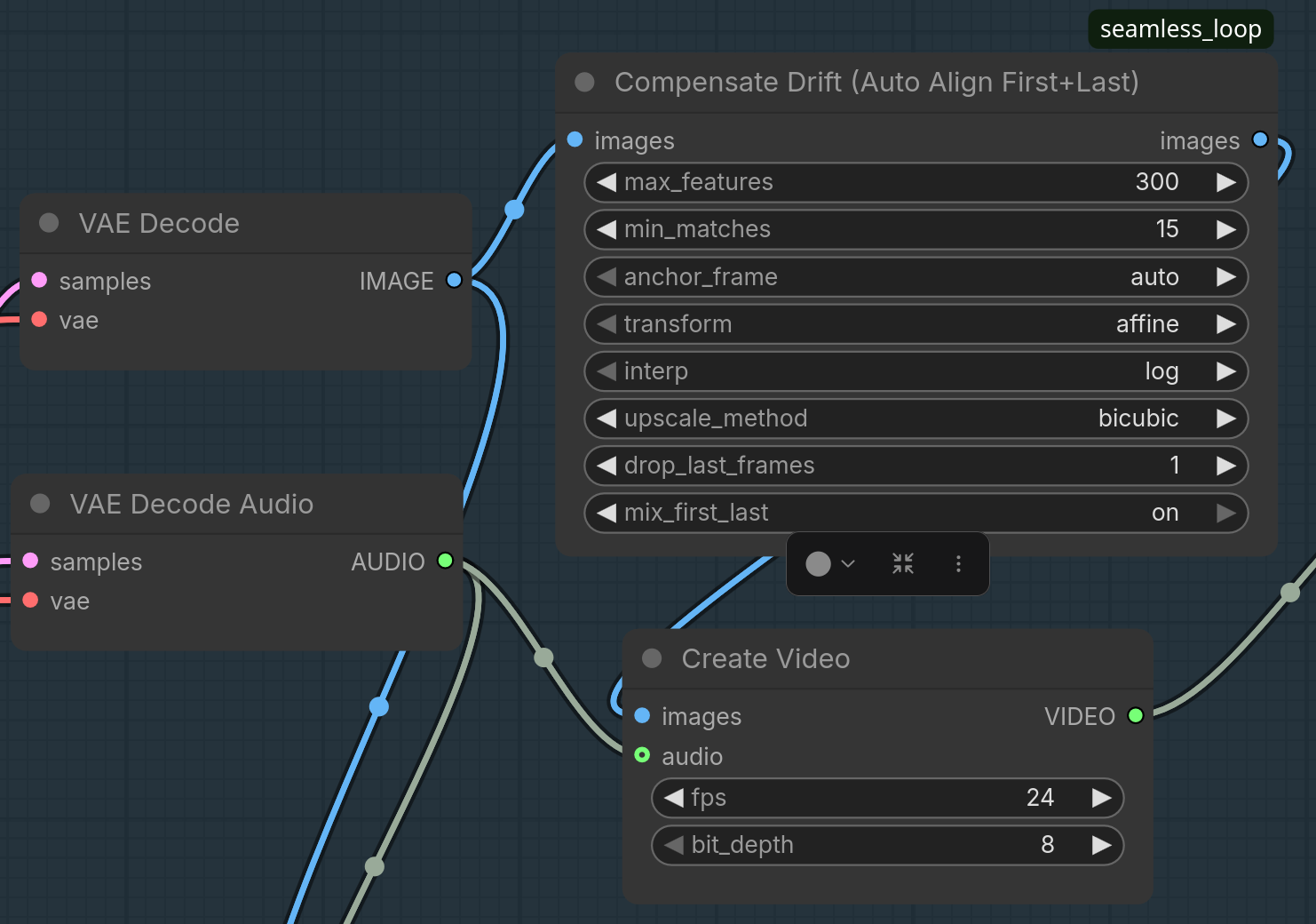
VAE Decode ──► Compensate Drift ──► Create Video
   (images)        (re-register)      (images)
Feed it your batch of frames and read the re-registered batch straight off the
images output — no other wiring required. Use drop_last_frames /
mix_first_last (see Parameter reference) for a
seamless loop wrap.
How it works
Given a batch of n frames, the node:
- Detects ORB keypoints/descriptors in the first and last frames and matches them, keeping only confident (ratio-tested) inlier matches after a RANSAC robust fit.
- Fits a global 2D transform (affine or similarity) from the first frame to the last frame framing.
- Picks one endpoint — the anchor — whose framing all
nframes will be warped to share. By default (auto) it anchors to whichever endpoint is more zoomed-in, so every intermediate warp is a magnification. - Computes a per-frame warp by interpolating between the identity and the
endpoint transform in the Lie-algebra (
log) or coefficient (linear) domain. - Outputs the re-registered frames (by default dropping the redundant last frame, and optionally blending it into the first for a seamless loop wrap).
[first] ──ORB──┐                 ┌── anchor = first (auto) → A = I, B = G
[last]  ──ORB──┴──match──RANSAC──┤
                                  └── anchor = last  (auto) → A = G⁻¹, B = I
        frames i=0..n-1  ────────► Tᵢ = interp(A, B, fᵢ)  →  warp → reference framing
The registration maths
1. Feature detection & matching
Both endpoint frames are converted to grayscale (cv2.cvtColor(…, COLOR_RGB2GRAY)) and fed to an ORB detector with max_features keypoints:
orb = cv2.ORB_create(nfeatures=max_features)
kp_first, des_first = orb.detectAndCompute(gray_first, None)
kp_last,  des_last  = orb.detectAndCompute(gray_last, None)
Descriptors are binary (Hamming) and are matched with a brute-force matcher
(cv2.BFMatcher(cv2.NORM_HAMMING)) using k=2. Lowe's ratio test keeps
only unambiguous matches — a match {m, nn} survives when
m.distance < 0.7 * nn.distance
i.e. the closest descriptor is at least ~30% closer than the second-closest, a proxy for distinctiveness. Surviving matches produce the correspondence sets
src_pts— points in the first frame,dst_pts— the matching points in the last frame.
If either endpoint yields fewer than min_matches keypoints, or fewer than
min_matches surviving matches, the batch is returned unchanged (see
Edge cases).
2. Transform estimation
The correspondences are robustly fit with RANSAC:
transform = "affine"→cv2.estimateAffine2Dfits a full 2D affine𝐌 ∈ ℝ^{2×3}with 6 dof (scale x, scale y, shear, rotation, tx, ty), reprojection threshold 3 px.transform = "similarity"→cv2.estimateAffinePartial2Dfits a similarity𝐌with 4 dof (uniform scale, rotation, tx, ty) — it cannot represent anisotropic stretch.
The fit returns the inlier mask. 𝐌 maps first → last framings:
p_last = 𝐌 · p_first
The returned M is embedded into a homogeneous 3×3 matrix
M33 = [ M₍₂₍₃₎ ]   M33 = [M11 M12 M13]
      [ 0 0 1 ]           [M21 M22 M23]
                          [ 0   0   1 ]
If fewer than min_matches inliers survive RANSAC, the batch is returned
unchanged.
3. Orientation disambiguation
estimateAffine2D returns a consistent src → dst orientation, but a
degenerate or noisy fit can still come back numerically ambiguous. As a
defensive check, the node warps the last frame with each candidate (M33
and its inverse) and keeps the one that best reproduces the first frame
inside a shared central box:
cen_y, cen_x, box = h // 2, w // 2, min(h, w) // 3
sl = lambda a: a[cen_y-box:cen_y+box, cen_x-box:cen_x+box]
The candidate with the smaller mean absolute difference in that region wins.
The result is G, the true map last → first framing
G ≈ M33     (if "forward" won)      G ≈ inv(M33)   (if "inverse" won)
detG = det(G₍₂₍₂₎)
detG summarizes the drift geometry: it is the area ratio of the last-frame
content when re-expressed in first-frame coordinates.
Interpretation:
detG > 1means the maplast → firstmagnifies — the first frame shows larger content (a closer / more zoomed-in shot) than the last.detG ≤ 1means the last frame is the closer shot. SodetGtells you which endpoint is more zoomed-in. The node logslast->first framing det=...so you can see which way the drift went.
4. Choosing the anchor frame
All frames must share one framing. The anchor_frame parameter decides which:
| anchor_frame | Decision |
|---|---|
| "auto" | Anchor to the more zoomed-in endpoint: detG > 1 → first, else last. |
| "first" | Force the first frame's framing as reference. |
| "last" | Force the last frame's framing as reference. |
The two endpoint warps A and B are set so the anchor is the identity:
if anchor is FIRST:
    A = I          # first frame already at the reference framing
    B = G          # last frame warped down to the first framing
else:              # anchor is LAST
    A = inv(G)     # first frame warped up to the last framing
    B = I          # last frame already at the reference framing
Why anchor to the most zoomed-in frame (auto)? Because then every
interpolated warp is a magnification: it samples a region strictly inside the
source frame and simply crops away border detail. You discard information but
never invent it. Warping the other way requires re-synthesising border
pixels that do not exist in the source, which produces soft, hallucinated
edges. first/last override this, at the cost of zooming out through part
of the sequence.
5. Per-frame interpolation
Let fᵢ = i/(n-1), fᵢ ∈ [0,1]. Frame i is warped with
-
interp = "linear"— coefficient-space lerp of the homogeneous matrices:Tᵢ = (1 - fᵢ)·A + fᵢ·B -
interp = "log"(default) — interpolation on the Lie algebra, i.e. of the matrix logarithms, giving constant velocity motion:Tᵢ = exp((1 - fᵢ)·log(A) + fᵢ·log(B)),implemented in the affine Lie algebra: the 3×3 homogeneous endpoint matrices are mapped into
log-space with_affine_log, blended, and mapped back with_affine_exp. Both use Sylvester's closed form on the 2×2 linear part (_log2x2/_exp2x2), which handles real-distinct, complex-conjugate, and repeated eigenvalues without an eigendecomposition, so it stays well-conditioned for near-translation and near-pure-scale matrices. The affine log also couples translation to the linear part (v = log(L)·(L−I)⁻¹·t) so a zoom-about-centre stays a constant-velocity zoom, while a pure translation degenerates tov = t.
For a monotonic zoom, log interpolation ramps the scale factor
exponentially, so the visual zoom rate is constant across the sequence and
every frame looks like the previous one scaled by the same factor. linear
interpolation in matrix coefficients does not keep the zoom rate constant
(scaling decelerates as it approaches the target).
6. Warping
cv2.warpAffine(img, T) treats T as a source→destination coordinate map,
so internally it samples src at T⁻¹·x_dst. Interpolation is selected by
upscale_method; borders are replicated
(BORDER_REPLICATE) to avoid black seams at the image edges when the zoom out
case shifts the crop.
7. Seamless loop blending
After re-registration the sequence can be looped, but the wrap point
(last output → first output) may still show a sub-pixel jump from
interpolation aliasing. When BOTH of these hold —
drop_last_frames == 1(the tail frame is dropped anyway), andmix_first_last = "on"
— the output first frame is replaced with the 50/50 average of the aligned first frame and the aligned (now-dropped) last frame:
out[0] = (aligned_first + aligned_last) / 2
Because both endpoints already share the same framing, this average hides the
residual interpolation noise at the loop seam at the cost of a slight
softening/ghosting in frame 0. It only applies for drop_last_frames == 1 so
the semantics stay predictable.
Radial distortion
Selecting transform = "radial" corrects barrel and pincushion
distortion and nothing else — it is mutually exclusive with the affine family
(affine/similarity correct pan/zoom/rotate/shear and nothing else). The two
cannot be combined, because a zoom and a radial distortion are confounded: a
global solver cannot tell whether the drift between two frames is a zoom or a
barrel. Pick whichever transform actually describes your footage.
The radial model uses a single coefficient on normalized coordinates (corner radius = 1):
r' = r·(1 + k·r²) # k > 0 = pincushion (edges pushed out), k < 0 = barrel
The node solves for k by global image alignment — it scans candidate
k values, removes each one from the last frame, and scores how well the
result reproduces the first frame in a shared central box (a per-keypoint
radius fit fails here because ORB only yields correspondences in the centre,
where the radial effect is sub-pixel). With the first frame as the radial
reference, every frame's coefficient interpolates 0 → k across the batch and
each frame is radially corrected toward the first framing.
Parameter reference
| Parameter | Type / values | Default | Description |
|---|---|---|---|
| images | IMAGE (B,H,W,C) | — | The batch of frames to re-register. |
| max_features | INT, 20–5000, step 10 | 300 | Maximum number of ORB keypoints per endpoint frame. More features = more robust RANSAC but slower. |
| min_matches | INT, 5–500, step 1 | 15 | Minimum number of ratio-test matches and RANSAC inliers required to proceed. Below this, the batch passes through unchanged. |
| anchor_frame | auto / first / last | auto | Which frame's framing all outputs share. auto anchors to the more zoomed-in endpoint (see Choosing the anchor frame). |
| transform | affine / similarity / radial | affine | Global model fit between endpoints. affine handles independent x/y scale & shear; similarity is rigid-ish (uniform scale + rotation + translation), more robust on noisy footage but cannot fix anisotropic stretch. radial corrects only radial (barrel/pincushion) distortion and is mutually exclusive with the affine family — it cannot pan/zoom/rotate (see Radial distortion). |
| interp | log / linear | log | How the per-frame transform is interpolated between the anchors (see Per-frame interpolation). log keeps zoom velocity constant; linear interpolates matrix coefficients directly. |
| upscale_method | nearest-exact / bilinear / area / bicubic / lanczos | bicubic | Resampling filter used for all warps. bicubic/lanczos are sharper; area is best when downsampling. |
| drop_last_frames | INT, 0–1000, step 1 | 1 | How many trailing frames to trim from the output (also the loop-closure bookend). Clamped to n−1. |
| mix_first_last | off / on | off | When on and drop_last_frames == 1, replace output frame 0 with the 50/50 blend of aligned first + dropped last frame for a seamless loop wrap (§7). Ignored otherwise. |
Output
A single IMAGE tensor of shape (n − drop_last_frames, H, W, C) on the same
device and dtype as the input. All retained frames share exactly one framing
(the chosen anchor).
Every run prints diagnostic logs to the console (prefixed [seamless_loop]):
frame count, size, matched/inlier counts, det of the last→first map, which
anchor was chosen (and why), and confirmation that the loop closed.
Edge cases & fallbacks
- 1 frame, or 0 frames: returned unchanged (trivially aligned).
- Featureless / masked frames: if fewer than
min_matcheskeypoints or matches are found on either endpoint, the batch is returned without any re-registration — butdrop_last_framesis still applied, so the output isimages[:out_n](the trailing frames are trimmed for loop closure). - RANSAC failure: if the fit returns
Noneor fewer thanmin_matchesinliers, the batch passes through (again asimages[:out_n]). drop_last_frames≥n: clamped ton−1so at least one frame always remains.- Different dtype/device: inputs are moved through CPU
float32for the OpenCV warps (anduint8only for ORB feature detection) and converted back to the original dtype/device on output. The image data is never quantised to 8-bit, sofloat64/float16inputs keep their precision through the warp.
Testing
The suite lives in tests/test_align.py and needs pytest, numpy,
torch and opencv-python. The node is not installed as a package — it is
a plain __init__.py inside the seamless_loop/ directory. The test file
handles the import itself by inserting the parent of the package dir onto
sys.path (tests/test_align.py), so from seamless_loop import … resolves
no matter what the current working directory is.
Run it from the repository root (the folder containing tests/):
python -m pytest tests/test_align.py -q
If you ever see
ModuleNotFoundError: No module named 'seamless_loop', the package parent is not onPYTHONPATH. Either run the command above from the repository root, or export the parent directory (thecustom_nodes/folder containingseamless_loop/) instead:PYTHONPATH=.. python -m pytest tests/test_align.py -q
It verifies the loop closes for zoom-in, zoom-out, and anisotropic drift; that
forced first/last anchoring still registers; dtype/device/shape
preservation; single-frame and featureless pass-through; and the first/last
blend maths.