
ComfyUI-Slap-Stickers
Place image stickers on photographed surfaces using MoGe geometry in ComfyUI.
Nodes (1)
ComfyUI-Slap-Stickers
English | 日本語
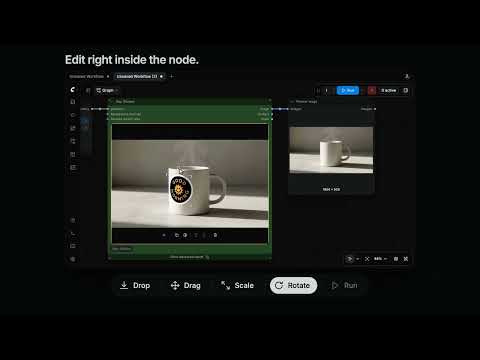
Slap your favorite stickers onto anything in a photo.
Slap Stickers is a ComfyUI custom node that puts logos, labels and illustrations onto the objects in a photograph. It reads the shape of each object with MoGe, so stickers follow round things like bottles and fruit. The result keeps the photo's original resolution, ready to use as it is or to refine with an image-editing model.
Inspired by Lovart.
Features
- Follows the shape. Stickers bend around curved objects and stop at their edges.
- Edit right in the node. Drop an image, then drag, resize and rotate it on the photo.
- Blends into the photo. The light and color of the photo carry over onto each sticker.
Installation
1. Install Slap Stickers
Install it from ComfyUI Manager:
- Open Custom Nodes Manager in ComfyUI Manager.
- Search for
Slap Stickersand click Install. - Restart ComfyUI.
Or install it from the Comfy Registry with comfy-cli:
comfy node install comfyui-slap-stickers
2. Set up MoGe
Slap Stickers reads the shape of the photo with MoGe, a model that estimates 3D geometry from a single image. The MoGe nodes are built into ComfyUI, so you only need to add the model file.
-
Update ComfyUI to the latest version. The nodes
Load MoGe ModelandRun MoGe Inferencemust be available. -
Download the model
moge_3_vitg_fp16.safetensors(about 2.5 GB) from Comfy-Org/MoGe on Hugging Face. -
Put it in
ComfyUI/models/geometry_estimation/.ComfyUI/ └── models/ └── geometry_estimation/ └── moge_3_vitg_fp16.safetensors -
Restart ComfyUI. Check that the file appears in the
Load MoGe Modelnode.
The example workflow uses this model, and it is the one we have tested. For other MoGe models, see the reference and the official MoGe guide.
Usage
- Open the example workflow. It is also listed as
slap_stickers_mogein ComfyUI's templates. - Choose a photo in
Load Image, then run the workflow once. The photo appears in the Slap Stickers node. - Drop an image onto the photo, or click + to choose one.
- Drag to move, drag a corner to resize, and drag the round handle to rotate.
- Run the workflow again to get the finished image.
Sticker images are saved in ComfyUI/input/slap_stickers/. When you share a workflow, share these files with it.
Documentation
- Reference: controls, inputs and outputs, limitations and troubleshooting.
- Development guide: setup, local development and tests.
License
MIT © 2026 alp-dot.