
OpenClip
OpenClip read/write nodes for ComfyUI - file exchange with Flame
Nodes (3)
ComfyOpenClip
OpenClip read/write nodes for ComfyUI, designed for VFX pipelines that use Autodesk Flame, but also other apps that handle OpenClips like Nuke and Baselight.
Frames rendered in ComfyUI are written as versioned OpenClip packages that Flame can import directly from its MediaHub. Clips exported from Flame can be read back into ComfyUI for processing.
Quick Start
The easiest way to use these nodes is to add an OpenClip Reader node at the beginning of the workflow. Point it at an existing .clip file rendered from Flame, leave version as 'current', and use the IMAGE output. (For a plain name.####.exr sequence with no .clip, such as a Blender render, use the OpenClip EXR Sequence Reader instead.)
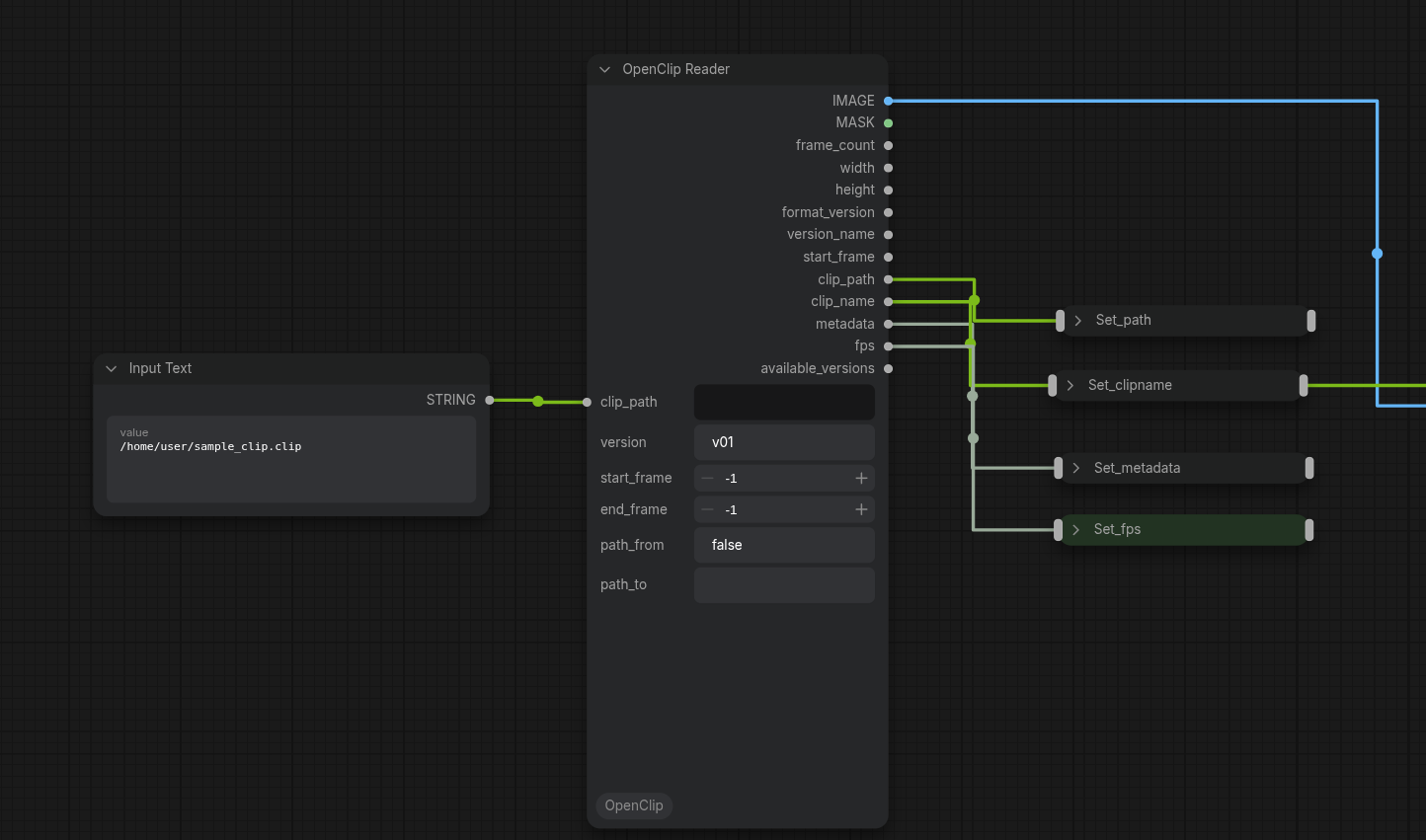
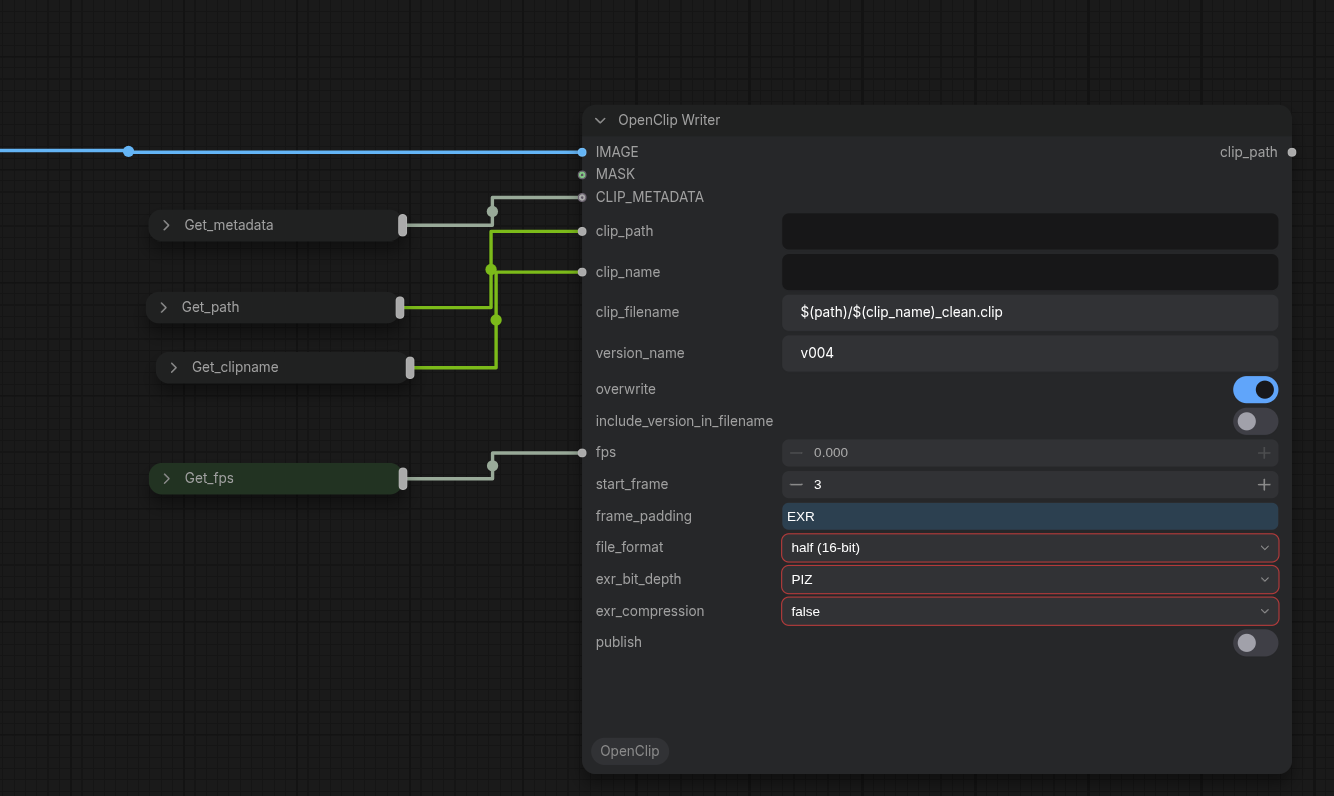
Then at the end of the workflow add a OpenClip Writer node, connecting the finished image into the Image input. Leave the version on the 'next' default, pipe the clip_path, clip_name, metadata, and fps values through from the reader, add "_updated" at the end of the clip_name pattern in the OpenClip Writer and all should be well.
The rest are options for more advanced workflows.
If a specific version should be read, rather than 'current', run the Reader once. The available versions are listed inside the node (and on its available_versions output, which you can wire to a Preview Text node). Pick one and copy/paste it into the 'version' input.
Nodes
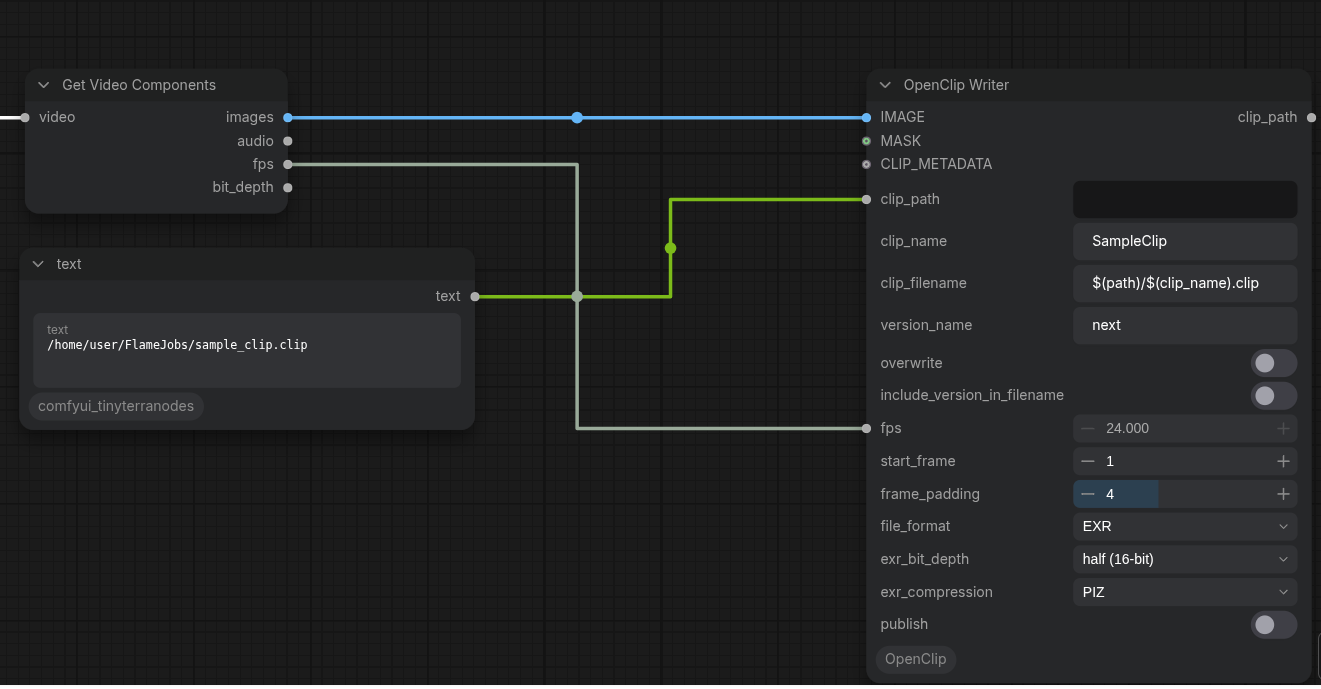
OpenClip Writer
Writes an image sequence and generates a .clip XML manifest that Flame can import.
At the top level based on path there is the .clip XML manifest. It has a versions subfolder, which contains a folder of EXR files per version present.
Various options can be set to configure the clip and the EXR file generation. If the OpenClips are used in a round-trip scenario from Flame, many parameters can be piped through from the read node. (see example 1 in screenshots below).
The write node has the follwing inputs/settings:
- IMAGE: takes an image sequence (if the workflow generates video rather than image batch, use a 'Get Video Components' node to extract an image batch and accompanying parameters).
- MASK (optional): an alpha channel to go with the EXR files.
- CLIP_METADATA (optional): the standard metadata structure. The most common use case is to pipe it through from the Reader to maintain all metadata in the pipeline.
- aov_chain (optional): AOVs to write alongside the beauty pass, built with OpenClip AOV Writer nodes.
- colour_space (optional): the colour space declared in the .clip XML; can be wired from a Reader.
- clip_path: where the OpenClip files will be stored.
- clip_name: logical clip name.
- clip_filename: filename of the .clip file. This uses a pattern, referencing the other clip settings to construct the full filename. Default is:
$(path)/$(clip_name).clip. - version_name: the text string of the version. The default of 'next' will allocate the next version, or start with v001.
- overwrite: whether existing versions are allowed to be overwritten. If the latest version is 'v003', and the version_name is also set to 'v003', the existing version 'v003' will be deleted and a new version will be written. If disabled, writing an existing version number results in an error.
- include_version_in_filename: whether to include the 'v003' version in the EXR filenaming convention. As each version is written into separate folders, this is optional, but common practice in some pipelines.
- fps: the frame rate to place into the clip metadata (must match a standard rate such as 23.976, 24, 25, 29.97, 30, 48, 50, 59.94, 60).
- start_frame: the number of the first written frame.
- frame_padding: how many zeros to put in front of short frame numbers.
- file_format: choose between EXR and PNG (AOVs require EXR).
- exr_bit_depth, exr_compression: EXR specific.
- aov_layout:
Multichannelwrites each AOV as a named part inside the same EXR file;Separate Fileswrites one extra<name>_AOV_<aov>.####.exrfile per AOV. - publish: if selected, a copy of the JSON file of the current ComfyUI workflow will be copied into the version folder.
The Writer checks the frame rate and the format of an existing clip (size, frame rate, file format) before writing anything, so a refused run leaves nothing on disk.
OpenClip Reader
Reads any version from an existing .clip file and returns an IMAGE and MASK tensor batch. Also owns version browsing/selection — there is no separate selector node.
The reader node has the following inputs/settings:
- clip_path: the full filename of the .clip file to be read.
- version: the version to be read (defaults to 'current', based on which version is marked as current in .clip file)
- end_frame/start_frame: select a specific frame range to be read (-1 means the clip's own range)
- path_from/path_to: replace a path prefix in the media paths stored in the .clip (leave blank to auto-detect, e.g. when a clip made on another machine points at a different mount).
- frame_cap: read at most this many frames (-1 = no cap).
The node as the following outputs:
- IMAGE: the image batch read from the file.
- MASK: the alpha channel read from the file (fully opaque if the source has no alpha).
- frame_count: the number of frames read.
- width/height: the dimensions of the canvas.
- format_version: the OpenClip XML schema version (8 or 9; 9 is Flame 2027.1).
- version_name: the resolved version that was actually read (e.g.
v002, never the literal 'current'). - start_frame: first frame number, for wiring into the Writer.
- clip_path: the path of the .clip file that was read.
- clip_name: the name of the clip that was read.
- metadata: the EXR header metadata (CLIP_METADATA).
- aov_handle: a lightweight handle to the clip's frames for the OpenClip AOV Reader (decodes nothing itself).
- colour_space: the colour space recorded in the EXR header.
- fps: frame rate indicated in the file.
- available_versions: a text output (also shown in the node) listing the versions in the file.
- available_aovs: a text output (also shown in the node) listing the AOV/part names found in the first frame.
The Reader also takes an optional frame range and version. Queue the Reader alone to inspect a clip's versions and AOVs.
OpenClip EXR Sequence Reader
Reads plain name.####.exr sequences with no .clip file, such as Blender renders (including Blender's single-part "OpenEXR MultiLayer" layout) or Nuke output. Provides the same IMAGE/MASK outputs in the same positions as the OpenClip Reader, so the two can be swapped behind a switch node, plus the aov_handle and available_aovs outputs.
OpenClip AOV Reader
Takes an aov_handle from either reader and a part_name, and decodes only that one named part (e.g. depth, normals, a puzzle matte). Outputs image and matte; a single-channel AOV is returned as matte only. Use available_aovs on the reader to see the names. Cryptomatte decoding is not supported. If the named part is not found in any frame, the outputs are None.
OpenClip AOV Writer
Builds an AOV_WRITE_CHAIN of named AOV entries (name, image and/or matte). Chain several together via aov_chain, then wire the result into the OpenClip Writer's aov_chain input. AOVs can only be written to EXR, not PNG.
OpenClip Colour Space Transform
Converts between OCIO colour spaces; the target can be 'Same as input (via pipe)', using the Reader's colour_space output.
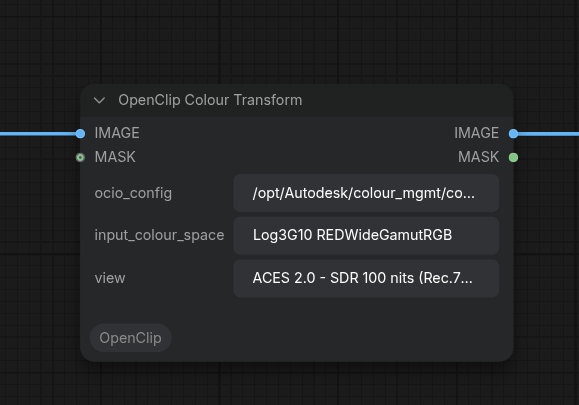
OpenClip Colour Transform
Applies an OCIO display/view transform (including the ACES output transform, with a selectable view) to make log and camera spaces compatible with models that have been trained on BT1886/Rec709 footage.
Insert after the reader and before the rest of the workflow.
When installed on Flame workstations, it will default to the ACES 2.0 OCIO config that ships with flame, usually located at /opt/Autodesk/colour_mgmt/configs/flame_configs/.
It falls back to the $OCIO environment variable if set
Screenshots
Several screenshots showing latest version of the nodes in action. There are two versions of the write node, one that is paired with the read node, the other that is independent on a brand new open clip file generated by a workflow.
Requirements
| Package | Purpose | Required |
|---|---|---|
| lxml | XML parse and serialise | Always |
| openimageio | EXR and PNG I/O | Always |
| opencolorio | OCIO colour transforms | Colour transform nodes only |
ComfyUI Manager installs all dependencies automatically from requirements.txt when you install the node pack — no manual steps needed.
Manual install:
pip install -r requirements.txt
If you don't need the colour transform nodes, opencolorio can be skipped — the other nodes will load and run without it.
Installation
Via ComfyUI Manager / the ComfyUI Registry (recommended): search for "OpenClip" in the Manager, or run comfy node install comfy-openclip.
Manual:
cd ComfyUI/custom_nodes
git clone https://github.com/allklier/ComfyUI_OpenClip.git
Restart ComfyUI. The nodes appear under the OpenClip category.
Notes
- XML is always written as OpenClip v8 (v8 and v9 clips can both be read).
- Screenshots below predate the AOV and EXR Sequence Reader nodes.
- Frames are never clamped on the EXR path (half or float); PNG output is 8-bit and does clamp.
- The Colour Transform node's
viewinput defaults toACES 2.0 - SDR 100 nits (Rec.709)to match what Flame expects on import, but any view exposed by the OCIO config can be used instead. - Flame users can point the OCIO config field at their project config, typically found at
/opt/Autodesk/colour_mgmt/configs/flame_configs/<version>/aces2.0_config/config.ocio.