
ComfyUI-GU_Nodepack
Several utility nodes for ComfyUI: LoRA management, image annotation, project organization, sampling utilities, system integration.
Nodes (27)
Your loader says 300 frames, but you're really working with 150
Glue strings together without building filenames by hand
Get the actual prompt back out of an image's metadata
Turn 'whatever image you just loaded' into an actual filename
Stop typing the checkpoint name — read it off the loader
Is this node actually on?
Pick a sampler by number so loops can change samplers too
The scheduler version of 'pick by number' — for sampler sweeps
Burn the whole recipe onto the image so you never lose it
Roll the dice on LoRAs and let the tags ride along
Six LoRAs, independent strengths, and a checkbox to keep them on ice
Stack AnimateDiff motion LoRAs without the spaghetti
One text box that names every project folder you save into
The filename builder that turns 'test_00001_.png' into something you can actually find
A resolution picker that knows about video, Midjourney, and portrait mode
A sidecar .txt that remembers what the image can't tell you
Keep a running list of every seed you've tried — and file it away
The 'N*8 + 1' frame counter that keeps LTX and WAN happy
Four outpainting paddings, one tidy wire
The other half of the padding pair — turn the tuple back into numbers
Split a prompt list into usable lines — GU String Lines
Turn a comma string into typed numbers — GU String To Values
A multi-way switch that routes anything by number — GU Switch Any by Index
Edit machine-generated text before it hits your sampler — GU Text Edit
How long did that actually take? Read it off a wire — GU TimerOFF
Start the stopwatch before your sampler runs — GU TimerON
Flip between full-quality and turbo LoRA with one checkbox — GU Turbo Lora
⚠️ Disclaimer
Tested on Windows; Linux/macOS support is best-effort. Designed for single-user ComfyUI — race conditions may occur in some nodepack functions on multi-user servers.
GU Nodepack: nodes in alphabetical order
Calculate Frame Count
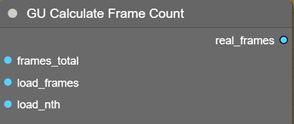
Returns the integer count of real frames in a video, useful when frame skipping is configured at load time - e.g. for displaying the effective amount of work.
frames_total = total number of frames in the video
load_frame = requested number of frames to load
load_nth = load only every n-th frame in the sequence
Concat Strings
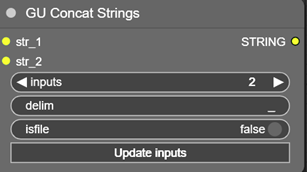
Concatenates an arbitrary number of input strings with a configurable delimiter. The number of inputs is set via the inputs parameter followed by clicking Update inputs.
delim = separator character between concatenated strings; defaults to _ for assembling a filename from multiple blocks.
isfile = flag that validates the resulting string as a filename. When enabled, forbidden characters are replaced with _, producing a safe string on output.
!!! On old ComfyUI versions, spurious inputs str_-2, str_-1, str_0 may appear - do not use them !!!
Extract Prompt
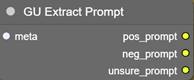
Extracts prompts from the metadata of an incoming image (loaded, for example, by Load Image with Metadata, the input connects to metadata_raw). On output:
If the metadata contains nodes whose title or class name includes words like prompt, encode, string, pos, neg, etc. (including text-display nodes such as ShowText, which may contain the final combined prompt), the string content of those nodes is accumulated line-by-line into 3 blocks:
pos_prompt = likely positive prompt
neg_prompt = likely negative prompt
unsure_prompt = strings that could not be classified unambiguously
Get Media Input Name
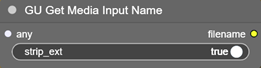
Takes the filename (image, video, audio) from an upstream node. Can be connected to any loader output; reroutes are handled. By default the extension is stripped from the filename (strip_ext).
The node always executes when the Queue runs.
!!! There may currently be ordering issues when several such nodes exist in the same graph !!!
Get Model Filename
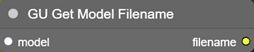
Takes the model filename (.safetensor, .ckpt) from an upstream node. Can be connected to any loader output; reroutes are handled.
The node always executes when the Queue runs.
Get Node Active
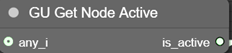
Outputs the state of the upstream node - whether it is active or not.
Get Sampler Indexed
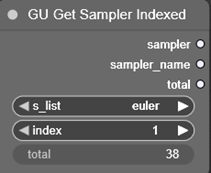
Selects a sampler by index from the list of system samplers. Convenient in loops. The node returns a sampler reference, its name, and the list length (shown in the total field, indication only).
Get Scheduler Indexed
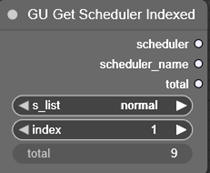
Same as GU Get Sampler Indexed, but operates on schedulers.
Image Label
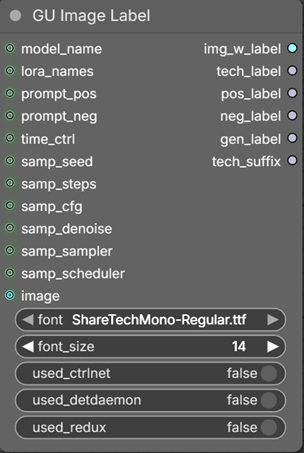
From many input parameters (whose input names are self-explanatory) it assembles strings describing the generation's technical specs.
time_ctrl = elapsed time in hh:mm:ss format, returned e.g. by GU TimerOFF (see below).
The final image itself may also be fed in - the collected information will then be rendered as extra caption blocks at the bottom of the image. The caption's font face and size can be configured; the block height auto-adjusts to the text volume.
The node returns 4 specially-formatted text blocks:
tech_label = hardware spec, including CUDA version, memory amounts, ...
pos_label = positive prompt
neg_label = negative prompt
gen_label = generation parameters, including elapsed time
(timing via a GU TimerON / GU TimerOFF pair is recommended)
tech_suffix = short string indicating use of ControlNet, DetailDaemon, Redux - for use in
GU Project Path, as well as in the image caption
Lora Randomizer
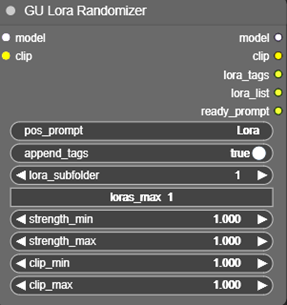
Randomly loads LoRAs from the folder specified in lora_subfolder (only that folder itself is scanned, without child subfolders!). LoRAs and their weights are picked at random from the candidate list.
loras_max = max number of LoRAs to load, up to 6 (if the folder contains fewer, it will load as many as it finds).
strength_min, strength_max = LoRA strength (-100..100, typically 0..1)
clip_min, clip_max = Clip strength (-100..100, typically 0..1)
Additional parameters pos_prompt and append_tags let you pass a source prompt and optionally append LoRA tags to it; the result is available on the ready_prompt output.
On output, in addition to the modified model and clip, it returns lora_tags - the string list of tags of the loaded LoRAs - and lora_list with the LoRA application parameters in the format <lora:name:str:clp>, where str = LoRA strength and clp = CLIP strength.
The node always executes when the Queue runs.
Lora Stack Extended
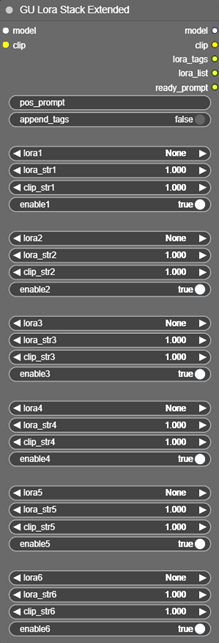
Loads up to 6 individual LoRAs with independent LoRA and Clip strength control. The enable checkbox under each slot lets you disable a LoRA without losing its configured parameters.
Additional parameters pos_prompt and append_tags let you pass a source prompt and optionally append LoRA tags to it; the result is available on the ready_prompt output.
On output, in addition to the modified model and clip, it returns lora_tags - the string list of tags of the loaded LoRAs - and lora_list with the LoRA application parameters in the format <lora:name:str:clp>, where str = LoRA strength and clp = Clip strength.
Motion Lora Stack
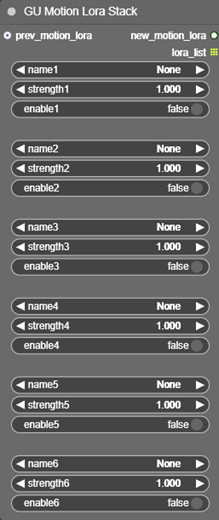
Stack for animation LoRAs used by AnimateDiff (from the animatediff_motion_lora folder in the ComfyUI tree). Also returns the list of used LoRA names (for example, to inject into an info file or into the output video filename).
Project Name
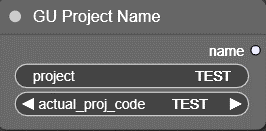
Outputs the project code name. Can be entered manually in the project field, or picked from preset values in actual_proj_codes. List of the project codes stored in
ComfyUI-GU_Nodepack\web\proj_codes.txt
Project Path
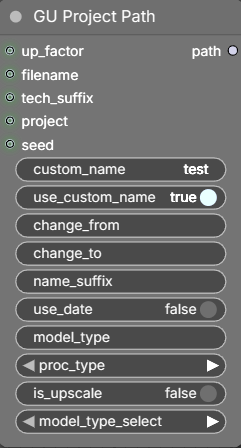
Builds the base filename for saving an image or a video. Inside ComfyUI's /output folder, a folder is created whose name is taken from the project field (empty by default) and whose full path has the following shape:
[(work)/project/][_UP/][date/]name[_namesuffix][_upNx][_modeltype][_proctype][_techsuffix][_seed]_#####_.ext
(square brackets mark optional parts of the path - they are auto-included when the corresponding input values are present; darker color marks parameters that are driven directly from an input).
When the project name is set, the path is built from ComfyUI/output/(work)/project/. In addition, both the project name and the filename block any subfolder splitting (/ is replaced with _). If you need to specify a custom path of your own, leave project empty - the (work) folder is then not used, and a subfolder can be specified via custom_name.
If the is_upscale flag is on, the folder _UP/ is added to the path.
If the use_date flag is on, the short date YYYY_MM_DD/ is added to the path.
The filename is either entered manually in custom_name (active when use_custom_name is on) or read from the filename input, to which a string from an upstream node is connected (e.g. from GU Get Media Input Name).
If part of the source name (custom or filename) needs to be replaced, change_from and change_to specify the substring to find and its replacement.
name_suffix = string appended after the name, e.g. to add filename clarifications - can be automated via an upstream input.
After the suffix, if is_upscale is on, _upNx is appended, where N = up_factor. The up_factor input takes a float upscale value (rounded up to an integer; values < 2 are ignored).
After that, the following are appended:
- model_type - short label for the generative model type. Model codes are customizable here: ComfyUI-GU_Nodepack\web\model_codes.txt
- proc_type - generation process type:
text-2-image,image-2-image,inpaint, ... It is recommended to omit this for upscales, since technically upscaling is also a distinct process but affects the path/name differently. - tech_suffix - extra info about the use of LoRA, ControlNet, DetailDaemon, Redux (preferably sourced from GU Image Label)
- seed - added when the corresponding node input is connected
At the very end, the automatic index and the file extension are appended (not controlled from this node).
Example of a minimally-detailed path: test_00001_.png
Example of a maximally-detailed path:
(work)/TEST/_UP/2026_04_11/TEST_test_a_up3x_F1D_(used_loras_detdaemon)_00001_.png
Notes: the date is formatted in reverse order so that Explorer sorts correctly. The sequence number with a leading underscore is appended automatically by Comfy.
Resolution Select
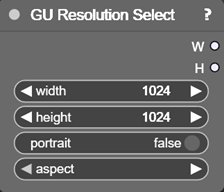
Offers a wide choice of popular image and video resolutions, including Midjourney resolutions.
The portrait toggle swaps the width/height on output, because the list only contains landscape formats (but the swap is also applied to manual entries - no extra check is performed!).
Save Image Info
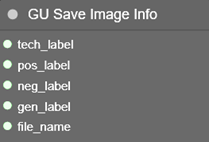
Saves a TXT file to the path specified by file_name (it is recommended to feed it from GU Project Path so that the image and text file share the same name and live side by side). It also accepts the text blocks produced by GU Image Label: tech info, positive and negative prompts, and generation parameters.
Subfolders inside ComfyUI's output folder are allowed; any path that would leave it is rejected with a console warning and no file is written (see Security Notes).
The node always executes when the Queue runs.
Seed List
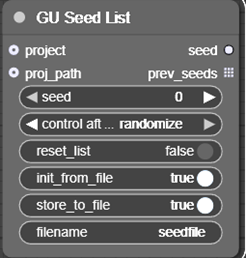
Seed-value generator. Each value that differs from the previous one (i.e. not in fixed mode) is stored in the output list prev_seeds, and optionally appended line-by-line to a text file stored in ComfyUI's output folder (unless the proj_path input is provided - see below).
reset_list = when enabled, the list is cleared on the next run and accumulation starts over. Ignored when init_from_file is on.
init_from_file = activates loading the list of numbers from the file specified by filename. If the file is missing or the name is empty, the node starts from scratch.
store_to_file = saves the output list to a file.
filename = file name; worth changing per task, otherwise every node of this class would overwrite the same default seedfile.txt.
project = optional input - connect the output of GU Project Name. The seed-file will then be saved under the same path as the generated images. If a string is entered manually, it must be a path to a file (not a folder), because the node expects a final-file path (designed to work with GU Project Name).
Both filename and project may address subfolders inside ComfyUI's output folder, but never outside it: such a path is rejected with a console warning, and neither reading nor writing happens (see Security Notes).
The node always executes when the Queue runs.
Set Frames Video
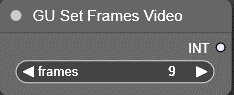
Sets the frame count for video generation in LTX / WAN-style pipelines, where the count must follow the formula N*8 + 1.
Sides Pack
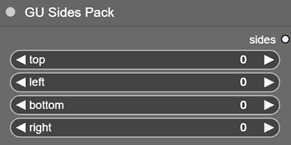
Accepts 4 integers and packs them into a single tuple parameter that can be passed down the pipeline. Intended for outpaint, where it is convenient to set per-side padding in a single node.
Sides Unpack
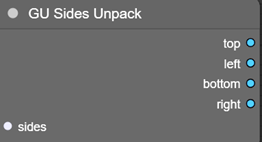
Unpacks the integer tuple, restoring the individual values.
String Lines
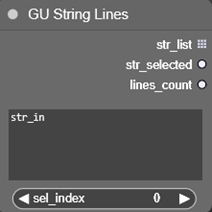
Splits the multi-line input text str_in into separate lines, ignoring empty ones. Returns str_list - the list of effective (non-empty) lines - plus str_selected (the line chosen by sel_index) and lines_count (the number of lines in the list).
String to Values
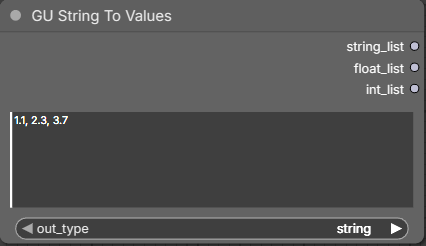
Splits the input string into elements by delimiter. Returns a list of elements of different types depending on the chosen out_type.
Switch Any by Index
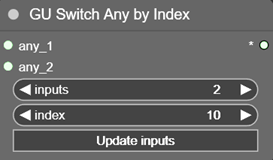
Forwards the value of one of its inputs. The number of inputs is controlled by inputs (2 to 10; after changing the value, press Update inputs). The output data type matches the selected input. Accepts any data.
Selection is driven by the index parameter (1 to 10). If the value is outside 1..inputs, the nearest boundary input is used automatically.
!!! On old ComfyUI versions, spurious inputs any_-1, any_0 may appear - do not use them !!!
Text Edit
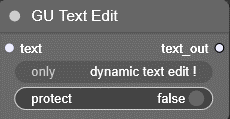
Allows editing an incoming string: a string - e.g. one produced by image-to-text (i.e. not hand-edited) - is connected to the text field. After that, a field appears at the bottom of the node, containing the input text and letting you edit it. Suitable for tweaking auto-generated text. On every Queue (Run), the field is reset to the input value; the protect switch prevents this - when on, updates to the edited field from the incoming text are blocked.
Works only with dynamic text! The text is not preserved across workflow or ComfyUI restarts. The first run populates the editable field; the second run forwards its content downstream.
The node always executes when the Queue runs.
!!! Warning! Currently only one Text Edit node per graph can be reliably used !!!
TimerON
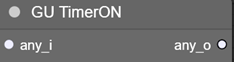
Starts an internal time counter that will later be stopped and consumed by TimerOFF.
The node always executes when the Queue runs.
TimerOFF
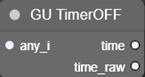
Stops the internal timer started by TimerON, computes the elapsed time, and outputs it as a string in hh:mm:ss format. Also returns time_raw as an int in seconds.
Turbo Lora
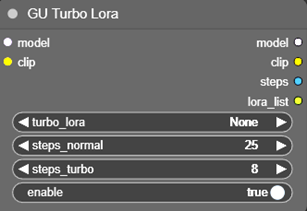
Separately attaches an accelerating LoRA to the current incoming model. Also returns a variable step count (steps) depending on whether the LoRA is enabled, and a LoRA parameter string
(lora_list).
turbo_lora = the specific file to use
steps_normal = default step count
steps_turbo = step count when the LoRA is on
enable = whether the LoRA is attached or not
ComfyUI-GU_Nodepack/example folder contains an example workflow (as well as a test image) to check the functionality of most nodes.
Security Notes
Path confinement. Every file path built from graph data (GU Save Image Info → file_name,
GU Seed List → project / filename) is confined to ComfyUI's output directory.
A path containing a .. component, an absolute path or a drive/stream prefix (C:) is
rejected outright — never silently rewritten — with a console warning, and no file is
read, written or created. Remaining components are sanitized (illegal and control characters,
trailing dots/spaces, reserved Windows device names), and the resolved path is verified with
os.path.realpath + os.path.commonpath against the output root — re-verified again after
directory creation, so a symlink swapped in between the check and the write does not help
either. Subfolders inside the output root stay fully supported, since GU Project Path
legitimately emits (work)/<project>/<date>/<name>.
This nodepack contains one pattern that may be flagged by automated security scanners:
prestartup_script.py imports aiohttp.web — this is used solely to monkey-patch
web.WebSocketResponse.prepare in order to hook the moment a browser tab connects to ComfyUI.
The hook calls on_reload(), which refreshes the LoRA file list and resets the seed-file flag
so that users see fresh LoRA lists without restarting ComfyUI. No custom HTTP routes are
registered. No new endpoints are added to the server.
The patch is applied defensively: it checks the method signature before installing, wraps the original in a try/except, and falls back gracefully if the aiohttp API ever changes.
Other patterns confirmed absent:
- No
subprocessorexec()calls anywhere in the codebase - No
pickleusage - JS files use
fetch()only to load the nodepack's own static.txtconfig files (proj_codes.txt,model_codes.txt) — standard ComfyUI extension pattern
License
This nodepack is released under the MIT License — see LICENSE for the full text. Copyright (c) 2026 Alexander Guryev.
Third-party credits
- Share Tech Mono (
fonts/ShareTechMono-Regular.ttf) — font by Carrois Apostrophe, distributed under the SIL Open Font License 1.1. The license text ships alongside the font as required by OFL 1.1.