
ComfyUI-Enhance-Pack
Image enhance pack. - Adjust Image(color correction, sharpen, denoise, resize), Despeckle Image - a/Workflow
Nodes (2)
ComfyUI-Enhance-Pack
Image enhance nodes: colour correction, sharpening, denoising, despeckling and resizing as torch ops on the GPU ComfyUI computes on.
Example

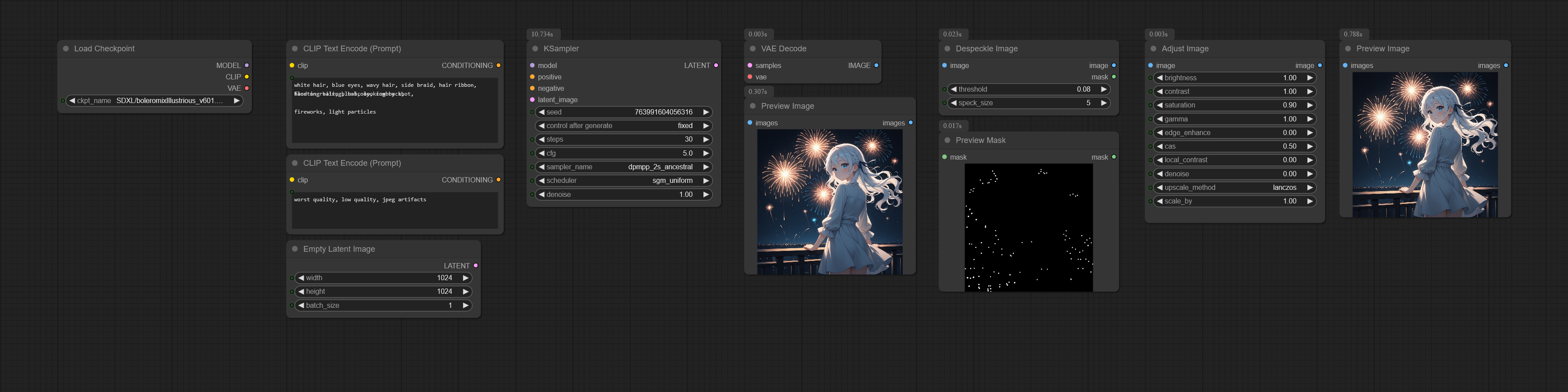
Usage
Adjust Image
Colour correction, sharpen and denoise filters and an optional resize in one node. Every widget defaults to a no-op, so the node passes the image through until a slider is moved. RGB is processed and an alpha channel is passed through untouched.
| Widget | What it does |
|--------|--------------|
| brightness | 1.0 = no change, <1.0 darker, >1.0 brighter |
| contrast | Scales around mid-gray 0.5 |
| saturation | 0.0 = grayscale, >1.0 = more vivid |
| gamma | <1.0 brightens mid-tones, >1.0 darkens them |
| edge_enhance | Blend factor for a fixed edge-enhance kernel. 0.0 = off |
| cas | Contrast Adaptive Sharpening (AMD FidelityFX). Sharpens flat regions more and already-sharp edges less. 0.0 = off |
| local_contrast | Large-radius unsharp mask ("clarity") that adds mid-scale depth. 0.0 = off |
| denoise | Edge-preserving bilateral filter that removes flat noise and banding while keeping lines. 0.0 = off |
| upscale_method | Resampling used when scale_by is not 1.0 |
| scale_by | Scale factor. 1.0 = no resize |
The order is fixed: brightness → contrast → saturation → gamma → denoise → edge enhance → CAS → local contrast → resize. Denoise runs before the sharpeners so they do not amplify the noise it removed.
Despeckle Image
Removes stray bright dots from a generated image and leaves hair strands, highlights and textures alone. A pixel is a
speck when it is brighter than its surroundings, belongs to a blob that fits in a window twice speck_size, and the
patch around it holds only a few other such blobs; lines, lit edges, carvings, textured areas and the sheen on a fold
are kept. On a near-black background the threshold drops on its own, so faint salt goes too. Dark lines next to a
speck (an outline, a mouth) are never overwritten. The specks and their dark halo are filled with a weighted average
of the pixels around them, so a gradient under the speck continues through it.
| Widget | What it does |
|--------|--------------|
| threshold | How much brighter than its surroundings a pixel must be to count. Default 0.08 |
| speck_size | Largest speck to remove, in pixels. Anything this wide or wider (an eye highlight) is kept. Default 5 |
| mask (output) | The pixels that were replaced, feathered at the edge |
Installation
Search for ComfyUI-Enhance-Pack in ComfyUI Manager, or:
cd ComfyUI/custom_nodes
git clone https://github.com/alchemine/comfyui-enhance-pack
Nodes
EnhancePack/Image
| Node | Description | |------|-------------| | Adjust Image | Colour correction, sharpen, denoise and resize | | Despeckle Image | Remove isolated bright dots |
The node id AdjustImage is the one comfyui-alchemine-pack used before v8.0.0, so workflows made with that pack load
as they are.
License
GPL-3.0. See LICENSE.