
ComfyUI-DAAM-Pack
Interactive tag attention explorer (SDXL only) Click a spot in the image → the related tag Click a tag → the related part of the image
Nodes (2)
ComfyUI-DAAM-Pack
https://github.com/user-attachments/assets/9903ff79-d4fa-459b-bf72-b7c09f0b21f6
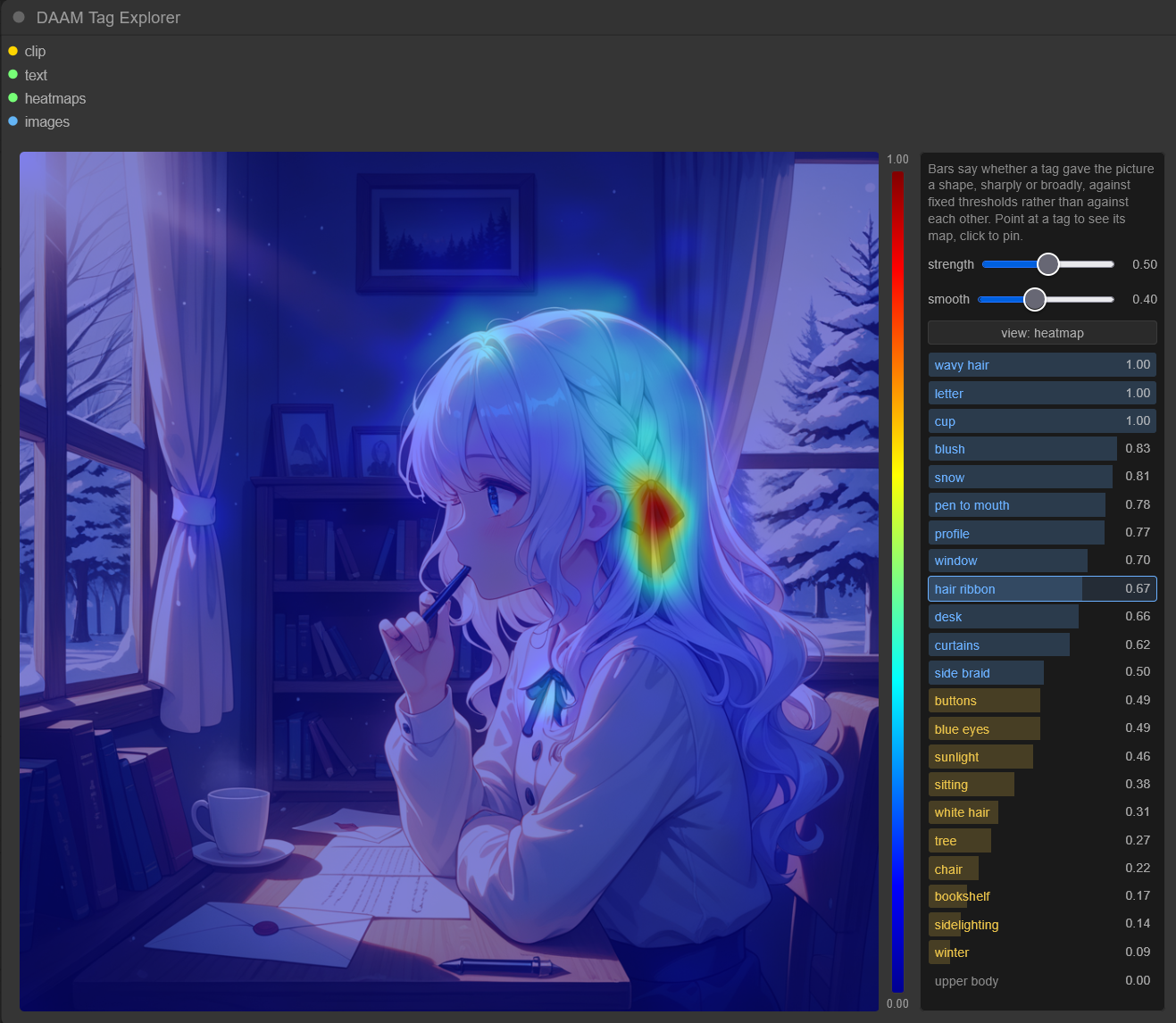
See which prompt tag shaped which part of the image, via cross-attention heatmaps (DAAM).
[!IMPORTANT] SDXL only. The heatmaps are read out of the UNet's cross-attention blocks, which DiT models — Flux, SD3, Qwen-Image, Wan — do not have.
Usage
Everything happens inside the DAAM Tag Explorer node, between the image on the left and the tag list on the right.
| Do this | Get this |
|---------|----------|
| Hover the image | Each tag's bar shows its share of the attention at that pixel. Blue is over 2/N, yellow over 1/N, for N tags |
| Click the image | Selects the tag that dominates that pixel. Ctrl/Shift-click adds it to the selection instead of replacing it |
| Hover a tag | Shows that tag's map while the pointer rests on it |
| Click a tag | Pins it. Click more to pin several — they show at once, each at its own scale |
| Arrow keys | Walk the list. Enter / Space pins, Escape clears |
With the pointer off the image, the bars turn into a 0-to-1 score for whether the tag's map has a shape. A narrow red region on a flat blue rest scores highest, a wide one a little lower, a map spread over the whole picture lower still, and a map whose red sits along the border, where attention piles up whatever the tag, lowest. The scale is fixed rather than relative to the other tags. Rows are sorted by it.
| Control | What it does |
|---------|--------------|
| strength | How strongly the map is applied. 0 leaves the render untouched |
| smooth | Blurs the map before it is drawn. 0 shows the raw attention cells |
| tagging | Where the shown tags' names go on the image: top and down stack them at the top or bottom centre, off hides them, max puts each at its map's peak |
| mode: heatmap | Jet colours over the image, 0 to 1 on the colorbar |
| mode: mask | The map becomes the image's visibility instead: what the tag looked at stays lit, the rest goes dark |
| save grid | Downloads the tags the list shows as one PNG grid, each cell drawn as on screen with the tag's name and score. The column count keeps the grid closest to square. The file also carries every tag's map, score and the render in a daam text chunk |
Example


Installation
Search for ComfyUI-DAAM-Pack in ComfyUI Manager, or:
cd ComfyUI/custom_nodes
git clone https://github.com/alchemine/comfyui-daam-pack
Nodes (DaamPack/DAAM)
Sampler Custom (DAAM) — SamplerCustom plus pos_heatmaps / neg_heatmaps, the per-token attention maps. Leave them unconnected and it costs what SamplerCustom costs.
DAAM Tag Explorer — the viewer above.
| Input | Description |
|-------|-------------|
| clip | The CLIP that encoded the prompt |
| text | The prompt string, BREAK included. Must be the exact string the conditioning was encoded from — feed both from the same node, or the tags will not line up |
| heatmaps | pos_heatmaps from Sampler Custom (DAAM) |
| images | The decoded images |
License
GPL-3.0 — see LICENSE.